
asp.net core + log4net+exceptionles+DI
参考了ABP的代码,我也用依赖注入的原则,设计了日志模块。
与abp不同之处在于:1)DI容器使用的是.net core自带的注入容器,2)集成了excetpionless日志模块,3)不依赖于abp
主要的思想就是,1)定义日志操作接口 2)使用log4net实现日志接口,3)实现注入 4)使用日志
1)定义日志接口,这里直接使用了castle的日志接口
2)使用log4net实现日志接口
    [Serializable]

    public class Log4NetLogger :

            MarshalByRefObject,

            ILogger

    {

        private static readonly Type DeclaringType = typeof(Log4NetLogger);

        private log4net.Core.ILogger _logger;

        private Log4NetLoggerFactory _factory;

        public Log4NetLogger()

        {

            _factory = new Log4NetLoggerFactory();

            _logger = _factory.GetLogger("cislog");

        }

        public bool IsDebugEnabled

        {

            get { return _logger.IsEnabledFor(Level.Debug); }

        }

        public bool IsErrorEnabled

        {

            get { return _logger.IsEnabledFor(Level.Error); }

        }

        public bool IsFatalEnabled

        {

            get { return _logger.IsEnabledFor(Level.Fatal); }

        }

        public bool IsInfoEnabled

        {

            get { return _logger.IsEnabledFor(Level.Info); }

        }

        public bool IsWarnEnabled

        {

            get { return _logger.IsEnabledFor(Level.Warn); }

        }

        public override string ToString()

        {

            return _logger.ToString();

        }

        public void Debug(string message)

        {

            if (IsDebugEnabled)

            {

                _logger.Log(DeclaringType, Level.Debug, message, null);

            }

        }

        public void Debug(Func<string> messageFactory)

        {

            if (IsDebugEnabled)

            {

                _logger.Log(DeclaringType, Level.Debug, messageFactory.Invoke(), null);

            }

        }

        public void Debug(string message, Exception exception)

        {

            if (IsDebugEnabled)

            {

                _logger.Log(DeclaringType, Level.Debug, message, exception);

            }

        }

        public void DebugFormat(string format, params Object[] args)

        {

            if (IsDebugEnabled)

            {

                _logger.Log(DeclaringType, Level.Debug, new SystemStringFormat(CultureInfo.InvariantCulture, format, args), null);

            }

        }

        public void DebugFormat(Exception exception, string format, params Object[] args)

        {

            if (IsDebugEnabled)

            {

                _logger.Log(DeclaringType, Level.Debug, new SystemStringFormat(CultureInfo.InvariantCulture, format, args), exception);

            }

        }

        public void DebugFormat(IFormatProvider formatProvider, string format, params Object[] args)

        {

            if (IsDebugEnabled)

            {

                _logger.Log(DeclaringType, Level.Debug, new SystemStringFormat(formatProvider, format, args), null);

            }

        }

        public void DebugFormat(Exception exception, IFormatProvider formatProvider, string format, params Object[] args)

        {

            if (IsDebugEnabled)

            {

                _logger.Log(DeclaringType, Level.Debug, new SystemStringFormat(formatProvider, format, args), exception);

            }

        }

        public void Error(string message)

        {

            if (IsErrorEnabled)

            {

                _logger.Log(DeclaringType, Level.Error, message, null);

            }

        }

        public void Error(Func<string> messageFactory)

        {

            if (IsErrorEnabled)

            {

                _logger.Log(DeclaringType, Level.Error, messageFactory.Invoke(), null);

            }

        }

        public void Error(string message, Exception exception)

        {

            if (IsErrorEnabled)

            {

                _logger.Log(DeclaringType, Level.Error, message, exception);

            }

        }

        public void ErrorFormat(string format, params Object[] args)

        {

            if (IsErrorEnabled)

            {

                _logger.Log(DeclaringType, Level.Error, new SystemStringFormat(CultureInfo.InvariantCulture, format, args), null);

            }

        }

        public void ErrorFormat(Exception exception, string format, params Object[] args)

        {

            if (IsErrorEnabled)

            {

                _logger.Log(DeclaringType, Level.Error, new SystemStringFormat(CultureInfo.InvariantCulture, format, args), exception);

            }

        }

        public void ErrorFormat(IFormatProvider formatProvider, string format, params Object[] args)

        {

            if (IsErrorEnabled)

            {

                _logger.Log(DeclaringType, Level.Error, new SystemStringFormat(formatProvider, format, args), null);

            }

        }

        public void ErrorFormat(Exception exception, IFormatProvider formatProvider, string format, params Object[] args)

        {

            if (IsErrorEnabled)

            {

                _logger.Log(DeclaringType, Level.Error, new SystemStringFormat(formatProvider, format, args), exception);

            }

        }

        public void Fatal(string message)

        {

            if (IsFatalEnabled)

            {

                _logger.Log(DeclaringType, Level.Fatal, message, null);

            }

        }

        public void Fatal(Func<string> messageFactory)

        {

            if (IsFatalEnabled)

            {

                _logger.Log(DeclaringType, Level.Fatal, messageFactory.Invoke(), null);

            }

        }

        public void Fatal(string message, Exception exception)

        {

            if (IsFatalEnabled)

            {

                _logger.Log(DeclaringType, Level.Fatal, message, exception);

            }

        }

        public void FatalFormat(string format, params Object[] args)

        {

            if (IsFatalEnabled)

            {

                _logger.Log(DeclaringType, Level.Fatal, new SystemStringFormat(CultureInfo.InvariantCulture, format, args), null);

            }

        }

        public void FatalFormat(Exception exception, string format, params Object[] args)

        {

            if (IsFatalEnabled)

            {

                _logger.Log(DeclaringType, Level.Fatal, new SystemStringFormat(CultureInfo.InvariantCulture, format, args), exception);

            }

        }

        public void FatalFormat(IFormatProvider formatProvider, string format, params Object[] args)

        {

            if (IsFatalEnabled)

            {

                _logger.Log(DeclaringType, Level.Fatal, new SystemStringFormat(formatProvider, format, args), null);

            }

        }

        public void FatalFormat(Exception exception, IFormatProvider formatProvider, string format, params Object[] args)

        {

            if (IsFatalEnabled)

            {

                _logger.Log(DeclaringType, Level.Fatal, new SystemStringFormat(formatProvider, format, args), exception);

            }

        }

        public void Info(string message)

        {

            if (IsInfoEnabled)

            {

                _logger.Log(DeclaringType, Level.Info, message, null);

            }

        }

        public void Info(Func<string> messageFactory)

        {

            if (IsInfoEnabled)

            {

                _logger.Log(DeclaringType, Level.Info, messageFactory.Invoke(), null);

            }

        }

        public void Info(string message, Exception exception)

        {

            if (IsInfoEnabled)

            {

                _logger.Log(DeclaringType, Level.Info, message, exception);

            }

        }

        public void InfoFormat(string format, params Object[] args)

        {

            if (IsInfoEnabled)

            {

                _logger.Log(DeclaringType, Level.Info, new SystemStringFormat(CultureInfo.InvariantCulture, format, args), null);

            }

        }

        public void InfoFormat(Exception exception, string format, params Object[] args)

        {

            if (IsInfoEnabled)

            {

                _logger.Log(DeclaringType, Level.Info, new SystemStringFormat(CultureInfo.InvariantCulture, format, args), exception);

            }

        }

        public void InfoFormat(IFormatProvider formatProvider, string format, params Object[] args)

        {

            if (IsInfoEnabled)

            {

                _logger.Log(DeclaringType, Level.Info, new SystemStringFormat(formatProvider, format, args), null);

            }

        }

        public void InfoFormat(Exception exception, IFormatProvider formatProvider, string format, params Object[] args)

        {

            if (IsInfoEnabled)

            {

                _logger.Log(DeclaringType, Level.Info, new SystemStringFormat(formatProvider, format, args), exception);

            }

        }

        public void Warn(string message)

        {

            if (IsWarnEnabled)

            {

                _logger.Log(DeclaringType, Level.Warn, message, null);

            }

        }

        public void Warn(Func<string> messageFactory)

        {

            if (IsWarnEnabled)

            {

                _logger.Log(DeclaringType, Level.Warn, messageFactory.Invoke(), null);

            }

        }

        public void Warn(string message, Exception exception)

        {

            if (IsWarnEnabled)

            {

                _logger.Log(DeclaringType, Level.Warn, message, exception);

            }

        }

        public void WarnFormat(string format, params Object[] args)

        {

            if (IsWarnEnabled)

            {

                _logger.Log(DeclaringType, Level.Warn, new SystemStringFormat(CultureInfo.InvariantCulture, format, args), null);

            }

        }

        public void WarnFormat(Exception exception, string format, params Object[] args)

        {

            if (IsWarnEnabled)

            {

                _logger.Log(DeclaringType, Level.Warn, new SystemStringFormat(CultureInfo.InvariantCulture, format, args), exception);

            }

        }

        public void WarnFormat(IFormatProvider formatProvider, string format, params Object[] args)

        {

            if (IsWarnEnabled)

            {

                _logger.Log(DeclaringType, Level.Warn, new SystemStringFormat(formatProvider, format, args), null);

            }

        }

        public void WarnFormat(Exception exception, IFormatProvider formatProvider, string format, params Object[] args)

        {

            if (IsWarnEnabled)

            {

                _logger.Log(DeclaringType, Level.Warn, new SystemStringFormat(formatProvider, format, args), exception);

            }

        }

        public ILogger CreateChildLogger(string loggerName)

        {

            throw new NotImplementedException();

        }

    }
    public class Log4NetLoggerFactory : AbstractLoggerFactory

    {

        internal const string DefaultConfigFileName = "log4net.config";

        private readonly ILoggerRepository _loggerRepository;

        public Log4NetLoggerFactory()

            : this(DefaultConfigFileName)

        {

        }

        public Log4NetLoggerFactory(string configFileName)

        {

            _loggerRepository = LogManager.CreateRepository(

                typeof(Log4NetLoggerFactory).GetAssembly(),

                typeof(log4net.Repository.Hierarchy.Hierarchy)

            );

            XmlConfigurator.Configure(_loggerRepository, new FileInfo("log4net.config"));

        }

        public log4net.Core.ILogger GetLogger(string name)

        {

            return LogManager.GetLogger(_loggerRepository.Name, name).Logger;

        }

        public override ILogger Create(string name)

        {

            if (name == null)

            {

                throw new ArgumentNullException(nameof(name));

            }

            return new Log4NetLogger();

        }

        public override ILogger Create(string name, LoggerLevel level)

        {

            throw new NotSupportedException("Logger levels cannot be set at runtime. Please review your configuration file.");

        }

    }

    public static class TypeExtensions

    {

        public static Assembly GetAssembly(this Type type)

        {

            return type.GetTypeInfo().Assembly;

        }

    }
下面是扩展方法,这里实现注入:
    public static class Log4NetLoggerExtensions

    {

        public static IServiceCollection UseExceptionless(this IServiceCollection services)

        {

            services.AddTransient<ILogger, Log4NetLogger>();

            return services;

        }

    }
然后就可以在startup中使用了
        public void ConfigureServices(IServiceCollection services)

        {

            services.AddMvc();

            services.UseExceptionless();

        }
比如我们在HomeController中使用:
    public class HomeController : Controller

    {

        private ILogger _logger;

        public HomeController(ILogger logger)

        {

            _logger = logger;

        }

        public IActionResult Index()

        {

           // throw new Exception("快点来!!!!!!!!!!!!!!!!!!");

            _logger.Info("index view");

            _logger.Debug("出错了!,快点来,!!");

            _logger.Error("Controller Error");

            return View();

        }

}
最后是配置文件:
最重要的是注意exceptionless的配置
<?xml version="1.0" encoding="utf-8" ?>

<configuration>

  <!-- This section contains the log4net configuration settings -->

  <log4net>

    <appender name="ConsoleAppender" type="log4net.Appender.ConsoleAppender">

      <layout type="log4net.Layout.PatternLayout" value="%date [%thread] %-5level %logger - %message%newline" />

    </appender>

    <appender name="RollingLogFileAppender" type="log4net.Appender.RollingFileAppender">

      <file value="Logs/" />

      <appendToFile value="true" />

      <rollingStyle value="Composite" />

      <staticLogFileName value="false" />

      <datePattern value="yyyy-MM-dd'.log'" />

      <maxSizeRollBackups value="10" />

      <maximumFileSize value="1MB" />

      <layout type="log4net.Layout.PatternLayout">

        <conversionPattern value="%date [%thread] %-5level %logger [%property{NDC}] - %message%newline" />

      </layout>

    </appender>

    <appender name="Exceptionless" type="Exceptionless.Log4net.ExceptionlessAppender,Exceptionless.Log4net">

      <apiKey value="d5qna1t9qTUVwrRzLFz1T3z8wSUeO3xNtxOGMHLf" />

      <serverUrl value="http://10.117.130.150:9001" />

      <layout type="log4net.Layout.PatternLayout">

        <conversionPattern value="%-4timestamp [%thread] %-5level %logger %ndc - %message%newline"/>

      </layout>

    </appender>

    <!-- Setup the root category, add the appenders and set the default level -->

    <root>

      <level value="ALL" />

      <appender-ref ref="ConsoleAppender" />

      <appender-ref ref="RollingLogFileAppender" />

      <appender-ref ref="Exceptionless"/>

    </root>

  </log4net>

</configuration>
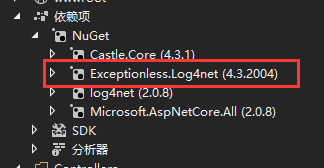
还有一点非常重要,记得引用,否则在exceptionless中也看不到日志
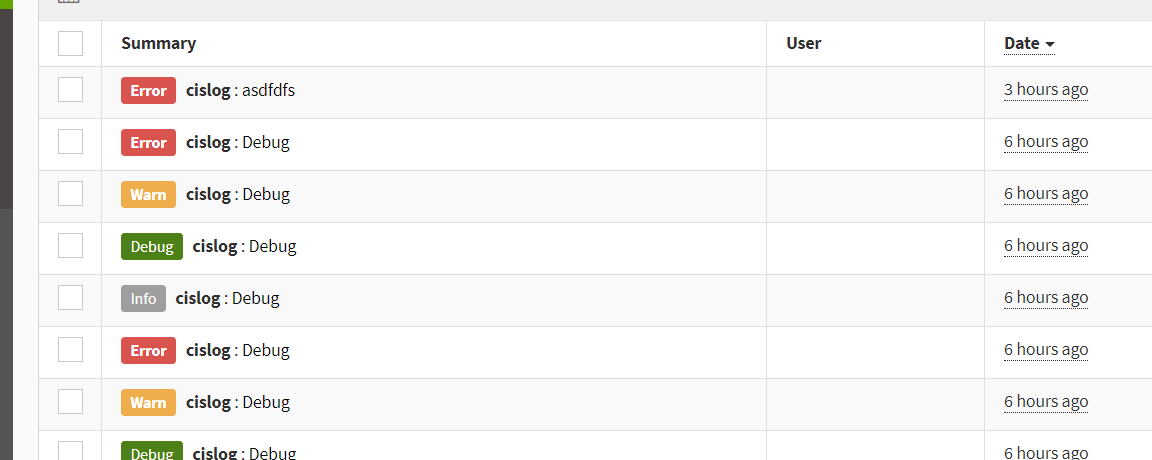
效果如图:
最后,提一点:
现在容器技术很火,如果把这套代码放在容器中运行肯定是不行,因为在配置文件中配置了apikey和url, 所以要稍做修改如下:
添加一个类:
    public class ExceptionlessOption

    {

        /// <summary>

        /// 日志应用标识,从Exceptionless面板获取

        /// </summary>

        public string ApiKey { get; set; }

        /// <summary>

        /// 日志应用接口地址

        /// </summary>

        public string Url { get; set; }

    }
            services.AddMvc();

            services.UseExceptionless(() =>

            {

                return new ExceptionlessOption {

                    ApiKey = "234na1t9qTU234234234z8wSUeO3x234234HLf",

                    Url = "http://100.11.13.10:9001" };

            });
        public Log4NetLoggerFactory(ExceptionlessOption _option, string configFileName)

        {

            _loggerRepository = LogManager.CreateRepository(

                typeof(Log4NetLoggerFactory).GetAssembly(),

                typeof(log4net.Repository.Hierarchy.Hierarchy)

            );

            //读取配置

            XmlConfigurator.Configure(_loggerRepository, new FileInfo("log4net.config"));

            //TODO这里修改

            ExceptionlessClient.Default.Configuration.ApiKey = _option.ApiKey ?? "d5qna1t9qTUVwrRzLFz1T3z8wSUeO3xNtxOGMHLf";

            ExceptionlessClient.Default.Configuration.ServerUrl = _option.Url ??  "http://10.117.130.150:9001";

        }
然后你就可以在startup中通过读取配置文件,实现参数的传入了。
asp.net core + log4net+exceptionles+DI的更多相关文章
- Asp.net Core + Log4net + ELK 搭建日志中心
原文:Asp.net Core + Log4net + ELK 搭建日志中心 Docker中一键安装ELK 对于这种工具类的东西,第一步就直接到docker的hub中查找了,很幸运,不仅有Elasti ...
- 浅谈ASP.NET Core中的DI
DI的一些事 传送门马丁大叔的文章 什么是依赖注入(DI: Dependency Injection)? 依赖注入(DI)是一种面向对象的软件设计模式,主要是帮助开发人员开发出松耦合的应用程序 ...
- asp.net core 四 IOC&DI Autofac
其实关于IOC,DI已经有了很多的文章,但是自己在使用中还是有很多困惑,而且相信自己使用下,印象还是会比较深刻的 关于这段时间一直在学习.net core,但是这篇文章是比较重要的,也是我自己觉得学习 ...
- 在Asp.Net Core中使用DI的方式使用Hangfire构建后台执行脚本
最近项目中需要用到后台Job,原有在Windows中我们会使用命令行程序结合计划任务或者直接生成Windows Service,现在.Net Core跨平台了,虽然Linux下也有计划任务,但跟原有方 ...
- ASP.NET Core 依赖注入(DI)
ASP.NET Core的底层设计支持和使用依赖注入.ASP.NET Core 应用程序可以利用内置的框架服务将服务注入到启动类的方法中,并且应用程序服务也可以配置注入.由ASP.NET Core 提 ...
- ASP.NET Core依赖注入(DI)
ASP.NET Core允许我们指定注册服务的生存期.服务实例将根据指定的生存时间自动处理.因此,我们无需担心清理此依赖关系,他将由ASP.NET Core框架处理.有如下三种类型的生命周期. 关于依 ...
- asp.net core 内置DI容器的一点小理解
DI容器本质上是一个工厂,负责提供向它请求的类型的实例. .net core内置了一个轻量级的DI容器,方便开发人员面向接口编程和依赖倒置(IOC). 具体体现为Micorosoft.Extensio ...
- Asp.net core 学习笔记 ( DI 依赖注入 )
比起 Angular 的依赖注入, core 的相对简单许多, 容易明白 所有 provider 都在 startup 里配置. public void ConfigureServices(IServ ...
- Asp.Net Core Log4Net 配置分多个文件记录日志(不同日志级别)
本文所有配置都是在core3.1环境下. 首先看看最终的效果. 请求监控:对每次请求的相关信息做一个记录. 全局异常:我不想我的错误信息,跟其他的信息混合在一起,查看的时候不大方便. 应用日志:这个主 ...
随机推荐
- JPA 入门程序及相关注解
1. 概述 JPA(Java Persistence API):用于对象持久化的API; JPA本质上是一种ORM规范,不是ORM框架;提供了一些编程的API接口; Hibernate是实现; 1.1 ...
- 【react map函数】
{...runInfos.map((rowinfo) => { console.log(rowinfo); })}
- Power Strings----poj2406(kmp扩展 循环节)
题目链接:http://poj.org/problem?id=2406 题意:就是求串s能够最多由多少个相同的串a串联而成: 例如 ababab 由3个ab串联而成: abababa 只能由1个aba ...
- C++入门(1)
#include<>直接从编译器自带的函数库中寻找文件 #include""是先从自定义的文件中找 ,如果找不到在从函数库中寻找文件 采用"< > ...
- 9.如何让ubuntu的ssh免密码登录
ubuntu 默认已安装了 SSH client,此外还需要安装 SSH server: sudo apt-get install openssh-server 安装后,可以使用如下命令登陆本机: s ...
- python手写bp神经网络实现人脸性别识别1.0
写在前面:本实验用到的图片均来自google图片,侵删! 实验介绍 用python手写一个简单bp神经网络,实现人脸的性别识别.由于本人的机器配置比较差,所以无法使用网上很红的人脸大数据数据集(如lf ...
- 机器学习第2周---炼数成金-----线性回归与Logistic
重点归纳 回归分析就是利用样本(已知数据),产生拟合方程,从而(对未知数据)迚行预测用途:预测,判别合理性例子:利用身高预测体重:利用广告费用预测商品销售额:等等.线性回归分析:一元线性:多元线性:广 ...
- SQL Server创建事务——锁
参考地址:http://www.cnblogs.com/knowledgesea/p/3714417.html 事务定义: 事务是作为单个逻辑单元执行的一系列操作,它是一个不可分割的工作逻辑单元.它包 ...
- centos运行asp.netcore的正确姿势
centos安装.netcore2.0 一切都很顺利,console app运行 dotnet run也ok 但是asp.net core app运行 dotnet run 会抛出Warn:“Unab ...
- HDU - 4609 3-idiots (FFT+母函数)
题意:给N个数,求任意选三个数能构成三角形的概率 分析:枚举两条边之和的复杂度\(O(N^2)\),显然不行,所以要更高效地做到枚举出两边之和. 所以用生成函数搭配FFT在\(O(NlogN)\)的时 ...