
ASP.NET Core的身份认证框架IdentityServer4--(5)自定义用户登录(通过接口登录,无UI版本)
官网接口详解文档地址:文档地址 (PS:可通过接口名称搜索相应接口信息。)
源码地址:https://github.com/YANGKANG01/IdentityServer4-IdentityAuth
一、修改服务端
1、修改Startup文件源码如下:
namespace Server

{

    public class Startup

    {

        public void ConfigureServices(IServiceCollection services)

        {

            //配置身份服务器与内存中的存储,密钥,客户端和资源

            services.AddIdentityServer()

                .AddDeveloperSigningCredential()

                .AddInMemoryIdentityResources(Config.GetIdentityResources());//添加对OpenID Connect的支持

                .AddInMemoryApiResources(Config.GetApiResources())//添加api资源

                .AddInMemoryClients(Config.GetClients())//添加客户端

                .AddResourceOwnerValidator<LoginValidator>()//用户校验

                .AddProfileService<ProfileService>();

        }

        public void Configure(IApplicationBuilder app, IHostingEnvironment env)

        {

            if (env.IsDevelopment())

            {

                app.UseDeveloperExceptionPage();

            }

            //添加到HTTP管道中。

            app.UseIdentityServer();

        }

    }

}
2、修改config文件
namespace Server

{

    public class Config

    {

        /// <summary>

        /// 添加对OpenID Connect的支持

        /// </summary>

        /// <returns></returns>

        public static IEnumerable<IdentityResource> GetIdentityResources()

        {

            return new List<IdentityResource>

            {

                new IdentityResources.OpenId(), //必须要添加,否则报无效的scope错误

                new IdentityResources.Profile()

            };

        }

        /// <summary>

        /// 范围定义系统中的API资源

        /// </summary>

        /// <returns></returns>

        public static IEnumerable<ApiResource> GetApiResources()

        {

            return new List<ApiResource>

            {

                new ApiResource("api1", "My API")

            };

        }

        /// <summary>

        /// 客户想要访问资源(又称范围)

        /// </summary>

        /// <returns></returns>

        public static IEnumerable<Client> GetClients()

        {

            // 客户端信息

            return new List<Client>

            {

             //自定义客户端

             new Client

                {

                    //客户端名称

                    ClientId = "client1",

                    //客户端访问方式:密码验证

                    AllowedGrantTypes = GrantTypes.ResourceOwnerPassword,

                    //用于认证的密码加密方式

                    ClientSecrets =

                    {

                        new Secret("secret".Sha256())

                    },

                    //客户端有权访问的范围

                    AllowedScopes = { "api1",IdentityServerConstants.StandardScopes.OpenId, //必须要添加,否则报403 forbidden错误

                  IdentityServerConstants.StandardScopes.Profile }

                }

            };

        }

    }

}
3、新建LoginValidator类,用于用户校验
namespace Server

{

    /// <summary>

    /// 自定义用户登录校验

    /// </summary>

    public class LoginValidator : IResourceOwnerPasswordValidator

    {

        public LoginValidator()

        {

        }

        /// <summary>

        /// 登录用户校验

        /// </summary>

        /// <param name="context"></param>

        /// <returns></returns>

        public async Task ValidateAsync(ResourceOwnerPasswordValidationContext context)

        {

            //根据context.UserName和context.Password与数据库的数据做校验,判断是否合法

            if (context.UserName == "test" && context.Password == "")

            {

                context.Result = new GrantValidationResult(

                 subject: context.UserName,

                 authenticationMethod: "custom",

                 claims: GetUserClaims());

            }

            else

            {

                //验证失败

                context.Result = new GrantValidationResult(TokenRequestErrors.InvalidGrant, "账号密码错误");

            }

        }

        /// <summary>

        /// 可以根据需要设置相应的Claim

        /// </summary>

        /// <returns></returns>

        private Claim[] GetUserClaims()

        {

            return new Claim[]

            {

            new Claim("UserId", .ToString()),

            new Claim(JwtClaimTypes.Name,"test"),

            new Claim(JwtClaimTypes.GivenName, "jaycewu"),

            new Claim(JwtClaimTypes.FamilyName, "yyy"),

            new Claim(JwtClaimTypes.Email, "test@qq.com"),

            new Claim(JwtClaimTypes.Role,"admin")

            };

        }

    }

}
4、新建ProfileService类,用于返回用户自定义信息
namespace Server

{

    /// <summary>

    /// 获取用户信息并返回给客户端

    /// </summary>

    public class ProfileService : IProfileService

    {

        /// <summary>

        /// 获取用户信息

        /// </summary>

        /// <param name="context"></param>

        /// <returns></returns>

        public async Task GetProfileDataAsync(ProfileDataRequestContext context)

        {

            try

            {

                //用户信息

                var claims = context.Subject.Claims.ToList();

                //获取用户信息

                context.IssuedClaims = claims.ToList();

            }

            catch (Exception ex)

            {

                //log your error

            }

        }

        /// <summary>

        /// 获取或设置一个值,该值指示主题是否处于活动状态并且可以接收令牌。

        /// </summary>

        /// <param name="context"></param>

        /// <returns></returns>

        public async Task IsActiveAsync(IsActiveContext context)

        {

            context.IsActive = true;

        }

    }

}
5、通过接口获取用户信息
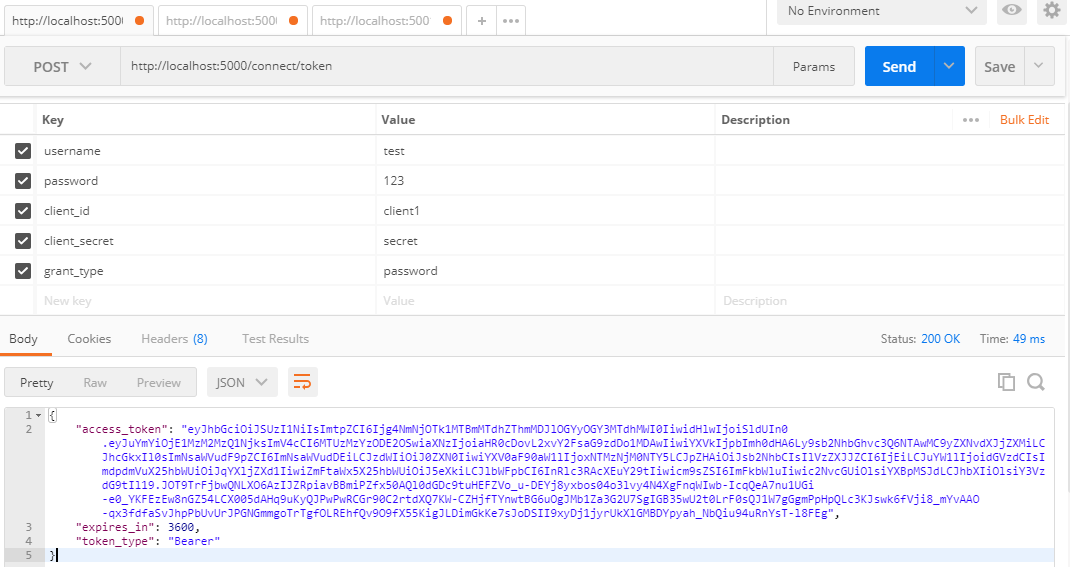
5.1、用户登录接口:http://localhost:5000/connect/token
| 参数名 | 说明 | 是否必填 | 示例 |
| username | 用户名 | Y | test |
| password | 密码 | Y | 123 |
| grant_type | 加密类型 | Y | password |
| client_id | 客户端名称 | Y | client1 |
| client_secret | 客户端加密类型 | Y | secret |
效果图:
5.2、获取用户信息接口:http://localhost:5000/connect/userinfo
| 参数 | 是否必填 | 说明 |
| Authorization | Y | 值的格式:key空格value |
PS:key 的值为上面接口返回的 token_type 的值,value 为 access_token 的值。
通过调用上面两个接口,完成登录授权。
效果图:

ASP.NET Core的身份认证框架IdentityServer4--(5)自定义用户登录(通过接口登录,无UI版本)的更多相关文章
- ASP.NET Core的身份认证框架IdentityServer4(7)- 使用客户端证书控制API访问
前言 今天(2017-9-8,写于9.8,今天才发布)一口气连续把最后几篇IdentityServer4相关理论全部翻译完了,终于可以进入写代码的过程了,比较累.目前官方的文档和Demo以及一些相关组 ...
- ASP.NET Core的身份认证框架IdentityServer4(1)-特性一览
IdentityServer4是ASP.NET Core的一个包含OpenID和OAuth 2.0协议的框架.OpenID和OAuth 的区别请看 https://www.zhihu.com/ques ...
- ASP.NET Core的身份认证框架IdentityServer4(6)- 开始
安装和概述 启动一个新的IdentityServer项目有两种基本方法: 从头开始 从Visual Studio中的ASP.NET身份模板开始 如果从头开始,我们提供了一些文档.项目帮助和内存存储支持 ...
- ASP.NET Core的身份认证框架IdentityServer4(5)- 包和构建
包和构建 IdentityServer有许多nuget包 IdentityServer4 nuget | github 包含IdentityServer核心对象模型,服务和中间件. 仅支持内存配置和用 ...
- ASP.NET Core的身份认证框架IdentityServer4(9)-使用OpenID Connect添加用户认证
OpenID Connect OpenID Connect 1.0是OAuth 2.0协议之上的一个简单的身份层. 它允许客户端基于授权服务器执行的身份验证来验证最终用户的身份,以及以可互操作和类似R ...
- ASP.NET Core的身份认证框架IdentityServer4(3)-术语的解释
IdentityServer4 术语 IdentityServer4的规范.文档和对象模型使用了一些你应该了解的术语. 身份认证服务器(IdentityServer) IdentityServer是一 ...
- ASP.NET Core的身份认证框架IdentityServer4(8)- 使用密码认证方式控制API访问
前言 本文及IdentityServer这个系列使用的都是基于.net core 2.0的.上一篇博文在API项目中我使用了icrosoft.AspNetCore.Authentication.Jwt ...
- ASP.NET Core的身份认证框架IdentityServer4(4)- 支持的规范
IdentityServer实现以下规范: OpenID Connect OpenID Connect Core 1.0 (spec) OpenID Connect Discovery 1.0 (sp ...
- ASP.NET Core的身份认证框架IdentityServer4--入门
ASP.NET Core的身份认证框架IdentityServer4--入门 2018年08月11日 10:09:00 qq_42606051 阅读数 4002 https://blog.csdn ...
- ASP.NET Core的身份认证框架IdentityServer4--入门【转】
原文地址 Identity Server 4是IdentityServer的最新版本,它是流行的OpenID Connect和OAuth Framework for .NET,为ASP.NET Cor ...
随机推荐
- React 初学
React.createClass({}); getInitialState,this.setState({}); {}解读代码块,外层不要加引号,比如onChange={this.handleCha ...
- 王者荣耀交流协会Beta发布文案美工展示博客
logo: 我们的logo是蓝底白字,非常简洁大气的设计感,上面印有我们的软件名称,更好的直观的彰显了我们的主题.我们的软件就是要迎合使用者,给使用者更加方便快捷的工作体验,更好的衡量自己的时间分配. ...
- 冲刺ing-2
第二次Scrum冲刺 队员完成的任务 队员 完成任务 吴伟华 分配任务 蔺皓雯 编写博客,查阅资料 蔡晨旸 查阅资料 曾茜 暂无 鲁婧楠 暂无 杨池宇 暂无 成员遇到的问题 队员 问题 吴伟华 暂无 ...
- 转 从红帽、GitHub和Docker看开源商业模式的进阶
从红帽.GitHub和Docker看开源商业模式的进阶 发表于2014-12-16 10:26| 7594次阅读| 来源http://stratechery.com/| 0 条评论| 作者Ben Th ...
- beta阶段评语
首先我说一下自己心中的排序 1.俄罗斯方块 2 连连看 3 考试管理系统 4 食物链教学软件 5 约跑App 6 礼物挑选小工具 我的理由: 新峰的俄罗斯的方块,虽然当初的亮点没做出来,但是整体流程完 ...
- 爬虫学习之-git拉取远程错误
本文讲的是把git在最新2.9.2,合并pull两个不同的项目,出现的问题如何去解决 如果合并了两个不同的开始提交的仓库,在新的 git 会发现这两个仓库可能不是同一个,为了防止开发者上传错误,于是就 ...
- 第179天:javascript中replace使用总结
ECMAScript提供了replace()方法.这个方法接收两个参数,第一个参数可以是一个RegExp对象或者一个字符串,第二个参数可以是一个字符串或者一个函数.现在我们来详细讲解可能出现的几种情况 ...
- 出现脚本错误或者未正确调用 Page()
pages/xxxx/xxxx.js 出现脚本错误或者未正确调用 Page() 自己创建的小程序出现上面报错,可能是因为 xxxx.js是一个空文件,所以才会出现未正确调用: 如果是空文件的话,解决办 ...
- Importing/Indexing database (MySQL or SQL Server) in Solr using Data Import Handler--转载
原文地址:https://gist.github.com/maxivak/3e3ee1fca32f3949f052 Install Solr download and install Solr fro ...
- 堆模板(pascal)洛谷P3378
题目描述 如题,初始小根堆为空,我们需要支持以下3种操作: 操作1: 1 x 表示将x插入到堆中 操作2: 2 输出该小根堆内的最小数 操作3: 3 删除该小根堆内的最小数 输入输出格式 输入格式: ...