
ItemContainerStyleSelector
ItemContainerStyleSelector是容器Style选择器
用法和ItemTemplateSelector差不多
同样也是也是继承类 StyleSelector,也是重写方法SelectStyle,参数都是一样的,一是数据,二是数据对象。返回值则是Style,默认值则是Null
XAML也是差不多的,同样使用绑定的语法
选择器类:
public class SelectOFStyle: StyleSelector

    {

        public int i = ;

        public override Style SelectStyle(object item, DependencyObject container)

        {

            var u = container as FrameworkElement;

            i++;

            if (i %  == )

                return u.FindResource("St1") as Style;

            else

                return u.FindResource("St2") as  Style;

        }

    }
xaml
 <Window.Resources>

        <Storyboard x:Key="S2">

            <DoubleAnimationUsingKeyFrames Storyboard.TargetProperty="(UIElement.RenderTransform).(TransformGroup.Children)[2].(RotateTransform.Angle)" >

                <EasingDoubleKeyFrame KeyTime="" Value=""/>

                <EasingDoubleKeyFrame KeyTime="" Value=""/>

                <EasingDoubleKeyFrame KeyTime="0:0:0.4" Value="-5"/>

                <EasingDoubleKeyFrame KeyTime="0:0:0.5" Value=""/>

            </DoubleAnimationUsingKeyFrames>

            <DoubleAnimationUsingKeyFrames Storyboard.TargetProperty="(UIElement.RenderTransform).(TransformGroup.Children)[0].(ScaleTransform.ScaleX)" >

                <EasingDoubleKeyFrame KeyTime="" Value=""/>

                <EasingDoubleKeyFrame KeyTime="" Value=""/>

                <EasingDoubleKeyFrame KeyTime="0:0:0.5" Value=""/>

            </DoubleAnimationUsingKeyFrames>

            <DoubleAnimationUsingKeyFrames Storyboard.TargetProperty="(UIElement.RenderTransform).(TransformGroup.Children)[0].(ScaleTransform.ScaleY)" >

                <EasingDoubleKeyFrame KeyTime="" Value=""/>

                <EasingDoubleKeyFrame KeyTime="" Value=""/>

                <EasingDoubleKeyFrame KeyTime="0:0:0.5" Value=""/>

            </DoubleAnimationUsingKeyFrames>

        </Storyboard>

        <Storyboard x:Key="S1">

            <DoubleAnimationUsingKeyFrames Storyboard.TargetProperty="(UIElement.RenderTransform).(TransformGroup.Children)[0].(ScaleTransform.ScaleY)" >

                <EasingDoubleKeyFrame KeyTime="" Value=""/>

                <EasingDoubleKeyFrame KeyTime="" Value=""/>

                <EasingDoubleKeyFrame KeyTime="0:0:0.5" Value=""/>

            </DoubleAnimationUsingKeyFrames>

        </Storyboard>

        <Style  TargetType="ListBoxItem" x:Key="St1">

            <Setter Property="RenderTransform" >

                <Setter.Value>

                    <TransformGroup>

                        <ScaleTransform/>

                        <SkewTransform/>

                        <RotateTransform/>

                        <TranslateTransform/>

                    </TransformGroup>

                </Setter.Value>

            </Setter>

            <Style.Triggers>

                <EventTrigger  RoutedEvent="FrameworkElement.Loaded">

                    <BeginStoryboard Storyboard="{StaticResource S2}"/>

                </EventTrigger>

            </Style.Triggers>

        </Style>

        <Style  TargetType="ListBoxItem" x:Key="St2">

            <Setter Property="RenderTransform" >

                <Setter.Value>

                    <TransformGroup>

                        <ScaleTransform/>

                    </TransformGroup>

                </Setter.Value>

            </Setter>

            <Style.Triggers>

                <EventTrigger  RoutedEvent="FrameworkElement.Loaded">

                    <BeginStoryboard Storyboard="{StaticResource S1  }"/>

                </EventTrigger>

            </Style.Triggers>

        </Style>

        <local:Select  x:Key="sl2"/>

        <local:SelectOFStyle x:Key="sl1"/>

        <DataTemplate x:Key="d1">

            <Image x:Name="image" Height=""  Width="" Source="{Binding Image}"  />

        </DataTemplate>

        <DataTemplate x:Key="d2">

            <Image x:Name="image" Height="" Width="" Source="{Binding Image}"  />

        </DataTemplate>

    </Window.Resources>

    <Grid>

        <ListBox ItemTemplateSelector="{StaticResource sl2}" ItemContainerStyleSelector="{StaticResource sl1}"  x:Name="ListBoxFile" Margin="0,0,0,119"   >

            <ListBox.ItemsPanel>

                <ItemsPanelTemplate>

                    <StackPanel Orientation="Horizontal"/>

                </ItemsPanelTemplate>

            </ListBox.ItemsPanel>

        </ListBox>

        <Button Click="Button_Click" Margin="451,321,0,0"/>

    </Grid>
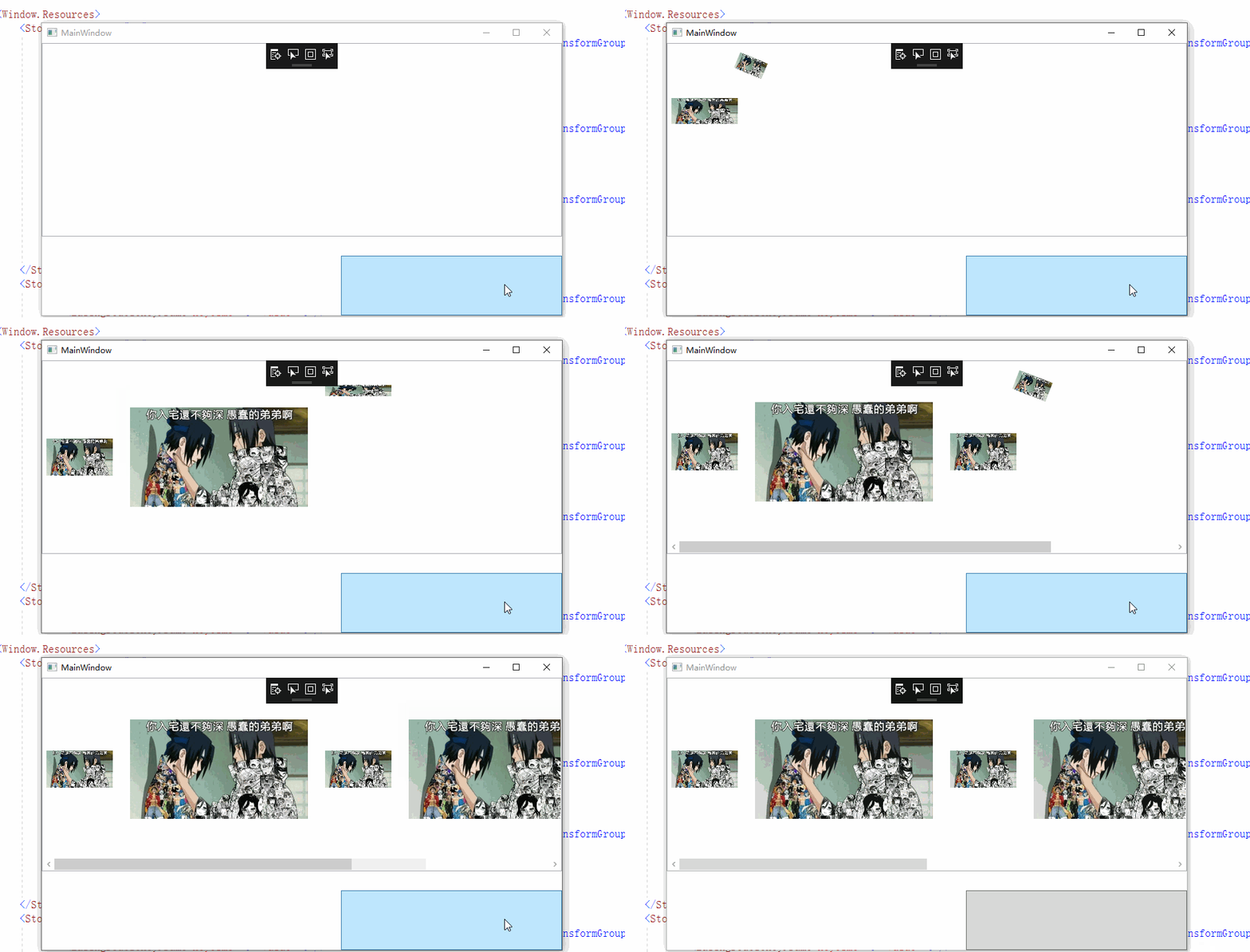
图片效果
ItemContainerStyleSelector的更多相关文章
- 项模板选择器属性(ItemTemplateSelector属性)和样式选择器(ItemContainerStyleSelector)
3.4.5 共享尺寸组 样式选择器: 或者========================================
- [WPF系列]-数据邦定之DataTemplate 对 ItemsControl 进行样式和模板处理
引言 即使 ItemsControl 不是 DataTemplate 所用于的唯一控件类型,将 ItemsControl 绑定到集合仍然很常见. 在 DataTemplate 中有哪些内容一节中, ...
- WPF开发的彩票程序(练手好例子) 附源码
前言 WPF是.NET最新的界面开发库,开发界面非常灵活!但是学习WPF难度也非常大. 应朋友之邀,编写了一个小程序.程序虽小,五脏俱全,WPF开发的灵活性可窥见一斑. 对于新手学习有很好的借鉴意义, ...
- WPF使用总结
ListboxItemContainer样式 一般items控件的项模板 很容易 设置DataTemplate就可以了,比如listbox .但是在选中和失去焦点的时候 却是Windows自带的那种 ...
- WPF核心对象模型-类图和解析
DispatcherObject是根基类,通过继承该类,可以得到访问创建该对象的UI线程的Dispatcher对象的能力.通过Dispatcher对象,可以将代码段合并入该UI线程执行. Depend ...
- WPF开发的彩票程序(练手好例子)
前言 WPF是.NET最新的界面开发库,开发界面非常灵活!但是学习WPF难度也非常大. 应朋友之邀,编写了一个小程序.程序虽小,五脏俱全,WPF开发的灵活性可窥见一斑. 对于新手学习有很好的借鉴意义, ...
- WPF数据模板样式选择器
在使用数据模板样式选择器时,不能设置ItemContainerStyle的属性值,如果设置了该值,那么数据模板样式选择器会失去作用. 在使用数据模板样式选择器时,首先要创建数据模板样式选择器对象,此对 ...
- [WPF自定义控件库]简单的表单布局控件
1. WPF布局一个表单 <Grid Width="400" HorizontalAlignment="Center" VerticalAlignment ...
- WinRT ListView间隔变色(一)
我们知道,在WPF里,MSDN提供了三种方法 1.使用转换器Converter 2.继承ListView类,自己处理 3.使用StyleSelctor 到了WinRT的世界了 1. Winrt中Set ...
随机推荐
- 如何设置tomcat,直接通过IP 访问
找到tomcat的主目录,进入conf文件夹,找到server.xml文件,并打开: 修改tomcat的监听端口为80端口: 在server.xml文件中找到: <Connector por ...
- zoj1001-A + B Problem
http://acm.zju.edu.cn/onlinejudge/showProblem.do?problemId=1 A + B Problem Time Limit: 2 Seconds ...
- HTML5新增的非主体结构元素
-------------------siwuxie095 HTML5 新增的非主体结构元素 1.header 元素 ...
- orcle clob字段查询
select utl_raw.cast_to_varchar2(DBMS_LOB.SUBSTR(column,2000,1)) from t
- [JAVA] 冻结Excel的第一行或第一列
可以按照如下设置创建冻结窗口. sheet.createFreezePane( 3, 2, 3, 2 ); 前两个参数是你要用来拆分的列数和行数.后两个参数是下面窗口的可见象限,其中第三个参数是右边区 ...
- [SoapUI] 通过SoapUI发送POST请求,请求的body是JSON格式的数据
通过SoapUI发送POST请求,请求的body是JSON格式的数据: data={"currentDate":"2015-06-19","reset ...
- Spring Boot☞ 使用Thymeleaf模板引擎渲染web视图
静态资源访问 在我们开发Web应用的时候,需要引用大量的js.css.图片等静态资源. 默认配置 Spring Boot默认提供静态资源目录位置需置于classpath下,目录名需符合如下规则: /s ...
- 我的ubuntu14.04配置
完全卸载java(移除所有 Java相关包 (Sun, Oracle, OpenJDK, IcedTea plugins, GIJ)) 转载修改, 原文见:http://blog.csdn.net/s ...
- spring mvc 集成hibernate步骤
今天从头把hibernate集成进入springMVC框架中,把过程记录下来. 1.首先要在监听器配置文件中加入hibernate支持,如下: <?xml version="1.0&q ...
- libevent学习
libevent是一个开源的事件控制机制,如果不想陷入多进程或多线程的困扰,那么libevent将是很合适的工具. libevent提供了很多的API来管理和控制事件,可用于设计读.写.信号.定时等各 ...