
odoo订餐系统之订单相关知识点理解
1.对重载函数name_get的理解
第一,此函数位于Model基类中,返回值是一个list列表,列表中的每个值是如(key,value)形式的键值对,此处为(id,name).
第二,在自己的Model类中如果重写此函数,需要遵循第一条返回值的格式。
第三,这个函数何时调用呢。其一,用户/开发人员明确调用类的id并在界面上显示的时候,此时会使用该方法。其二,框架自身调用,比如用户点击tree视图列表中的数据切换到form视图的时候,Edit/Create按钮上面的部分会显示诸如 "action_name/当前id对应的name".
  def name_get(self, cr, uid, ids, context=None):

        if not ids:

            return []

        res = []

        for elmt in self.browse(cr, uid, ids, context=context):

            name = _("Lunch Order")

            name = name + ' ' + str(elmt.id)

            res.append((elmt.id, name))

        return res
订单中我们的功能很简单,就是建立(id,“Lunch Order” + id )的键值列表。具体的运行效果如下图:
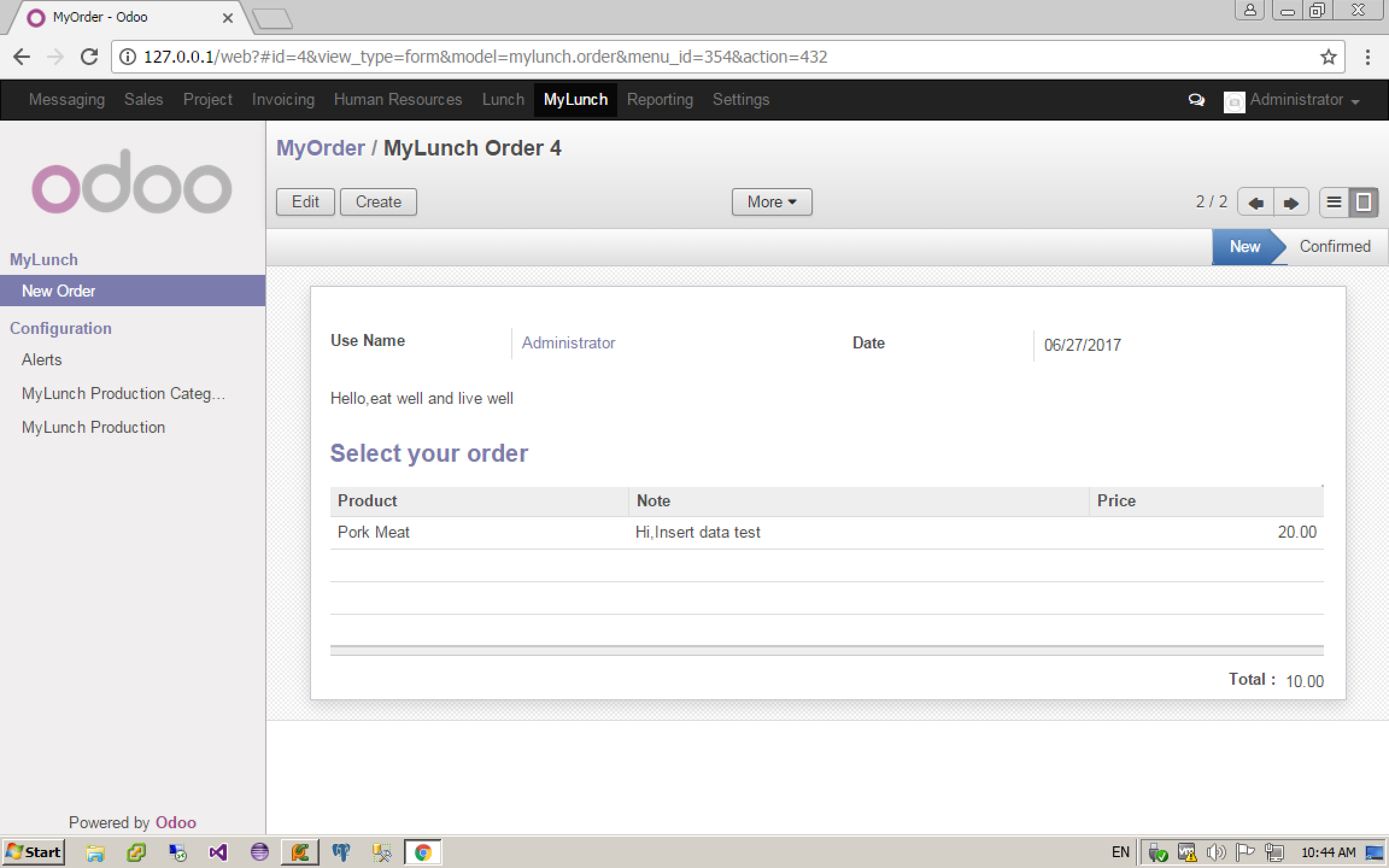
其他效果:http://odootechnical.com/overriding-name_get-method-in-odoo-8/
2.重载函数fileds_view_get的理解
第一,此函数仍旧位于Model基类中,从表ir_ui_view表或ir_model_data表返回值是一个类对象,大概包含了name,model,arch,type,view_id,fileds等相关值。
    def fields_view_get(self, cr, uid, view_id=None, view_type='form', context=None, toolbar=False, submenu=False):

        """ fields_view_get([view_id | view_type='form'])

        Get the detailed composition of the requested view like fields, model, view architecture

        :param view_id: id of the view or None

        :param view_type: type of the view to return if view_id is None ('form', 'tree', ...)

        :param toolbar: true to include contextual actions

        :param submenu: deprecated

        :return: dictionary describing the composition of the requested view (including inherited views and extensions)

        :raise AttributeError:

                            * if the inherited view has unknown position to work with other than 'before', 'after', 'inside', 'replace'

                            * if some tag other than 'position' is found in parent view

        :raise Invalid ArchitectureError: if there is view type other than form, tree, calendar, search etc defined on the structure

        """

        if context is None:

            context = {}

        View = self.pool['ir.ui.view']

        result = {

            'model': self._name,

            'field_parent': False,

        }

        # try to find a view_id if none provided

        if not view_id:

            # <view_type>_view_ref in context can be used to overrride the default view

            view_ref_key = view_type + '_view_ref'

            view_ref = context.get(view_ref_key)

            if view_ref:

                if '.' in view_ref:

                    module, view_ref = view_ref.split('.', )

                    cr.execute("SELECT res_id FROM ir_model_data WHERE model='ir.ui.view' AND module=%s AND name=%s", (module, view_ref))

                    view_ref_res = cr.fetchone()

                    if view_ref_res:

                        view_id = view_ref_res[]

                else:

                    _logger.warning('%r requires a fully-qualified external id (got: %r for model %s). '

                        'Please use the complete `module.view_id` form instead.', view_ref_key, view_ref,

                        self._name)

            if not view_id:

                # otherwise try to find the lowest priority matching ir.ui.view

                view_id = View.default_view(cr, uid, self._name, view_type, context=context)

        # context for post-processing might be overriden

        ctx = context

        if view_id:

            # read the view with inherited views applied

            root_view = View.read_combined(cr, uid, view_id, fields=['id', 'name', 'field_parent', 'type', 'model', 'arch'], context=context)

            result['arch'] = root_view['arch']

            result['name'] = root_view['name']

            result['type'] = root_view['type']

            result['view_id'] = root_view['id']

            result['field_parent'] = root_view['field_parent']

            # override context from postprocessing

            if root_view.get('model') != self._name:

                ctx = dict(context, base_model_name=root_view.get('model'))

        else:

            # fallback on default views methods if no ir.ui.view could be found

            try:

                get_func = getattr(self, '_get_default_%s_view' % view_type)

                arch_etree = get_func(cr, uid, context)

                result['arch'] = etree.tostring(arch_etree, encoding='utf-8')

                result['type'] = view_type

                result['name'] = 'default'

            except AttributeError:

                raise except_orm(_('Invalid Architecture!'), _("No default view of type '%s' could be found !") % view_type)

        # Apply post processing, groups and modifiers etc...

        xarch, xfields = View.postprocess_and_fields(cr, uid, self._name, etree.fromstring(result['arch']), view_id, context=ctx)

        result['arch'] = xarch

        result['fields'] = xfields

        # Add related action information if aksed

        if toolbar:

            toclean = ('report_sxw_content', 'report_rml_content', 'report_sxw', 'report_rml', 'report_sxw_content_data', 'report_rml_content_data')

            def clean(x):

                x = x[]

                for key in toclean:

                    x.pop(key, None)

                return x

            ir_values_obj = self.pool.get('ir.values')

            resprint = ir_values_obj.get(cr, uid, 'action', 'client_print_multi', [(self._name, False)], False, context)

            resaction = ir_values_obj.get(cr, uid, 'action', 'client_action_multi', [(self._name, False)], False, context)

            resrelate = ir_values_obj.get(cr, uid, 'action', 'client_action_relate', [(self._name, False)], False, context)

            resaction = [clean(action) for action in resaction if view_type == 'tree' or not action[].get('multi')]

            resprint = [clean(print_) for print_ in resprint if view_type == 'tree' or not print_[].get('multi')]

            #When multi="True" set it will display only in More of the list view

            resrelate = [clean(action) for action in resrelate

                         if (action[].get('multi') and view_type == 'tree') or (not action[].get('multi') and view_type == 'form')]

            for x in itertools.chain(resprint, resaction, resrelate):

                x['string'] = x['name']

            result['toolbar'] = {

                'print': resprint,

                'action': resaction,

                'relate': resrelate

            }

        return result
第二,在自己的Model类重写此函数的时候,我们可以根据自己的需要做一些UI上的处理。例如我们的订单Form视图中,根据用户记录显示对应的偏好菜单。
订单Form视图,自定义部分,下面的红色部分:
<record model="ir.ui.view" id="orders_form_view">

            <field name="name">Lunch Order</field>

            <field name="model">lunch.order</field>

            <field name="arch" type="xml">

                <form string='Orders Form' class="oe_lunch">

                    <header>

                        <field name='state' widget='statusbar' statusbar_visible='new,confirmed'/>

                    </header>

                    <sheet>

                        <group>

                            <group>

                                <field name='user_id'

                                context="{'default_groups_ref': ['base.group_user', 'base.group_partner_manager', 'lunch.group_lunch_user']}"/>

                            </group>

                            <group>

                                <field name='date'/>

                            </group>

                        </group>

                        <field name='alerts' attrs="{'invisible': ['|',('state','!=','new'),('alerts','=',False)]}" class="oe_inline oe_lunch_alert"/>

                        <div name="preferences">

                               </div>

                        <separator string='Select your order'/>

                        <field name='order_line_ids' nolabel='' on_change='onchange_price(order_line_ids)'>

                            <tree string='List' editable='bottom'>

                                <field name='product_id' on_change='onchange_price(product_id)'/>

                                <field name='note' />

                                <field name='price' on_change='onchange_price(product_id)'/>

                                <field name='supplier' invisible=""/>

                                <field name="state" invisible=""/>

                            </tree>

                        </field>

                        <group class='oe_subtotal_footer oe_right'>

                            <field name='total'/>

                        </group>

                        <br/><br/>

                    </sheet>

                </form>

            </field>

        </record>
我们重写此函数,根据历史订单添加用户偏好的菜单和对应的按钮事件。
def fields_view_get(self, cr, uid, view_id=None, view_type=False, context=None, toolbar=False, submenu=False):

        """

        Add preferences in the form view of order.line

        """

        res = super(lunch_order,self).fields_view_get(cr, uid, view_id=view_id, view_type=view_type, context=context, toolbar=toolbar, submenu=submenu)

        line_ref = self.pool.get("lunch.order.line")

        if view_type == 'form':

            doc = etree.XML(res['arch'])

            pref_ids = line_ref.search(cr, uid, [('user_id', '=', uid)], order='id desc', context=context)

            xml_start = etree.Element("div")

            #If there are no preference (it's the first time for the user)

            if len(pref_ids)==:

                #create Elements

                xml_no_pref_1 = etree.Element("div")

                xml_no_pref_1.set('class','oe_inline oe_lunch_intro')

                xml_no_pref_2 = etree.Element("h3")

                xml_no_pref_2.text = _("This is the first time you order a meal")

                xml_no_pref_3 = etree.Element("p")

                xml_no_pref_3.set('class','oe_grey')

                xml_no_pref_3.text = _("Select a product and put your order comments on the note.")

                xml_no_pref_4 = etree.Element("p")

                xml_no_pref_4.set('class','oe_grey')

                xml_no_pref_4.text = _("Your favorite meals will be created based on your last orders.")

                xml_no_pref_5 = etree.Element("p")

                xml_no_pref_5.set('class','oe_grey')

                xml_no_pref_5.text = _("Don't forget the alerts displayed in the reddish area")

                #structure Elements

                xml_start.append(xml_no_pref_1)

                xml_no_pref_1.append(xml_no_pref_2)

                xml_no_pref_1.append(xml_no_pref_3)

                xml_no_pref_1.append(xml_no_pref_4)

                xml_no_pref_1.append(xml_no_pref_5)

            #Else: the user already have preferences so we display them

            else:

                preferences = line_ref.browse(cr, uid, pref_ids, context=context)

                categories = {} #store the different categories of products in preference

                count =

                for pref in preferences:

                    #For each preference

                    categories.setdefault(pref.product_id.category_id.name, {})

                    #if this product has already been added to the categories dictionnary

                    if pref.product_id.id in categories[pref.product_id.category_id.name]:

                        #we check if for the same product the note has already been added

                        if pref.note not in categories[pref.product_id.category_id.name][pref.product_id.id]:

                            #if it's not the case then we add this to preferences

                            categories[pref.product_id.category_id.name][pref.product_id.id][pref.note] = pref

                    #if this product is not in the dictionnay, we add it

                    else:

                        categories[pref.product_id.category_id.name][pref.product_id.id] = {}

                        categories[pref.product_id.category_id.name][pref.product_id.id][pref.note] = pref

                currency = self.pool.get('res.users').browse(cr, uid, uid, context=context).company_id.currency_id

                #For each preferences that we get, we will create the XML structure

                for key, value in categories.items():

                    xml_pref_1 = etree.Element("div")

                    xml_pref_1.set('class', 'oe_lunch_30pc')

                    xml_pref_2 = etree.Element("h2")

                    xml_pref_2.text = key

                    xml_pref_1.append(xml_pref_2)

                    i =

                    value = value.values()

                    #TODO: sorted_values is used for a quick and dirty hack in order to display the  last orders of each categories.

                    #It would be better to fetch only the  items to display instead of fetching everything then sorting them in order to keep only the  last.

                    #NB: The note could also be ignored + we could fetch the preferences on the most ordered products instead of the last ones...

                    sorted_values = {}

                    for val in value:

                        for elmt in val.values():

                            sorted_values[elmt.id] = elmt

                    for key, pref in sorted(sorted_values.iteritems(), key=lambda (k, v): (k, v), reverse=True):

                        #We only show  preferences per category (or it will be too long)

                        if i == :

                            break

                        i +=

                        xml_pref_3 = etree.Element("div")

                        xml_pref_3.set('class','oe_lunch_vignette')

                        xml_pref_1.append(xml_pref_3)

                        xml_pref_4 = etree.Element("span")

                        xml_pref_4.set('class','oe_lunch_button')

                        xml_pref_3.append(xml_pref_4)

                        xml_pref_5 = etree.Element("button")

                        xml_pref_5.set('name',"add_preference_"+str(pref.id))

                        xml_pref_5.set('class','oe_link oe_i oe_button_plus')

                        xml_pref_5.set('type','object')

                        xml_pref_5.set('string','+')

                        xml_pref_4.append(xml_pref_5)

                        xml_pref_6 = etree.Element("button")

                        xml_pref_6.set('name',"add_preference_"+str(pref.id))

                        xml_pref_6.set('class','oe_link oe_button_add')

                        xml_pref_6.set('type','object')

                        xml_pref_6.set('string',_("Add"))

                        xml_pref_4.append(xml_pref_6)

                        xml_pref_7 = etree.Element("div")

                        xml_pref_7.set('class','oe_group_text_button')

                        xml_pref_3.append(xml_pref_7)

                        xml_pref_8 = etree.Element("div")

                        xml_pref_8.set('class','oe_lunch_text')

                        xml_pref_8.text = escape(pref.product_id.name)+str(" ")

                        xml_pref_7.append(xml_pref_8)

                        price = pref.product_id.price or 0.0

                        cur = currency.name or ''

                        xml_pref_9 = etree.Element("span")

                        xml_pref_9.set('class','oe_tag')

                        xml_pref_9.text = str(price)+str(" ")+cur

                        xml_pref_8.append(xml_pref_9)

                        xml_pref_10 = etree.Element("div")

                        xml_pref_10.set('class','oe_grey')

                        xml_pref_10.text = escape(pref.note or '')

                        xml_pref_3.append(xml_pref_10)

                        xml_start.append(xml_pref_1)

            first_node = doc.xpath("//div[@name='preferences']")

            if first_node and len(first_node)>:

                first_node[].append(xml_start)

            res['arch'] = etree.tostring(doc)

        return res
我们重写的函数,首先调用基类的函数,获取默认情况下的form视图数据,然后我们向<div name="prefernces"></div>节点中添加html节点和相关数据,这样我们就动态改变了Form视图的结果。这里在向节点添加数据的时候,对Button按钮设置了事件,如上面的红色部分设置name属性为add_prefernces_1,add_prefernces_2,add_prefernces_3 .....为后面的事件处理打下伏笔。
第三,何时调用的问题。根据以前研究的代码,这个函数是前端UI框架中在显示Form UI之前主动调用的。
3.__getattr__函数的理解
1.这个函数似乎也是基类中的,但没有在源代码中找到。
2.何时调用的问题?估计是用户点击前端UI按钮触发事件失败的时候调用此函数。
    def __getattr__(self, attr):

        """

        this method catch unexisting method call and if it starts with

        add_preference_'n' we execute the add_preference method with

        'n' as parameter

        """

        if attr.startswith('add_preference_'):

            pref_id = int(attr[:])

            def specific_function(cr, uid, ids, context=None):

                return self.add_preference(cr, uid, ids, pref_id, context=context)

            return specific_function

        return super(lunch_order, self).__getattr__(attr)
我们订单中的按钮要触发诸如add_prefernces_1类型的事件,可这样的函数并不存在于我们的Mode类中,此时就会调用__getattr__函数,如果属性值以add_prefernce_开始,那么就默认调用specific_function函数,而该函数直接调用add_prefernce函数,参数值add_prefernce_1中的1,也即第15位之后的数字。
def add_preference(self, cr, uid, ids, pref_id, context=None):

        """

        create a new order line based on the preference selected (pref_id)

        """

        assert len(ids) ==

        orderline_ref = self.pool.get('lunch.order.line')

        prod_ref = self.pool.get('lunch.product')

        order = self.browse(cr, uid, ids[], context=context)

        pref = orderline_ref.browse(cr, uid, pref_id, context=context)

        new_order_line = {

            'date': order.date,

            'user_id': uid,

            'product_id': pref.product_id.id,

            'note': pref.note,

            'order_id': order.id,

            'price': pref.product_id.price,

            'supplier': pref.product_id.supplier.id

        }

        return orderline_ref.create(cr, uid, new_order_line, context=context)
此函数的主要功能是根据pref_id获取的值向表lunch.order.line中插入一条数据。
odoo订餐系统之订单相关知识点理解的更多相关文章
- odoo订餐系统之订单设计
订餐系统的主要功能便是用户下单部分,这里我们分为表头mylunch_order和表体mylunch_order_line两张主要的数据表,表头主要记录订单的一些通用信息,比如下单的操作人员 下单日期 ...
- odoo 订餐系统之消息提醒
打算入手odoo开发新的系统,先研究下开发的过程是如何的.案例模仿自带的订餐系统,此系统模块不多,但很典型,可以达到联系的目的.先记录下订餐系统消息提醒的开发过程. 1.添加自己的addons目录my ...
- odoo订餐系统之菜单设计
1.model类的设计 class MyLunchProduction(osv.Model): _name = "mylunch.production" _description ...
- odoo订餐系统之类型设计
这次开发的模块是订餐的类型设计,比如大荤 小荤 蔬菜 米饭 等基本数据.1.设计model类,很简单就一个字段: class MyLunchProductionCategory(osv.Model): ...
- 终于等到你---订餐系统之负载均衡(nginx+memcached+ftp上传图片+iis)
又见毕业 对面工商大学的毕业生叕在拍毕业照了,一个个脸上都挂满了笑容,也许是满意自己四年的修行,也许是期待步入繁华的社会... 恰逢其时的连绵细雨与满天柳絮,似乎也是在映衬他们心中那些离别的忧伤,与对 ...
- 订餐系统之微信支付,踩了官方demo的坑
最近一个项目要增加微信支付的功能,想来这个东西出来这么久了,按微信提供的应该可以很快搞定的,结果提供的demo( JS API网页支付)中各种坑,咨询他们的客服,态度倒是非常好,就是解决不了问 ...
- IOS开发涉及有点概念&相关知识点
前言,IOS是基于UNIX的,用C/C+/OC直通系统底层,不想android有个jvm. 首先还是系统架构的分层架构 1.核心操作系统层 Core OS,就是内存管理.文件系统.电源管理等 2.核心 ...
- Python flask构建微信小程序订餐系统
第1章 <Python Flask构建微信小程序订餐系统>课程简介 本章内容会带领大家通览整体架构,功能模块,及学习建议.让大家在一个清晰的开发思路下,进行后续的学习.同时领着大家登陆ht ...
- Python flask构建微信小程序订餐系统✍✍✍
Python flask构建微信小程序订餐系统 整个课程都看完了,这个课程的分享可以往下看,下面有链接,之前做java开发也做了一些年头,也分享下自己看这个视频的感受,单论单个知识点课程本身没问题, ...
随机推荐
- “一切都是消息”--iMSF(即时消息服务框架)入门简介
“一切都是消息”--这是iMSF(即时消息服务框架)的设计哲学. MSF的名字是 Message Service Framework 的简称,由于目前框架主要功能在于处理即时(immediately) ...
- (后端)Java新人入职——配置环境及安装开发工具(完全)
转自csdn:执笔记忆的空白 很多新人对于进入新公司,相关工具的安装和环境变量的设定很苦恼.又苦于没有完整的配置开发环境的资料,我这里写一篇操作步骤的案例, 至少让你能把开发工具安装起来,并实用起来, ...
- tkinter中lable标签控件(二)
lable控件 对于tkinter来说,学起来很简单,只要设置好相应的参数即可出结果,所以不用刻意去记住这些参数.学习一遍后理解每个参数的作用是什么即可. 当下次用到的时候来笔记上看一下就行. 内容很 ...
- 解决windows 挂载 nfs 驱动器中 中文乱码问题
乱码问题,是由于 mount.nfs 命令不支持 utf-8字符集.所以是系统软件支持的问题.在网络上找了很多方案都没能解决. 网上主要有三种方案(1)换解决方案,使用smb 共享,这等于不是解决方法 ...
- 用Python实现数据结构之优先级队列
优先级队列 如果我们给每个元素都分配一个数字来标记其优先级,不妨设较小的数字具有较高的优先级,这样我们就可以在一个集合中访问优先级最高的元素并对其进行查找和删除操作了.这样,我们就引入了优先级队列 这 ...
- 上下文管理器——with语句的实现
前言 with语句的使用给我们带来了很多的便利,最常用的可能就是关闭一个文件,释放一把锁. 既然with语句这么好用,那我也想让我自己写的代码也能够使用with语句,该怎么实现? 下面具体介绍怎样实现 ...
- vmware linux 虚拟机开机状态加硬盘
在开机状态先加一块盘,如图: 在系统中查看当前硬盘状态: 新加的硬盘还没刷出来.执行如下命令再试一下: $ echo "- - -" >/sys/class/scsi_hos ...
- nginx服务器开启缓存、反向代理
一.反向代理配置 1.反向代理服务器配置如下 反向代理就是需要这一行proxy_pass来完成.当我们要访问后端web服务器的时候,我们只需要访问代理服务器就可以了,此时代理服务器就充当后端web服务 ...
- 用友U8年度账结转 常用凭证丢失
用友年度账结转常用凭证丢失解决方法 1.将新年度账两个表备份后清空:gl-bfreq和gl-bfreqinfo 2.复制旧年度账中gl-bfreq和gl-bfreqinfo两个表数据到新年度账即可.
- VMWare:vSphere6 企业版参考序列号
HV4WC-01087-1ZJ48-031XP-9A843 NF0F3-402E3-MZR80-083QP-3CKM2 4F6FX-2W197-8ZKZ9-Y31ZM-1C3LZ JZ2E9-6D2D ...