
metasploit安装,按官网说明
mkdir -p $HOME/git

cd $HOME/git

git clone git@github.com:YOUR_USERNAME_FOR_GITHUB/metasploit-framework

cd metasploit-framework
2
git remote add upstream git@github.com:rapid7/metasploit-framework.git

git fetch upstream

git checkout -b upstream-master --track upstream/master
3
登录https://rvm.io/
gpg --keyserver hkp://keys.gnupg.net --recv-keys 409B6B1796C275462A1703113804BB82D39DC0E3 7D2BAF1CF37B13E2069D6956105BD0E739499BDB
curl -sSL https://rvm.io/mpapis.asc | gpg --import -curl -L https://get.rvm.io | bash -s stable
4
curl -o rvm.sh -L https://get.rvm.io5
less rvm.sh # Read it and see it's all good
cat rvm.sh | bash -s stable
,这一步我出错了,然后用rvm重新安装了2.4.2的版本,metasploit目录下的.ruby0version版本为2.42,我机器上的版本为2.3.1,重新装一下
source ~/.rvm/scripts/rvm

cd ~/git/metasploit-framework

rvm --install $(cat .ruby-version)
当ruby -v 的版本和 .ruby-version中版本相同时,就往下走
6
gem install bundler
cd ~/git/metasploit-framework/7
bundle install
等一会就完成 8
运行msconsole 权限,
这里我的代码是从windows拷贝过来的,以前打开过,然后默认编辑器给我把换行给改了,在ubuntu下提示
/usr/bin/env: ‘ruby\r’: No such file or directory 看到\r了吧,直接git checkout msfconsole
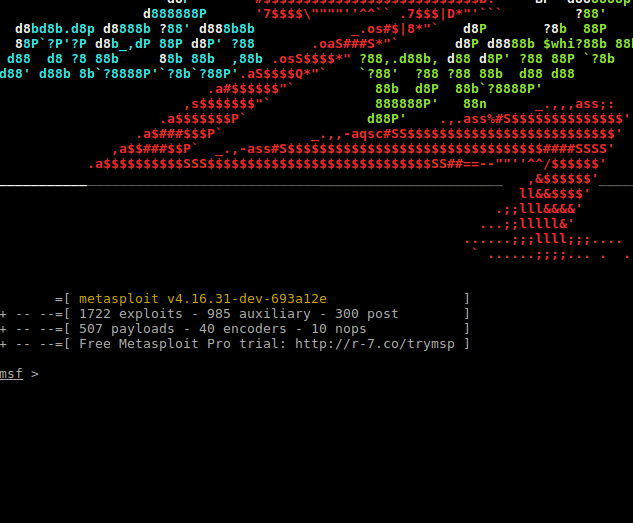
9安装postgresqlsudoapt-getinstallpostgresql postgresql-client
# 查看状态

sudo /etc/init.d/postgresql status

# 启动

sudo /etc/init.d/postgresql start

# 停止

sudo /etc/init.d/postgresql stop

# 重启

sudo /etc/init.d/postgresql restart
10
按官网的来,安装数据库,等一系列操作,修改~/.msf4/database.yml中数据库密码

11。运行./msfconsole
检测是否连接数据库成功

metasploit安装,按官网说明的更多相关文章
- Kudu安装(官网推荐的步骤)(installing build Kudu from source)
不多说,直接上干货! Kudu安装前的建议说明(博主推荐) 这是安装Kudu的另一种方法 Kudu安装(官网推荐的步骤)(installing Kudu using parcels or packag ...
- Kudu安装(官网推荐的步骤)(installing Kudu using parcels or packages)
不多说,直接上干货! Kudu安装前的建议说明(博主推荐) Kudu官网推荐的步骤: 本篇博文是installing Kudu using parcels or packages的方式. http:/ ...
- USB2.0学习笔记连载(四):安装Cypress官网套件
上一篇博客大概讲了一下USB通用驱动程序的解析.笔者使用Cypress官网给定的资料去完成USB驱动开发.官网资料地址:http://www.cypress.com/?rID=14321 下载如下图的 ...
- Nginx安装(官网翻译)
转载自:https://www.nginx.com/resources/wiki/start/topics/tutorials/install/ 二进制版本预包装的Linux和BSD大多数Linux发 ...
- gitlab安装教程、gitlab官网、英文文档
gitlab官网 https://about.gitlab.com/ gitlab安装和官网英文文档 https://about.gitlab.com/downloads/ 清华大学tuna镜像源 G ...
- 照着官网来安装openstack pike之创建并启动instance
有了之前组件(keystone.glance.nova.neutron)的安装后,那么就可以在命令行创建并启动instance了 照着官网来安装openstack pike之environment设置 ...
- 官网安装Python包太慢?教你三种下载安装方式-PiP、conda、轮子,教你三种Pytorch的下载安装方式,保证你再也不用出现Error
上一期我们介绍了CUDA下载安装以及其总结,这一期教大家如何在Anaconda中使用CUDA来进行加速.神经网络依赖cuDNN的下载安装,以及下载和安装Pytorch-GPU安装包的三种方式(cond ...
- 小谢第58问:nuxt搭建企业官网
最近公司要重构公司官网,jq+bootstrap 改为了vue,刚开始我以为用vue不是挺好的嘛,后来才发现,有于vue单页面的特性,不利于搜索引擎的抓取,因此在seo方面需要另外想办法,于是乎,就找 ...
- 史上最详细Windows版本搭建安装React Native环境配置 转载,比官网的靠谱亲测可用
史上最详细Windows版本搭建安装React Native环境配置 2016/01/29 | React Native技术文章 | Sky丶清| 95条评论 | 33530 views ...
随机推荐
- lbs@node(lbs asp blog 移植到 nodejs)
lbs@node 2018年的4月26日,我在自己的idea清单中,加上了一条"基于 nodejs 移植 lbs 博客系统". 一.lbs 是什么东东? 它是一款比较小众的博客程序 ...
- spring源码:Aware接口
一.spring容器中的aware接口介绍 Spring中提供了各种Aware接口,比较常见的如BeanFactoryAware,BeanNameAware,ApplicationContextAwa ...
- docker容器添加微软雅黑字体
添加中文字体其实很简单,往容器里COPY一个ttf字体文件就生效了,不需要执行fc-cache. 基于debian 8的tomcat容器,Dockerfile: COPY msyh.ttf /usr/ ...
- Socket端口复用
在网络应用中(如Java Socket Server),当服务关掉立马重启时,很多时候会提示端口仍被占用(因端口上有处于TIME_WAIT的连接).此时可通过 SO_REUSEADDR 参数( soc ...
- Java中Comparable和Comparator区别
很好的一篇博客:http://blog.csdn.net/jq_ak47/article/details/61203817 http://www.cnblogs.com/cmxwt/p/6215253 ...
- 关于ping地址的几个意义
1.ping 127.0.0.1 判断电脑的tcp/ip协议栈有没有问题 2.ping 本机ip 判断电脑的网卡驱动有没有问题 3.ping 网关 判断数据是否可以到达路由 4.ping www.ba ...
- jQuery UI =>jquery-ui.js中sortable方法拖拽对象位置偏移问题
今天要处理sortable方法处理的对象,拖拽的时候,位置偏移的问题. 按理应该是鼠标在哪,对象就跟着在哪的 百度了一下问题,http://blog.csdn.net/samed/article/de ...
- Linux网络设备驱动 _驱动模型
Linux素来以其强大的网络功能著名,同时, 网络设备也作为三大设备之一, 成为Linux驱动学习中必不可少的设备类型, 此外, 由于历史原因, Linux并没有强制对网络设备贯彻其"一切皆 ...
- mybatis12--一级缓存
验证一级缓存的存在 对应的实体类 /** *学生对应的实体类 */ public class Student { private Integer sId; private String sName; ...
- java学习之路--面试之并发基础
1. 什么是原子操作?在Java Concurrency API中有哪些原子类(atomic classes)?原子操作是指一个不受其他操作影响的操作任务单元.原子操作是在多线程环境下避免数据不一致必 ...