
Delphi10.2 DPR文件
通过选择【Project | View Source】,可以看到DPR文件的基本面貌,操作如下:
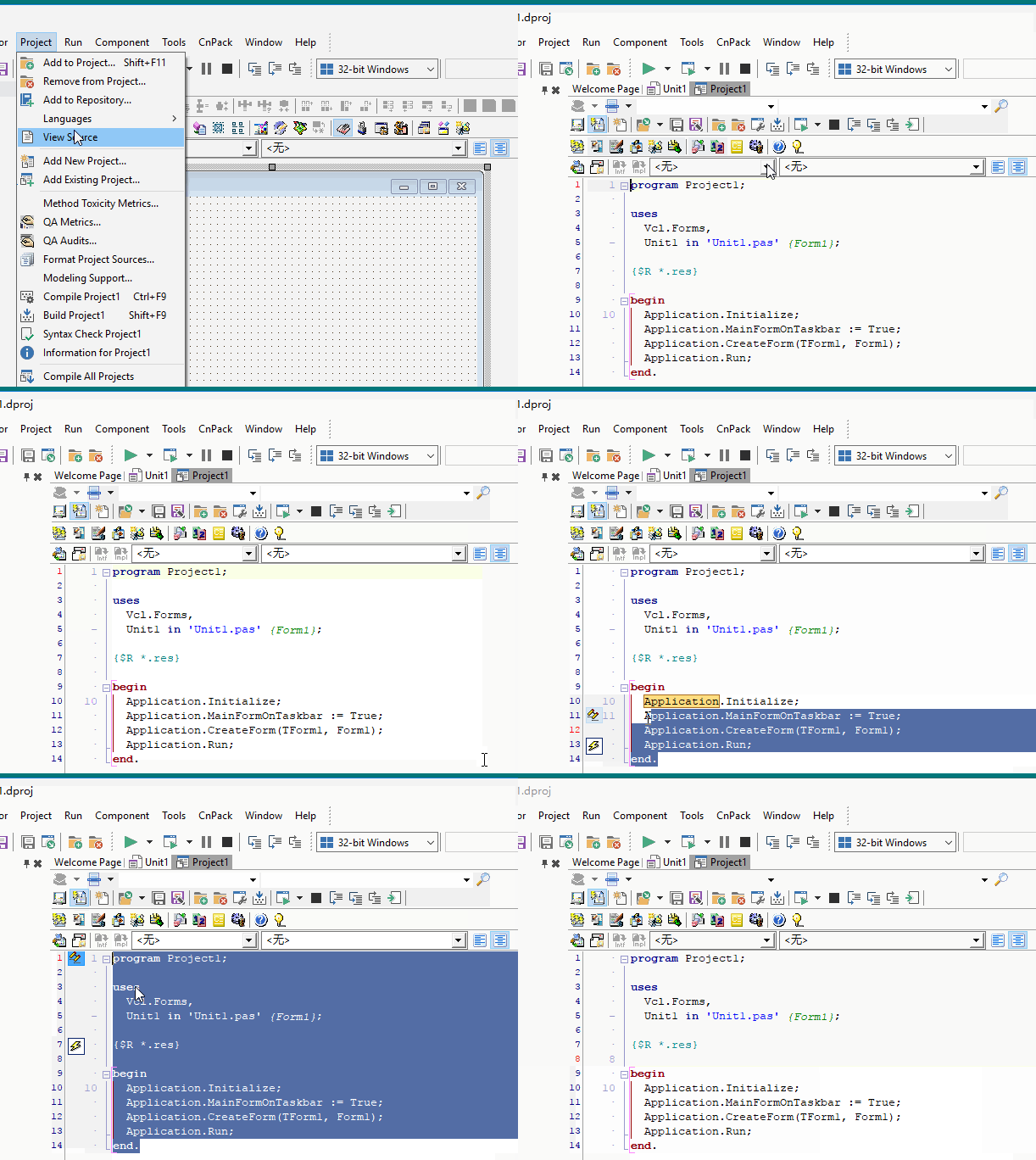
默认的 Delphi 项目文件的内容如下:
program Project1; {关键字 program}

uses              {uses 单元引用}

  Vcl.Forms,   //新的单元名称VCL限定

  Unit1 in 'Unit1.pas' {Form1};

{$R *.res}

begin

  Application.Initialize;

  Application.MainFormOnTaskbar := True;

  {默认已经MainForm显示于任务栏,而不是之前版本的Application}

  Application.CreateForm(TForm1, Form1);

  Application.Run;

end.
通过查看官方的帮助文件,我们来了解下 Application.MainFormOnTaskbar 的含义,官方解释如下:
The MainFormOnTaskBar property controls how Windows taskbar buttons are handled by VCL.
If the property is true, a taskbar button represents the application's main form and displays its caption. If false, a taskbar button represents the application's (hidden) main window and bears the application's Title.
MainFormOnTaskBar must be true to use Windows Vista Aero effects. These include live taskbar thumbnails, Dynamic Windows, Windows Flip, and Windows Flip 3D.
If a change to default behavior is required, MainFormOnTaskBar should be set in the .dpr file after Application.Initialize and before main form creation. The MainFormOnTaskBar setting is intended to persist for the life of the application; later runtime changes of this property could result in unexpected behavior.
MainFormOnTaskBar defaults to True for applications created in Delphi 2007 and later products and False for earlier products.
The property can be applied to older applications. Note that it affects the Z-order of your MainForm in case your application depends on this.
To update existing VCL applications, add the following line to the project's .dpr file after Application.Initialize;:
This line is automatically added to new projects.
Delphi10.2 DPR文件的更多相关文章
- XE系列资源文件的奇怪问题
这是一个关于资源文件的故事.......-_- 今天写一个功能测试Demo, 为了省事直接在工程文件里Resources And Images里添加了几个图片, 类型都是默认的RCDATA 然后直接就 ...
- 如何用DELPHI编程修改外部EXE文件的版本信
右击里面有修改 点开直接修改就可以了吧. DELPHI 里程序的版本信息怎么是灰色的,无法更改 耐心读以下说明,应该能解决你的问题,如果不能解决,请Hi我~ 如何给自己的dll文件添加版本信息呢? 首 ...
- Delphi窗体创建释放过程及单元文件小结(转)
Delphi窗体创建释放过程及单元文件小结 Delphi中的窗体,有模式窗体与非模式窗体两种.两种窗体的调用方式不同,模式窗体使用ShowModal显示,非模式窗体使用Show显示.当显示模式窗体的时 ...
- delphi关于文件操作集锦
关于文件操作集锦 取得该快捷方式的指向EXE关键词:快捷方式 LNK unit Unit1; interface usesWindows, Messages, SysUtils, Varian ...
- 把EXE可执行文件等作为资源包含在Delphi编译文件中
摘自我自己过去写的一段心得. 1.编辑资源文件 *.RCWave: 资源文件是声音文件:RCDATA: 二进制数据AVI: AVI动画:ICON: 图标文件:BITMAP: 位图文件:CURSOR: ...
- Delphi_01_控制台版HelloWorld
对于Windows下的控制台编程,我相信很多人都不陌生.而C语言开始的著名的“Hello world”程序基本是学习编程的第一步.我想对于 RAD开发,大家熟悉的一般都是GUI编程,而对于consol ...
- Delphi容器类之---TList、TStringList、TObjectList,以及一个例程的代码分析
转载自:http://blog.csdn.net/jqandjq/article/details/5429137 看了这里标题,大家可能以为我会谈TListBox控件,那就错了.我要谈的是Delphi ...
- Delphi DLL的创建、静态及动态调用
转载:http://blog.csdn.net/welcome000yy/article/details/7905463 结合这篇博客:http://www.cnblogs.com/xumenger/ ...
- 转:认识MyBean
1. 初步体验 我们先看一个框架自带的例子,以增加感性认识.打开samples\singleDEMO示例项目.这个示例演示了在一个EXE程序内,使用插件的概念调用两个窗口.其中包括一个主窗体 ufrm ...
随机推荐
- 关于ACtion类利用file类型取得上传文件的内容,名字和内容类型
上面的Action提供了两个属性:uploadFileName和uploadContentType,这个两个属性分别用于封转上传文件的文件名.上传文件的文件类型.Action类直接通过File类型属性 ...
- element-ui upload组件上传
方法一: <el-table-column label="操作"> <template slot-scope="scope"> < ...
- CodeForces - 862C Mahmoud and Ehab and the xor(构造)【异或】
<题目链接> 题目大意: 给出n.m,现在需要你输出任意n个不相同的数(n,m<1e5),使他们的异或结果为m,如果不存在n个不相同的数异或结果为m,则输出"NO" ...
- tar 打包压缩
tar命令详解 -c: 建立压缩档案 -x:解压 -t:查看内容 -r:向压缩归档文件末尾追加文件 -u:更新原压缩包中的文件 这五个是独立的命令,压缩解压都要用到其中一个,可以和别的命令连用但只能用 ...
- dhcp搭建
DHCP服务搭建 动态主机配置协议 dhcp曾用名 bootp 应用规模:终端超过五台,建议使用DHCP分配的信息:IP地址,NETMASK掩码,GATEWAY网关,DNS1DNS服务器,DNS2,D ...
- 241. String to Integer
描述 Given a string, convert it to an integer. * You may assume the string is a valid integer number t ...
- DataGridView修改数据并传到数据库
1. 两个属性设置: 第一个:设置自动创建列,默认为True DataGridView1. AutoGenerateColumns = True; 虽然默认为True,但写下去总是好的!!! 第二个: ...
- C# 中BindingSource 的用法
.引言 BindingSource组件是数据源和控件间的一座桥,同时提供了大量的API和Event供我们使用.使用这些API我们可以将Code与各种具体类型数据源进行解耦:使用这些Event我们可以洞 ...
- Shell脚本笔记(三)shell中的数学计算
shell中的数学计算 一.使用方括号 #!/bin/bash a= b= c= res=$[$a * ($c-$b)] echo $res 二.使用(()) +)) ((i=+)) b=$((-*) ...
- LeetCode(12. 整数转罗马数字)
问题描述 罗马数字包含以下七种字符: I, V, X, L,C,D 和 M. 字符 数值 I 1 V 5 X 10 L 50 C 100 D 500 M 1000 例如, 罗马数字 2 写做 II , ...