
微信小程序之自定义模态弹窗(带动画)实例
1、基本需求。
- 实现用户自定义弹框
- 带动画(动画可做参靠,个人要是觉得不好看可以自定义动画)
- 获取弹出框的内容,自定义事件获取
2、案例目录结构

二、程序实现具体步骤
1.弹框index.wxml代码
<!--button-->

<view class="btn" bindtap="powerDrawer" data-statu="open">来点我呀</view>

<!--mask-->

<view class="drawer_screen" bindtap="powerDrawer" data-statu="close" wx:if="{{showModalStatus}}"></view>

<!--content-->

<!--使用animation属性指定需要执行的动画-->

<view animation="{{animationData}}" class="drawer_box" wx:if="{{showModalStatus}}">

  <!--drawer content-->

  <view class="drawer_title">弹窗标题</view>

  <view class="drawer_content">

    <view class="top grid">

      <label class="title col-0">标题</label>

      <input class="input_base input_h30 col-1" name="rName" value="可自行定义内容"></input>

    </view>

    <view class="top grid">

      <label class="title col-0">标题</label>

      <input class="input_base input_h30 col-1" name="mobile" value="110"></input>

    </view>

    <view class="top grid">

      <label class="title col-0">标题</label>

      <input class="input_base input_h30 col-1" name="phone" value="拒绝伸手党"></input>

    </view>

    <view class="top grid">

      <label class="title col-0">标题</label>

      <input class="input_base input_h30 col-1" name="Email" value="仅供学习使用"></input>

    </view>

    <view class="top bottom grid">

      <label class="title col-0">备注</label>

      <input class="input_base input_h30 col-1" name="bz"></input>

    </view>

  </view>

  <view class="btn_ok" bindtap="powerDrawer" data-statu="close">确定</view>

</view>
2.弹框index.wxss代码
/*button*/

.btn {

  width: 80%;

  padding: 20rpx 0;

  border-radius: 10rpx;

  text-align: center;

  margin: 40rpx 10%;

  background: #000;

  color: #fff;

}

/*mask*/

.drawer_screen {

  width: 100%;

  height: 100%;

  position: fixed;

  top: 0;

  left: 0;

  z-index: 1000;

  background: #000;

  opacity: 0.5;

  overflow: hidden;

}

/*content*/

.drawer_box {

  width: 650rpx;

  overflow: hidden;

  position: fixed;

  top: 50%;

  left: 0;

  z-index: 1001;

  background: #FAFAFA;

  margin: -150px 50rpx 0 50rpx;

  border-radius: 3px;

}

.drawer_title{

  padding:15px;

  font: 20px "microsoft yahei";

  text-align: center;

}

.drawer_content {

  height: 210px;

  overflow-y: scroll; /*超出父盒子高度可滚动*/

}

.btn_ok{

  padding: 10px;

  font: 20px "microsoft yahei";

  text-align: center;

  border-top: 1px solid #E8E8EA;

  color: #3CC51F;

}

.top{

    padding-top:8px;

}

.bottom {

    padding-bottom:8px;

}

.title {

    height: 30px;

    line-height: 30px;

    width: 160rpx;

    text-align: center;

    display: inline-block;

    font: 300 28rpx/30px "microsoft yahei";

}

.input_base {

    border: 2rpx solid #ccc;

    padding-left: 10rpx;

    margin-right: 50rpx;

}

.input_h30{

    height: 30px;

    line-height: 30px;

}

.input_h60{

    height: 60px;

}

.input_view{

    font: 12px "microsoft yahei";

    background: #fff;

    color:#000;

    line-height: 30px;

}

input {

    font: 12px "microsoft yahei";

    background: #fff;

    color:#000 ;

}

radio{

    margin-right: 20px;

}

.grid { display: -webkit-box; display: box; }

.col-0 {-webkit-box-flex:0;box-flex:0;}

.col-1 {-webkit-box-flex:1;box-flex:1;}

.fl { float: left;}

.fr { float: right;}
3.弹框index.js逻辑代码
a.动画部分的功能实现
util: function(currentStatu){

    /* 动画部分 */

    // 第1步:创建动画实例

    var animation = wx.createAnimation({

      duration: 200,  //动画时长

      timingFunction: "linear", //线性

      delay: 0  //0则不延迟

    });

    // 第2步:这个动画实例赋给当前的动画实例

    this.animation = animation;

    // 第3步:执行第一组动画

    animation.opacity(0).rotateX(-100).step();

    // 第4步:导出动画对象赋给数据对象储存

    this.setData({

      animationData: animation.export()

    })

    // 第5步:设置定时器到指定时候后,执行第二组动画

    setTimeout(function () {

      // 执行第二组动画

      animation.opacity(1).rotateX(0).step();

      // 给数据对象储存的第一组动画,更替为执行完第二组动画的动画对象

      this.setData({

        animationData: animation

      })

      //关闭

      if (currentStatu == "close") {

        this.setData(

          {

            showModalStatus: false

          }

        );

      }

    }.bind(this), 200)

    // 显示

    if (currentStatu == "open") {

      this.setData(

        {

          showModalStatus: true

        }

      );

    }

  }
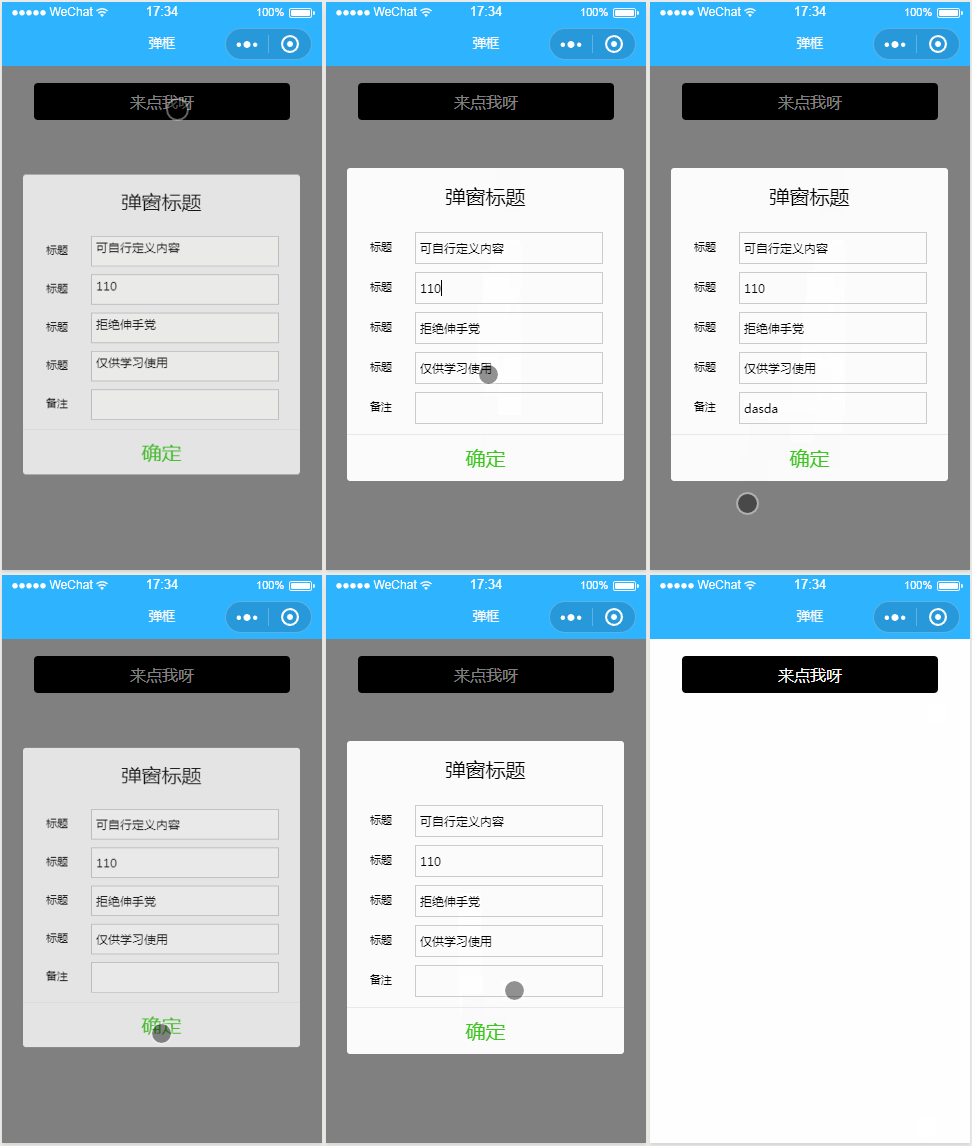
三、案例运行效果图
微信小程序之自定义模态弹窗(带动画)实例的更多相关文章
- 微信小程序之自定义toast弹窗
微信小程序里面的自带弹窗icon只有两种,success和loading.有时候用户输入错误的时候想加入一个提醒图标,也可以使用wx.showToast中的image来添加图片达到使用自定义图标的目的 ...
- 【微信小程序】自定义模态框实例
原文链接:https://mp.weixin.qq.com/s/23wPVFUGY-lsTiQBtUdhXA 1 概述 由于官方API提供的显示模态弹窗,只能简单地显示文字内容,不能对对话框内容进行自 ...
- 微信小程序 修改(自定义) 单选/复选按钮样式 checkbox/radio样式自定义
参考文章: 微信小程序 修改(自定义) 单选/复选按钮样式 checkbox/radio样式自定义
- 微信小程序中自定义modal
微信小程序中自定义modal .wxml <modal hidden="{{hidden}}" title="这里是title" confirm-text ...
- 微信小程序开发动感十足的加载动画--都在这里!
代码地址如下:http://www.demodashi.com/demo/14242.html 一.前期准备工作 软件环境:微信开发者工具 官方下载地址:https://mp.weixin.qq.co ...
- 微信小程序之自定义select下拉选项框组件
知识点:组件,animation,获取当前点击元素的索引与内容 微信小程序中没有select下拉选项框,所以只有自定义.自定义的话,可以选择模板的方式,也可以选择组件的方式来创建. 这次我选择了组件, ...
- 微信小程序之自定义组件
在微信小程序项目中 肯定会存在很多功能和样式上相似的部分 面对这种情况 只是单单的ctrl+c ctrl+v 就显得很low了,而且也不便于后期维护那么这时候 使用微信小程序中的自定义组件功能就很合适 ...
- 微信小程序:自定义组件
为什么要学习自定义组件? 1.用上我自己的单词abc,我希望在页面中展示椭圆形的图片, 2.打开手机淘宝,假如现在要做一个企业级项目,里面有很多页面,首页存在导航模块,点击天猫,进入第二个页面,而第二 ...
- 微信小程序之自定义组件的应用
小程序支持自定义组件,下面是一个简单的购物车组件,实现的效果如图: 效果图 创建组件 在根目录创建components目录,然后创建计数组件 count 如图: 组件内容 <!--compone ...
随机推荐
- Java Day26进程01天
Java开启多个线程有两种方法,一种继承Thread类,一种实现Runnable接口.具体示例如下: 01继承Thread类 02实现Runnable接口
- centos实现永久修改hostname
前言 介绍一下centos的两种修改hostname的方式. 查看hostname [root@slave02 ~]# hostname slave02 临时性修改 [root@slave02 ~]# ...
- byobu 禁止窗口名称随目录变化
It looks like the config set-window-option -g automatic-rename off doesn't work. When I added the fo ...
- actuator/hystrix.stream 没有反应的方法
http://localhost:8086/actuator/hystrix.stream 在启动类加上,就ok了 @Bean public ServletRegistrationBean hystr ...
- Java虚拟机 内存区域划分
(图片来自https://www.cnblogs.com/whgk/p/6138522.html) 先从线程私有区开始介绍 虚拟机栈 Java虚拟机栈是由一个个栈帧组成的,当一个方法被调用时,代表这个 ...
- 【VBA】セールの最初起動時、VBAを自動的に実行方法
方法一 セールの「ThisWorkbook」にて.「Workbook」の「Open」関数にて.ロジックを追加する Private Sub Workbook_Open() Msgbox "He ...
- 安装64位office时,弹出提示,要求卸载32位office
运行 regedit,进入到HKEY_CLASSES_ROOT\Installer\Products下,删除0000510开头的项或00002开头项.然后重启计算机. 参考: https://blo ...
- python3 urllib.parse 常用函数
1.获取url参数 urlparse from urllib import parse url = "https://docs.python.org/3.5/library/urllib.p ...
- win10下使用wget
一.下载 官网:http://gnuwin32.sourceforge.net/packages/wget.htm 下载地址:http://downloads.sourceforge.net/gnuw ...
- Apache beam中的便携式有状态大数据处理
Apache beam中的便携式有状态大数据处理 目标: 什么是 apache beam? 状态 计时器 例子&小demo 一.什么是 apache beam? 上面两个图片一个是正面切图,一 ...