
【Android学习】android:layout_weight的用法实例
对于android:layout_weight的用法,用下面的例子来说明:
<LinearLayout xmlns:android="http://schemas.android.com/apk/res/android"

    xmlns:tools="http://schemas.android.com/tools"

    android:layout_width="match_parent"

    android:layout_height="match_parent"

    android:orientation="vertical"

    tools:context="com.chenming.test.MainActivity" >

    <LinearLayout

        android:layout_width="match_parent"

        android:layout_height="wrap_content"

        android:orientation="horizontal"

        android:background="#ff0000">

        <TextView

            android:layout_width="wrap_content"

            android:layout_height="wrap_content"

            android:background="#00ff00"

            android:textSize="35sp"

            android:text="first"/>

        <TextView

            android:layout_width="wrap_content"

            android:layout_height="wrap_content"

            android:background="#0000ff"

            android:textSize="35sp"

            android:text="second"/>

    </LinearLayout>

    <LinearLayout

        android:layout_width="match_parent"

        android:layout_height="wrap_content"

        android:orientation="horizontal"

        android:background="#ff0000">

        <TextView

            android:layout_width="wrap_content"

            android:layout_height="wrap_content"

            android:background="#00ff00"

            android:textSize="35sp"

            android:layout_weight="1"

            android:text="first"/>

        <TextView

            android:layout_width="wrap_content"

            android:layout_height="wrap_content"

            android:background="#0000ff"

            android:layout_weight="1"

            android:textSize="35sp"

            android:text="second"/>

    </LinearLayout>

        <LinearLayout

        android:layout_width="match_parent"

        android:layout_height="wrap_content"

        android:orientation="horizontal"

        android:background="#ff0000">

        <TextView

            android:layout_width="0dp"

            android:layout_height="wrap_content"

            android:background="#00ff00"

            android:textSize="35sp"

            android:layout_weight="1"

            android:text="first"/>

        <TextView

            android:layout_width="0dp"

            android:layout_height="wrap_content"

            android:background="#0000ff"

            android:layout_weight="1"

            android:textSize="35sp"

            android:text="second"/>

    </LinearLayout>

</LinearLayout>
以上是activity_main.xml布局文件,其效果如下:
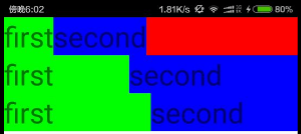
对应刚好三行三个例子,由XML文件可以看到,红色表示空白区域,绿色表示第一个控件,蓝色表示第二个控件。
例子一:为正常的顺序排列,他们的 android:layout_width都是包含内容,所以长度为蓝色比较长,剩下的为空白区域。
例子二:在上一个例子的基础上,加入了分别加入android:layout_weight="1",weight的中文意思是权重,那么很明显,这个意思是两个控件的权重值1:1,但是要注意,这个不是说两个控件的长度是1:1,而是说在已有的长度下,把剩余的空白空间按照1:1再分给两个空间。所以,所谓的1:1指下图中的两条黑线是1:1,实际是蓝色控件长度大于绿色控件(因为second的英文长度比first长)。
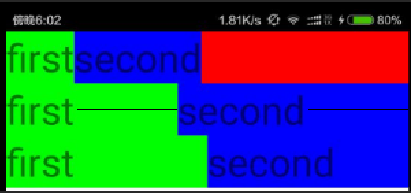
例子三:那么,要如何能让蓝色控件长度等于绿色控件?只需让一开始的未分配1:1空白空间时候长度相等即可,所以例子三是在例子二的基础上把android:layout_width="wrap_content"改为android:layout_width="0dp",即宽度都为0而不是刚好包含内容,这样一来,剩余空白空间就是一整行,再按1:1分配就能是使得两个控件长度相等,也就是第三行例子三的样子。
所以android:layout_weight的用法要记住是分配剩余空白空间,而不是一开始的空间!后面改成2:3,4:5等等也都一样的道理。
【Android学习】android:layout_weight的用法实例的更多相关文章
- Android学习笔记_72_Spinner的用法
一.普通 1. <?xml version="1.0" encoding="utf-8"?> <TextView xmlns:android= ...
- android学习——android架构
android架构:在了解全局的情况下进行细致化的分析才能更有效的学习android的运行原理,才能更深刻的理解android开发: 1.架构图直观 2.架构详解 2.1.Linux Kernel 2 ...
- android学习——Android Layout标签之-viewStub,requestFocus,merge,include
定义Android Layout(XML)时,有四个比较特别的标签是非常重要的,其中有三个是与资源复用有关,分别是<viewStub/>, <requestFocus />, ...
- Android学习之Layoutinflater的用法
•她的第一次 话说,那是一个风雪交加的夜晚,看着她独自一个人走在漆黑的小道上,我抓紧跟了过去: 那晚,我们...... 记得第一次接触这个 Layoutinflater 应该是在学习 ListView ...
- android学习9——Handler简单用法
Handler用来发消息和处理消息.典型的用法是更新界面.android不允许在子线程里面更新界面,通常是把Handler传到子线程中,在子线程里通过sendEmptyMessage函数发消息.Han ...
- Android学习笔记-绘制圆形ImageView实例
现在很多的APP都很喜欢圆形的头像,这里就简单的写个圆形的ImageView~ 第三方圆形ImageView控件: RoundedImageView CircleImageView 实现代码: 自定义 ...
- Android学习----Android架构
android分为四个层,从高层到低层分别是应用程序层.应用程序框架层.系统运行库层和linux核心层.蓝色的代表java程序,黄色的代码为运行JAVA程序而实现的虚拟机,绿色部分为C/C++语言编写 ...
- android学习——Android Studio下创建menu布局文件
一.问题: android studio项目中没有看到menu文件夹: 在android studio项目中想要添加menu布局文件,一开始我的做法是:直接在res文件夹右键选择xml文件来添加,如下 ...
- openfire Android学习---android客户端聊天开发之登录 和 注销登录
一切就绪,新建一个android测试工程: 上网权限配置,界面绘制啥的,这里就不说了. 首先 导入一个smark包.这个是用来维护长连接的,也可以是asmark.我用的是asmark 先普及一些基本知 ...
随机推荐
- log4j.properties配置详解
1.Loggers Loggers组件在此系统中被分为五个级别:DEBUG.INFO.WARN.ERROR和FATAL.这五个级别是有顺序的,DEBUG < INFO < WARN < ...
- POJ1336 The K-League[最大流 公平分配问题]
The K-League Time Limit: 1000MS Memory Limit: 10000K Total Submissions: 715 Accepted: 251 Descri ...
- UVA - 11137 Ingenuous Cubrency[背包DP]
People in Cubeland use cubic coins. Not only the unit of currency iscalled a cube but also the coins ...
- NOIP2013火柴排队[逆序对]
题目描述 涵涵有两盒火柴,每盒装有 n 根火柴,每根火柴都有一个高度. 现在将每盒中的火柴各自排成一列, 同一列火柴的高度互不相同, 两列火柴之间的距离定义为: ∑(ai-bi)^2 其中 ai 表示 ...
- 二分法&三分法
ural History Exam 二分 #include <iostream> #include <cstdlib> using namespace std; //二分 ...
- Rect 和 Bounds
Rect 表示一个2D矩形区域 Bounds 表示一个3D的方块区域 http://www.cnblogs.com/crazylights/p/3977348.html
- java并发编程学习: 阻塞队列 使用 及 实现原理
队列(Queue)与栈(Stack)是数据结构中的二种常用结构,队列的特点是先进先出(First In First Out),而Stack是先进后出(First In Last Out),说得通俗点: ...
- Qt——透明无边框Widget的bug
Experience 最近在封装一些类的时候,打算做一个窗口框架,能实现拖动.缩放.最大最小化.基本样式等功能,可不慎遇见一件无比蛋疼的事情,QWidget最小化后再恢复正常界面,最小化按钮居然仍处于 ...
- Js 遍历json对象所有key及根据动态key获取值
var obj = {}; for(var k in obj) { //遍历对象,k即为key,obj[k]为当前k对应的值 console.log(obj[k]); } 文章来自:https://z ...
- C#软件设计——小话设计模式原则之:单一职责原则SRP
前言:上篇C#软件设计——小话设计模式原则之:依赖倒置原则DIP简单介绍了下依赖倒置的由来以及使用,中间插了两篇WebApi的文章,这篇还是回归正题,继续来写写设计模式另一个重要的原则:单一职责原则. ...