
Postman-Tests模块测试方法记录
用Postman的时候大多数测试结果是可以用Tests模块的测试方法来代替人工检查的,测试方法本质上是JavaScript代码,我们可以通过运行测试用例(测试脚本是在发送请求之后并且从服务器接收到响应时执行),观察结果是“PASS”还是“FAIL”就能判断测试结果:
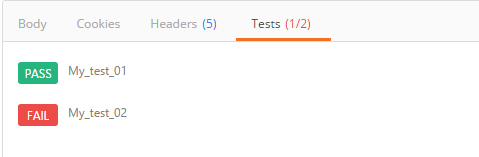
在此记录一些常用方法备忘(当遇到需要判断返回值为A或B的时候,使用“||”符号):
1.设置环境变量
pm.environment.set("variable_key", "variable_value");
2.将一个嵌套的对象设置为一个环境变量
var array = [1, 2, 3, 4];
pm.environment.set("array", JSON.stringify(array, null, 2));
var obj = { a: [1, 2, 3, 4], b: { c: 'val' } };
pm.environment.set("obj", JSON.stringify(obj))
3.获得一个环境变量
pm.environment.get("variable_key");
4.获得一个环境变量(其值是一个字符串化的对象)
// These statements should be wrapped in a try-catch block if the data is coming from an unknown source.
var array = JSON.parse(pm.environment.get("array"));
var obj = JSON.parse(pm.environment.get("obj"));
5.清除一个环境变量
pm.environment.unset("variable_key");
6.设置一个全局变量
pm.globals.set("variable_key", "variable_value");
7.获取一个全局变量
pm.globals.get("variable_key");
8.清除一个全局变量
pm.globals.unset("variable_key");
9.获取一个变量(该函数在全局变量和活动环境中搜索变量)
pm.variables.get("variable_key");
10.检查响应主体是否包含字符串
pm.test("Body matches string", function () {
pm.expect(pm.response.text()).to.include("string_you_want_to_search");
});
11.检查响应体是否等于字符串
pm.test("Body is correct", function () {
pm.response.to.have.body("response_body_string");
});
12.检查JSON值
pm.test("Your test name", function () {
var jsonData = pm.response.json();
pm.expect(jsonData.value).to.eql(100);
});
13.Content-Type 存在
pm.test("Content-Type is present", function () {
pm.response.to.have.header("Content-Type");
});
14.返回时间少于200ms
pm.test("Response time is less than 200ms", function () {
pm.expect(pm.response.responseTime).to.be.below(200);
});
15.状态码是200
pm.test("Status code is 200", function () {
pm.response.to.have.status(200);
});
16.代码名包含一个字符串
pm.test("Status code name has string", function () {
pm.response.to.have.status("Created");
});
17.成功的POST请求状态码
pm.test("Successful POST request", function () {
pm.expect(pm.response.code).to.be.oneOf([201,202]);
});
18.为JSON数据使用TinyValidator
var schema = {
"items": {
"type": "boolean"
}
};
var data1 = [true, false];
var data2 = [true, 123];
pm.test('Schema is valid', function() {
pm.expect(tv4.validate(data1, schema)).to.be.true;
pm.expect(tv4.validate(data2, schema)).to.be.true;
});
19.解码base64编码数据
var intermediate,
base64Content, // assume this has a base64 encoded value
rawContent = base64Content.slice('data:application/octet-stream;base64,'.length);
intermediate = CryptoJS.enc.Base64.parse(base64content); // CryptoJS is an inbuilt object, documented here: https://www.npmjs.com/package/crypto-js
pm.test('Contents are valid', function() {
pm.expect(CryptoJS.enc.Utf8.stringify(intermediate)).to.be.true; // a check for non-emptiness
});
20.发送异步请求
此函数可作为预请求和测试脚本使用
pm.sendRequest("https://postman-echo.com/get", function (err, response) {
console.log(response.json());
});
21.将XML主体转换为JSON对象
var jsonObject = xml2Json(responseBody);
-----------------------------------------------------------------------------------------------------------------------------
1. 清除一个全局变量
Clear a global variable
对应脚本:
postman.clearGlobalVariable("variable_key");
参数:需要清除的变量的key
2.清除一个环境变量
Clear an environment variable
对应脚本:
postman.clearEnvironmentVariable("variable_key");
参数:需要清除的环境变量的key
3.response包含内容
Response body:Contains string
对应脚本:
tests["Body matches string"] =responseBody.has("string_you_want_to_search");
参数:预期内容
4.将xml格式的response转换成son格式
Response body:Convert XML body to a JSON Object
对应脚本:
var jsonObject = xml2Json(responseBody);
参数:(默认不需要设置参数,为接口的response)需要转换的xml
5.response等于预期内容
Response body:Is equal to a string
对应脚本:
tests["Body is correct"] = responseBody === "response_body_string";
参数:预期response
6.json解析key的值进行校验
Response body:JSON value check
对应脚本:
tests["Args key contains argument passed as url parameter"] = 'test' in responseJSON.args
参数:test替换被测的值,args替换被测的key
7.检查response的header信息是否有被测字段
Response headers:Content-Type header check
对应脚本:
tests["Content-Type is present"] = postman.getResponseHeader("Content-Type");
参数:预期header
8.响应时间判断
Response time is less than 200ms
对应脚本:
tests["Response time is less than 200ms"] = responseTime < 200;
参数:响应时间
9.设置全局变量
Set an global variable
对应脚本:
postman.setGlobalVariable("variable_key", "variable_value");
参数:全局变量的键值
10.设置环境变量
Set an environment variable
对应脚本:
postman.setEnvironmentVariable("variable_key", "variable_value");
参数:环境变量的键值
11.判断状态码
Status code:Code is 200
对应脚本:
tests["Status code is 200"] = responseCode.code != 400;
参数:状态码
12.检查code name 是否包含内容
Status code:Code name has string
对应脚本:
tests["Status code name has string"] = responseCode.name.has("Created");
参数:预期code name包含字符串
13.成功的post请求
Status code:Successful POST request
对应脚本:
tests["Successful POST request"] = responseCode.code === 201 || responseCode.code === 202;
14.微小验证器
Use Tiny Validator for JSON data
对应脚本:
var schema = {
"items": {
"type": "boolean"
}
};
var data1 = [true, false];
var data2 = [true, 123];
console.log(tv4.error);
tests["Valid Data1"] = tv4.validate(data1, schema);
tests["Valid Data2"] = tv4.validate(data2, schema);
参数:可以修改items里面的键值对来对应验证json的参数
Postman-Tests模块测试方法记录的更多相关文章
- postman简单教程,使用tests模块来验证接口时是否通过
接口测试醉重要的就是返回数据的检查,一个简单的接口,我们可以肉眼检查返回数据,但接口一旦多起来且复杂,每次的检查都会很费劲,此时我们就需要postman 的tests模块来代替 概念: Postman ...
- postman tests实例记录(还没看,一些常用的)
这段时间准备测试api接口,postman这个工具很是方便,特别是里面的tests的javascript脚本. 记录一下测试接口常用的tests验证的实例. 1.设置环境变量 postman.setE ...
- Python DDT(data driven tests)模块心得
关于ddt模块的一些心得,主要是看官网的例子,加上一点自己的理解,官网地址:http://ddt.readthedocs.io/en/latest/example.html ddt(data driv ...
- Python有关模块学习记录
1 pandas numpy模块 首先安装搭建好jupyter notebook,运行成功后的截图如下: 安装使用步骤(PS:确定Python安装路径和安装路径里面Scripts文件夹路径已经配置到环 ...
- python 之 处理excel表的xlwt模块学习记录
python 操作excel表的常用模块主要有2个: 1:xlrd:读取excel表 2:xlwt:创建并写入excel表 安装方法: 可以直接下载安装:https://pypi.python.org ...
- postman tests常用方法
postman常用方法集合: 1.设置环境变量 postman.setEnvironmentVariable("key", "value"); pm.envir ...
- postman Tests断言
摘要:关于postman的断言方法很多,在网上随便搜寻下,能搜出一大推,什么牛鬼蛇神都有,让人眼花缭乱..甚至在应用时出现错误.Test断言都是根据js规则来写的,对于我这种不懂js语言的来说确实不友 ...
- 【学习】Python os模块常用方法 记录
记录一些工作中常用到的用法 os.walk() 模块os中的walk()函数可以遍历文件夹下所有的文件. os.walk(top, topdown=Ture, onerror=None, follow ...
- Python3-logging模块-日志记录
Python3中的logging模块提供了较为灵活的事件日志系统 日志级别 DEBUG < INFO < WARING(Python默认) < ERROR < FATAL(CR ...
随机推荐
- 基于XMPP的即时通信系统的建立 — XMPP IQ详解
XMPP详解 XMPP(eXtensible Messaging and Presence Protocol,可扩展消息处理和现场协议)是一种在两个地点间传递小型结构化数据的协议.在此基础上,XMPP ...
- POJ 2192
#include <iostream> #include <string> #define MAXN 500 using namespace std; bool dp[MAXN ...
- 新人须知的网站文件和MySQL数据库备份流程思路
昨天老左再次遇到一个网友告知使用的一台服务器自己无意中点击主机商面板的导致服务器被重新安装系统(居然这也可以),问问是否可以恢复数据.这个同学和之前遇到好几次的网友真相似,从开始购买服务器,到自己网站 ...
- ubuntu14 安装tftp服务器
安装 sudo apt-get install tftp-hpa tftpd-hpa 配置 sudo gedit /etc/default/tftpd-hpa 打开tftpd-hpa修改里面的配置: ...
- Vue 不睡觉教程2 - 洋气的文件结构
目标书接上回,上回那个例子实在太土了.实际开发中我们不可能把整个网站的js和html全写到一个页面上.所以我们这节课的目标在于改造这个例子的文件结构,让它不那么土Let's do it 环境参数vue ...
- PXE+Kickstart 批量安装CentOS 7
安装之前 将需要安装 CentOS 的服务器与 PXE 服务器通过网络设备连接:PXE 服务器安装 CentOS,并且关闭firewalld.selinux,设置静态IP地址,本例设为10.0.0.1 ...
- 使用go写一个简单的exe文件
工作需要一个小工具给分析师用,原先打算写一个脚本的,但是呢我又不会用python,要写的话只能用java来实现(打包成可执行jar,使用java -jar 的命令来执行,当然得安装jdk).这种命令行 ...
- 图像的上采样(upsampling)与下采样(subsampled)
缩小图像(或称为下采样(subsampled)或降采样(downsampled))的主要目的有两个:1.使得图像符合显示区域的大小:2.生成对应图像的缩略图. 放大图像(或称为上采样(upsampli ...
- JavaIO流总结
字节流 InputStream FileInputStream FilterInputStream BufferedInputStream DataInputStream PushbackInputS ...
- 静态类和静态方法,抽象类和抽象方法,new关键字,值类型和引用类型,接口
静态类和静态方法:静态成员是与类相关,而非实例相关:普通类中的静态成员:1.只能通过类名访问.2.静态方法中只能访问静态成员,或通过对象访问实例成员.3.多个对象共享同一个成员.静态类(一般用作工具类 ...