
【转载】windows安装python2.7后的注册表问题
原文出自:https://www.cnblogs.com/tlz888/p/6879227.html
【提要】win平台上,python2.7官网的安装包在安装后不会添加环境变量且不会把安装信息写入注册表。
把python和pip的安装路径添加到环境变量是做python开发必要的一步,而写入注册表的原因是,有些python包以
windows installer的形式安装,安装的时候需要用到python的注册表信息,比如,numpy, scipy。
安装步骤:
(1)到python官网下载安装包,www.python.org/downloads,运行安装;
(2)把python.exe所在路径(python安装路径)以及pip.exe路径(python安装路径下的Script文件加)添加到path环境变量。
比如我的python在这里:“C:\Python27”,那么添加路径:“C:\Python27”和“C:\Python27\Scripts”到path环境变量;
(3)在注册表中添加python注册信息,用于python可以操作windows的注册表,可以运行python文件来完成此步操作,
以下为python源码,把它拷贝出来,放在任意位置,用python运行即可。
import sys

from _winreg import *

# tweak as necessary

version = sys.version[:3]

installpath = sys.prefix

regpath = "SOFTWARE\\Python\\Pythoncore\\%s\\" % (version)

installkey = "InstallPath"

pythonkey = "PythonPath"

pythonpath = "%s;%s\\Lib\\;%s\\DLLs\\" % (

installpath, installpath, installpath

)

def RegisterPy():

    print "begin RegisterPy "

    try:

        print "open key : %s"%regpath

        reg = OpenKey(HKEY_CURRENT_USER, regpath)

    except EnvironmentError as e:

        try:

            reg = CreateKey(HKEY_CURRENT_USER, regpath)

            SetValue(reg, installkey, REG_SZ, installpath)

            SetValue(reg, pythonkey, REG_SZ, pythonpath)

            CloseKey(reg)

        except:

            print "*** EXCEPT: Unable to register!"

            return

        print "--- Python", version, "is now registered!"

        return

    if (QueryValue(reg, installkey) == installpath and

        QueryValue(reg, pythonkey) == pythonpath):

            CloseKey(reg)

            print "=== Python", version, "is already registered!"

            return CloseKey(reg)

    print "*** ERROR:Unable to register!"

    print "*** REASON:You probably have another Python installation!"

def UnRegisterPy():

    #print "begin UnRegisterPy "

    try:

        print "open HKEY_CURRENT_USER key=%s"%(regpath)

        reg = OpenKey(HKEY_CURRENT_USER, regpath)

        #reg = OpenKey(HKEY_LOCAL_MACHINE, regpath)

    except EnvironmentError:

        print "*** Python not registered?!"

        return

    try:

       DeleteKey(reg, installkey)

       DeleteKey(reg, pythonkey)

       DeleteKey(HKEY_LOCAL_MACHINE, regpath)

    except:

       print "*** Unable to un-register!"

    else:

       print "--- Python", version, "is no longer registered!"

if __name__ == "__main__":

    RegisterPy()
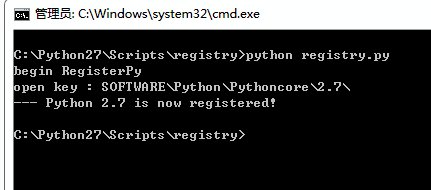
如下图所示,出现Pyhton 2.7 is now registered!字样即为注册成功。
在注册表中也能看到相应的信息:
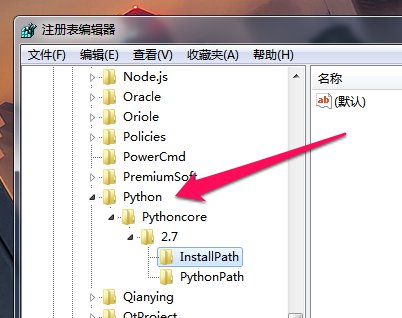
如果由于诸如安装后又卸载了多个版本python的原因导致注册表信息不对,可以直接手动编辑注册表,然后重新注册。
手动在注册表中添加注册信息的方法跟上述python代码中过程一致。
【转载】windows安装python2.7后的注册表问题的更多相关文章
- windows安装python2.7后的注册(registry)问题
[提要]win平台上,python2.7官网的安装包在安装后不会添加环境变量且不会把安装信息写入注册表. 把python和pip的安装路径添加到环境变量是做python开发必要的一步,而写入注册表的原 ...
- Windows 安装 python2.7
Windows 安装 python2.7 python2.7下载地址: https://www.python.org/downloads/release/python-2714/ 安装过程: 设置系统 ...
- Win 2008 R2安装SQL Server 2008“性能计数器注册表配置单元一致性”失败的解决办法
Win 2008 R2安装SQL Server 2008“性能计数器注册表配置单元一致性”失败的解决办法(2011-02-23 19:37:32) 转载▼ 今天在惠普服务器上安装数据库2008时, ...
- SQL Server 2008 安装过程中遇到“性能计数器注册表配置单元一致性”检查失败 问题的解决方法
操作步骤: 1. 在 Microsoft Windows 2003 或 Windows XP 桌面上,依次单击"开始"."运行",然后在"打开&quo ...
- 安装Oracle服务端后配置注册表与PL/SQL
1.流程: 1.安装Oracle客户端(绿色版和安装版均可,建议安装在和Oracle服务端文件夹并行的路径下,例:E:\app\yginuo\product\11.2.0) 2.配置环境变量和注册表( ...
- CentOS6.5 安装Python2.7后, yum出现“No module named yum”错误
安装如下方法安装python2.7: yum install –y python27 python27-devel python-docutils cd /usr/bin/ rm -rf python ...
- C#部署安装,将用户安装路径记录下写入注册表,并启动
安装部署程序,将安装目录写入注册表 (1)在“安装部署项目”上点击“注册表编辑器” (2)在HKey_LOCAL_MACHINE_SoftWare 下新建键 Manufacturer 代表软件的制造商 ...
- Windows XP和Wndows7误删除了注册表下.exe文件夹之修复办法
在桌面空白处鼠标右击选择“新建-文本文档”,然后将下面的代码复制粘贴进去;如图所示: Windows Registry Editor Version 5.00 [HKEY_CLASSES_ROOT\. ...
- 从Windows系统服务获取活动用户的注册表信息(当前活动用户的sessionId. 当前活动用户的 hUserToken)
首先,对“活动用户”的定义是,当前拥有桌面的用户.对于Windows XP及其以后的系统,即使是可以多个用户同时登录了,拥有桌面的也仅仅只有一个. 如果系统级服务调用Windows API来获取注册表 ...
随机推荐
- nodejs中npm以及yarn常用指令
1.npm下载相关 1.npm install/i vue //下载vue的包 2.npm i vue --save-dev / -D //下载vue的包,并添加到开发依赖中 3.npm i //下载 ...
- chromium之MessageLoop浅析
对chromium的MessageLoop非常感兴趣,接下来会详细分析Windows平台的具体实现. 代码版本:chromium-4.0.210.0_p26329 先看一下依赖的文件 message_ ...
- python3 datetime和time获取当前日期和时间
import datetime import time # 获取当前时间, 其中中包含了year, month, hour, 需要import datetime today = datetime.da ...
- PHP+jQuery实现双击修改table表格
<td signs="name"> <input type="text" disabled="disabled" read ...
- -L -Wl,-rpath-link -Wl,-rpath区别精讲
目录 前言 源码准备 源码内容 尝试编译,保证源码没有问题 编译 首先编译world.c 编译并链接hello.c 调试编译test.c 结论 转载请注明出处,谢谢 https://www.cnblo ...
- 偏前端-纯css,手写轮播-(焦点切换 和 自动轮播 只可选择一种,两者不可共存)
现在我们一般都是在网上找个轮播插件,各种功能应有尽有,是吧!!~大家似乎已经生疏了手写是什么感觉.万一哪天想不起来,人家要手写,就尴尬了!~~跟我一起复习一下吧 不多说:效果图看一下: 高度不能是固定 ...
- Uncaught SyntaxError: Unexpected token : 开发遇到的跨域问题
先描述一下,这个问题,是如何遇到的 在ajax调用远程服务的时候,报了一个Origin xxxxxx is not allowed by Access-Control-Allow-Origin 的错误 ...
- Python中级 —— 01面向对象进阶
面向对象进阶 总结.补充(http://blog.csdn.net/fgf00/article/details/52479307) 面向对象高级语法部分 静态方法.类方法.属性方法 类的特殊方法 反射 ...
- Myeclipse报错:The word is not correctly spelled
在eclipse下的Window--Preference输入spell,然后把第一个复选框“Enable spell checking"给去掉就可以了.
- PHP打包zip并下载
$file_template = FCPATH.'canddata/cand_picture.zip';//在此之前你的项目目录中必须新建一个空的zip包(必须存在) $downname = $car ...