
ASP.NET OAuth 2.0 新手上路
OAuth2.0资料
初衷:一直想整理授权系列demo,让自己项目高端大尚,列出新手授权系列,帮助小白程序员不用在为授权头疼
OAuth 允许用户提供一个令牌,而不是用户名和密码来访问他们存放在特定服务提供者的数据。每一个令牌授权一个特定的网站(例如,视频编辑网站)在特定的时段(例如,接下来的 2 小时内)内访问特定的资源(例如仅仅是某一相册中的视频)。这样,OAuth 让用户可以授权第三方网站访问他们存储在另外服务提供者的某些特定信息,而非所有内容。
以上概念来自:https://zh.wikipedia.org/wiki/OAuth
详细理论知识,参考文章如下文章,本文章重在实践
1.http://www.cnblogs.com/lanxiaoke/p/6358332.html
2.https://www.cnblogs.com/selimsong/p/8037717.html
3.http://www.cnblogs.com/xishuai/p/aspnet-webapi-owin-oauth2.html
项目实践开发
步骤1和步骤2都行,看官乐意就行
步骤1
通过NuGet安装
Microsoft.Owin.Security.OAuth
Owin Microsoft.Owin.Host.SystemWeb(重点)
步骤2
Owin Microsoft.Owin.Host.SystemWeb(重点)
Microsoft.Owin.Security.OAuth
Microsoft.Owin.Security.Cookies(可忽略)
Microsoft.AspNet.Identity.Owin
重点在于步骤1少了一个核心dll,少了这个核心dll无法启动部署owin
新增Startup.cs
[assembly: OwinStartup(typeof(OAuth2.Startup))]

namespace OAuth2

{

    public partial class Startup

    {

        public void Configuration(IAppBuilder app)

        {

            ConfigureAuth(app);

        }

    }

}
Owin Microsoft.Owin.Host.SystemWeb 通过这个dll,程序启动时候注册,如果不引用,该方法不会生效,看官可以打个断点试一试
新增Startup.Auth.cs
namespace OAuth2

{

    public partial class Startup

    {

        public void ConfigureAuth(IAppBuilder app)

        {

            app.UseOAuthBearerAuthentication(new OAuthBearerAuthenticationOptions()

            {

                //从url中获取token,兼容hearder方式

                //Provider = new QueryStringOAuthBearerProvider("access_token")

            });

            var OAuthOptions = new OAuthAuthorizationServerOptions

            {

                AllowInsecureHttp = true,

                TokenEndpointPath = new PathString("/token"), //获取 access_token 认证服务请求地址

                AuthorizeEndpointPath = new PathString("/authorize"), //获取 authorization_code 认证服务请求地址

                AccessTokenExpireTimeSpan = TimeSpan.FromSeconds(), //access_token 过期时间

                Provider = new OpenAuthorizationServerProvider(), //access_token 相关认证服务

                AuthorizationCodeProvider = new OpenAuthorizationCodeProvider(), //authorization_code 认证服务

                RefreshTokenProvider = new OpenRefreshTokenProvider() //refresh_token 认证服务

            };

            app.UseOAuthBearerTokens(OAuthOptions); //表示 token_type 使用 bearer 方式

        }

    }

    public class QueryStringOAuthBearerProvider : OAuthBearerAuthenticationProvider

    {

        readonly string _name;

        public QueryStringOAuthBearerProvider(string name)

        {

            _name = name;

        }

        public override Task RequestToken(OAuthRequestTokenContext context)

        {

            var value = context.Request.Query.Get(_name);

            if (!string.IsNullOrEmpty(value))

            {

                context.Token = value;

            }

            return Task.FromResult<object>(null);

        }

    }

}
眼光犀利的同学肯定注意到这两个类名相同,命名空间也相同,为什么没有报错 请注意关键字 partial
OpenAuthorizationServerProvider示例代码 详细见demo,只提代码需要注意地方
        /// <summary>

        /// 验证 client 信息

        /// </summary>

        public override async Task ValidateClientAuthentication(OAuthValidateClientAuthenticationContext context)

        {

            string clientId;

            string clientSecret;

            if (!context.TryGetBasicCredentials(out clientId, out clientSecret))

            {

                context.TryGetFormCredentials(out clientId, out clientSecret);

            }

            if (clientId != "xishuai" || clientSecret != "")

            {

                context.SetError("invalid_client", "client or clientSecret is not valid");

                return;

            }

            context.Validated();

        }
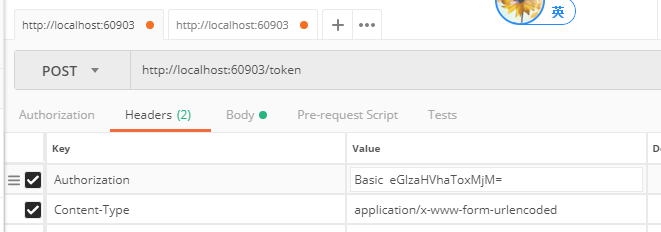
        public string BaseString()

        {

            string clientId = "xishuai";

            string clientSecret = "";

            return Convert.ToBase64String(Encoding.ASCII.GetBytes(clientId + ":" + clientSecret));

        }
验证生效如图 按照如下格式 key:value,然后base64编码
context.TryGetBasicCredentials 否则解析不了 验证不通过
OpenAuthorizationCodeProvider示例代码 详细见demo
OpenRefreshTokenProvider 示例代码 详细见demo
新增ValueController.cs
public class ValueController : ApiController

    {

        // GET api/values  access_token验证才能访问

        [Authorize]

        [HttpGet]

        public IEnumerable<string> Index()

        {

            return new string[] { "value1", "value2" };

        }


        //获取授权code

        [HttpGet]

        [Route("api/authorization_code")]

        public HttpResponseMessage Get(string code)

        {

            return new HttpResponseMessage()

            {

                Content = new StringContent(code, Encoding.UTF8, "text/plain")

            };

        }

    }
新增OAuthon2Controller.cs
    public class OAuthon2Controller : Controller

    {

        //根据你项目端口

        private const string HOST_ADDRESS = "http://localhost:60903";

        // GET: OAuthon2   直接获取授权code链接,方便获取code

        public string Index()

        {

            string clientId = "xishuai";

            string url = $"{HOST_ADDRESS}/authorize?grant_type=authorization_code&response_type=code&client_id={clientId}&redirect_uri={HttpUtility.UrlEncode($"{HOST_ADDRESS}/api/authorization_code")}";

            return url;

        }

    }
根据获取的url, 在将红色部分url复制出来到浏览器中可以获取到code

现在code有了 将获取access_token
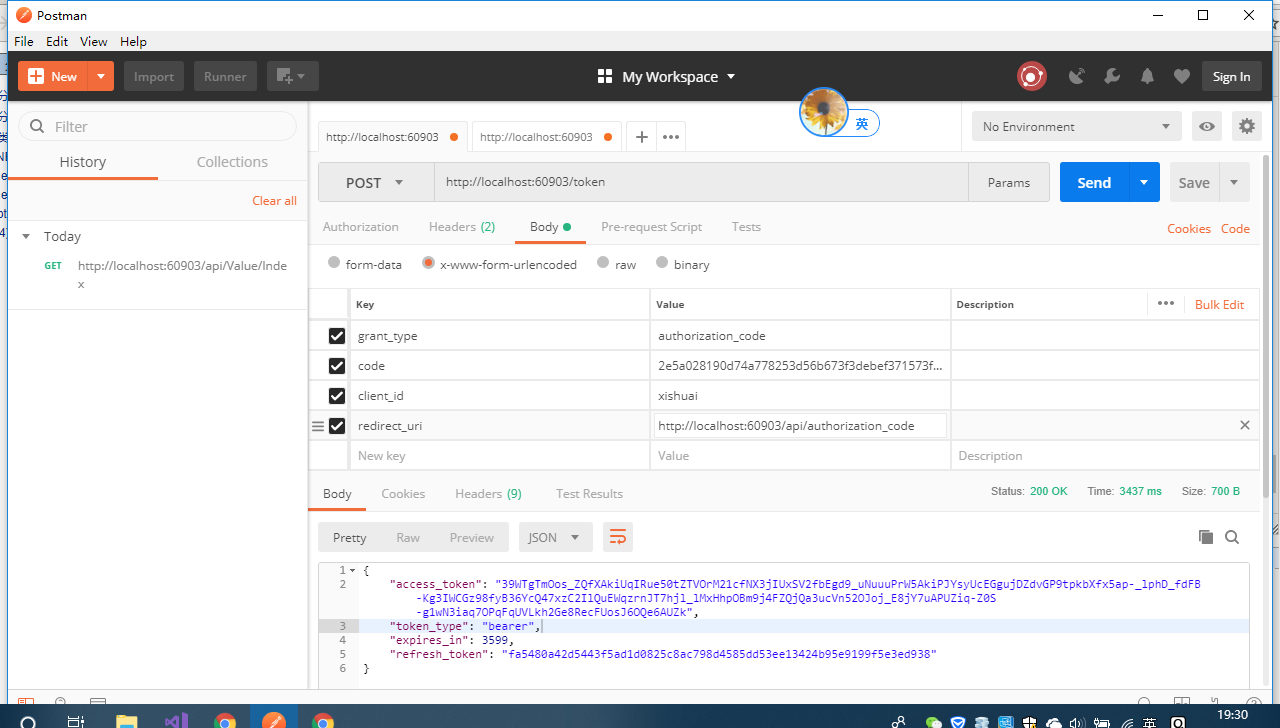
grant_type:authorization_code
code:图上红色url返回给你的
client_id:xishuai 可以理解为appid 自定义,因为代码中固定了,你可以改
redirect_uri:这个链接你也能改的,接受code 在ValueController.cs (action:api/authorization_code)
http://localhost:60903/api/authorization_code
这个地方需要注意 需要和你获取code redirect_uri保持一致就行
string url = $"{HOST_ADDRESS}/authorize?grant_type=authorization_code&response_type=code&client_id={clientId}&redirect_uri={HttpUtility.UrlEncode($"{HOST_ADDRESS}/api/authorization_code")}";
然后你就拿到access_token 去调用 api/Value/Index
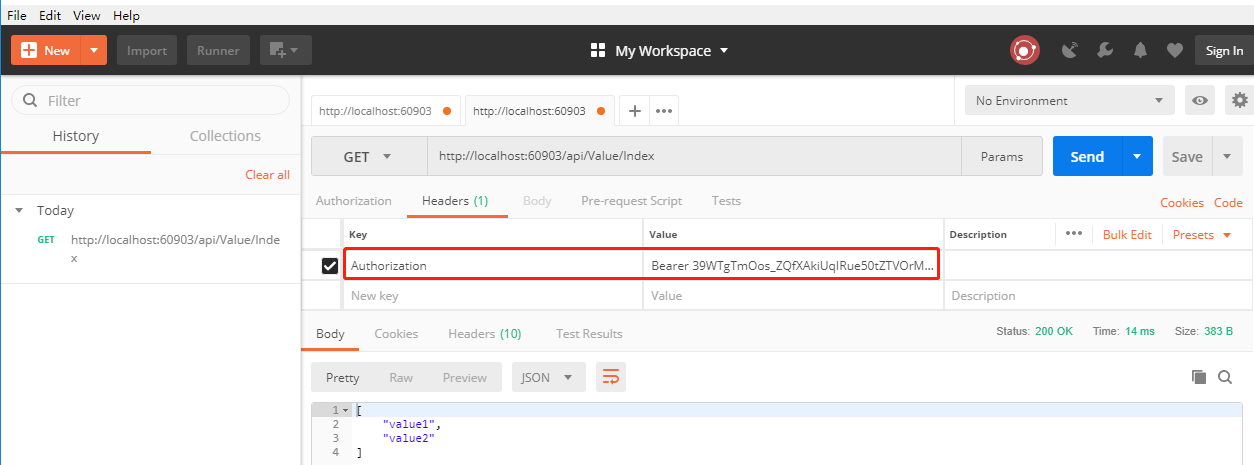
如果这个地方你输入错,会获取失败
Authorization Bearer后面空格 在输入access_token
ASP.NET OAuth 2.0 新手上路的更多相关文章
- ASP.NET WebApi OWIN 实现 OAuth 2.0
OAuth(开放授权)是一个开放标准,允许用户让第三方应用访问该用户在某一网站上存储的私密的资源(如照片,视频,联系人列表),而无需将用户名和密码提供给第三方应用. OAuth 允许用户提供一个令牌, ...
- IdentityServer4 ASP.NET Core的OpenID Connect OAuth 2.0框架学习保护API
IdentityServer4 ASP.NET Core的OpenID Connect OAuth 2.0框架学习之保护API. 使用IdentityServer4 来实现使用客户端凭据保护ASP.N ...
- [转]An introduction to OAuth 2.0 using Facebook in ASP.NET Core
本文转自:http://andrewlock.net/an-introduction-to-oauth-2-using-facebook-in-asp-net-core/ This is the ne ...
- ASP.NET 中OAUTH 2.0 及OPENID CONNECT的介绍
了解以下内容对ASP.NET 5中的验证中间件应用有很大帮助! OAUTH2是目前很多大型网站都使用的对外提供开放资源接口的应用标准,比入taobao\alipay\腾讯\豆瓣等.它和目前的另 ...
- asp.net权限认证:OWIN实现OAuth 2.0 之客户端模式(Client Credential)
asp.net权限认证系列 asp.net权限认证:Forms认证 asp.net权限认证:HTTP基本认证(http basic) asp.net权限认证:Windows认证 asp.net权限认证 ...
- asp.net权限认证:OWIN实现OAuth 2.0 之密码模式(Resource Owner Password Credential)
asp.net权限认证系列 asp.net权限认证:Forms认证 asp.net权限认证:HTTP基本认证(http basic) asp.net权限认证:Windows认证 asp.net权限认证 ...
- asp.net权限认证:OWIN实现OAuth 2.0 之授权码模式(Authorization Code)
asp.net权限认证系列 asp.net权限认证:Forms认证 asp.net权限认证:HTTP基本认证(http basic) asp.net权限认证:Windows认证 asp.net权限认证 ...
- asp.net权限认证:OWIN实现OAuth 2.0 之简化模式(Implicit)
asp.net权限认证系列 asp.net权限认证:Forms认证 asp.net权限认证:HTTP基本认证(http basic) asp.net权限认证:Windows认证 asp.net权限认证 ...
- ASP.NET WebApi OWIN 实现 OAuth 2.0(自定义获取 Token)
相关文章:ASP.NET WebApi OWIN 实现 OAuth 2.0 之前的项目实现,Token 放在请求头的 Headers 里面,类似于这样: Accept: application/jso ...
随机推荐
- Spring batch学习 持久化表结构详解(2)
#接上一篇 这一篇讲一下持久化需要表 batch_job_execution, batch_job_execution_context, batch_job_execution_params, bat ...
- Python实践练习:正则表达式查找
题目 编写一个程序,打开文件夹中所有的.txt 文件,查找匹配用户提供的正则表达式的所有行.结果应该打印到屏幕上. 代码 #!/usr/bin/python # -*- coding: UTF-8 - ...
- Creating Self-Signed SSL Certificates
http://weblogic-wonders.com/weblogic/2011/05/25/ssl-configuration-for-weblogic-server/ http://m-butt ...
- X264编码流程详解(转)
http://blog.csdn.net/xingyu19871124/article/details/7671634 对H.264编码标准一直停留在理解原理的基础上,对于一个实际投入使用的编码器是如 ...
- mysql性能优化-慢查询分析、优化索引和配置【转】
一.优化概述 二.查询与索引优化分析 1性能瓶颈定位 Show命令 慢查询日志 explain分析查询 profiling分析查询 2索引及查询优化 三.配置优化 1) max_connec ...
- js常用代码整理
引用js <script type="text/javascript" src="js/jquery-1.11.2.min.js"></scr ...
- web api的新玩法
前言: 目前大多数的.net core 项目的web api 都是用的json作为数据传输格式,或者说几乎是所有的都是,可是有没有想过换一种数据传输格式怎么处理,比如XML,或者谷歌首推的Protob ...
- JS nodeJs 的日期计算
目录[-] date-utils Static Methods 静态方法 Instance Methods 接口方法 date-utils 前端引用 <script type="tex ...
- 【hdu4347】The Closest M Points 【KD树模板】
题意 一个k维空间,给出n个点的坐标,给出t个询问,每个询问给出一个点的坐标和一个m.对于每个询问找出跟这个点最接近的m个点 分析 kd树的模板题. #include <cstdio> # ...
- for 续5
-------siwuxie095 (五)usebackq 主要用于路径或文件名有空格时的情况 (说白了,就是对 in 后面的括号内集合进行转义) 单靠看帮助文 ...