
scrapy实例matplotlib脚本下载
利用scrapy框架实现matplotlib实例脚本批量下载至本地并进行文件夹分类;话不多说上代码:
首先是爬虫代码:
import scrapy

from scrapy.linkextractors import LinkExtractor

from urllib.parse import urljoin

from ..items import MatplotlibExamplesItem

class MatExamplesSpider(scrapy.Spider):

    name = 'mat_examples'

    # allowed_domains = ['matplotlib.org']

    start_urls = ['https://matplotlib.org/gallery/index.html']

    def parse(self, response):

        le = LinkExtractor(restrict_xpaths='//span[contains(@class, "caption-text")]/a[contains(@class, "reference internal")]')

        links = le.extract_links(response)

        for link in links:

            yield scrapy.Request(link.url, callback=self.parse_mat)


    def parse_mat(self, response):

        href = response.xpath('//div[contains(@class, "docutils container")]/a/@href').extract_first()

        # print('href:', href)

        url = response.urljoin(href)

        # print('url:', url)

        example = MatplotlibExamplesItem()

        example['file_urls'] = [url]

        return example
分析代码:
parse函数主要为了获取初始url中的所有实例所在页面的url,通过yield输出scrapy.Request中的callback来调用parse_mat函数,下面继续介绍parse_mat函数的作用;
le = LinkExtractor(restrict_xpaths='//span[contains(@class, "caption-text")]/a[contains(@class, "reference internal")]')
此处代码主要是为了获取单个实例代码所在页面链接,如下图示:
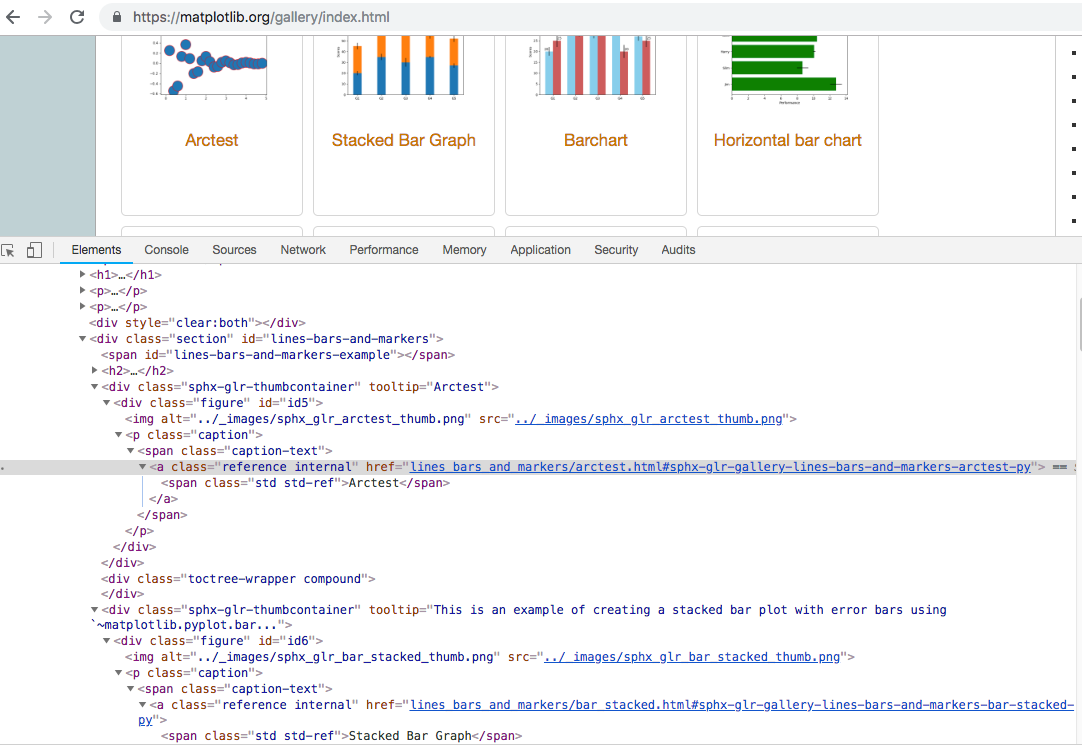
parse_mat函数主要是为了获取每个实例所在的下载链接,并存入item中返回至pipelines中进行下载;
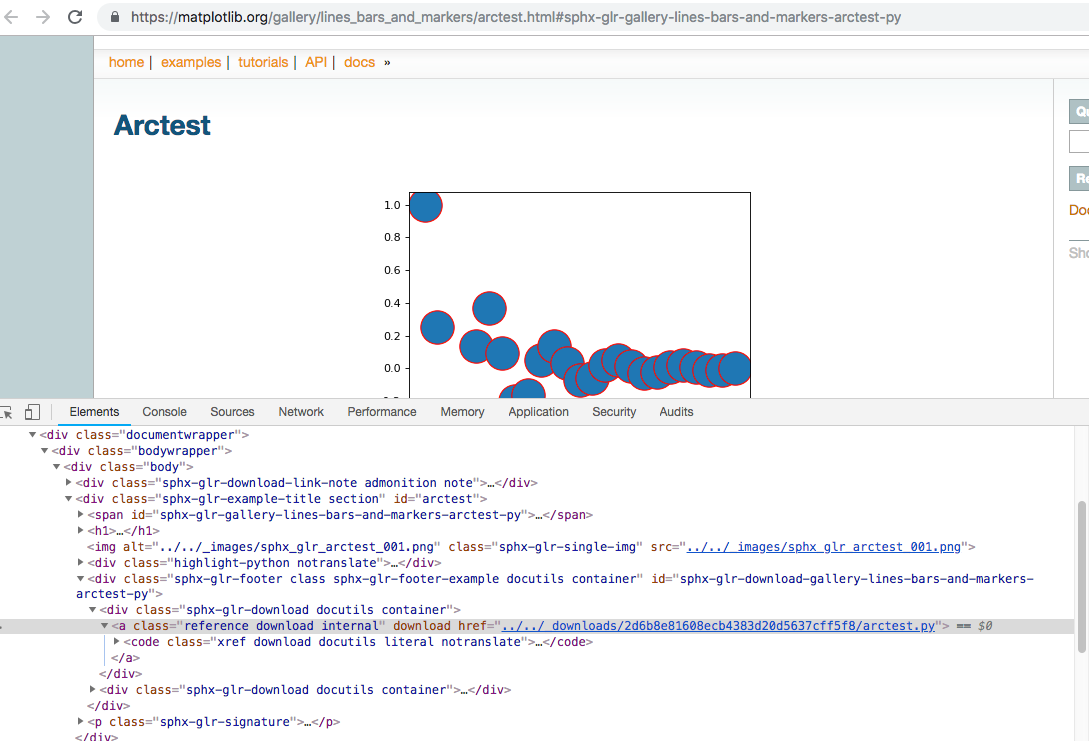
href = response.xpath('//div[contains(@class, "docutils container")]/a/@href').extract_first() ---通过xpath规则获取对应的下载链接;
url = response.urljoin(href) ---通过urljoin方法将链接补全;
example = MatplotlibExamplesItem()
example['file_urls'] = [url] ----存入item中返回
下图为显示下载链接所在页面位置,便于使用xpath规则获取链接;
接下来写pipelines代码,具体代码如下:
from scrapy.pipelines.files import FilesPipeline

from urllib.parse import urlparse

from os.path import basename, dirname, join

class MatplotlibExamplesFilesPipeline(FilesPipeline):

    """docstring for Matploitem, spiderbExamplesFilesPipeline"""

    def file_path(self, request, response=None, info=None):

        # print('rl:', request.url)

        path = urlparse(request.url).path

        print('path', path)

        # return join(basename(dirname(path)), basename(path))

        return join(basename(path).split('.')[0], basename(path))
通过重写file_path方法保存下载文件,至于文件下载的文件或者路径可在setting中配置;
分析代码:
path = urlparse(request.url).path ---通过urlparse方法将url进行分解,以下用实例进行介绍该方法的输出:

实例1:介绍urlparse方法的输出
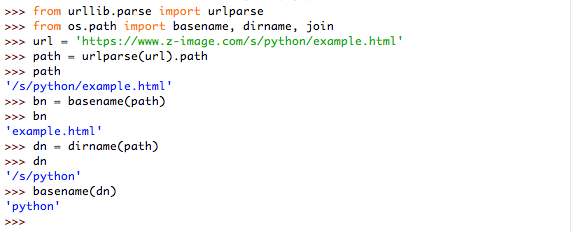
实例2:介绍basename与dirname方法的输出
return join(basename(path).split('.')[0], basename(path))
由于获取的下载链接:https://matplotlib.org/_downloads/2d6b8e81608ecb4383d20d5637cff5f8/arctest.py
所以basename(dirname(path))得到的是一串’2d6b8e81608ecb4383d20d5637cff5f8‘哈希值,于是就直接用basename(path).split('.')[0]为文件夹的名字
接下来写上简单的item的代码(这个代码最简单了,就是写url和file):
import scrapy

class MatplotlibExamplesItem(scrapy.Item):

    # define the fields for your item here like:

    # name = scrapy.Field()

    file_urls = scrapy.Field()

    files = scrapy.Field()
最后贴上setting的代码:
BOT_NAME = 'matplotlib_examples'

SPIDER_MODULES = ['matplotlib_examples.spiders']

NEWSPIDER_MODULE = 'matplotlib_examples.spiders'

ITEM_PIPELINES = {

    # 'scrapy.pipelines.files.FilesPipeline':1,

    'matplotlib_examples.pipelines.MatplotlibExamplesFilesPipeline':1,

}

FILES_STORE = 'result'

# Obey robots.txt rules

ROBOTSTXT_OBEY = False

# Disable cookies (enabled by default)

COOKIES_ENABLED = False

# Override the default request headers:

DEFAULT_REQUEST_HEADERS = {

  'user-agent' : 'Mozilla/5.0 (Macintosh; Intel Mac OS X 10_12_3) AppleWebKit/537.36 (KHTML, like Gecko) Chrome/71.0.3578.98 Safari/537.36'

}
'BOT_NAME' ----爬虫项目名称;一般进行新建scrapy爬虫后都自动写入了;
'ITEM_PIPELINES ' ---此处记得改为自己写的pipelines类名;
'FILES_STORE' ---此处为下载文件所在的文件夹;
其他的配置就基本了;例如是否遵循robots.txt协议,是否用cookies,user-agent改为与浏览器相同,这些都是为了避免被‘ban’;
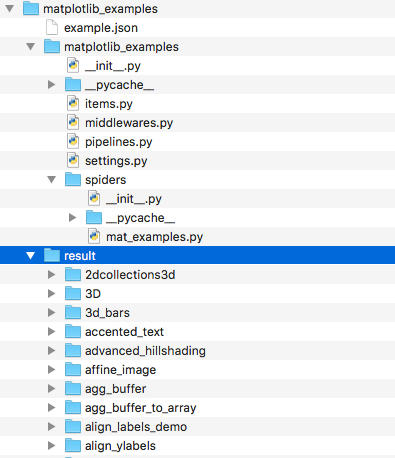
最后的最后附上项目:
scrapy实例matplotlib脚本下载的更多相关文章
- 爬虫入门六 总结 资料 与Scrapy实例-bibibili番剧信息
title: 爬虫入门六 总结 资料 与Scrapy实例-bibibili番剧信息 date: 2020-03-16 20:00:00 categories: python tags: crawler ...
- 10个提供免费PHP脚本下载的网站
本文将重点介绍10个PHP脚本的免费资源下载站.之前推荐 <16个下载超酷脚本的热门网站>,这些网站除了PHP脚本,还有JavaScript.Java.Perl.ASP等脚本.如果你已是脚 ...
- Python爬虫框架Scrapy实例(三)数据存储到MongoDB
Python爬虫框架Scrapy实例(三)数据存储到MongoDB任务目标:爬取豆瓣电影top250,将数据存储到MongoDB中. items.py文件复制代码# -*- coding: utf-8 ...
- 第三百四十一节,Python分布式爬虫打造搜索引擎Scrapy精讲—编写spiders爬虫文件循环抓取内容—meta属性返回指定值给回调函数—Scrapy内置图片下载器
第三百四十一节,Python分布式爬虫打造搜索引擎Scrapy精讲—编写spiders爬虫文件循环抓取内容—meta属性返回指定值给回调函数—Scrapy内置图片下载器 编写spiders爬虫文件循环 ...
- 第三百二十五节,web爬虫,scrapy模块标签选择器下载图片,以及正则匹配标签
第三百二十五节,web爬虫,scrapy模块标签选择器下载图片,以及正则匹配标签 标签选择器对象 HtmlXPathSelector()创建标签选择器对象,参数接收response回调的html对象需 ...
- python爬虫脚本下载YouTube视频
python爬虫脚本下载YouTube视频 爬虫 python YouTube视频 工作环境: python 2.7.13 pip lxml, 安装 pip install lxml,主要用xpath ...
- 二十 Python分布式爬虫打造搜索引擎Scrapy精讲—编写spiders爬虫文件循环抓取内容—meta属性返回指定值给回调函数—Scrapy内置图片下载器
编写spiders爬虫文件循环抓取内容 Request()方法,将指定的url地址添加到下载器下载页面,两个必须参数, 参数: url='url' callback=页面处理函数 使用时需要yield ...
- python脚本下载 Google Driver 文件
使用python脚本下载 Google Driver 文件 import yaml import sys import requests import os import re import tarf ...
- Python爬虫框架Scrapy实例(四)下载中间件设置
还是豆瓣top250爬虫的例子,添加下载中间件,主要是设置动态Uesr-Agent和代理IP Scrapy代理IP.Uesr-Agent的切换都是通过DOWNLOADER_MIDDLEWARES进行控 ...
随机推荐
- side-stepping the Global Interpreter Lock by using subprocesses instead of threads
16.6. multiprocessing — Process-based “threading” interface — Python 2.7.14 documentation https://do ...
- 64. Extjs中grid 的ColumnModel 属性配置
转自:https://blog.csdn.net/u011530389/article/details/45821945 本文导读:Ext.grid.ColumnModel 该类用于定义表格的列模型, ...
- Centos搭建图形界面VNC
#!/bin/sh unset SESSION_MANAGER unset DBUS_SESSION_BUS_ADDRESS exec /etc/X11/xinit/xinitrc
- C++ 指针 部分
基本知识:在内存中的每个字节都有一个编号,这就是“地址”,相当于旅馆中的房间号.记住,内存单元的地址和内存单元的内容是两个不同的概念. 程序在编译之后,就已经将变量名转换成变量地址,对变量值的存取都是 ...
- E20170930-hm
parse vt. 从语法上描述或分析(词句等);
- sigar的使用
与普通jar包不同,Sigar API还要依赖本地的库文件来进行工作,其中: Windows下Sigar.jar 依赖:sigar-amd64-winnt.dll 或 sigar-x86-winnt. ...
- mahjong
题目描述 “为什么, 你们的力量在哪里得到如此地......”“我们比 1 分钟前的我们还要进步, 虽然很微小, 但每转一圈就会前进一寸.这就是钻头啊!”“那才是通向毁灭的道路.为什么就没有意识到螺旋 ...
- fcc html5 css 练习3
行内样式看起来是这样的 <h1 style="color: green"> .pink-text { color: pink !important; } ...
- cms中某些标题链接的单独写法
href="{$CATEGORYS[45][url]}" 链接写法, {$CATEGORYS[45][catname]} 标题写法 在show页面中 src="{$thu ...
- 4星|《JAC写给外贸公司老板的企管书》:善总结爱学习、有业绩的老外贸的经验谈
作者从事外贸10余年,作出了业绩,也善总结.爱学习.爱分享.本书是作者在外贸行业的从业经验集.有一些战略方面的,比如开发小语种市场,大部分都是战术方面的操作细节(比如如何做营销),应该是非常适合从业者 ...