
关于使用 autoFac 的注入方法
1、使用 NUGET 安装 Autofac
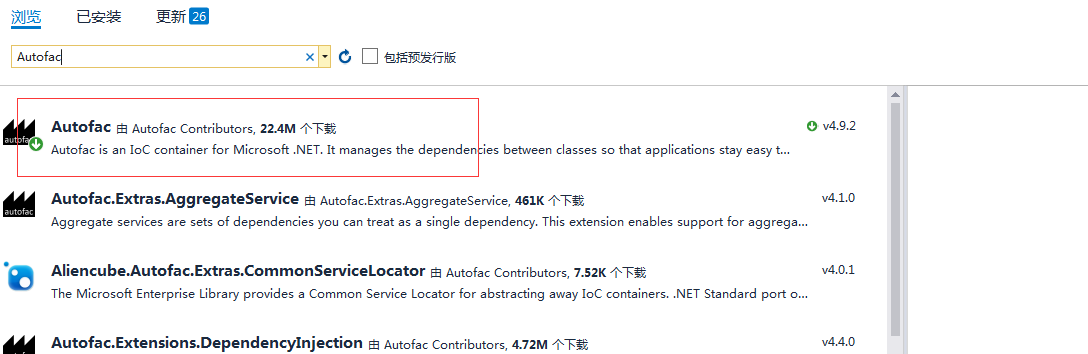
2、需要引用Autofac ASP.NET MVC 5 Integration 这个扩展包。
但有时候在NuGet中找不到 该包 需要使用“程序要控制器控制台”安装
输入 安装解决
Install-Package Autofac.Mvc5 -Version 4.0.2

安装完成后引用里面就多了Autofac.dll和Autofac.Intergration.MVC,如果是在webApi里使用Autofac需要安装Autofac ASP.NET Web API2.2 Intergration 才可以。
install-package autofac.webapi2
3、使用方法,以下方式引用 https://www.cnblogs.com/zjoch/p/6485170.html 博客
新建一个person实体类
public class Person

    {

        public int Id { get; set; }

        public string Name { get; set; }

        public int Age { get; set; }

        public string Address { get; set; }

    }
新建一个person仓储接口
public interface IPersonRepository

    {

        IEnumerable<Person> GetAll();

        Person Get(int id);

        Person Add(Person item);

        bool Update(Person item);

        bool Delete(int id);

    }
新建一个person仓储
public class PersonRepository : IPersonRepository

    {

        List<Person> person = new List<Person>();

        public PersonRepository()

        {

            Add(new Person { Id = 1, Name = "joye.net1", Age = 18, Address = "中国上海" });

            Add(new Person { Id = 2, Name = "joye.net2", Age = 18, Address = "中国上海" });

            Add(new Person { Id = 3, Name = "joye.net3", Age = 18, Address = "中国上海" });

        }

        public IEnumerable<Person> GetAll()

        {

            return person;

        }

        public Person Get(int id)

        {

            return person.Find(p => p.Id == id);

        }

        public Person Add(Person item)

        {

            if (item == null)

            {

                throw new ArgumentNullException("item");

            }

            person.Add(item);

            return item;

        }

        public bool Update(Person item)

        {

            if (item == null)

            {

                throw new ArgumentNullException("item");

            }

            int index = person.FindIndex(p => p.Id == item.Id);

            if (index == -1)

            {

                return false;

            }

            person.RemoveAt(index);

            person.Add(item);

            return true;

        }

        public bool Delete(int id)

        {

            person.RemoveAll(p => p.Id == id);

            return true;

        }

    }
Global属性注入
public class MvcApplication : System.Web.HttpApplication

    {

        private void SetupResolveRules(ContainerBuilder builder)

        {

            builder.RegisterType<PersonRepository>().As<IPersonRepository>();

        }

        protected void Application_Start()

        {

            var builder = new ContainerBuilder();

            SetupResolveRules(builder);

            builder.RegisterControllers(Assembly.GetExecutingAssembly()).PropertiesAutowired();

            var container = builder.Build();

            DependencyResolver.SetResolver(new AutofacDependencyResolver(container));

            AreaRegistration.RegisterAllAreas();

            FilterConfig.RegisterGlobalFilters(GlobalFilters.Filters);

            RouteConfig.RegisterRoutes(RouteTable.Routes);

            BundleConfig.RegisterBundles(BundleTable.Bundles);

        }

    }
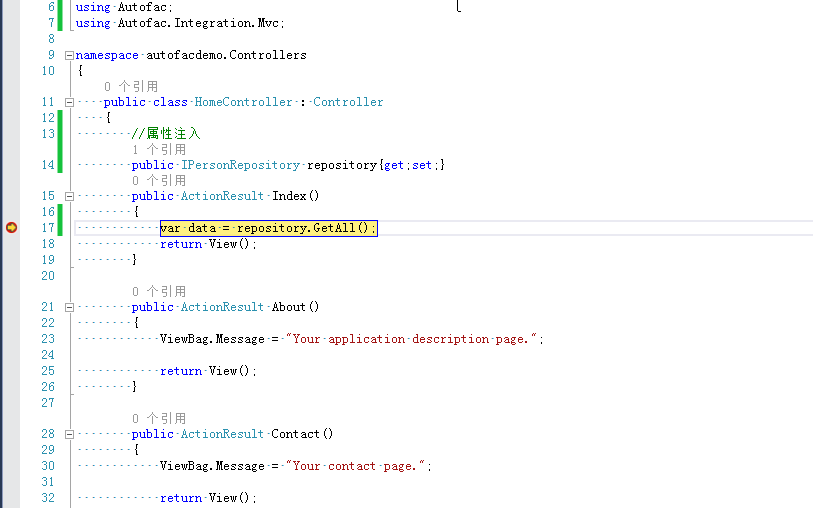
效果图
关于使用 autoFac 的注入方法的更多相关文章
- 从零开始,搭建博客系统MVC5+EF6搭建框架(2),测试添加数据、集成Autofac依赖注入
一.测试仓储层.业务层是否能实现对数据库表的操作 1.创建IsysUserInfoRepository接口来继承IBaseRepository父接口 namespace Wchl.WMBlog.IRe ...
- ASP.NET MVC Autofac自动注入
依赖注入容器有很多插件,我用过Unity和Autofac,这两个插件给我最明显的感觉就是Autofac很快,非常的快,毕竟是第三方开发的,而Unity相对而言性能比较稳定 下面附上Autofac自动注 ...
- Autofac手动注入及自动注入示例
参考:http://www.cnblogs.com/xinchuang/archive/2013/05/07/3065433.html#2911661 一.环境 vs2012.mvc4..Net Fr ...
- 【干货】利用MVC5+EF6搭建博客系统(二)测试添加数据、集成Autofac依赖注入
PS:如果图片模糊,鼠标右击复制图片网址,然后在浏览器中打开即可. 一.测试仓储层.业务层是否能实现对数据库表的操作 1.在52MVCBlog.IRepository程序集下创建IsysUserInf ...
- asp.net mvc4 简单使用Autofac依赖注入小结
1,首先使用 NuGet下载适当的Autofac版本 文件一,Autofac.3.5.2 文件二,Autofac.Mvc4.3.1.0 1,接口类 public interface IReposito ...
- ASP.NETCore使用AutoFac依赖注入
原文:ASP.NETCore使用AutoFac依赖注入 实现代码 1.新建接口类:IRepository.cs,规范各个操作类的都有那些方法,方便管理. using System; using Sys ...
- ADO.NET .net core2.0添加json文件并转化成类注入控制器使用 简单了解 iTextSharp实现HTML to PDF ASP.NET MVC 中 Autofac依赖注入DI 控制反转IOC 了解一下 C# AutoMapper 了解一下
ADO.NET 一.ADO.NET概要 ADO.NET是.NET框架中的重要组件,主要用于完成C#应用程序访问数据库 二.ADO.NET的组成 ①System.Data → DataTable, ...
- Asp.NetCore3.1版本的CodeFirst与经典的三层架构与AutoFac批量注入
Core3.1 CodeFirst与AutoFac批量注入(最下面附GitHub完整 Demo,由于上传网速较慢,这里就直接压缩打包上传了) ===Core3.1 CodeFirst 数据库为远程阿里 ...
- Autofac依赖注入
简介 Autofac 是一款超赞的.NET IoC 容器 . 它管理类之间的依赖关系, 从而使 应用在规模及复杂性增长的情况下依然可以轻易地修改 .它的实现方式是将常规的.net类当做 组件 处理. ...
随机推荐
- json数组显示格式
{“colorAndImg”:[{"颜色":“红色”,"地址":“www.sohu.com”}, {“颜色”:“绿色,“地址”:“www.sohu.com”}] ...
- 命令行man的帮助手册
http://blog.csdn.net/gatieme/article/details/51656707 指定使用那种语音的手册,可以使用命令选项-M man -M /usr/share/man/z ...
- clamav完整查杀linux病毒实战(摘抄)
http://dadloveu.blog.51cto.com/blog/715500/1882521 Linux服务器一直给我们的印象是安全.稳定.可靠,性能卓越.由于一来Linux本身的安全机制,L ...
- System.AccessViolationException”类型的未经处理的异常在 System.Data.dll 中发生。其它信息:尝试读取或写入受保护的内存。这通常指示其它内存已损坏。
错误背景: 操作系统:编程环境:VS2013. 语言:VB.net: 数据库:SQLserver2008 做数据库连接时.发生的错误: 错误提示为: 说明:用VB.net连接SQLServer数据 ...
- Codeforces Round #271 (Div. 2) D. Flowers (递推 预处理)
We saw the little game Marmot made for Mole's lunch. Now it's Marmot's dinner time and, as we all kn ...
- 一个最简单的Servlet实例
先在tomcat的webapps目录下,新建一目录,如test.然后,在test目录下建立WEB-INF为名的目录.这个必须有. 然后,在WEB-INF目录下建立classes目录.用以存储所用到的c ...
- hdu oj 3127 WHUgirls(2009 Asia Wuhan Regional Contest Online)
WHUgirls Time Limit: 3000/2000 MS (Java/Others) Memory Limit: 131072/131072 K (Java/Others) Total ...
- ios之UILabel实现文本自适应方法
UILabel实现文本自适应方法(ios7) - (void)initUserInterface { UILabel *label = [[UILabel alloc]init]; label.num ...
- hdu1115 Lifting the Stone(几何,求多边形重心模板题)
转载请注明出处:http://blog.csdn.net/u012860063 题目链接:pid=1115">http://acm.hdu.edu.cn/showproblem.php ...
- 利用游标返回结果集的的例子(Oracle 存储过程)JAVA调用方法和.NET调用方法
在sqlplus中建立如下的内容: 1.程序包 SQL> create or replace package types 2 as 3 type cursorType is re ...