
android 服务
1.创建服务
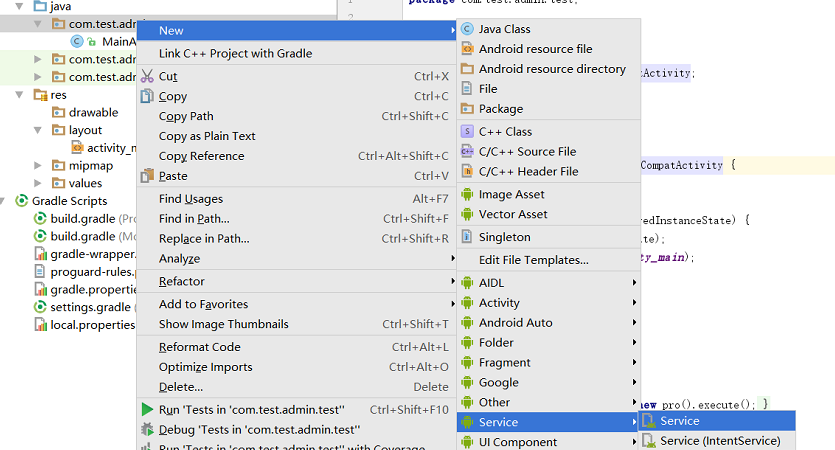
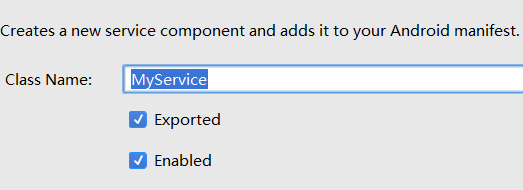
Exported:是否允许除了当前程序之外的其他程序访问这个服务
Enable:是否启用这个服务
点击完成后自动生成
import android.app.Service;

import android.content.Intent;

import android.os.IBinder;

public class MyService extends Service {

    public MyService() {

    }

    @Override

    public IBinder onBind(Intent intent) {

        throw new UnsupportedOperationException("Not yet implemented");

    }

}
onBind 是Service唯一的抽象方法。
创建完成后会在AndroidManifest.xml中自动进行注册
 <service

            android:name=".MyService"

            android:enabled="true"

            android:exported="true"></service>
2.开关服务
public class MainActivity extends AppCompatActivity {

    @Override

    protected void onCreate(Bundle savedInstanceState) {

        super.onCreate(savedInstanceState);

        setContentView(R.layout.activity_main);

    }

    public void startClick(View view){

        Intent startIntent=new Intent(this,MyService.class);

        //启动服务

        startService(startIntent);

    }

    public void stopClick(View view){

        Intent startIntent=new Intent(this,MyService.class);

        //关闭服务

        stopService(startIntent);

    }

}
界面

<?xml version="1.0" encoding="utf-8"?>

<LinearLayout xmlns:android="http://schemas.android.com/apk/res/android"

    android:layout_width="match_parent"

        android:layout_height="match_parent"

        android:orientation="horizontal">

        <Button

            android:layout_width="wrap_content"

            android:layout_height="wrap_content"

            android:text="启动服务"

            android:onClick="startClick" />

        <Button

            android:layout_width="wrap_content"

            android:layout_height="wrap_content"

            android:text="停止服务"

            android:onClick="stopClick" />

    </LinearLayout>
点击启动服务按钮,在手机系统里可以发现多出一个服务名,
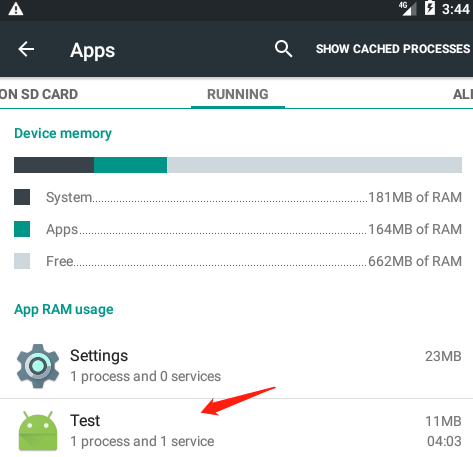
即使关闭程序,服务也不会停止。直到点击停止服务按钮,或者卸载了该程序。
3.
public class MyService extends Service {

    public MyService() {

    }

    @Override

    public IBinder onBind(Intent intent) {

        throw new UnsupportedOperationException("Not yet implemented");

    }

    //服务创建时调用

    @Override

    public void onCreate() {

        super.onCreate();

        Log.d("MyService","执行了onCreate方法");

    }

    //服务每次启动时调用

    @Override

    public int onStartCommand(Intent intent, int flags, int startId) {

        Log.d("MyService","执行了onStartCommand方法");

        return super.onStartCommand(intent, flags, startId);

    }

    //服务销毁时调用

    @Override

    public void onDestroy() {

        Log.d("MyService","执行了onDestroy方法");

        super.onDestroy();

    }

}
第一次点击启动服务
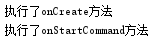
再次点击启动服务

点击停止服务

4.关联活动与服务
添加两个按钮
  <Button

        android:layout_width="wrap_content"

        android:layout_height="wrap_content"

        android:text="绑定服务"

        android:onClick="bind" />

    <Button

        android:layout_width="wrap_content"

        android:layout_height="wrap_content"

        android:text="取消绑定"

        android:onClick="unBind" />
MyService
public class MyService extends Service {

    private Download dlBinder =new Download();

    class Download extends Binder{

        public void startDownload(){

            Log.d("MyService","开始下载");

        }

        public int getProgress(){

            Log.d("MyService","得到进度");

            return 0;

        }

    }

    @Override

    public IBinder onBind(Intent intent) {

        return dlBinder;

    }
MainActivity
public class MainActivity extends AppCompatActivity {

    private MyService.Download dlBinder;

    //匿名类

    private ServiceConnection connection =new ServiceConnection() {

        //活动与服务成功绑定时调用

        @Override

        public void onServiceConnected(ComponentName name, IBinder service) {

            //

            dlBinder=(MyService.Download)service;

            dlBinder.startDownload();

            dlBinder.getProgress();

        }

        //活动与服务解除绑定时调用

        @Override

        public void onServiceDisconnected(ComponentName name) {

        }

    };

    @Override

    protected void onCreate(Bundle savedInstanceState) {

        super.onCreate(savedInstanceState);

        setContentView(R.layout.activity_main);

    }

    public void bind(View view){

        Intent bindIntent=new Intent(this,MyService.class);

        //绑定服务

        bindService(bindIntent,connection,BIND_AUTO_CREATE);

    }

    public void unBind(View view){

        Intent unBindIntent=new Intent(this,MyService.class);

        //解绑服务

        unbindService(connection);

    }
}
点击 绑定服务
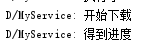
点击取消绑定

android 服务的更多相关文章
- Android 服务类Service 的详细学习
http://blog.csdn.net/vipzjyno1/article/details/26004831 Android服务类Service学习四大组建 目录(?)[+] 什么是服务 服务有 ...
- Android 服务端开发之开发环境配置
Android 服务端开发之开发环境配置 这里是在Eclipse的基础上安装PhpEclipse插件方法,PHPEclipse是Eclipse的 一个用于开发PHP的插件.当然也可以采用Java开发a ...
- 【转】Android 服务器之SFTP服务器上传下载功能
原文网址:http://blog.csdn.net/tanghua0809/article/details/47056327 本文主要是讲解Android服务器之SFTP服务器的上传下载功能,也是对之 ...
- Android服务之PackageManagerService启动源码分析
了解了Android系统的启动过程的读者应该知道,Android的所有Java服务都是通过SystemServer进程启动的,并且驻留在SystemServer进程中.SystemServer进程在启 ...
- erlang-百度云推送Android服务端功能实现-erlang
百度云推送官方地址http://developer.baidu.com/wiki/index.php?title=docs/cplat/push 简单的介绍下原理: 百度云推送支持IOS和Androi ...
- Android服务Service具体解释(作用,生命周期,AIDL)系列文章-为什么须要服务呢?
Android服务Service具体解释(作用,生命周期,AIDL) 近期沉迷于上班,没有时间写博客了.解衣入睡,未眠.随起床写一篇博客压压惊! ##我们android系统为什么须要服务Service ...
- Android 服务入门
前言:硬着头皮把数据库SQLite看完了,接下来就是android服务了,因为自己本身就是菜鸟,所以呢,也只是做做笔记,技术上的东西就别指望我了. 1.什么是服务呢?举个例子,百度地图,美团外卖,OF ...
- android 服务与多线程
android服务是执行在UI主线程的.一下是代码demo: package com.example.testservice; import android.os.Bundle; import and ...
- 【转】Android 服务器之SFTP服务器上传下载功能 -- 不错
原文网址:http://blog.csdn.net/tanghua0809/article/details/47056327 本文主要是讲解Android服务器之SFTP服务器的上传下载功能,也是对之 ...
- Android服务之混合方式开启服务
引言 前面介绍过了Android服务的两种开启方式:Start方式可以让服务在后台运行:bind方式能够调用到服务中的方法. 在实际的开发工作中,有很多需求是:既要在后台能够长期运行,又要在服务中操作 ...
随机推荐
- pre-receive hook declined
没有master分支的代码提交权限. 分配权限或者提交分支合并申请
- java在线聊天项目1.0版 异常处理——开启多个客户端,关闭一个客户端后,在其他客户端中再发出信息会出现异常的处理
异常一 只开启一个客户端,输入信息后关闭,客户端出现如下异常 根据异常说明 ChatClientFrame客户端117行 提示原因是Socket关闭 分析原因 客户端代码 while (connect ...
- WYS APP
UI图:http://modao.io/app/H8eZCQdV1pskjQ7z8bLh 四个tab:我要赛.赛事.运动吧.个人中心 赛事页面 1.主要是个NavigationController 2 ...
- ios多线程原理及runloop介绍
一.线程概述 有些程序是一条直线,起点到终点:有些程序是一个圆,不断循环,直到将它切断.直线的如简单的Hello World,运行打印完,它的生命周期便结束了,像昙花一现那样:圆如操作系统,一直运行直 ...
- 【模拟】bzoj1686: [Usaco2005 Open]Waves 波纹
打完模拟题来庆祝一波:):感觉最近陷入一种“口胡五分钟打题两小时”的巨坑之中…… Description Input 第1行:四个用空格隔开的整数Pj Bi,B2,R. P(1≤P≤5)表示石 ...
- [LUOGU] P2245 星际导航
题目描述 sideman做好了回到Gliese 星球的硬件准备,但是sideman的导航系统还没有完全设计好.为了方便起见,我们可以认为宇宙是一张有N 个顶点和M 条边的带权无向图,顶点表示各个星系, ...
- C语言:哲学家吃饭问题
//五个哲学家围坐在一起,两人之间都放有一个叉子,意大利面需要2个叉子吃,哲学家吃饭时候叉子只能拿左右手,哲学家除了吃饭时间其他时间都在思考 #include <stdio.h> #inc ...
- Web安全XSS、CSRF和SQL注入
SQL注入 SQL注入是以用户的输入作为sql语句的一部分,如后端接收到用户的请求数据后,不经过数据转义,就把数据拼接到SQL中执行,容易导致SQL的语义被篡改,即受到攻击了. 解决办法是对接收的数据 ...
- python--前端CSS
一.CSS介绍 CSS(Cascading Style Sheet,层叠样式表)定义了如何显示HTML元素,给HTML设置样式,让他更加美观. 当浏览器读到这个样式表, 他就会按照这个样式来对文档进行 ...
- i.mx53开发的一些问题
i.mx53开发的一些问题 转载于此:http://blog.csdn.net/shell_albert/article/details/8242288 原来i.mx53上4GB的Nand Fla ...