
Spring.Net学习笔记(1)-容器的使用
一、下载地址:
http://www.springframework.net/download.html
二、相关程序集
Spring.Net容器定义在程序集Spring.Core.dll中,它依赖于Common.Logging.dll。该程序集位于
Spring.NET-1.3.1\Spring.NET\bin\net\4.0\release目录下
三、创建容器
1.编程方式的容器
使用Spring.Context.Support.StaticApplicationContxt直接创建容器
public class Person

    {

        public string Name { get; set; }

        public override string ToString()

        {

            return "This is Person";

        }

    }
class Program

{

    static void Main(string[] args)

    {

        //创建容器

        Spring.Context.Support.StaticApplicationContext context = new StaticApplicationContext();

        //注册Person类

        context.RegisterPrototype("Person", typeof(Person), null);

        //从容器中获取Person对象

        Person person = context.GetObject("Person") as Person;

        Console.WriteLine(person);

    }

}
2.使用xml方式(注意xml的输出方式)
处理xml的配置处理器:Spring.Context.Support.XmlApplicationContext
<?xml version="1.0" encoding="utf-8" ?>

<objects xmlns="http://www.springframework.net">

  <object id="Person" type="CPrj.Person,Cprj"></object>

</objects>
class Program

{

    static void Main(string[] args)

    {

        Spring.Context.Support.XmlApplicationContext context = new XmlApplicationContext("objects.xml");

        Person person = context.GetObject("Person") as Person;

        Console.WriteLine(person);

    }

}
注:<object>的父节点必须是<objects>,且objects的xmlns元素是必须的
3.使用配置文件+xml文件
处理器Spring.Context.Support.ContextHandler在启动程序时候加载配置信息
<?xml version="1.0" encoding="utf-8" ?>

<objects xmlns="http://www.springframework.net">

  <object id="Person" type="CPrj.Person,Cprj"></object>

</objects>
<?xml version="1.0" encoding="utf-8" ?>

<configuration>

  <configSections>

    <sectionGroup name="spring">

      <section name="context" type="Spring.Context.Support.ContextHandler,Spring.Core"></section>

    </sectionGroup>

  </configSections>

  <spring>

    <context>

      <resource uri="file://objects.xml"></resource>

    </context>

  </spring>

  <startup>

    <supportedRuntime version="v4.0" sku=".NETFramework,Version=v4.5" />

  </startup>

</configuration>
class Program

{

    static void Main(string[] args)

    {

        Spring.Context.IApplicationContext context = Spring.Context.Support.ContextRegistry.GetContext();

        Person person = context.GetObject("Person") as Person;

        Console.WriteLine(person);

    }

}
注:context节点的默认type就是 Spring.Context.Support.XmlApplicationContext,Spring.Core 。故可省去
<spring>

  <context type="Spring.Context.Support.XmlApplicationContext,Spring.Core">

    <resource uri="file://objects.xml"></resource>

  </context>

</spring>
4.使用配置文件
xml对象定义也可以放在DotNet的标准应用程序配置文件中,此时必须为<objects>节点预先注册相应的节点处理器
需要使用一个新的配置处理器:Spring.Context.Support.DefaultSectionHandler
它可以帮助我们解析spring配置信息
<?xml version="1.0" encoding="utf-8" ?>

<configuration>

  <configSections>

    <sectionGroup name="spring">

      <section name="context" type="Spring.Context.Support.ContextHandler,Spring.Core"></section>

      <section name="objects" type="Spring.Context.Support.DefaultSectionHandler,Spring.Core"/>

    </sectionGroup>

  </configSections>

  <spring>

    <context>

      <resource uri="config://spring/objects"></resource>

    </context>

    <objects xmlns="http://www.springframework.net">

      <object id="Person" type="CPrj.Person,CPrj"></object>

    </objects>

  </spring>

  <startup>

    <supportedRuntime version="v4.0" sku=".NETFramework,Version=v4.5" />

  </startup>

</configuration>
class Program

{

    static void Main(string[] args)

    {

        Spring.Context.IApplicationContext context = Spring.Context.Support.ContextRegistry.GetContext();

        Person person = context.GetObject("Person") as Person;

        Console.WriteLine(person);

        Console.ReadKey();

    }

}
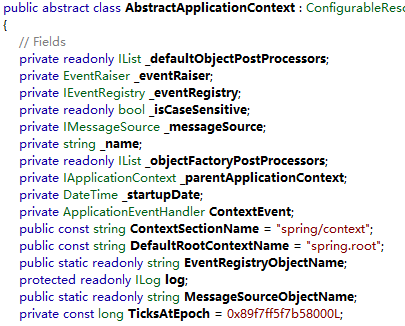
注:spring和context节点名称不是任意的,必须是spring和context。Spring.Net本身将“spring/context”作为字符串常亮定义在AbstractApplicationContext类中以表示上下文的节点名称
5.混合使用外部配置文件和嵌入的配置
<?xml version="1.0" encoding="utf-8" ?>

<configuration>

    <configSections>

        <sectionGroup name="spring">

            <section name="context" type="Spring.Context.Support.ContextHandler, Spring.Core"/>

            <section name="objects" type="Spring.Context.Support.DefaultSectionHandler, Spring.Core" />

        </sectionGroup>

    </configSections>

    <spring>

        <context>

            <resource uri="file://objects.xml"/>

            <resource uri="config://spring/objects"/>

        </context>

        <objects>

            <object id="Person" type="CPrj.Person,CPrj"></object>

        </objects>

    </spring>

</configuration>
四、参考文章
http://www.cnblogs.com/haogj/archive/2011/06/10/2077540.html
Spring.Net学习笔记(1)-容器的使用的更多相关文章
- 【转】Spring.NET学习笔记——目录
目录 前言 Spring.NET学习笔记——前言 第一阶段:控制反转与依赖注入IoC&DI Spring.NET学习笔记1——控制反转(基础篇) Level 200 Spring.NET学习笔 ...
- Spring.NET学习笔记——目录(原)
目录 前言 Spring.NET学习笔记——前言 第一阶段:控制反转与依赖注入IoC&DI Spring.NET学习笔记1——控制反转(基础篇) Level 200 Spring.NET学习笔 ...
- SpringBoot + Spring Security 学习笔记(三)实现图片验证码认证
整体实现逻辑 前端在登录页面时,自动从后台获取最新的验证码图片 服务器接收获取生成验证码请求,生成验证码和对应的图片,图片响应回前端,验证码保存一份到服务器的 session 中 前端用户登录时携带当 ...
- spring揭密学习笔记
spring揭密学习笔记 spring揭密学习笔记(1) --spring的由来 spring揭密学习笔记(2)-spring ioc容器:IOC的基本概念
- Spring Boot学习笔记2——基本使用之最佳实践[z]
前言 在上一篇文章Spring Boot 学习笔记1——初体验之3分钟启动你的Web应用已经对Spring Boot的基本体系与基本使用进行了学习,本文主要目的是更加进一步的来说明对于Spring B ...
- Spring框架学习笔记(8)——spring boot+mybatis plus+mysql项目环境搭建
之前写的那篇Spring框架学习笔记(5)--Spring Boot创建与使用,发现有多小细节没有提及,,正好现在又学习了mybatis plus这款框架,打算重新整理一遍,并将细节说清楚 1.通过I ...
- Spring MVC 学习笔记一 HelloWorld
Spring MVC 学习笔记一 HelloWorld Spring MVC 的使用可以按照以下步骤进行(使用Eclipse): 加入JAR包 在web.xml中配置DispatcherServlet ...
- SpringBoot + Spring Security 学习笔记(五)实现短信验证码+登录功能
在 Spring Security 中基于表单的认证模式,默认就是密码帐号登录认证,那么对于短信验证码+登录的方式,Spring Security 没有现成的接口可以使用,所以需要自己的封装一个类似的 ...
- Spring MVC 学习笔记12 —— SpringMVC+Hibernate开发(1)依赖包搭建
Spring MVC 学习笔记12 -- SpringMVC+Hibernate开发(1)依赖包搭建 用Hibernate帮助建立SpringMVC与数据库之间的联系,通过配置DAO层,Service ...
随机推荐
- CLR运行机制
CLR编译器会将我们的代码编译成托管模块(中间IL语言和元数据),托管模块是一个标准的PE32执行文件,或者PE32+执行文件.但是CLR实际不和托管模块一起工作,他会将托管模块合并成程序集,程序集是 ...
- cogs——1364. 聚会
1364. 聚会 ★ 输入文件:partyb.in 输出文件:partyb.out 简单对比时间限制:1 s 内存限制:128 MB [问题描述] 小S想要从某地出发去同学k的家中参加 ...
- 学习swift从青铜到王者之字符串和运算符02
1 字符和字符串初步 var c :Character = "a" 2 构造字符串 let str1 = "hello" let str2 = " ...
- Linux学习系列之LNMP
LNMP介绍 LNMP是什么 LNMP(Linux-Nginx-MySQL-PHP)网站架构是目前国际流行的Web架构; 这四种软件组合,可以成为一个免费.高效.扩展性强的Web架构; LNMP原理图 ...
- 微信JSSDK使用指南
这篇文章主要来说说微信JSSDK的一些配置和微信分享的使用,包括从前端sdk文件引入到server端和微信server的交互. 另外Tangide已经把一些工作做好了.我会简要说一说怎么把它用 ...
- 11种常见sqlmap使用方法
sqlmap是渗透中常用的一个注入工具,其实在注入工具方面,一个sqlmap就足够用了,只要你用的熟,秒杀各种工具,只是一个便捷性问题. 一.SQLMAP用于Access数据库注入 (1) 猜解是否能 ...
- UGUI 实现Button长按效果(RepeatButton)
Tag:加入了一个延迟,在button按下状态一段时间后再開始 repeate using UnityEngine; using UnityEngine.Events; using UnityEngi ...
- 容器ConcurrentHashMap原理(学习)
一.概述 HashMap 是非线程安全的,在不考虑性能问题的时候,我们的解决方案有 Hashtable 或者Collections.synchronizedMap(hashMap),这两种方式基本都是 ...
- C中 数组和指针的异同
数组在很多情况下是和指针等价的,数组的下标运算和指针的解引用也有等价形式:arr[i] == *(arr + 1):但是也有一些情况下数组和指针是不一样的:extern int arr[]; exte ...
- hdoj--5526--欧拉回路(欧拉回路)
欧拉回路 Time Limit: 2000/1000 MS (Java/Others) Memory Limit: 32768/32768 K (Java/Others) Total Su ...