
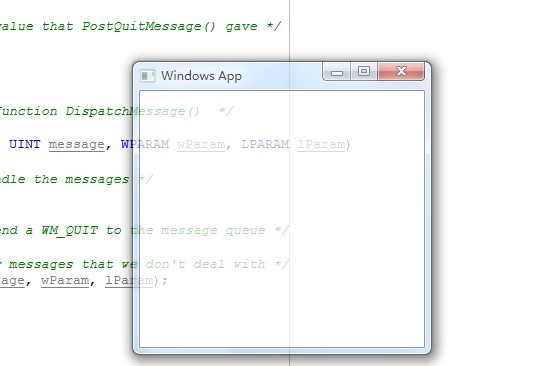
windows sdk 设置窗体透明
#define WINVER 0x0501

#include <windows.h>

/*  Declare Windows procedure  */

LRESULT CALLBACK WindowProcedure (HWND, UINT, WPARAM, LPARAM);

/*  Make the class name into a global variable  */

char szClassName[ ] = "WindowsApp";

int WINAPI WinMain (HINSTANCE hThisInstance,

                    HINSTANCE hPrevInstance,

                    LPSTR lpszArgument,

                    int nFunsterStil)

{

    HWND hwnd;               /* This is the handle for our window */

    MSG messages;            /* Here messages to the application are saved */

    WNDCLASSEX wincl;        /* Data structure for the windowclass */

    /* The Window structure */

    wincl.hInstance = hThisInstance;

    wincl.lpszClassName = szClassName;

    wincl.lpfnWndProc = WindowProcedure;      /* This function is called by windows */

    wincl.style = CS_HREDRAW | CS_VREDRAW ;                 /* Catch double-clicks */

    wincl.cbSize = sizeof (WNDCLASSEX);

    /* Use default icon and mouse-pointer */

    wincl.hIcon = LoadIcon (NULL, IDI_APPLICATION);

    wincl.hIconSm = LoadIcon (NULL, IDI_APPLICATION);

    wincl.hCursor = LoadCursor (NULL, IDC_ARROW);

    wincl.lpszMenuName = NULL;                 /* No menu */

    wincl.cbClsExtra = ;                      /* No extra bytes after the window class */

    wincl.cbWndExtra = ;                      /* structure or the window instance */

    /* Use Windows's default color as the background of the window */

    wincl.hbrBackground = (HBRUSH) GetStockObject (WHITE_BRUSH);

    /* Register the window class, and if it fails quit the program */

    if (!RegisterClassEx (&wincl))

        return ;

    /* The class is registered, let's create the program*/

    hwnd = CreateWindow(

           szClassName,         /* Classname */

           "Windows App",       /* Title Text */

           WS_OVERLAPPEDWINDOW, /* default window */

           CW_USEDEFAULT,       /* Windows decides the position */

           CW_USEDEFAULT,       /* where the window ends up on the screen */

           ,                 /* The programs width */

           ,                 /* and height in pixels */

           NULL,        /* The window is a child-window to desktop */

           NULL,                /* No menu */

           hThisInstance,       /* Program Instance handler */

           NULL                 /* No Window Creation data */

           );

    /* Make the window visible on the screen */

    ShowWindow (hwnd, nFunsterStil);

    SetWindowLong(hwnd, GWL_EXSTYLE, GetWindowLong(hwnd, GWL_EXSTYLE) | WS_EX_LAYERED);

    // Make this window 70% alpha

    SetLayeredWindowAttributes(hwnd, , ( * ) / , LWA_ALPHA);

    /* Run the message loop. It will run until GetMessage() returns 0 */

    while (GetMessage (&messages, NULL, , ))

    {

        /* Translate virtual-key messages into character messages */

        TranslateMessage(&messages);

        /* Send message to WindowProcedure */

        DispatchMessage(&messages);

    }

    /* The program return-value is 0 - The value that PostQuitMessage() gave */

    return messages.wParam;

}

/*  This function is called by the Windows function DispatchMessage()  */

LRESULT CALLBACK WindowProcedure (HWND hwnd, UINT message, WPARAM wParam, LPARAM lParam)

{

    switch (message)                  /* handle the messages */

    {

        case WM_DESTROY:

            PostQuitMessage ();       /* send a WM_QUIT to the message queue */

            break;

        default:                      /* for messages that we don't deal with */

            return DefWindowProc (hwnd, message, wParam, lParam);

    }

    return ;

}
windows sdk 设置窗体透明的更多相关文章
- 设置窗体透明C#代码
上个示例是C#调用windows api 在原来代码上加入窗体透明,控件不透明代码: using System; using System.Runtime.InteropServices; using ...
- Unity 设置窗体透明
设置窗口透明.窗口置顶.鼠标穿透 方法一. 缺点:边缘不平滑,有毛边 参考博客: 1.https://alastaira.wordpress.com/2015/06/15/creating-wi ...
- Qt 设置窗体透明
一.前言 在音频开发中,窗体多半为半透明.圆角窗体,如下为Qt 5.5 VS2013实现半透明方法总结. 二.半透明方法设置 1.窗体及子控件都设置为半透明 1)setWindowOpacity(0. ...
- windows sdk编程隐藏窗体标题栏
#include <windows.h> /*消息处理函数声明*/ HRESULT CALLBACK WindowProc(HWND hwnd, UINT message, WPARAM ...
- windows sdk编程禁止改变窗体大小
#include <windows.h> /*消息处理函数声明*/ HRESULT CALLBACK WindowProc(HWND hwnd, UINT message, WPARAM ...
- windows sdk编程禁止窗体最大化最小化
#include <windows.h> /*消息处理函数声明*/ HRESULT CALLBACK WindowProc(HWND hwnd, UINT message, WPARAM ...
- Windows SDK 实现不规则窗口介绍
不规则窗口在程序界面设计中能提供非常好的用户体验,以下是我程序运行时的效果图: 以下是代码,注意需要修改一些简单的位置,如资源ID,项目的头文件等,这些是根据你创建的win32程序的项目名改变的,我的 ...
- Qt设置窗体的透明度: setWindowOpacity
在Qt中,设置窗体透明度的函数有:void setWindowOpacity(qreal level) 特性: 透明度的有效范围从1.0(完全不透明)到0.0(完全透明的). 默认情况下,此属 ...
- Kinect for Windows SDK开发入门(二):基础知识 上
原文来自:http://www.cnblogs.com/yangecnu/archive/2012/03/31/KinectSDK_Application_Fundamentals_Part1.htm ...
随机推荐
- 一.OC基础之:1,OC语言的前世今生 ,2,OC语言入门,3,OC语言与C的差异,4,面向对象,5,类和对象的抽象关系,6,类的代码创建,7,类的成员组成及访问
1,OC语言的前世今生 , 一, 在20世纪80年代早期,布莱德.麦克(Brad Cox)设计了OC语言,它在C语言的基础上增加了一层,这意味着对C进行了扩展,从而创造出一门新的程序设计语言,支持对象 ...
- 洛谷P1527 矩阵乘法——二维树状数组+整体二分
题目:https://www.luogu.org/problemnew/show/P1527 整体二分,先把所有询问都存下来: 然后二分一个值,小于它的加到二维树状数组的前缀和里,判断一遍所有询问,就 ...
- 转载:百为STM32开发板教程之十二——NAND FLASH
http://bbs.21ic.com/icview-586200-1-1.html 百为STM32开发板教程之十二——NAND FLASH 参考资料:百为stm32开发板光盘V3\百为stm32开发 ...
- INT_PTR数据类型
A signed integer type for pointer precision. Use when casting a pointer to an integer to perform poi ...
- HDU 4893 Wow! Such Sequence! (树状数组)
题意:给有三种操作,一种是 1 k d,把第 k 个数加d,第二种是2 l r,查询区间 l, r的和,第三种是 3 l r,把区间 l,r 的所有数都变成离它最近的Fib数, 并且是最小的那个. 析 ...
- ubuntu下为thunderbird添加邮件提醒功能(转载)
转自:http://blog.csdn.net/zhangt85/article/details/9154525 1.“工具”-->“附件组件” 2.搜索“new_mail_attention” ...
- sql server 分组排序
环境: sql server 2012 语法 select ROW_NUMBER() over(partition BY 分组字段 order by 排序字段),* as rowNums from 表 ...
- P4323 [JSOI2016]独特的树叶(树哈希)
传送门 树哈希?->这里 反正大概就是乱搞--的吧-- //minamoto #include<bits/stdc++.h> #define R register #define l ...
- 【react native】有关入坑3个月RN的心路历程
由于一些原因,笔者最近变更到了RN的团队,回归到了hybrid app的开发的圈子中,固然是有蛮多新鲜感和新机遇的,不过遥想起以前在hybrid中各种view之前跳转的头疼等各种问题,笔者怀着忐忑的心 ...
- 1-最全CSS3选择器
一,CSS3 选择器分类 二,选择器语法 1,基本选择器语法 选择器 类型 功能描述 * 通配选择器 选择文档中所以HTML元素 E 元素选择器 选择指定类型的HTML元素 #id ID选择器 ...