
docker常用命令理解
docker help

Commands:

  attach      Attach local standard input, output, and error streams to a running container //重新进入一个运行的容器

  build       Build an image from a Dockerfile

  commit      Create a new image from a container's changes              //可以自定义一个容器并生成镜像提交
docker commit -a="author" -m="description" 容器id 要创建的目标镜像名:[标签名]
  cp          Copy files/folders between a container and the local filesystem

  create      Create a new container

  diff        Inspect changes to files or directories on a container's filesystem

  events      Get real time events from the server

  exec        Run a command in a running container

  export      Export a container's filesystem as a tar archive

  history     Show the history of an image

  images      List images         //列出本地的镜像

  import      Import the contents from a tarball to create a filesystem image

  info        Display system-wide information

  inspect     Return low-level information on Docker objects

  kill        Kill one or more running containers

  load        Load an image from a tar archive or STDIN

  login       Log in to a Docker registry

  logout      Log out from a Docker registry

  logs        Fetch the logs of a container

  pause       Pause all processes within one or more containers

  port        List port mappings or a specific mapping for the container

  ps          List containers

  pull        Pull an image or a repository from a registry

  push        Push an image or a repository to a registry

  rename      Rename a container

  restart     Restart one or more containers

  rm          Remove one or more containers    //删除容器

  rmi         Remove one or more images      //docker rmi -f 镜像名称

  run         Run a command in a new container

  save        Save one or more images to a tar archive (streamed to STDOUT by default)

  search      Search the Docker Hub for images

  start       Start one or more stopped containers

  stats       Display a live stream of container(s) resource usage statistics

  stop        Stop one or more running containers

  tag         Create a tag TARGET_IMAGE that refers to SOURCE_IMAGE

  top         Display the running processes of a container

  unpause     Unpause all processes within one or more containers

  update      Update configuration of one or more containers

  version     Show the Docker version information

  wait        Block until one or more containers stop, then print their exit codes

Run 'docker COMMAND --help' for more information on a command.

docker run [OPTIONS] IMAGE [COMMAND] [ARG...]
OPTIONS说明:

-a stdin: 指定标准输入输出内容类型,可选 STDIN/STDOUT/STDERR 三项;

-d: 后台运行容器,并返回容器ID;

-i: 以交互模式运行容器,通常与 -t 同时使用;

-p: 端口映射,格式为:主机(宿主)端口:容器端口

-t: 为容器重新分配一个伪输入终端,通常与 -i 同时使用;

--name="nginx-lb": 为容器指定一个名称;

--dns 8.8.8.8: 指定容器使用的DNS服务器,默认和宿主一致;

--dns-search example.com: 指定容器DNS搜索域名,默认和宿主一致;

-h "mars": 指定容器的hostname;

-e username="ritchie": 设置环境变量;

--env-file=[]: 从指定文件读入环境变量;

--cpuset="0-2" or --cpuset="0,1,2": 绑定容器到指定CPU运行;

-m :设置容器使用内存最大值;

--net="bridge": 指定容器的网络连接类型,支持 bridge/host/none/container: 四种类型;

--link=[]: 添加链接到另一个容器;

--expose=[]: 开放一个端口或一组端口;
ctrl+p+q:容器不停止而退出
exit:停止并退出容器
docker attach ...id   重新进入未关闭的容器
docker exec -it  ...id /bin/bash  进入容器并返回一个shell

将宿主机的目录与docker容器中的目录相关联起来,目录挂载:
docker run -it -v /宿主机绝对路径目录:/容器内目录 镜像名

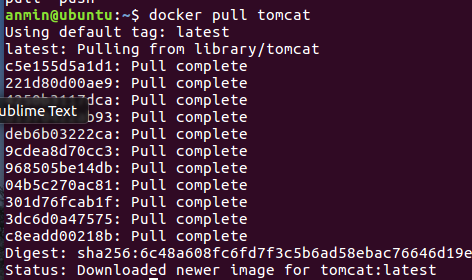
docker镜像 联合文件系统 以tomcat为例

参考:docker命令大全
docker常用命令理解的更多相关文章
- Docker 常用命令和Dockerfile
Docker 简介 官方的解释为:Docker 是一个开源的应用容器引擎,让开发者可以打包他们的应用以及依赖包到一个可移植的镜像中,然后发布到任何流行的 Linux或Windows 机器上,也可以实现 ...
- [转帖]Docker常用命令总结
Docker常用命令总结 http://www.ha97.com/5546.html 发表于: Linux, 互联网, 虚拟化与云计算 | 作者: 博客教主 标签: docker,常用命令,总结 PS ...
- Docker常用命令速查手册(华贵铂金版)
原创声明:作者:Arnold.zhao 博客园地址:https://www.cnblogs.com/zh94 Docker常用命令速查手册 搜索仓库镜像 docker search nginx 获取 ...
- docker常用命令、镜像命令、容器命令、数据卷,使用dockerFile创建镜像,dockefile的语法规则。
一.docker常用命令? 1. 常用帮助命令 1.1 docker的信息以及版本号 /* docker info 查看docker的信息 images2 docker本身就是一个镜像. docker ...
- 关于Docker 常用命令
Docker 常用命令 分类列一下常用的CLI命令 仓库相关 search/ pull / push / login etc. 例:docker pull ubuntu 从仓库下载ubuntuimag ...
- 【Docker】(3)---linux部署Docker、Docker常用命令
linux部署Docker.Docker常用命令 本次部署Linux版本:CentOS 7.4 64位. 说明: 因为Docker是基于Linux 64bit的 所以Docker要求64位的系统且内核 ...
- Docker常用命令(二)
Docker常用命令 查看Docker所有正在运行的容器 docker ps 查看Docker已退出的容器 docker ps -a 查看Docker所有镜像 docker images 删除镜像 删 ...
- Docker应用二:docker常用命令介绍
Docker常用命令使用介绍 docker中常用的命令: 1.docker search image_name:搜查镜像 2.docker pull image_name:从镜像库中拉去镜像 3.d ...
- Docker常用命令汇总,和常用操作举例
Docker命令 docker 常用命令如下 管理命令: container 管理容器 image 管理镜像 network 管理网络 node 管理Swarm节点 plugin 管理插件 secre ...
随机推荐
- 图像处理之基础---图像缩放中的双线性插值c实现
在进入频域变换之前, 我们还是轻松一下,再搞点平面上的变化来看看.这把选了一个双线性插值(Bilinear interpolation)来实现是源于看到了csdn上别人的问题, 权且实现一个函数,方便 ...
- B. Amr and The Large Array(Codeforces Round #312 (Div. 2)+找出现次数最多且区间最小)
B. Amr and The Large Array time limit per test 1 second memory limit per test 256 megabytes input st ...
- 逆向碰到3des分析
1.ios 某个app碰到涉及3des的解密函数. 2.底层调用的库函数. 3.对比CCCrypt的头文件 CCCryptorStatus CCCrypt( CCOperation op, /* kC ...
- Html.RenderPartial使用三个参数
Html.RenderPartial("usercontrolurl", model, ViewDataDictionary) 当使用三个参数时可以这样使用: var data = ...
- 【NOI 2007】 社交网络
[题目链接] 点击打开链接 [算法] 首先,跑floyd,计算最短路和最短路径数 然后,计算答案,枚举k,s,t,若dist[s][k] + dist[k][t] = dist[s][t], 那么,点 ...
- 配置文件git config介绍
Git有一个工具被称为git config,它允许你获得和设置配置变量:这些变量可以控制Git的外观和操作的各个方面. 一. 配置文件的存储位置 这些变量可以被存储在三个不同的位置: 1./etc/g ...
- 使用JS准确获取URL网址中参数的几种方法
记录下使用JS准确获取URL网址中参数的方法: 参考链接1. https://blog.csdn.net/Zhihua_W/article/details/54845945?utm_source=bl ...
- 2017年最新VOS2009/VOS3000最新手机号段导入文件(手机归属地数据)
VOS2009.vos3000.vos5000最新手机号段归属地数据库导入文件. 基于2017年4月最新版手机号段归属地制作 共360569条记录,兼容所有版本的昆石VOS,包括VOS2009.vos ...
- 栗染-Not enough physical memory is available to power on this virtual machine with its configured settings.
这是在打开虚拟机的时候报的错 解决办法:打开虚拟机的时候选择以管理员身份运行()目测可以 原文参考来自:http://blog.csdn.net/qq_35757415/article/details ...
- 编写第一Spring程序
构建Spring项目 通过https://start.spring.io/来构建项目,在这里我选择了两个依赖,web 和 Actuator. 项目结构 通过eclipse导入项目,可以看到这是一个标准 ...