
C# wpf InkCanvas 保存图片jpg

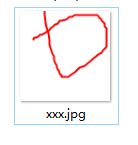
前端xaml页面代码
<Window x:Class="WpfApplication6.MainWindow"

        xmlns="http://schemas.microsoft.com/winfx/2006/xaml/presentation"

        xmlns:x="http://schemas.microsoft.com/winfx/2006/xaml"

        Title="MainWindow" Height="" Width="">

    <Grid>

        <Canvas x:Name="Screen" Width="96  " Height="">

            <InkCanvas x:Name="inkCanvas" Height="" Width="" Canvas.Left="-203" Canvas.Top="-108" />

            <TextBlock Canvas.Left="" Canvas.Top="" x:Name="VSSize" ></TextBlock>

        </Canvas>

        <Button Content="保存" Height="" HorizontalAlignment="Right" Margin="0,274,0,12" Name="button1" Width="" Click="button1_Click" />

    </Grid>

</Window>
后台cs页面代码
using System;

using System.Collections.Generic;

using System.Linq;

using System.Text;

using System.Windows;

using System.Windows.Controls;

using System.Windows.Data;

using System.Windows.Documents;

using System.Windows.Input;

using System.Windows.Media;

using System.Windows.Media.Imaging;

using System.Windows.Navigation;

using System.Windows.Shapes;

using System.IO;

using System.Windows.Ink;

namespace WpfApplication6

{

    /// <summary>

    /// MainWindow.xaml 的交互逻辑

    /// </summary>

    public partial class MainWindow : Window

    {

        DrawingAttributes drawingAttributes;

        public MainWindow()

        {

            InitializeComponent();

            //创建 DrawingAttributes 类的一个实例

            drawingAttributes = new DrawingAttributes();

            //将 InkCanvas 的 DefaultDrawingAttributes 属性的值赋成创建的 DrawingAttributes 类的对象的引用

            //InkCanvas 通过 DefaultDrawingAttributes 属性来获取墨迹的各种设置,该属性的类型为 DrawingAttributes 型

            inkCanvas.DefaultDrawingAttributes = drawingAttributes;

            //设置 DrawingAttributes 的 Color 属性设置颜色

            drawingAttributes.Color = Colors.Red;

        }

        private void button1_Click(object sender, RoutedEventArgs e)

        {

            RenderTargetBitmap rtb = new RenderTargetBitmap(, , this.Screen.Width, this.Screen.Height, PixelFormats.Default);

            rtb.Render(this.inkCanvas);

            BmpBitmapEncoder encoder = new BmpBitmapEncoder();

            encoder.Frames.Add(BitmapFrame.Create(rtb));

            string file = "d:\\xxx.jpg";

            using (Stream stm = File.Create(file))

            {

                encoder.Save(stm);

            }

        }

    }

}
C# wpf InkCanvas 保存图片jpg的更多相关文章
- WPF InkCanvas 毛笔效果
原文:WPF InkCanvas 毛笔效果 1.先来看看InkCanvas的一般用法: <InkCanvas> <InkCanvas.DefaultDrawingAttrib ...
- WPF InkCanvas 画图 基础使用教程
大家好,由于很多原因,我有很长一段时间没有在 CSDN 上分享我的学习成果了,如今终于可以回归分享之路了. 之前在做一个项目的时候,想在一个区域里绘制自己的图形,于是上网搜索资料,无意中找到了 Ink ...
- WPFのInkCanvas作为蒙版透明笔迹不透明
本人最近利用inkcavas做一个蒙版的功能,结果发现笔迹稀释了,经过一番查找发现:应该讲inkcavas的背景设置为白色,然后透明,而不是将整个控件透明,具体代码: <InkCanvas Na ...
- WPF InkCanvas EditingMode为Select时 在其选择时各种事件中撤销Select模式的方法
InkCanvas有多种输入模式. 通过InkCanvasEditingMode来进行对其调整 分别是 None=0// 忽略鼠标和手写笔输入 Ink = 1// 允许用户绘制批注,默认模式.使用鼠标 ...
- WPF InkCanvas MouseDown及MouseLeftButtonDown事件不触发的代替事件
PreviewMouseDown事件可以触发 再通过e.LeftButton 的状态判断是否按钮被按下 特此备忘
- WPF InkCanvas 书写毛笔效果
https://www.cnblogs.com/younShieh/p/10602787.html
- WPF 毛笔字
1.先来看看InkCanvas的一般用法: <InkCanvas> <InkCanvas.DefaultDrawingAttributes> < ...
- 多点触摸画板(MultiTouchCanvas)
这是个简单的支持多点触摸的画板控件, 绘制功能基于WPF InkCanvas,也是我drawTool系列文章的开篇. 阅读该文章后可能产生一些问题: 1. 如果对生成的笔迹对象进行控制 如果要对生成的 ...
- WPF布局管理之Canvas、InkCanvas (转)
一.Canvas 在WPF中子元素的绝对定位的布局控件 其子元素使用Width.Height定义元素的宽度和高度 使用Convas.Left(Convas.Right).Convas.Top(Conv ...
随机推荐
- python之socket运用2
今天实现在客户端和服务端之间进行持续的通信 客户端代码 import socket ip_port = ("127.0.0.1",3000) sk = socket.socket( ...
- C#控制台进度条(Programming Progress bar in C# Consle application)
以下代码从Stack Overflow,觉得以后会用到就收藏一下,我是辛勤的搬运工,咿呀咿呀哟- 1.showing percentage in .net console application(在. ...
- 菜刀连接webshell
中国菜刀,一个非常好用而又强大的webshell,它可不是用来切菜的做饭的道具哦,是一款专业的网站管理软件,大小只有300多KB,真是小巧实用啊!不过被不法分子利用到,就是一个黑站的利器了.我记得以前 ...
- Golang之hello,beego
学习谢大神的beego记录 过程: 目录结构: 编译命令: go build -o myBeego.exe go_dev/day13/beego_example/main执行myBeego.exe即可 ...
- Windows下误删资料的恢复
只要三步,就能找回你删掉并清空回收站的东西 : 1.打开“运行”消息框,然后输入regedit (打开注册表) 2.依次展开:HEKEY——LOCAL——MACHIME/SOFTWARE/micros ...
- axios 设置拦截器 全局设置带默认参数(发送 token 等)
应用场景: 1,每个请求都带上的参数,比如token,时间戳等. 2,对返回的状态进行判断,比如token是否过期 代码如下: [javascript] view plain copy axios.i ...
- Laravel 5.4+Vue.js 初体验:Laravel下配置运行Vue.js
生产材料PHP:PHP 5.6+Laravel 5.4:https://github.com/laravel/laravel/releases/Composer:http://getcomposer. ...
- mysql 导入导出摘要
1.导入by数据文件. mysql>load data infile '文件路径' into table 表名 fields terminated by '字段分隔符' lines termin ...
- 简单的socket编程
1.socket 服务器搭建 实例化socket服务器,循环获取请求 package com.orange.util; import java.io.IOException; import java. ...
- 2018.09.27 bzoj4300: 绝世好题(二进制dp)
传送门 简单dp. 根据题目的描述. 如果数列bn{b_n}bn合法. 那么有:bi−1b_{i-1}bi−1&bi!=0b_i!=0bi!=0,因此我们用f[i]f[i]f[i]表示数 ...