
exception http://java.sun.com/jsp/jstl/core cannot be resolved in either web.xml or the jar files deployed with this application
http://java.sun.com/jsp/jstl/core cannot be resolved in either web.xml or the jar files deployed with this application
CreationTime--2018年8月6日15点16分
Author:Marydon
1.情景展示
在eclipse下,启动成功后,项目网页能正常打开,但是在服务器的tomcat上运行时,报错:

2.问题分析
主要原因:项目需要jstl标签库,在jsp页面引入jstl时报错
在eclipse中为什么不会报错?
调用jstl标签库需要引入jstl的jar包,在eclipse下web项目需绑定tomcat,
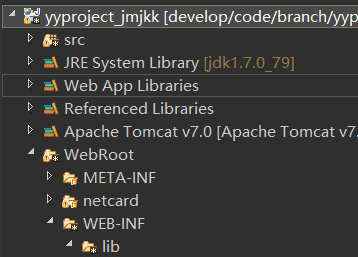
tomcat的lib目录下有jstl.jar包,eclipse会自动将lib下的jar包绑定到项目当中
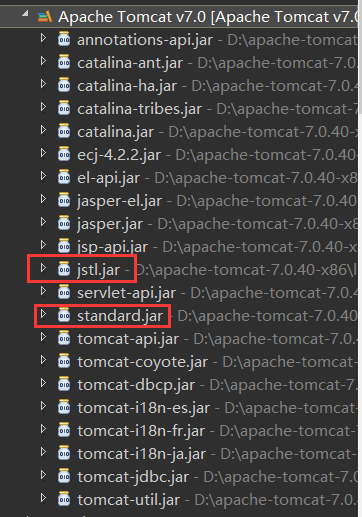
所以,项目可以正常访问。
3.解决方案
添加jar包并构建到项目当中。
第一步:jar包
方式一:
jstl1.1版本 由2个必要包构成:standard-1.1.jar和jstl1.1.jar;
方式二:推荐使用
jstl1.2版本 只有一个必要包jstl1.2.jar。
tomcat6.0既支持jstl1.2版本,也支持jstl1.1版本
然后,将所需jar包拷贝到WEB-INF/lib目录下
第二步:构建项目
选中jar包-->右键Build Path-->Add to Build Path
exception http://java.sun.com/jsp/jstl/core cannot be resolved in either web.xml or the jar files deployed with this application的更多相关文章
- exception The absolute uri: [http://java.sun.com/jsp/jstl/core] cannot be resolved in either web.xml or the jar files deployed with this application
1.情景展示 eclipse,运行web项目时,报错信息如下: The absolute uri: [http://java.sun.com/jsp/jstl/core] cannot be ...
- maven jstl The absolute uri: http://java.sun.com/jsp/jstl/core cannot be resolved in either web.xml or the jar files deployed with this application
maven jstl 报错 HTTP Status 500 – Internal Server Error Type Exception Report Message The absolute uri ...
- The absolute uri: http://java.sun.com/jsp/jstl/core cannot be resolved in either web.xml or the jar files deployed with this application问题解决方案参考
错误信息:The absolute uri: http://java.sun.com/jsp/jstl/core cannot be resolved in either web.xml or the ...
- The absolute uri: [http://java.sun.com/jsp/jstl/core] cannot be resolved in either web.xml or the jar files deployed with this application] with root cause异常处理及解释
1.问题描述: 在web的jsp文件中想用jstl这个标准库,在运行的时候很自然的引用jar包如下: <dependency> <groupId>javax.servlet.j ...
- org.apache.jasper.JasperException: The absolute uri: http://java.sun.com/jsp/jstl/core cannot be resolved in either web.xml or the jar files deployed with this application
编程中遇到:org.apache.jasper.JasperException: The absolute uri: http://java.sun.com/jsp/jstl/core cannot ...
- http://java.sun.com/jsp/jstl/core cannot be resolved in either web.xml or the jar files deployed wit
异常:The absolute uri: http://java.sun.com/jsp/jstl/core cannot be resolved in either web.xml or the j ...
- This absolute uri http://java.sun.com/jsp/jstl/core cannot be resolved in either web.xml or the jar files deployed with this application
部署生产环境出现以上错误,原因是jsp页面中使用了jstl的标签,但没有导入相应的jar包.因为开发环境 myeclipse10 自带类库已经集成 解决方法 ①将jstl.jar和standard.j ...
- maven使用jstl表达式和The absolute uri: http://java.sun.com/jsp/jstl/core cannot be resolved in either web.xml or the jar files deployed with this application解决
maven 中使用jstl表达式中出现如上错误.原因: 1.由于在maven中的web项目没有自动依赖jstl的jar 未在pom文件中添加jstl相关的jar <!--jstl表达式--> ...
- HTTP Status 500 - The absolute uri: http://java.sun.com/jsp/jstl/core cannot be resolved in either web.xml or the jar files deployed with this application 错误
解决方法链接:http://stackoverflow.com/questions/17709076/http-status-500-the-absolute-uri-http-java-sun-co ...
随机推荐
- oracle systemtap tracing
https://github.com/LucaCanali?tab=repositories https://github.com/LucaCanali/Linux_tracing_scripts/t ...
- C#程序集系列13,如何让CLR选择不同版本的程序集
本篇主要体验,在存在多个版本程序集的情况下,如何让CLR选择哪个版本程序集运行,以及程序集版本的切换. 分别生成非强名称程序集不同版本 □ 生成某个版本的程序集 →清理F盘as文件夹,剩下如下文件 → ...
- java跨域解决
import java.util.ArrayList; import java.util.List; import org.springframework.context.annotation.Bea ...
- [Erlang 0004] Centos 源代码编译 安装 Erlang
原文地址: http://www.cnblogs.com/me-sa/archive/2011/07/09/erlang0004.html 由于最终部署的生产环境是Centos,所以我需要在Cento ...
- 算法:堆排序(Heap Sort)
备注 考虑到 Heap 的特性,很容易想到将其用作排序的用处,为了提高效率需要适当的改进一下,如:in place remove 和 in place move down. 代码 using Syst ...
- [java web 入门](一)MyEclipse & HelloWorld 记录
第一部,下载安装MyEclipse for mac. http://downloads.myeclipseide.com/downloads/products/eworkbench/2014/inst ...
- android 内存溢出oom错误的一些小见解
转:http://blog.csdn.net/xuhui_7810/article/details/9493681 我们在代码里调用setBackgroundResource(int resid)来设 ...
- Mac下在Intellij Idea里设置VM运行参数的正确方法
打开应用程序,右键选择显示包内容 可以看到idea的初始jvm配置的位置: 但是真正生效的配置是个人目录下的此文件,注意每个版本都会重新生成一次 设置idea使其在右下角的位置显示内存使用情况:483 ...
- JavaBean的应用
1. 获取JavaBean属性信息 例1.1 在JSP页面中显示JavaBean属性信息. (1)创建名称为Produce的类,该类是封装商品对象的JavaBean,在Produce类中创建商品属性, ...
- 线程池的corePoolSize、maximumPoolSize和poolSize
什么是线程池: 为了避免系统频繁的创建和销毁线程,我们可以将创建的线程进行复用.在线程池中总有那么几个活跃的线程,也有一定的最大值限制,一个业务使用完线程之后,不是立即销毁而是将其放入到线程池中,从而 ...