
Thinkphp 3.2.3配置百度编辑器(UEditor)
Thinkphp 3.2.3配置百度编辑器(UEditor)
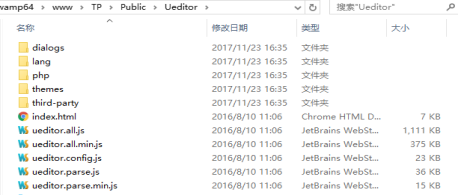
1、把百度编辑器放到项目的Public目录下 命名为:UEditor
2、找到thinkphp框架系统自带类中的Html.class.php,并且添加在switch(strtoupper($type)) {}中添加代码

case 'UEDITOR':
$parseStr = "\n".'<script type="text/javascript" charset="utf-8"
src="__ROOT__/Public/UEditor/ueditor.config.js"></script>'."\n".'
<script type="text/javascript" charset="utf-8"
src="__ROOT__/Public/UEditor/ueditor.all.js"></script>'."\n".'
<script type="text/plain" id="'.$id.'" name="'.$name.'" style="'
.$style.'">'.$content.'</script>'."\n".'<script type="text/javascript">var ue_'.$id.' = UE.getEditor("'.$id.'");</script>'."\n";
break;
3. 在项目文件的www/myproject/Application/Admin/Conf目录下新建ueditconfig.json文件,

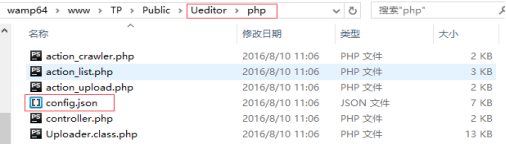
4. 把ueditor源码的php文件夹下的config.json中的内容复制到ueditconfig.json文件中
5.在百度编辑器目录的ueditor.config.js文件内修改:(好像可以省略)
// 服务器统一请求接口路径
, serverUrl: URL + "../../index.php/Home/Index/ueditup"

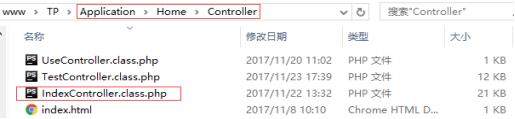
6. 就是你需要的用TP自带上传类处理上传了,在Home模块的Index控制器里加上下面的方法:
public function ueditup(){
header("Content-Type: text/html; charset=utf-8");
$editconfig = json_decode(preg_replace("/\/\*[\s\S]+?\*\//", "", file_get_contents(COMMON_PATH."Conf/ueditconfig.json")), true);
//dump($editconfig);
$action = I('get.action');
//echo $action;
switch ($action) {
case 'config':
$result = json_encode($editconfig);
break;
/* 上传图片 */
case 'uploadimage':
$result = $this->editup('img');
break;
/* 上传涂鸦 */
case 'uploadscrawl':
$result = $this->editup('img');
break;
case 'uploadvideo':
$result = $this->editup('video');
break;
case 'uploadfile':
$result = $this->editup('file');
//$result = include("action_upload.php");
break;
/* 列出图片 */
case 'listimage':
$result = $this->editlist('listimg');
break;
/* 列出文件 */
case 'listfile':
$result = $this->editlist('listfile');
break;
/* 抓取远程文件 */
case 'catchimage':
//$result = include("action_crawler.php");
break;
default:
$result = json_encode(array(
'state'=> '请求地址出错'
));
break;
}
/* 输出结果 */
if (isset($_GET["callback"])) {
if (preg_match("/^[\w_]+$/", $_GET["callback"])) {
echo htmlspecialchars($_GET["callback"]) . '(' . $result . ')';
} else {
echo json_encode(array(
'state'=> 'callback参数不合法'
));
}
} else {
echo $result;
}
}
public function editup($uptype){
if($this->islogin==false){
$_re_data['state'] = '请登陆';
return json_encode($_re_data);
}
$editconfig = json_decode(preg_replace("/\/\*[\s\S]+?\*\//", "", file_get_contents(COMMON_PATH."Conf/ueditconfig.json")), true);
switch ($uptype) {
case 'img':
$upload = new \Think\Upload();// 实例化上传类
$upload->rootPath = '.';
$upload->maxSize = $editconfig['imageMaxSize'];
$upload->exts = explode('.', trim(join('',$editconfig['imageAllowFiles']),'.'));
$upload->savePath = $editconfig['imagePathFormat'];
$upload->saveName = time().rand(100000,999999);
$info = $upload->uploadOne($_FILES[$editconfig['imageFieldName']]);
break;
case 'file':
$upload = new \Think\Upload();// 实例化上传类
$upload->rootPath = '.';
$upload->maxSize = $editconfig['fileMaxSize'];
$upload->exts = explode('.', trim(join('',$editconfig['fileAllowFiles']),'.'));
$upload->savePath = $editconfig['filePathFormat'];
$upload->saveName = time().rand(100000,999999);
$info = $upload->uploadOne($_FILES[$editconfig['fileFieldName']]);
break;
case 'video':
$upload = new \Think\Upload();// 实例化上传类
$upload->rootPath = '.';
$upload->maxSize = $editconfig['videoMaxSize'];
$upload->exts = explode('.', trim(join('',$editconfig['videoAllowFiles']),'.'));
$upload->savePath = $editconfig['videoPathFormat'];
$upload->saveName = time().rand(100000,999999);
$info = $upload->uploadOne($_FILES[$editconfig['videoFieldName']]);
break;
default:
return false;
break;
}
if(!$info) {// 上传错误提示错误信息
$_re_data['state'] = $upload->getError();
$_re_data['url'] = '';
$_re_data['title'] = '';
$_re_data['original'] = '';
$_re_data['type'] = '';
$_re_data['size'] = '';
}else{// 上传成功 获取上传文件信息
$_re_data['state'] = 'SUCCESS';
$_re_data['url'] = $info['savepath'].$info['savename'];
$_re_data['title'] = $info['savename'];
$_re_data['original'] = $info['name'];
$_re_data['type'] = '.'.$info['ext'];
$_re_data['size'] = $info['size'];
}
return json_encode($_re_data);
}
public function editlist($listtype){
$editconfig = json_decode(preg_replace("/\/\*[\s\S]+?\*\//", "", file_get_contents(COMMON_PATH."Conf/ueditconfig.json")), true);
switch ($listtype) {
case 'listimg':
$allowFiles = $editconfig['imageManagerAllowFiles'];
$listSize = $editconfig['imageManagerListSize'];
$path = $editconfig['imageManagerListPath'];
break;
case 'listfile':
$allowFiles = $editconfig['fileManagerAllowFiles'];
$listSize = $editconfig['fileManagerListSize'];
$path = $editconfig['fileManagerListPath'];
break;
default:
return false;
break;
}
/* 获取参数 */
$size = isset($_GET['size']) ? htmlspecialchars($_GET['size']) : $listSize;
$start = isset($_GET['start']) ? htmlspecialchars($_GET['start']) : 0;
$end = $start + $size;
/* 获取文件列表 */
$path = $_SERVER['DOCUMENT_ROOT'] . (substr($path, 0, 1) == "/" ? "":"/") . $path;
$files = $this->getfiles($path, $allowFiles);
if (!count($files)) {
return json_encode(array(
"state" => "no match file",
"list" => array(),
"start" => $start,
"total" => count($files)
));
}
/* 获取指定范围的列表 */
$len = count($files);
for ($i = min($end, $len) - 1, $list = array(); $i < $len && $i >= 0 && $i >= $start; $i--){
$list[] = $files[$i];
}
//倒序
//for ($i = $end, $list = array(); $i < $len && $i < $end; $i++){
// $list[] = $files[$i];
//}
/* 返回数据 */
$result = json_encode(array(
"state" => "SUCCESS",
"list" => $list,
"start" => $start,
"total" => count($files)
));
return $result;
}
/**
* 遍历获取目录下的指定类型的文件
* @param $path
* @param array $files
* @return array
*/
public function getfiles($path, $allowFiles, &$files = array())
{
if (!is_dir($path)) return null;
if(substr($path, strlen($path) - 1) != '/') $path .= '/';
$handle = opendir($path);
while (false !== ($file = readdir($handle))) {
if ($file != '.' && $file != '..') {
$path2 = $path . $file;
if (is_dir($path2)) {
$this->getfiles($path2, $allowFiles, $files);
} else {
if(in_array('.'.pathinfo($file, PATHINFO_EXTENSION), $allowFiles)){
$files[] = array(
'url'=> substr($path2, strlen($_SERVER['DOCUMENT_ROOT'])),
'mtime'=> filemtime($path2)
);
}
}
}
}
return $files;
}
(7.8在一个页面进行)
7. 在需要用到编辑器的模板head内加上: (哪里需要它就就调用)
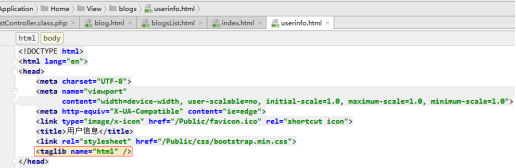
<taglib name="html" />
8. 在用到编辑器的地方加上:(哪里需要它就就调用)

<html:editor id="info" name="info" type="UEDITOR" >{$info.info}</html:editor>
综上效果

补充:使用UEDITOR存在数据库的资料带有标签和样式
当我们打印值的时候会出现如下情况(需要)

<{:htmlspecialchars_decode($xx['xx'])}>

Thinkphp 3.2.3配置百度编辑器(UEditor)的更多相关文章
- 关于百度编辑器UEditor的一点说明
大家在使用的时候要特别注意editor_config.js中的“URL”这个参数 我的理解:1.这个参数是editor整个结构的总路径 2.首先要把这个路径配置好了.才能正常的显示, ...
- [转载]百度编辑器-Ueditor使用
前段时间发表过一篇关于“KindEditor在JSP中使用”的博文.这几天在沈阳东软进行JavaWeb方面的实习工作,在一个CMS系统的后台和博客板块中又要用到文本编辑器,突然发现了这个——百度编辑器 ...
- 百度编辑器 ueditor .net开发
ueditor1.4.3 下载地址:http://pan.baidu.com/s/1bnCQVtd <!--editor--> <script type="text/j ...
- drupal7 安装百度编辑器Ueditor及后续使用
参考文章:drupal7安装百度编辑器ueditor 一.下载 1.需要下载安装的模块: 1.1.wysiwyg 1.2.ueditor 1.3Libraries 下载后安装在\sites\all\m ...
- 解决:百度编辑器UEditor,怎么将图片保存到图片服务器,或者上传到ftp服务器的问题(如果你正在用UE,这篇文章值得你看下)
在使用百度编辑器ueditor的时候,怎么将图片保存到另一个服务器,或者上传到ftp服务器?这个问题,估计很多使用UE的人会遇到.而且我百度过,没有找到这个问题的解决方案.那么:本篇文章就很适合你了. ...
- 百度编辑器UEditor,保存图片的配置问题
前言: 在使用百度编辑器UEditor的时候,如何将图片保存到服务器,我刚开始以为是要自己写上传文件的方法,后来发现只需要配置一下即可,如果你也正在使用百度富文本编辑器UEditor的话,这篇文章将非 ...
- 百度编辑器ueditor插入表格没有边框颜色的解决方法
附:从word excel 中 复制的表格提交后无边框,参考这个同学的,写的很详细: http://blog.csdn.net/lovelyelfpop/article/details/51678 ...
- 百度编辑器ueditor插入表格没有边框,没有颜色的解决方法 2015-01-06 09:24 98人阅读 评论(0) 收藏
百度富文本编辑器..很强大.. - - ,不过有些BUG..真的很无解.. 最近用这个,发现上传的表格全部没有表框.. 解决办法如下: 转载的.. 百度编辑器ueditor插入一个表格后,在编辑过程中 ...
- 百度编辑器ueditor 异步加载时,初始化没办法赋值bug解决方法
百度编辑器ueditor 异步加载时,初始化没办法赋值bug解决方法 金刚 前端 ueditor 初始化 因项目中使用了百度编辑器——ueditor.整体来说性能还不错. 发现问题 我在做一个编辑页面 ...
随机推荐
- golang array, slice, string笔记
本来想写一篇关于golang io的笔记,但是在学习io之前必须了解array, slice, string概念,因此将在下篇写golang io. array: 数组的长度是该数组类型的一部分, ...
- saprk2 structed streaming
netcat (windows) >nc -L -p 9999 import java.sql.Timestamp import org.apache.spark.sql.SparkSessio ...
- 5.WebAPI的Filter
1.WebApi的Filter介绍: 大家知道什么是AOP(aspect oriented programming)吗?它是可以通过预编译方式和运行期动态代理实现在不修改源代码的情况下给程序动态统一添 ...
- C#计算机性能参数
Process proc = Process.GetCurrentProcess(); //string info = "内存:" + (Environment.WorkingSe ...
- mysql 数据库优化第一篇(基础)
Mysql数据库优化 1. 优化概述 存储层:存储引擎.字段类型选择.范式设计 设计层:索引.缓存.分区(分表) 架构层:多个mysql服务器设置,读写分离(主从模式) sql语句层:多个sql语句都 ...
- pageadmin CMS网站制作教程:模板概念解释
pageadmin CMS网站建设教程:模板概念解释 1.模板页 又叫视图页面,PageAdmin后台栏目或信息中用到的模板页面的统称,格式必须是.cshtml后缀文件,前端人员制作的页面默认都是ht ...
- Meteor in Action(一)起步
杜撰的名字,这个系列文章旨在记录工作中开发APP所要学习meteor的过程. 最简单的例子,运行Meteor自带的缺省的Hello world例子. 安装好Meteor后,建立一个空白目录. 然后: ...
- python 多线程示例
原文链接:http://www.cnblogs.com/whatisfantasy/p/6440585.html 1 概念梳理: 1.1 线程 1.1.1 什么是线程 线程是操作系统能够进行运算调度的 ...
- JVM概念总结:数据类型、堆与栈
Java虚拟机中,数据类型可以分为两类:基本类型和引用类型.基本类型的变量保存原始值,即:他代表的值就是数值本身: 引用类型的变量保存引用值,引用值代表了某个对象的引用而不是对象的本身,对象的本身存放 ...
- 解决ORA-21561: OID generation failed
解决ORA-21561 在linux上使用sqlplus连接oracle数据库 [root@china ~]# sqlplus test/test@ORCL SQL Production :: Cop ...