
[控件] BookTextView
BookTextView
效果
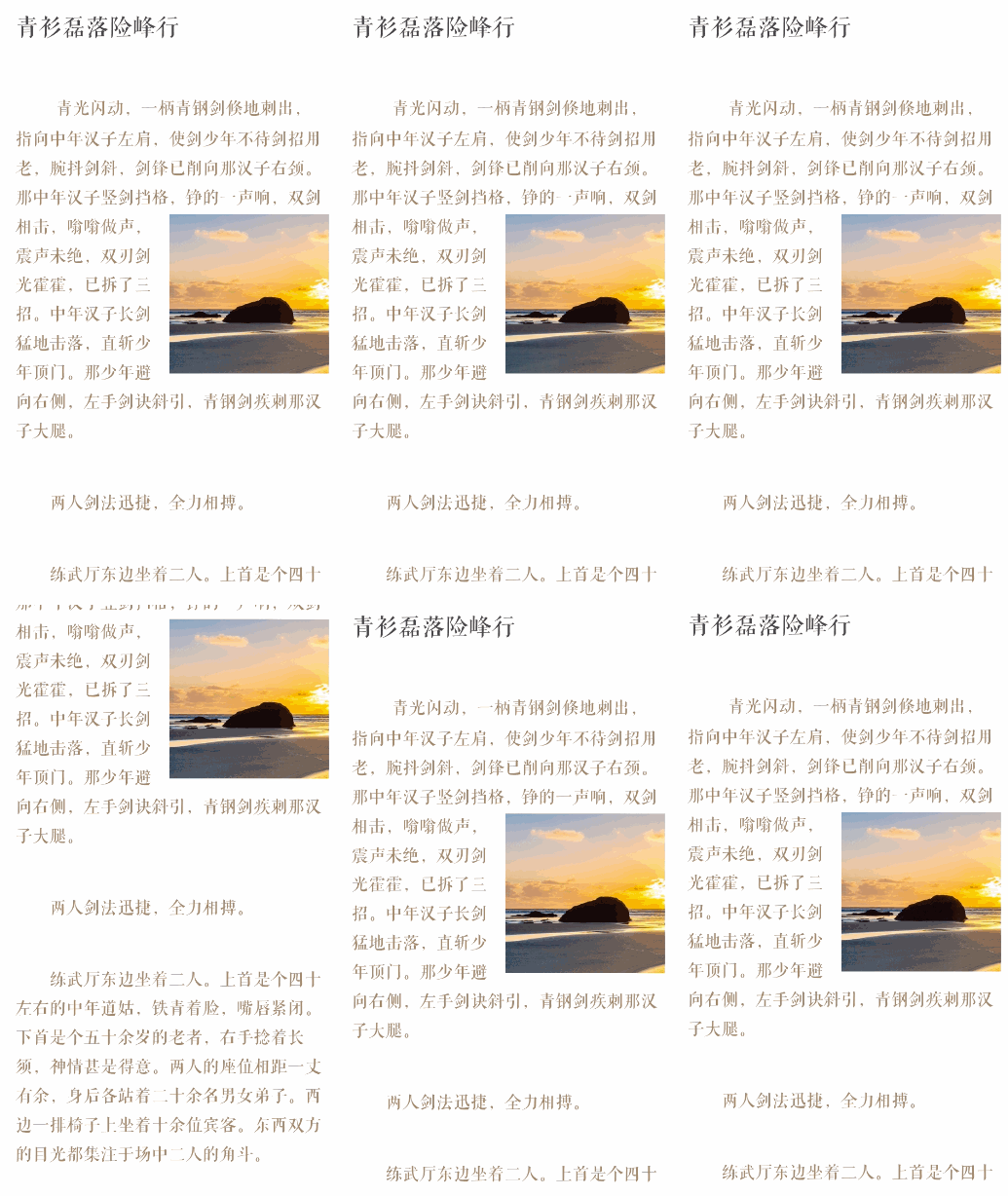
说明
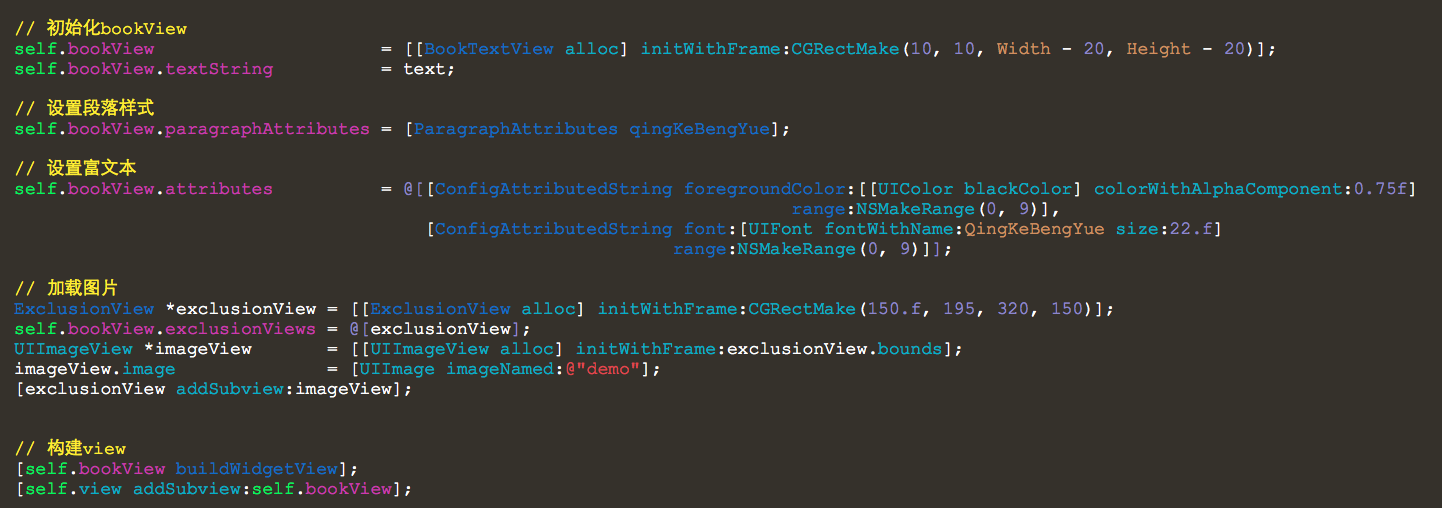
1. 支持富文本
2. 支持自定义view
3. 支持阅读百分比
源码
https://github.com/YouXianMing/UI-Component-Collection
//

//  BookTextView.h

//  InTheQuietNight

//

//  Created by YouXianMing on 15/5/18.

//  Copyright (c) 2015年 XianMingYou. All rights reserved.

//

#import <UIKit/UIKit.h>

#import "ExclusionView.h"

#import "ConfigAttributedString.h"

@interface BookTextView : UIView

// 要显示的文本

@property (nonatomic, strong)   NSString       *textString;

// 段落样式的设置

@property (nonatomic, strong)   NSDictionary   *paragraphAttributes;

// 富文本参数数组(ConfigAttributedString对象的数组)

@property (nonatomic, strong)   NSArray        *attributes;

// 计算出的文本的高度

@property (nonatomic, readonly) CGFloat         textHeight;

// 当前文本已读百分比

@property (nonatomic, readonly) CGFloat         currentPercent;

// 存储的图文混排的views

@property (nonatomic, strong)   NSArray        *exclusionViews;

/**

 *  构建出组件(设置完所有参数后再做)

 */

- (void)buildWidgetView;

/**

 *  移动到指定的位置(此方法只有延时执行才有效果,比如延时执行0.01s)

 *

 *  @param position 文本的高度位置

 */

- (void)moveToTextPosition:(CGFloat)position;

/**

 *  移动到指定的百分比(此方法只有延时执行才有效果,比如延时执行0.01s)

 *

 *  @param percent 百分比

 */

- (void)moveToTextPercent:(CGFloat)percent;

@end
//

//  BookTextView.m

//  InTheQuietNight

//

//  Created by YouXianMing on 15/5/18.

//  Copyright (c) 2015年 XianMingYou. All rights reserved.

//

#import "BookTextView.h"

typedef enum : NSUInteger {

    EBOOK_NONE,              // 什么也不做

    EBOOK_CALCULATE_HEIGHT,  // 计算文本高度

} EBookTextViewStatus;

@interface BookTextView ()<UITextViewDelegate> {

    EBookTextViewStatus _bookStatus;

    CGFloat             _tmpOffsetY;

    CGFloat             _tmpPercent;

}

@property (nonatomic, strong)   UITextView     *textView;

@property (nonatomic)           CGFloat         textHeight;

@property (nonatomic)           CGFloat         currentPercent;

@end

@implementation BookTextView

- (void)buildWidgetView {

    // 获取长宽

    CGFloat width  = self.frame.size.width;

    CGFloat height = self.frame.size.height;

    // 创建文本容器并设置段落样式

    NSTextStorage *storage = [[NSTextStorage alloc] initWithString:self.textString

                                                        attributes:self.paragraphAttributes];

    // 设置富文本

    for (int count = ; count < _attributes.count; count++) {

        ConfigAttributedString *oneConfig = _attributes[count];

        [storage addAttribute:oneConfig.attribute

                        value:oneConfig.value

                        range:oneConfig.range];

    }

    // 管理器

    NSLayoutManager *layoutManager = [NSLayoutManager new];

    [storage addLayoutManager:layoutManager];

    // 显示的容器

    NSTextContainer *textContainer = [NSTextContainer new];

    CGSize size                    = CGSizeMake(width, MAXFLOAT);

    textContainer.size             = size;

    [layoutManager addTextContainer:textContainer];

    // 给TextView添加带有内容和布局的容器

    self.textView = [[UITextView alloc] initWithFrame:CGRectMake(, , width, height)

                                        textContainer:textContainer];

    self.textView.scrollEnabled                    = YES;

    self.textView.editable                         = NO;

    self.textView.selectable                       = NO;

    self.textView.layer.masksToBounds              = YES;

    self.textView.showsVerticalScrollIndicator     = NO;

    self.textView.delegate                         = self;

    // 如果有额外的views

    if (self.exclusionViews) {

        NSMutableArray *pathArray = [NSMutableArray arrayWithCapacity:_exclusionViews.count];

        // 添加view + 添加path

        for (int count = ; count < _exclusionViews.count; count++) {

            // 添加view

            ExclusionView *tmpView = _exclusionViews[count];

            [_textView addSubview:tmpView];

            // 添加path

            [pathArray addObject:tmpView.createUIBezierPath];

        }

        textContainer.exclusionPaths = pathArray;

    }

    // 添加要显示的view

    [self addSubview:self.textView];

    // 存储文本高度

    [self storeBookHeight];

}

- (void)storeBookHeight {

    // 先偏移到文本末尾位置

    _bookStatus = EBOOK_CALCULATE_HEIGHT;

    [UIView setAnimationsEnabled:NO];

    [self.textView scrollRangeToVisible:NSMakeRange([self.textView.text length], )];

    [UIView setAnimationsEnabled:YES];

    _bookStatus = EBOOK_NONE;

    // 再偏移到文本开头位置

    [UIView setAnimationsEnabled:NO];

    [self.textView scrollRangeToVisible:NSMakeRange(, )];

    [UIView setAnimationsEnabled:YES];

}

- (void)moveToTextPosition:(CGFloat)position {

    [self.textView setContentOffset:CGPointMake(, position) animated:NO];

}

- (void)moveToTextPercent:(CGFloat)percent {

    // 计算出百分比

    CGFloat position = .f;

    if (percent >=  && percent <= ) {

        position = percent * _textHeight;

    } else if (percent < ) {

        position = .f;

    } else {

        position = _textHeight;

    }

    // 移动到指定的位置

    [self.textView setContentOffset:CGPointMake(, position) animated:NO];

}

- (void)scrollViewDidScroll:(UIScrollView *)scrollView {

    // Y轴偏移量

    _tmpOffsetY = scrollView.contentOffset.y;

    if (_bookStatus == EBOOK_NONE) {

        _tmpPercent = _tmpOffsetY / _textHeight;

        if (_tmpPercent >=  && _tmpPercent <= ) {

            _currentPercent = _tmpPercent;

        } else if (_tmpPercent < ) {

            _currentPercent = .f;

        } else {

            _currentPercent = .f;

        }

        NSLog(@"%f", _currentPercent);

    } else if (_bookStatus == EBOOK_CALCULATE_HEIGHT) {

        self.textHeight = scrollView.contentOffset.y;

    }

}

@end
[控件] BookTextView的更多相关文章
- JS调用Android、Ios原生控件
在上一篇博客中已经和大家聊了,关于JS与Android.Ios原生控件之间相互通信的详细代码实现,今天我们一起聊一下JS调用Android.Ios通信的相同点和不同点,以便帮助我们在进行混合式开发时, ...
- HTML5 progress和meter控件
在HTML5中,新增了progress和meter控件.progress控件为进度条控件,可表示任务的进度,如Windows系统中软件的安装.文件的复制等场景的进度.meter控件为计量条控件,表示某 ...
- 百度 flash html5自切换 多文件异步上传控件webuploader基本用法
双核浏览器下在chrome内核中使用uploadify总有302问题,也不知道如何修复,之所以喜欢360浏览器是因为帮客户控制渲染内核: 若页面需默认用极速核,增加标签:<meta name=& ...
- JS与APP原生控件交互
"热更新"."热部署"相信对于混合式开发的童鞋一定不陌生,那么APP怎么避免每次升级都要在APP应用商店发布呢?这里就用到了混合式开发的概念,对于电商网站尤其显 ...
- UWP开发必备:常用数据列表控件汇总比较
今天是想通过实例将UWP开发常用的数据列表做汇总比较,作为以后项目开发参考.UWP开发必备知识点总结请参照[UWP开发必备以及常用知识点总结]. 本次主要讨论以下控件: GridView:用于显示数据 ...
- 【踩坑速记】开源日历控件,顺便全面解析开源库打包发布到Bintray/Jcenter全过程(新),让开源更简单~
一.写在前面 自使用android studio开始,就被它独特的依赖方式:compile 'com.android.support:appcompat-v7:25.0.1'所深深吸引,自从有了它,麻 ...
- 对百度WebUploader开源上传控件的二次封装,精简前端代码(两句代码搞定上传)
前言 首先声明一下,我这个是对WebUploader开源上传控件的二次封装,底层还是WebUploader实现的,只是为了更简洁的使用他而已. 下面先介绍一下WebUploader 简介: WebUp ...
- Windows API 设置窗口下控件Enable属性
参考页面: http://www.yuanjiaocheng.net/webapi/create-crud-api-1-put.html http://www.yuanjiaocheng.net/we ...
- VB.NET设置控件和窗体的显示级别
前言:在用VB.NET开发射频检测系统ADS时,当激活已存在的目标MDI子窗体时,被其他子窗体遮住了,导致目标MDI子窗体不能显示. 这个问题怎么解决呢?网上看到一篇帖子VB.NET设置控件和窗体的显 ...
随机推荐
- Root-NFS: Unable to get mountd port number from server, using default
问题描述: 以前下载到开发板linux内核启动好好地,今天突然启动不了了,到达Root-NFS: Unable to get mountd port number from server, using ...
- mongodb3.4.15集群搭建
机器:ubuntu 2台 ip: 192.168.0.131 host1 192.168.0.132 host2 安装mongodb sudo apt-key adv --keyserver hkp: ...
- springboot 常用插件
热部署 使用run as -java application, 把spring-loader-1.2.4.RELEASE.jar下载下来,放到项目的lib目录中,然后把IDEA的run参数里VM参数设 ...
- SQL 集合例子
IF OBJECT_ID('tempdb..#Purchase', 'U') IS NOT NULL DROP TABLE #Purchase; CREATE TABLE #Purchase ( Pu ...
- C# 获取config文件 实体转换
随着项目的扩展,单独的key,value配置文件已经不能满足需求了 这里需要自定义配置节点,例如 <!--自定义 具体实体类配置问节点信息--> <School Name=" ...
- JavaScript 函数使用return返回值
我们可以把数据通过函数的 参数 来传入函数,也可以使用 return 语句把数据从一个函数中传出来. 举个栗子 function plusThree(num) {return num + 3;}var ...
- 350-两个阵列的交叉点II
给定两个数组,编写一个函数来计算它们的交集. 例1: 输入: nums1 = [1,2,2,1],nums2 = [2,2] 输出:[2,2] 例2: 输入: nums1 = [4,9,5],,nu ...
- tcpcopy + tcpdump 离线回放
简单来说,就是用tcpdump记录线上请求,用tcpcopy来重放,如下图所示: 有关 tcpdump 的命令详解请参考: http://www.cnblogs.com/ggjucheng/arc ...
- 解决:oracle+myBatis ResultMap 类型为 map 时返回结果中存在 timestamp 时使用 jackson 转 json 报错
前言:最近在做一个通用查询单表的组件,所以 sql 的写法就是 select *,然后 resultType="map" ,然后使用 jackson @ResponseBody 返 ...
- IntelliJ IDEA创建spring-boot项目
开发环境: jdk版本:JDK8 maven版本:maven-3.5.2 开发工具:Itellij IDEA 2017.1 前提条件:已安装以上软件并配置好jdk和maven的环境变量 创建步骤: 点 ...