
zabbix批量监控域名下nginx的访问50x状态码数量
背景:
购物车相关的站点某些页面经常出现502,如果超过一些阈值则需要报警给管理员知道 .自动发现脚本的编写
# vim /usr/local/zabbix_agents_3.2.0/scripts/store_nginx_code.sh #!/bin/bash
# function:monitor store nginx access error code store_domain_discovery () {
WEB_DOMAIN=($(cat /usr/local/zabbix_agents_3.2.0/scripts/store_site.txt|grep -v "^#"))
printf '{\n'
printf '\t"data":[\n'
for((i=;i<${#WEB_DOMAIN[@]};++i))
{
num=$(echo $((${#WEB_DOMAIN[@]}-)))
if [ "$i" != ${num} ];
then
printf "\t\t{ \n"
printf "\t\t\t\"{#SITENAME}\":\"${WEB_DOMAIN[$i]}\"},\n"
else
printf "\t\t{ \n"
printf "\t\t\t\"{#SITENAME}\":\"${WEB_DOMAIN[$num]}\"}]}\n"
fi
}
} # 统计nginx access log中的50x代码个数
error_code_count () {
web_site=$
if [ ${web_site} == 'store.wondershare.jp' ];then
/usr/bin/cat /data/www/logs/nginx_log/access/${web_site}.access.log |awk '{print $1" "$10" "$11}'|grep 'HTTP/1.1" 50'|uniq |wc -l
exit
fi
/usr/bin/cat /data/www/logs/nginx_log/access/${web_site}_access.log |awk '{print $1" "$10" "$11}'|grep 'HTTP/1.1" 50'|uniq |wc -l
} case "$1" in
store_domain_discovery)
store_domain_discovery
;;
error_code_count)
error_code_count $
;;
*) echo "Usage:$0 {store_web_discovery|error_code_count [URL]}"
;;
esac # chmod +x /usr/local/zabbix_agents_3.2.0/scripts/store_nginx_code.sh # 需要监控的日志(按照站点分类) vim /usr/local/zabbix_agents_3.2.0/scripts、store_site.txt store.aa.com
store.bb.net # 核心代码
[root@ws_store_web01:/usr/local/zabbix_agents_3.2.0/scripts]# cat error_status_count.sh
#!/bin/bash # Functions to return nginx stats function main {
web_site=$
if [ ${web_site} == 'store.cc.jp' ];then
/usr/bin/cat /data/www/logs/nginx_log/access/${web_site}.access.log |awk '{print $1" "$10" "$11}'|grep 'HTTP/1.1" 50'|uniq |wc -l
exit
fi
/usr/bin/cat /data/www/logs/nginx_log/access/${web_site}_access.log |awk '{print $1" "$10" "$11}'|grep 'HTTP/1.1" 50'|uniq |wc -l
} # Run the requested function
main $ .配置编写
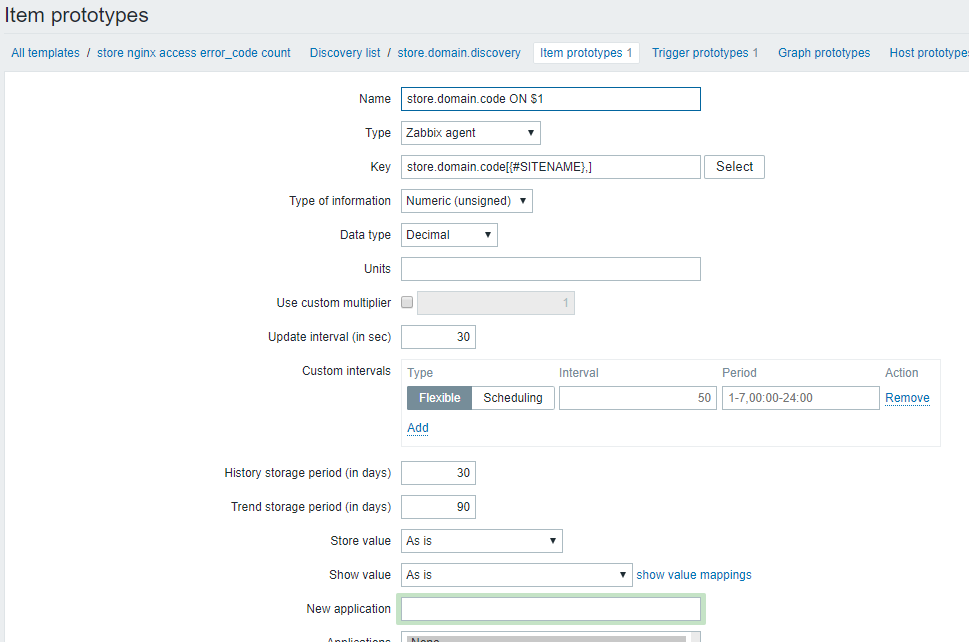
vim /usr/local/zabbix_agents_3.2.0/conf/zabbix_agentd/store_domain_discovery.conf UserParameter=store.domain.discovery,/usr/local/zabbix_agents_3.2.0/scripts/store_nginx_code.sh store_domain_discovery
UserParameter=store.domain.code[*],/usr/local/zabbix_agents_3.2.0/scripts/store_nginx_code.sh error_code_count $ 模板关键配置:
zabbix模板: <?xml version="1.0" encoding="UTF-8"?>
<zabbix_export>
<version>3.2</version>
<date>--26T08::38Z</date>
<groups>
<group>
<name>Templates</name>
</group>
</groups>
<templates>
<template>
<template>store nginx access error_code count</template>
<name>store nginx access error_code count</name>
<description/>
<groups>
<group>
<name>Templates</name>
</group>
</groups>
<applications/>
<items/>
<discovery_rules>
<discovery_rule>
<name>store.domain.discovery</name>
<type></type>
<snmp_community/>
<snmp_oid/>
<key>store.domain.discovery</key>
<delay></delay>
<status></status>
<allowed_hosts/>
<snmpv3_contextname/>
<snmpv3_securityname/>
<snmpv3_securitylevel></snmpv3_securitylevel>
<snmpv3_authprotocol></snmpv3_authprotocol>
<snmpv3_authpassphrase/>
<snmpv3_privprotocol></snmpv3_privprotocol>
<snmpv3_privpassphrase/>
<delay_flex/>
<params/>
<ipmi_sensor/>
<authtype></authtype>
<username/>
<password/>
<publickey/>
<privatekey/>
<port/>
<filter>
<evaltype></evaltype>
<formula/>
<conditions/>
</filter>
<lifetime></lifetime>
<description/>
<item_prototypes>
<item_prototype>
<name>store.domain.code ON $</name>
<type></type>
<snmp_community/>
<multiplier></multiplier>
<snmp_oid/>
<key>store.domain.code[{#SITENAME},]</key>
<delay></delay>
<history></history>
<trends></trends>
<status></status>
<value_type></value_type>
<allowed_hosts/>
<units/>
<delta></delta>
<snmpv3_contextname/>
<snmpv3_securityname/>
<snmpv3_securitylevel></snmpv3_securitylevel>
<snmpv3_authprotocol></snmpv3_authprotocol>
<snmpv3_authpassphrase/>
<snmpv3_privprotocol></snmpv3_privprotocol>
<snmpv3_privpassphrase/>
<formula></formula>
<delay_flex/>
<params/>
<ipmi_sensor/>
<data_type></data_type>
<authtype></authtype>
<username/>
<password/>
<publickey/>
<privatekey/>
<port/>
<description/>
<inventory_link></inventory_link>
<applications/>
<valuemap/>
<logtimefmt/>
<application_prototypes/>
</item_prototype>
</item_prototypes>
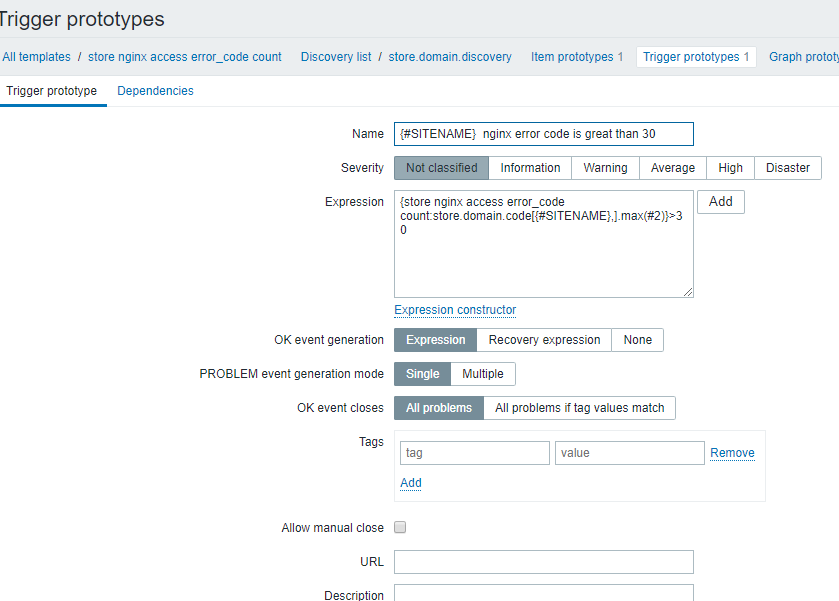
<trigger_prototypes>
<trigger_prototype>
<expression>{store nginx access error_code count:store.domain.code[{#SITENAME},].max(#)}></expression>
<recovery_mode></recovery_mode>
<recovery_expression/>
<name>{#SITENAME} nginx error code is great than </name>
<correlation_mode></correlation_mode>
<correlation_tag/>
<url/>
<status></status>
<priority></priority>
<description/>
<type></type>
<manual_close></manual_close>
<dependencies/>
<tags/>
</trigger_prototype>
</trigger_prototypes>
<graph_prototypes/>
<host_prototypes/>
</discovery_rule>
</discovery_rules>
<httptests/>
<macros/>
<templates/>
<screens/>
</template>
</templates>
</zabbix_export>

zabbix批量监控域名下nginx的访问50x状态码数量的更多相关文章
- Nginx的 HTTP 499 状态码处理
1.前言 今天在处理一个客户问题,遇到Nginx access log中出现大量的499状态码.实际场景是:客户的域名通过cname解析到我们的Nginx反向代理集群上来,客户的Web服务是由一个负载 ...
- HTTP 403 ,tomcat配置HTTPS,无法访问 返回状态码HTTP 403
为了将本机(windows系统)启动的应用以HTTPS的形式访问, 利用Keytool 生成证书之后.在tomcat的server.xml中将配置修改为如下: <Connector port=& ...
- java下使用chromedriver获取访问页面状态码
##在使用chromedriver的时候 并没有提供api来获取访问页面的状态码,但是可以打开日志来获取到 LoggingPreferences logPrefs = new LoggingPrefe ...
- zabbix 自定义监控项 获取nginx监控状态
本篇是基于zabbix 源码安装的 [root@localhost conf]# curl "http://192.168.0.73:8080/nginx_status" Acti ...
- zabbix批量监控urls的状态码
.添加url监控脚本 [root@node1 usr]# vim /usr/local/zabbix_agents_3.2.0/scripts/web_site_code_status.sh #!/b ...
- 检测Nginx访问成功(状态码200)的IP及次数
cat access.log |awk '{print $1,$9}'|grep '200'|sort | uniq -c|awk '{print $2" "$1}'
- nginx 定义的一些状态码
ngx_string(ngx_http_error_494_page), /* 494, request header too large */ ngx_string(ngx_http_erro ...
- Nginx code 常用状态码学习小结
最近了解下Nginx的Code状态码,在此简单总结下.一个http请求处理流程: 一个普通的http请求处理流程,如上图所示:A -> client端发起请求给nginxB -> ngin ...
- Nginx code 状态码说明
最近了解下Nginx的Code状态码,在此简单总结下. 先来再回顾一下一个http请求处理流程: 一个普通的http请求处理流程,如上图所示: A -> client端发起请求给nginx B ...
随机推荐
- System.getProperty System.getenv 区别 log4j取法
log4j 可以${}取系统变量相关属性 getProperty Java提供了System类的静态方法getenv()和getProperty()用于返回系统相关的变量与属性,getenv方法返回 ...
- idea免费破解
1.下载破解补丁. https://pan.baidu.com/s/1pWCr_HIHURSAbGvvo70wKA 密码:pxkv 2.下载idea网址: https://www.jetbrain ...
- JVM调优:HotSpot JVM垃圾收集器
HotSpot JVM垃圾收集器 - Snooper - 博客园https://www.cnblogs.com/snooper/p/8718478.html
- golang介绍
一.golang介绍 golang是Google开发的一种 静态强类型.编译型,并发型,并具有垃圾回收功能的编程语言. 二.语言特性 1..自动垃圾回收 2.支持函数多返回值 3.并发强 三.gol ...
- JDBC工具类完整版!
package com.aaa.util; import java.sql.*; import java.util.ArrayList; import java.util.HashMap; impor ...
- springdata find立即加载 get延迟加载 get返回的是一个动态代理对象 特点是 用的时候才会查询 否则不查询
- codeforces451C
Predict Outcome of the Game CodeForces - 451C There are n games in a football tournament. Three team ...
- Django模板语言进阶
一.母板 1.什么情况下使用母版 当多个页面的大部分内容都一样的时候,我们可以把相同的部分提取出来,放到一个单独的母版HTML文件中 然后在母版中定义需要被替换的block 例如:母板页面 <! ...
- Redis DeskTop Manager 使用教程
redis desktop manager windows 是一款能够跨平台使用的开源性redis可视化工具. redis desktop manager主要针对redis开发设计,拥有直观强大的可视 ...
- Android学习第十天
计算机表示图形的几种方式 a) Bmp:以高质量保存,用于计算机 b) Jpg:以良好的质量保存,用于计算机或网络 c) Png:以高质量保存 d) ...