
form表单提交数据,页面必定会刷新,ajax提交数据不会刷新,做到悄悄提交,多选删除,ajax提交实例
很多页面用到的模态对话框,如知明网站https://dig.chouti.com/的登录页都是模态对话框,
当点登录时,是用的ajax提交,因为输入错了信息,有返回消息,而页面没有刷新。
jquery ajax格式:
$.ajax({
    'url':'/orm',
    'type':'post',
    'data':{'id':1,'name':'hhh'},
    success:function (data) {
        alert(data);
    }
})
url是提交到那个地址  type是提交方法  data是要提交的数据集合,可使用变量如:$('#id').val(),可一句话提交一个表单里的所有值 如:'data':$('#f1').serialize(),
sucess:是服务成功返回数据时要执行的函数,服务器没返回数据时,这个函数不会执行,形参data,一定要带,即是返回的数据。
提交给orm操作后 常用Httprespones返回一个字符串json格式,再用json解析 ,不能用redirect,用render也没大用

这样我们在任何地方就可以用ajax提交数据到后台了,而页面不用刷新,一个简单标签即可提交,如:
$('#ajax_submit').click(function () {
    $.ajax({
        'url':'/orm',
        'type':'post',
        'data':{'id':1,'name':'hhh'},
        success:function (data) {
            alert(data);
        }
    })
})
例子:点击添加出现模态对话框,如果ip或端口格式不对,ajax提交立即返回错误提示不刷新。勾选1,3,5删除一次性删除并生效显示。
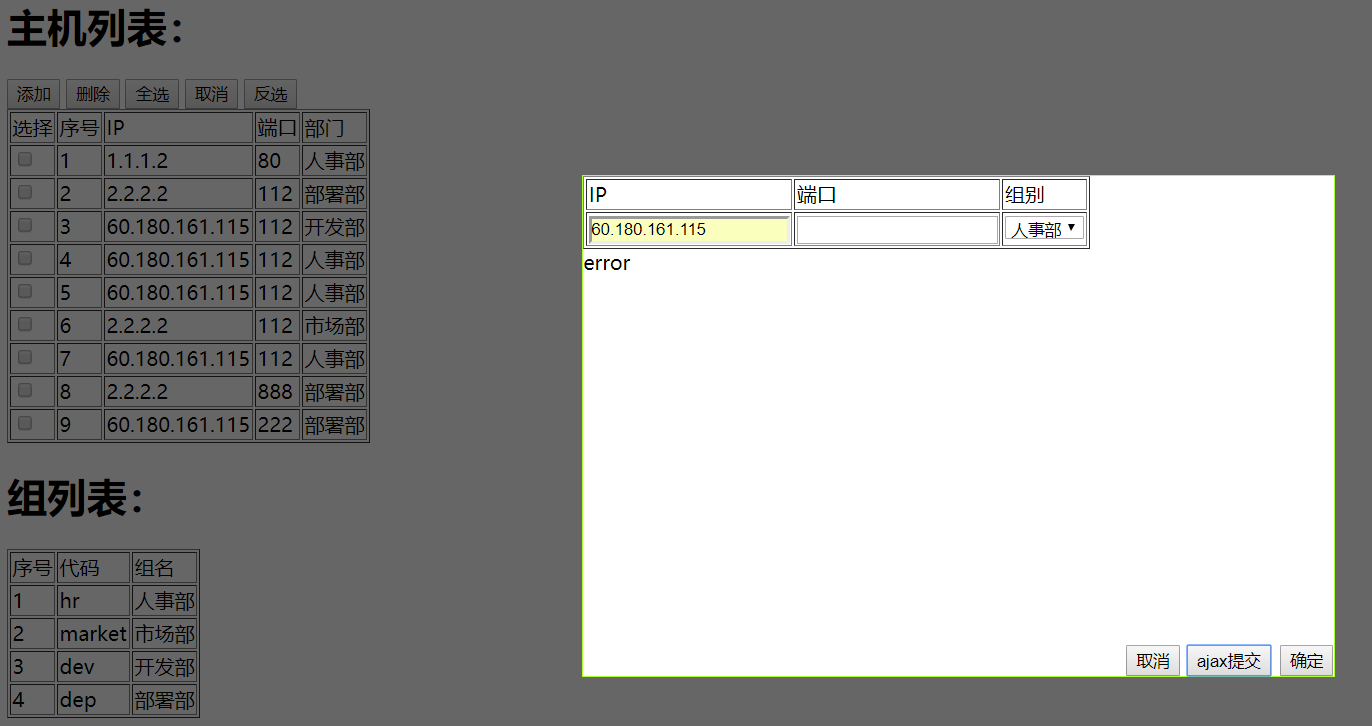
#models

from django.db import models

# Create your models here.

class host(models.Model):

    ip = models.CharField(max_length=255)

    port = models.IntegerField()

    group_code = models.ForeignKey(to='group',to_field='code',default='hr',on_delete='code')

class group(models.Model):

    code = models.CharField(max_length=30,default='hr',unique=True)

    name = models.CharField(max_length=255)

#views

from django.shortcuts import render,HttpResponse,redirect

from cmbd import models

import json

def home(request):

    return HttpResponse('<h1>home</h1>')

def orm(request):

    # models.host.objects.create(ip="1.1.1.1",port=80,code='market')

    #models.host.objects.create(ip="1.1.1.6",port=88,group_code_id='dev')

    # models.group.objects.create(code="dev",name="开发部")

    # dic = {'code':'dep','name':"工程部"}

    # models.group.objects.create(**dic)

    if request.method == 'GET':

        cmd =  request.GET.get('orm')

        if cmd == 'add_host':

            ip = request.GET.get('ip')

            port = request.GET.get('port')

            group_code = request.GET.get('group_code')

            if ip and port:

  models.host.objects.create(ip=ip,port=port,group_code_id=group_code)

            else:

                return HttpResponse('error')

            return redirect('/list')

    else:

        cmd = request.POST.get('orm')

        if cmd == 'del_host':

            host_id = request.POST.get('host_id')

            if host_id:

                models.host.objects.filter(id=host_id).delete()

            return HttpResponse('success')

        elif cmd == 'add_host':

            ip = request.POST.get('ip')

            port = request.POST.get('port')

            group_code = request.POST.get('group_code')

            if ip and port:

                models.host.objects.create(ip=ip,port=port,group_code_id=group_code)

            else:

                return HttpResponse('error')

            return HttpResponse('success')

        elif cmd == 'edit_host':

            id = request.POST.get('id')

            ip = request.POST.get('edit_ip')

            port = request.POST.get('edit_port')

            group_code = request.POST.get('edit_group_code')

            if ip and port:               models.host.objects.filter(id=id).update(ip=ip,port=port,group_code_id=group_code)

            else:

                return HttpResponse('error')

            return redirect('/list')

    return render(request,'orm.html')

def list(request):

    v1 = models.host.objects.all()

    v2 = models.group.objects.all()

    return render(request,'list.html',{'v1':v1,'v2':v2})

def test_ajax(request):

    ret = {"status":"true","data":"none","error":"none"}

    try:

        ip = request.POST.get('ip')

        port = request.POST.get('port')

        group_code = request.POST.get('group_code')

        if len(ip) < 4:

            ret["status"] = "false"

            ret["error"] = "ip addr error"

    except Exception as e:

        pass

    return HttpResponse(json.dumps(ret))

#templates

<!DOCTYPE html>

<html lang="en">

<head>

    <meta charset="UTF-8">

    <title>Title</title>

    <style>

        td a{

            cursor: pointer;

        }

        .hide{

            display: none;

        }

        .shade{

            position: fixed;

            top:0;

            left:0;

            right:0;

            bottom:0;

            background-color: black;

            opacity:0.6;

            z-index: 99;

        }

        .add_model{

            height:400px;

            width:600px;

            position: fixed;

            left: 50%;

            top: 50%;

            margin-left: -300px;

            margin-top: -200px;

            background-color: white;

            border: 1px solid greenyellow;

            z-index: 100;

        }

    </style>

</head>

<body>

<div id="shade" class="shade hide"></div>

<div id="add_model" class="add_model hide">

<form action="/orm" method="get" id="f1">

    <table border="1px">

        <thead><td>IP</td><td>端口</td><td>组别</td></thead>

        <tr>

            <td><input name="ip" type="text"/></td>

            <td><input name="port" type="text"/></td>

            <td>

                <select name="group_code">

                    {% for i in v2 %}

                    <option value="{{ i.code }}">{{ i.name }}</option>

                    {% endfor %}

                </select>

            </td>

        </tr>

    </table>

    <label id="msg" class="hide"></label>

    <input type="text" style="display: none;" name="orm" value="add_host"/>

    <input class="host_cancel" type="button" value="取消" style="position: absolute;bottom: 0;right: 123px;"/>

    <input id="add_host_ack" type="submit" value="确定" style="position: absolute;bottom: 0;right: 0;"/>

    <input id="ajax_submit" type="button" value="ajax提交" style="position: absolute;bottom: 0;right: 50px;"/>

</form>

</div>

<div id="edit_model" class="add_model hide">

<form action="/orm" method="post" id="f2">

    <table border="1px">

        <thead><td>IP</td><td>端口</td><td>组别</td></thead>

        <tr>

            <td><input name="edit_ip" type="text"/></td>

            <td><input name="edit_port" type="text"/></td>

            <td>

                <select name="edit_group_code">

                    {% for i in v2 %}

                    <option value="{{ i.code }}">{{ i.name }}</option>

                    {% endfor %}

                </select>

            </td>

        </tr>

    </table>

    <label id="edit_msg" class="hide"></label>

    <input type="text" class="hide" name="id"/>

    <input type="text" style="display: none;" name="orm" value="edit_host"/>

    <input class="host_cancel" type="button" value="取消" style="position: absolute;bottom: 0;right: 50px;"/>

    <input type="submit" value="确定" style="position: absolute;bottom: 0;right: 0;"/>

</form>

</div>

<h1>主机列表:</h1>

<form>

    <input type="button" id="add_host" value="添加">

    <input type="button" id="del_host" value="删除">

    <input type="button" id="select_all" value="全选">

    <input type="button" id="cancel_all" value="取消">

    <input type="button" id="revert" value="反选">

</form>

<table border="" id="t1">

    <thead><td>选择</td><td>序号</td><td>IP</td><td>端口</td><td>部门</td><td>操作</td></thead>

    {% for i in v1 %}

        <tr host_id="{{ i.id }}" group_code="{{ i.group_code_id }}">

            <td><input type="checkbox"/></td>

            <td>{{ forloop.counter }}</td><td>{{ i.ip}}</td><td>{{ i.port}}</td><td>{{ i.group_code.name}}</td><td><a class="del_single">删除</a>|<a class="edit_host">修改</a></td>

        </tr>

    {% endfor %}

</table>

<h1>组列表:</h1>

<table border="" id="t2">

        <thead><td>序号</td><td>代码</td><td>组名</td></thead>

    {% for i in v2 %}

        <tr group_id="{{ i.id }}"><td>{{ forloop.counter}}</td><td>{{ i.code}}</td><td>{{ i.name}}</td></tr>

    {% endfor %}

</table>

<script src="/static/jquery-3.3.1.js"></script>

<script>

    $(function () {

        $('#add_host').click(function () {

            $("#shade,#add_model").removeClass("hide");

        })

        $('.host_cancel').click(function () {

            $(".shade,.add_model").addClass("hide");

        })

        $('#select_all').click(function () {

            $('#t1 input[type="checkbox"]').prop("checked", true);

        })

        $('#cancel_all').click(function () {

            $('#t1 input[type="checkbox"]').prop("checked", false);

        })

        $('#revert').click(function () {

            $('#t1 input[type="checkbox"]').each(function () {

                if($(this).prop('checked')){

                    $(this).prop('checked',false);

                }else {

                    $(this).prop('checked',true);

                }

            });

        })

        $('#del_host').click(function () {

            $('#t1 input[type="checkbox"]').each(function () {

                if($(this).prop('checked')){

                    host_id = $(this).parent().parent().attr('host_id');

                    $.ajax({

                        'url':'/orm',

                        'type':'post',

                        'data':{'orm':'del_host','host_id':host_id},

                        success:function (data) {

                            console.log(data);

                            location.reload();

                        }

                    })

                }

            });

        })

        $('#ajax_submit').click(function () {

            $.ajax({

                'url':'/test_ajax',

                'type':'post',

                'data':$("#f1").serialize(),

                success:function (data) {

                    obj = JSON.parse(data)

                    if(obj.status=='true'){

                        $('#msg').removeClass('hide').text(obj.data);

                        location.reload();

                    }else {

                        $('#msg').removeClass('hide').text(obj.error);

                    }

                }

            })

        })

        $(".del_single").click(function () {

            host_id = $(this).parent().parent().attr('host_id');

            $(this).parent().parent().remove();

            $.ajax({

                'url':'/orm',

                'type':'post',

                'data':{'orm':'del_host','host_id':host_id},

                success:function (data) {

                    alert(data);

                }

            })

        })

        $(".edit_host").click(function () {

            group_code = $(this).parent().parent().attr('group_code');

            host_id = $(this).parent().parent().attr('host_id');

            ip = $(this).parent().parent().children().eq(2).text();

            port = $(this).parent().parent().children().eq(3).text();

            console.log(host_id,ip,port);

            $("#shade,#edit_model").removeClass("hide");

            $("#f2 select[name='edit_group_code']").val(group_code);

            $("#f2 input[name='edit_ip']").val(ip);

            $("#f2 input[name='edit_port']").val(port);

            $("#f2 input[name='id']").val(host_id);

        })

    })

</script>

</body>

</html>
form表单提交数据,页面必定会刷新,ajax提交数据不会刷新,做到悄悄提交,多选删除,ajax提交实例的更多相关文章
- form表单的一个页面多个上传按钮实例
/* * 图片上传 */ @RequestMapping("/uploadFile") @ResponseBody public String uploadFile(@Reques ...
- form表单提交和ajax提交的区别
form表单是整个页面跳到服务器的地址然后提交数据: ajax是往这个地址post数据 <form style="padding:0px;margin:0px;" targe ...
- web框架-(六)Django补充---form表单验证
一.form表单验证 1. 常规html页面的form表单验证 常规页面中,如果想实现对表单中用户输入信息的数据验证,需要配合Ajax来实现. 使用前我们先来熟悉下函数参数:request,其中包含的 ...
- 前端HTML基础之form表单
目录 一:form表单 1.form表单功能 2.表单元素 二:form表单搭建(注册页面) 1.编写input会出现黄色阴影问题 三:完整版,前端代码(注册页面) 四:type属性介绍 1.inpu ...
- Django中三种方式写form表单
除了在html中自己手写form表单外,django还可以通过 继承django.forms.Form 或django.forms.ModelForm两个类来自动生成form表单,下面依次利用三种方式 ...
- thinkPHP5.0使用form表单提交数据和删除文章,不用TP的提示页面,使用弹出提示信息
form表单提交数据和删除文章时,TP的默认信息提示页面的看起来不是很好看,想要实现弹窗提示怎么做呢? 前端:可以使用前端的一个知识--iframe,iframe元素会创建包含另外一个文档的内联框架: ...
- 从页面获取form表单提交的数据
1 使用HttpServletRequest,方便灵活 页面代码,使用action提交一个表单,里边有球的id,球的主人,球的颜色,所在省份,区域 <form action="ball ...
- 关于form表单提交数据后不跳转页面+ajax接收返回值的处理
1.前台的form表单建立,注意action.enctype的内容, 2.通过添加一个隐藏的iframe标签使form的target指向iframe来达到不跳转页面的效果,同时需要在js里获取ifra ...
- Form表单提交数据的几种方式
一.submit提交 在form标签中添加Action(提交的地址)和method(post),且有一个submit按钮(<input type='submit'>)就可以进行数据的提交, ...
- form表单action提交表单,页面不跳转且表单数据含文件的处理方法
在最近的项目中需要将含 input[type='file']的表单提交给后台 ,并且后台需要将文件存储在数据库中.之前所用的方法都是先将文件上传到七牛服务器上,然后七牛会返回文件的下载地址,在提交表单 ...
随机推荐
- 集合List的排序
自从出现了泛型和LINQ,对于集合的排序变得更简单了. //倒序 list.OrderByDescending(p=> p.a).ThenByDescending(p => p.b); / ...
- unzip解压war包并覆盖
unzip -o blog.war -d BLOG 参数: -o 不进行询问直接覆盖 -d 压缩文件解压到BLOG文件夹下 详细使用语法: unzip [-Z] [-opts[modifiers]] ...
- 关于linux 共享内存查看已经完整释放
完整删除共享内存脚本 #!/bin/sh function rmshm() { zero_status=`ipcs -m|awk '{print $6}'|grep -w 0|wc -l` if [ ...
- header头 下载文件 参数详解
header( header( header( header( header( header( header( header( header( //2 浏览器不会响应缓存 //1 Public指示响应 ...
- sqlite当天时间的23:59:59
select strftime('%Y-%m-%d %H:%M:%S','now','+1 day','localtime','start of day','-1 seconds')
- 输入一个正整数n,计算出[0,n]这些整数中的二进制数没有连续3个1的数字有多少
输入一个正整数n,计算出[0,n]这些整数中的二进制数没有连续3个1的数字有多少? 例子:输入数字9,则输出结果位9.因为[0-9]中,只有数字7有连续的三个‘1’出现,别的都没有,所以一共有9个数字 ...
- 卷积神经网络特征图可视化(自定义网络和VGG网络)
借助Keras和Opencv实现的神经网络中间层特征图的可视化功能,方便我们研究CNN这个黑盒子里到发生了什么. 自定义网络特征可视化 代码: # coding: utf-8 from keras.m ...
- 第二章 函数编程&常用标准库
函数编程&常用标准库 ...
- Linux CPU瓶颈问题分析
虚线部分为`下一步`的分析方向,图是网络抄的,放这里更容易找
- Apache HTTP 服务器 2.4(又名httpd)安装\配置 \启动
Apache HTTP 服务器 2.4 源文档