
通过swagger json一键解析为html页面、导出word和excel的解析算法分享
写在前面:
完全通过Spring Boot工程 Java代码,将swagger json 一键解析为html页面、导出word和execel的解析算法,不需要任何网上那些类似于“SwaggerMarkup2”等插件来实现。
由于业务需要,准备开发一个openapi开放平台,类似于阿里巴巴的CSB云服务总线项目,用于企业内外服务能力的打通和统一开放管理,提供独特的跨环境服务级联机制和常见协议适配支持,实现了对api接口的对外发布和订阅审核,让企业内外都能够更方便的使用到api接口。
其中需要实现一个核心功能,服务的导入功能,通过swagger json将我们其他项目中已经写好的接口一键导入到这个api开放平台并生成api接口详情页,那么这就需要实现一个swagger json解析的操作。
下面马上进入正题,本文主要也是分享一下,自己解析swagger json为html、word等功能的代码、思路以及界面。
页面效果展示:
将下图这样的swagger json解析出一个个api接口详情页。
解析前:
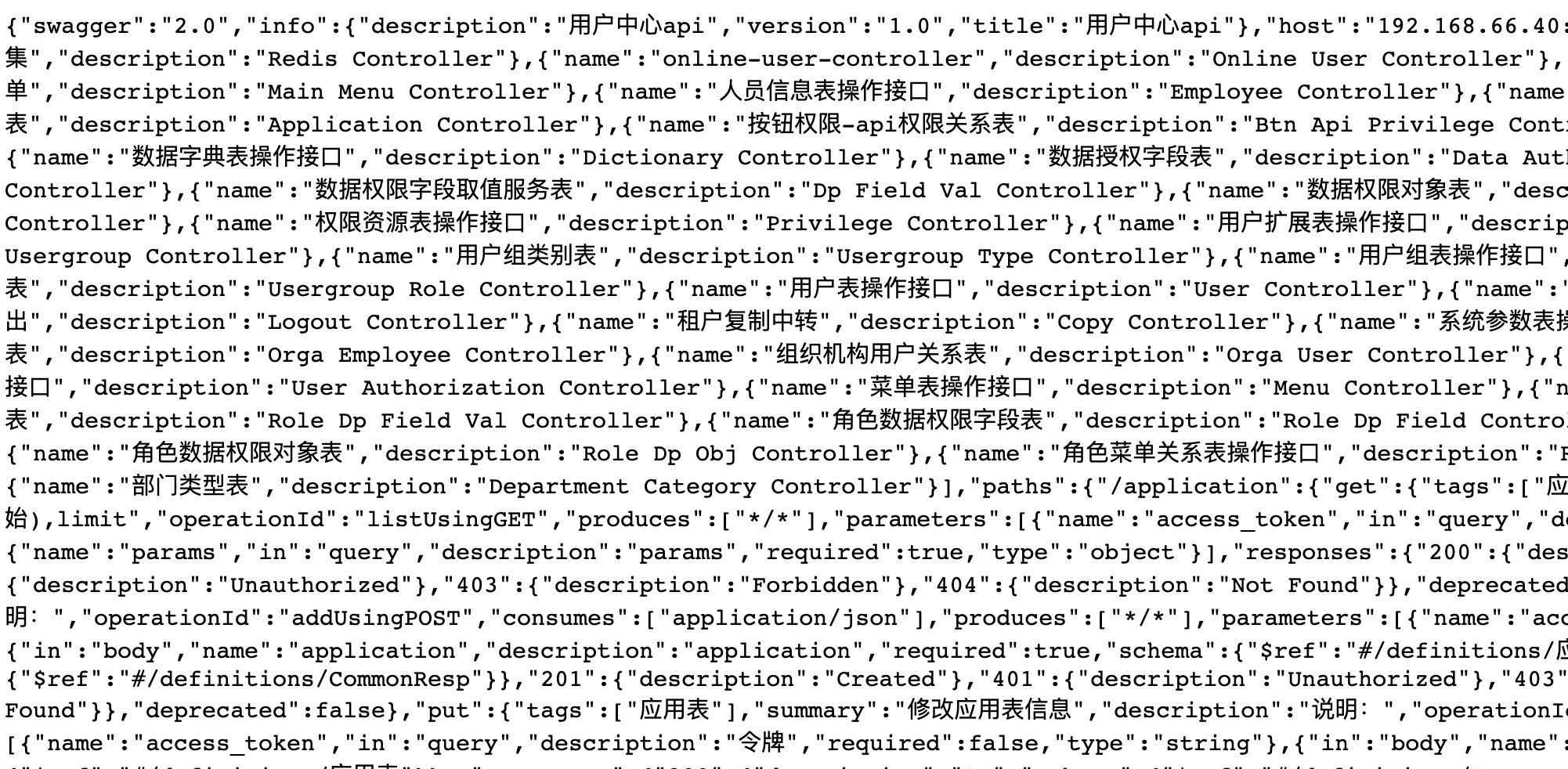
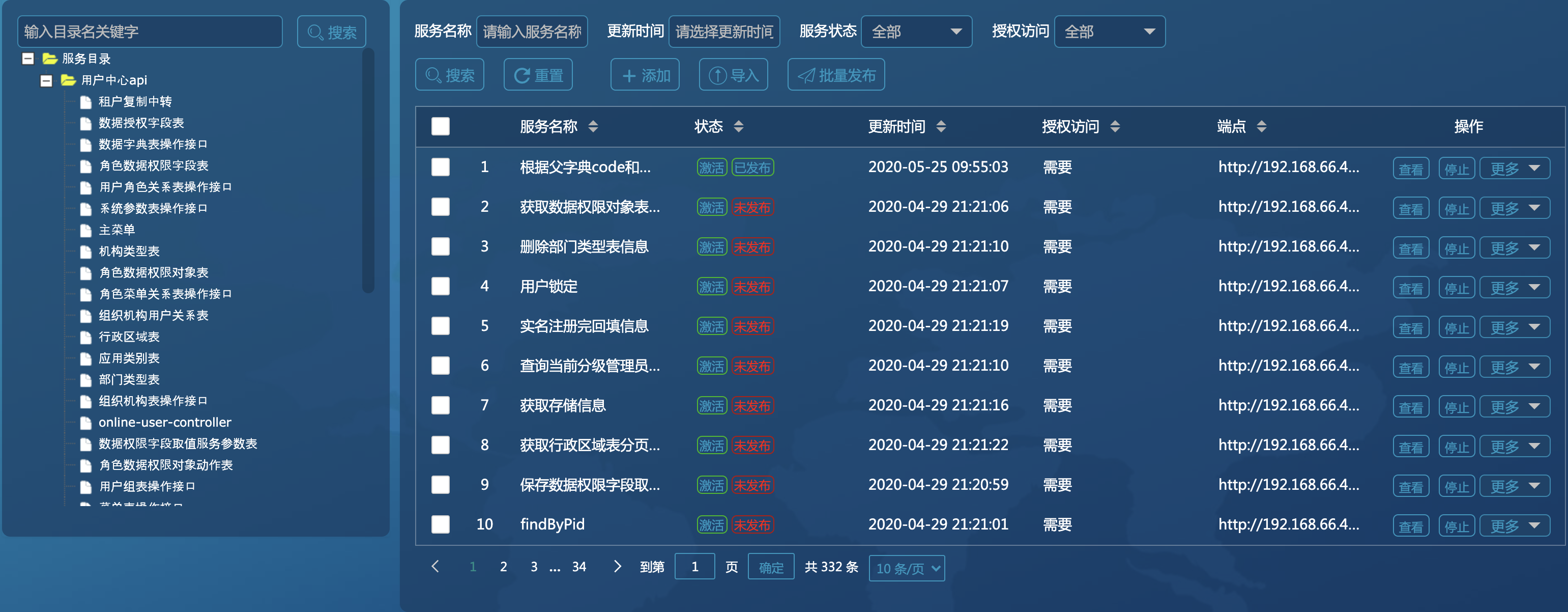
解析后:
通过json解析完可以显示所有的接口信息,如图:
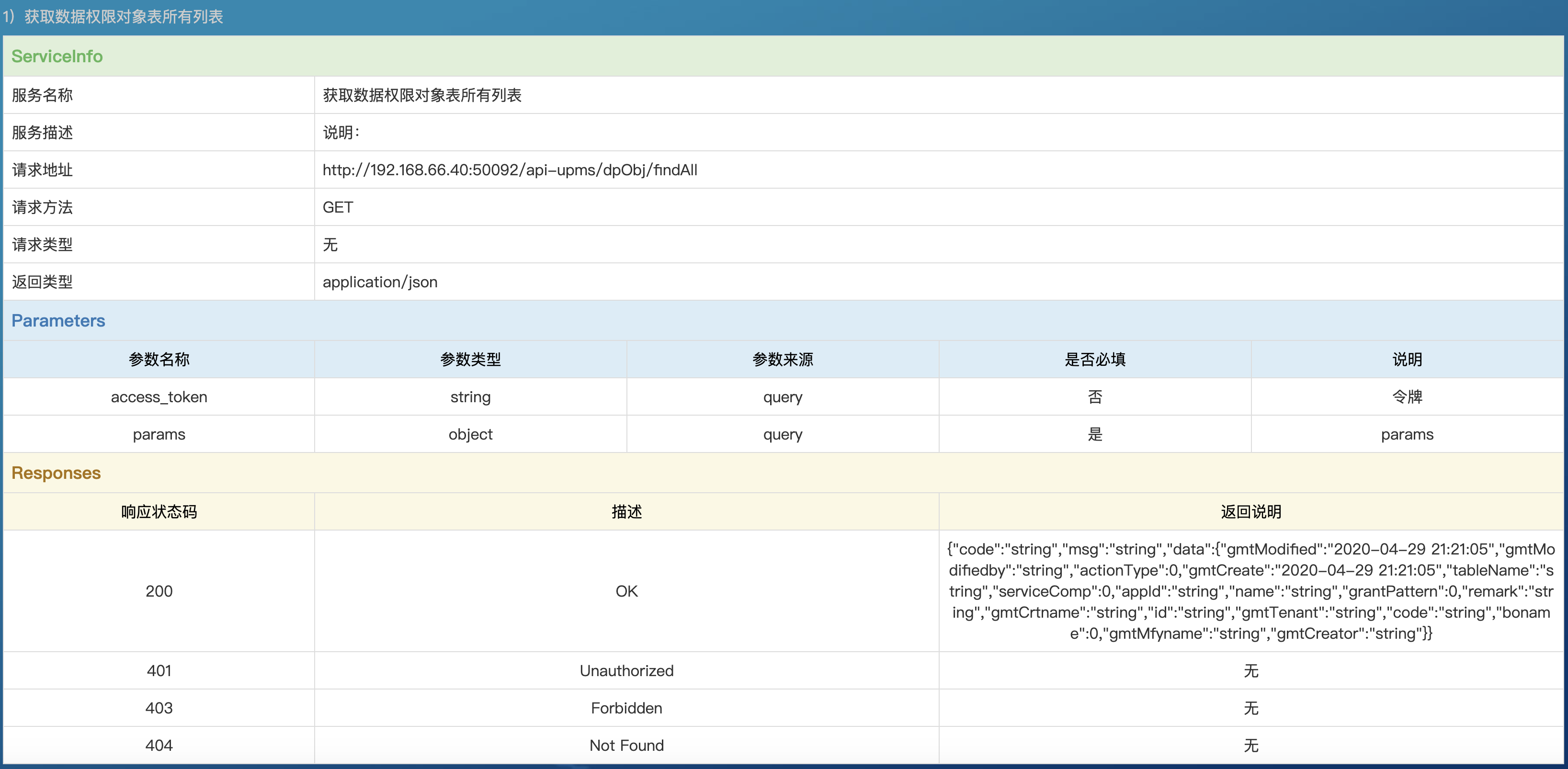
这是单个接口的api详情信息,如下图:
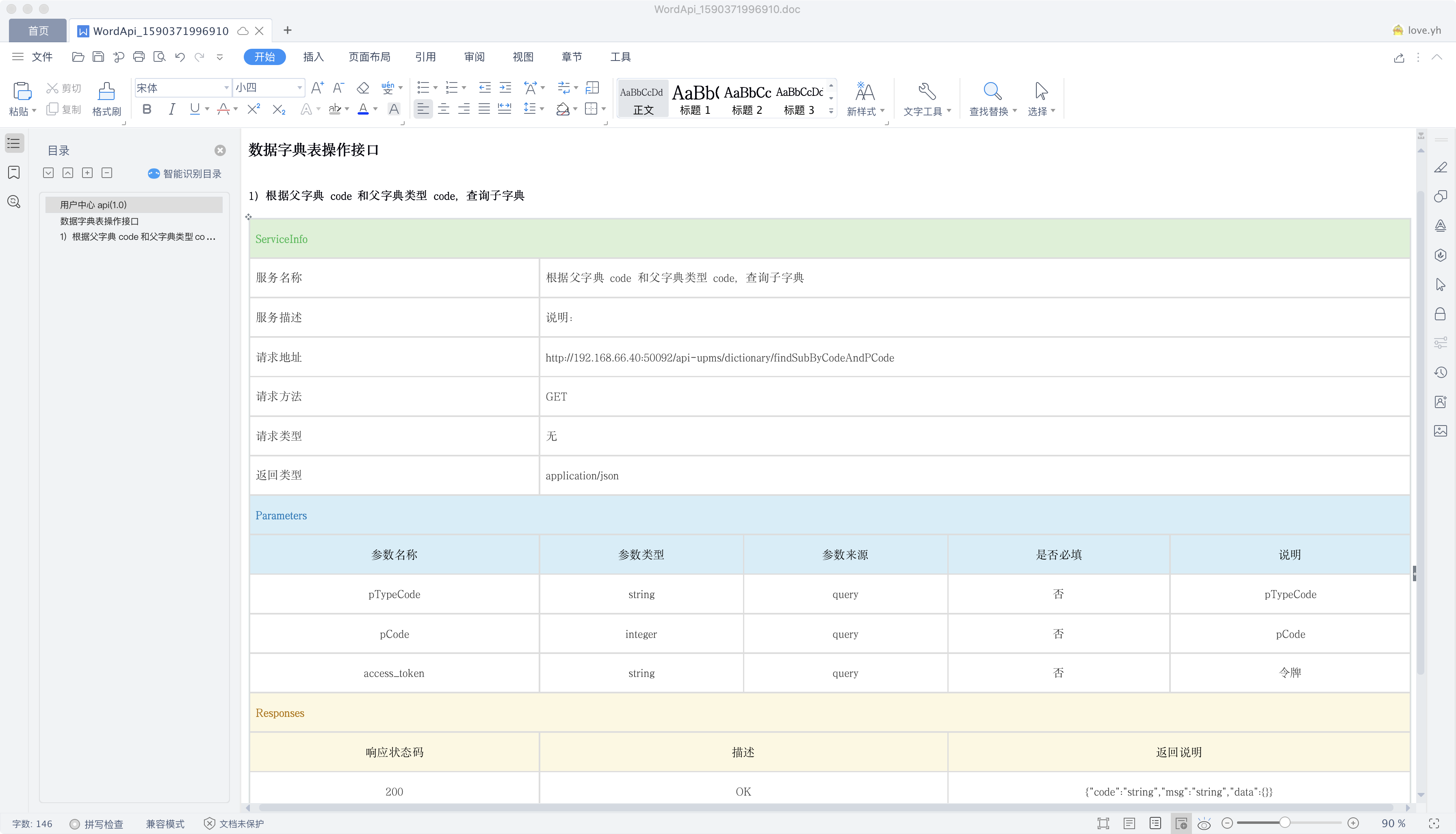
点击按钮导出api详情页为word的效果展示,如图:

导出word:
Swagger Json格式详解:

代码部分:
我这边实现两种思路,一是直接解析swagger json然后直接存入实体类生成为html,还要一种是建立好实体类以及数据库表后,将swagger json解析入库入表做持久化,再通过表中数据渲染到页面上。
下面我是介绍的swagger json入库入表再渲染为html的方案。
步骤大概是:首先定义好建好表,写好实体类后,再开始实现swagger json解析的算法。
实体类定义:
服务资源表:
@ApiModel(value = "服务资源表", description = "服务资源表")

public class ServiceResource implements Serializable{

/**

 * 程序序列化ID

 */

private static final long serialVersionUID=1L;

/**

 * 服务ID

 */

    @ApiModelProperty(value = "服务ID")

    private String id;

/**

 * 租户

 */

    @ApiModelProperty(value = "租户")

    private String gmtTenant;

/**

 * 创建时间

 */

    @JsonFormat(pattern = "yyyy-MM-dd HH:mm:ss", timezone = "GMT+8")

    @ApiModelProperty(value = "创建时间")

    private Date gmtCreate;

    public Date getGmtCreate(){

            return gmtCreate==null?null:(Date) gmtCreate.clone();

            }

    public void setGmtCreate(Date gmtCreate){

            this.gmtCreate = gmtCreate==null?null:(Date) gmtCreate.clone();

            }

/**

 * 创建人

 */

    @ApiModelProperty(value = "创建人")

    private String gmtCreator;

/**

 * 创建人名称

 */

    @ApiModelProperty(value = "创建人名称")

    private String gmtCrtname;

/**

 * 最后修改时间

 */

    @JsonFormat(pattern = "yyyy-MM-dd HH:mm:ss", timezone = "GMT+8")

    @ApiModelProperty(value = "最后修改时间")

    private Date gmtModified;

    public Date getGmtModified(){

            return gmtModified==null?null:(Date) gmtModified.clone();

            }

    public void setGmtModified(Date gmtModified){

            this.gmtModified = gmtModified==null?null:(Date) gmtModified.clone();

            }

/**

 * 最后修改人

 */

    @ApiModelProperty(value = "最后修改人")

    private String gmtModifiedby;

/**

 * 最后修改人名称

 */

    @ApiModelProperty(value = "最后修改人名称")

    private String gmtMfyname;

/**

 * 服务名称

 */

    @ApiModelProperty(value = "服务名称")

    private String serviceName;

/**

 * 请求地址

 */

    @ApiModelProperty(value = "请求地址")

    private String requestUrl;

/**

 * 请求方法

 */

    @ApiModelProperty(value = "请求方法")

    private String requestMethod;

/**

 * 请求格式

 */

    @ApiModelProperty(value = "请求类型")

    private String contentType;

/**

 * 返回类型

 */

    @ApiModelProperty(value = "返回类型")

    private String callContentType;

/**

 * 服务描述

 */

    @ApiModelProperty(value = "服务描述")

    private String serviceDesc;

/**

 * 服务版本

 */

    @ApiModelProperty(value = "服务版本")

    private String serviceVersion;

/**

 * 是否有效

 */

    @ApiModelProperty(value = "是否有效")

    private Integer isValid;

/**

 * 是否发布

 */

    @ApiModelProperty(value = "是否发布")

    private Integer isRelease;

    /**

     * 是否发布

     */

    @ApiModelProperty(value = "是否需要授权访问")

    private Integer isAuthorizedAccess;

    /**

     * 操作id

     */

    @ApiModelProperty(value = "操作id")

    private String operationId;

    private Integer isDelete;

    private String routeUuid;

    private String currentCatalogId;

    public static long getSerialVersionUID() {

        return serialVersionUID;

    }

    public String getId() {

        return id;

    }

    public void setId(String id) {

        this.id = id;

    }

    public String getGmtTenant() {

        return gmtTenant;

    }

    public void setGmtTenant(String gmtTenant) {

        this.gmtTenant = gmtTenant;

    }

    public String getGmtCreator() {

        return gmtCreator;

    }

    public void setGmtCreator(String gmtCreator) {

        this.gmtCreator = gmtCreator;

    }

    public String getGmtCrtname() {

        return gmtCrtname;

    }

    public void setGmtCrtname(String gmtCrtname) {

        this.gmtCrtname = gmtCrtname;

    }

    public String getGmtModifiedby() {

        return gmtModifiedby;

    }

    public void setGmtModifiedby(String gmtModifiedby) {

        this.gmtModifiedby = gmtModifiedby;

    }

    public String getGmtMfyname() {

        return gmtMfyname;

    }

    public void setGmtMfyname(String gmtMfyname) {

        this.gmtMfyname = gmtMfyname;

    }

    public String getServiceName() {

        if(!StringUtils.isEmpty(serviceName)){

            return serviceName.replaceAll(" ", "");

        }

        return serviceName;

    }

    public void setServiceName(String serviceName) {

        this.serviceName = serviceName;

    }

    public String getRequestUrl() {

        return requestUrl;

    }

    public void setRequestUrl(String requestUrl) {

        this.requestUrl = requestUrl;

    }

    public String getRequestMethod() {

        return requestMethod;

    }

    public void setRequestMethod(String requestMethod) {

        this.requestMethod = requestMethod;

    }

    public String getContentType() {

        return contentType;

    }

    public void setContentType(String contentType) {

        this.contentType = contentType;

    }

    public String getCallContentType() {

        return callContentType;

    }

    public void setCallContentType(String callContentType) {

        this.callContentType = callContentType;

    }

    public String getServiceDesc() {

        return serviceDesc;

    }

    public void setServiceDesc(String serviceDesc) {

        this.serviceDesc = serviceDesc;

    }

    public String getServiceVersion() {

        return serviceVersion;

    }

    public void setServiceVersion(String serviceVersion) {

        this.serviceVersion = serviceVersion;

    }

    public Integer getIsValid() {

        return isValid;

    }

    public void setIsValid(Integer isValid) {

        this.isValid = isValid;

    }

    public Integer getIsRelease() {

        return isRelease;

    }

    public void setIsRelease(Integer isRelease) {

        this.isRelease = isRelease;

    }

    public Integer getIsAuthorizedAccess() {

        return isAuthorizedAccess;

    }

    public void setIsAuthorizedAccess(Integer isAuthorizedAccess) {

        this.isAuthorizedAccess = isAuthorizedAccess;

    }

    public String getOperationId() {

        return operationId;

    }

    public void setOperationId(String operationId) {

        this.operationId = operationId;

    }

    public Integer getIsDelete() {

        return isDelete;

    }

    public void setIsDelete(Integer isDelete) {

        this.isDelete = isDelete;

    }

    public String getRouteUuid() {

        return routeUuid;

    }

    public void setRouteUuid(String routeUuid) {

        this.routeUuid = routeUuid;

    }

    public String getCurrentCatalogId() {

        return currentCatalogId;

    }

    public void setCurrentCatalogId(String currentCatalogId) {

        this.currentCatalogId = currentCatalogId;

    }

}
服务资源表
服务请求信息表:
@Data

@ApiModel(value = "服务请求信息表", description = "服务请求信息表")

public class ServiceRequest implements Serializable{

/**

 * 程序序列化ID

 */

private static final long serialVersionUID=1L;

/**

 * 服务ID

 */

    @ApiModelProperty(value = "服务ID")

    private String id;

/**

 * 租户

 */

    @ApiModelProperty(value = "租户")

    private String gmtTenant;

/**

 * 创建时间

 */

    @JsonFormat(pattern = "yyyy-MM-dd HH:mm:ss", timezone = "GMT+8")

    @ApiModelProperty(value = "创建时间")

    private Date gmtCreate;

    public Date getGmtCreate(){

            return gmtCreate==null?null:(Date) gmtCreate.clone();

            }

    public void setGmtCreate(Date gmtCreate){

            this.gmtCreate = gmtCreate==null?null:(Date) gmtCreate.clone();

            }

/**

 * 创建人

 */

    @ApiModelProperty(value = "创建人")

    private String gmtCreator;

/**

 * 创建人名称

 */

    @ApiModelProperty(value = "创建人名称")

    private String gmtCrtname;

/**

 * 最后修改时间

 */

    @JsonFormat(pattern = "yyyy-MM-dd HH:mm:ss", timezone = "GMT+8")

    @ApiModelProperty(value = "最后修改时间")

    private Date gmtModified;

    public Date getGmtModified(){

            return gmtModified==null?null:(Date) gmtModified.clone();

            }

    public void setGmtModified(Date gmtModified){

            this.gmtModified = gmtModified==null?null:(Date) gmtModified.clone();

            }

/**

 * 最后修改人

 */

    @ApiModelProperty(value = "最后修改人")

    private String gmtModifiedby;

/**

 * 最后修改人名称

 */

    @ApiModelProperty(value = "最后修改人名称")

    private String gmtMfyname;

/**

 * 服务资源ID

 */

    @ApiModelProperty(value = "服务资源ID")

    private String serviceId;

/**

 * 参数名称

 */

    @ApiModelProperty(value = "参数名称")

    private String reqName;

/**

 * 参数描述

 */

    @ApiModelProperty(value = "参数描述")

    private String reqDesc;

/**

 * 参数类型

 */

    @ApiModelProperty(value = "参数类型")

    private String reqType;

/**

 * 参数长度

 */

    @ApiModelProperty(value = "参数长度")

    private Integer reqLength;

/**

 * 是否必填

 */

    @ApiModelProperty(value = "是否必填")

    private Integer isRequired;

/**

 * 参数来源

 */

    @ApiModelProperty(value = "参数来源")

    private String reqFrom;

}
服务响应信息表:
@Data

@ApiModel(value = "服务响应信息表", description = "服务响应信息表")

public class ServiceResponse implements Serializable{

/**

 * 程序序列化ID

 */

private static final long serialVersionUID=1L;

/**

 * 服务ID

 */

    @ApiModelProperty(value = "服务ID")

    private String id;

/**

 * 租户

 */

    @ApiModelProperty(value = "租户")

    private String gmtTenant;

/**

 * 创建时间

 */

    @JsonFormat(pattern = "yyyy-MM-dd HH:mm:ss", timezone = "GMT+8")

    @ApiModelProperty(value = "创建时间")

    private Date gmtCreate;

    public Date getGmtCreate(){

            return gmtCreate==null?null:(Date) gmtCreate.clone();

            }

    public void setGmtCreate(Date gmtCreate){

            this.gmtCreate = gmtCreate==null?null:(Date) gmtCreate.clone();

            }

/**

 * 创建人

 */

    @ApiModelProperty(value = "创建人")

    private String gmtCreator;

/**

 * 创建人名称

 */

    @ApiModelProperty(value = "创建人名称")

    private String gmtCrtname;

/**

 * 最后修改时间

 */

    @JsonFormat(pattern = "yyyy-MM-dd HH:mm:ss", timezone = "GMT+8")

    @ApiModelProperty(value = "最后修改时间")

    private Date gmtModified;

    public Date getGmtModified(){

            return gmtModified==null?null:(Date) gmtModified.clone();

            }

    public void setGmtModified(Date gmtModified){

            this.gmtModified = gmtModified==null?null:(Date) gmtModified.clone();

            }

/**

 * 最后修改人

 */

    @ApiModelProperty(value = "最后修改人")

    private String gmtModifiedby;

/**

 * 最后修改人名称

 */

    @ApiModelProperty(value = "最后修改人名称")

    private String gmtMfyname;

/**

 * 服务资源ID

 */

    @ApiModelProperty(value = "服务资源ID")

    private String serviceId;

/**

 * 属性名称

 */

    @ApiModelProperty(value = "属性名称")

    private String propName;

/**

 * 属性描述

 */

    @ApiModelProperty(value = "属性描述")

    private String propDesc;

/**

 * 属性类型

 */

    @ApiModelProperty(value = "属性类型")

    private String propType;

/**

 * 属性长度

 */

    @ApiModelProperty(value = "属性长度")

    private Integer propLength;

}
服务响应状态表:
@Data

@ApiModel(value = "服务响应状态表", description = "服务响应状态表")

public class ResponseStatus implements Serializable{

/**

 * 程序序列化ID

 */

private static final long serialVersionUID=1L;

/**

 * 服务ID

 */

    @ApiModelProperty(value = "服务ID")

    private String id;

/**

 * 租户

 */

    @ApiModelProperty(value = "租户")

    private String gmtTenant;

/**

 * 创建时间

 */

    @JsonFormat(pattern = "yyyy-MM-dd HH:mm:ss", timezone = "GMT+8")

    @ApiModelProperty(value = "创建时间")

    private Date gmtCreate;

    public Date getGmtCreate(){

            return gmtCreate==null?null:(Date) gmtCreate.clone();

            }

    public void setGmtCreate(Date gmtCreate){

            this.gmtCreate = gmtCreate==null?null:(Date) gmtCreate.clone();

            }

/**

 * 创建人

 */

    @ApiModelProperty(value = "创建人")

    private String gmtCreator;

/**

 * 创建人名称

 */

    @ApiModelProperty(value = "创建人名称")

    private String gmtCrtname;

/**

 * 最后修改时间

 */

    @JsonFormat(pattern = "yyyy-MM-dd HH:mm:ss", timezone = "GMT+8")

    @ApiModelProperty(value = "最后修改时间")

    private Date gmtModified;

    public Date getGmtModified(){

            return gmtModified==null?null:(Date) gmtModified.clone();

            }

    public void setGmtModified(Date gmtModified){

            this.gmtModified = gmtModified==null?null:(Date) gmtModified.clone();

            }

/**

 * 最后修改人

 */

    @ApiModelProperty(value = "最后修改人")

    private String gmtModifiedby;

/**

 * 最后修改人名称

 */

    @ApiModelProperty(value = "最后修改人名称")

    private String gmtMfyname;

/**

 * 服务资源ID

 */

    @ApiModelProperty(value = "服务资源ID")

    private String serviceId;

/**

 * 状态码

 */

    @ApiModelProperty(value = "状态码")

    private String statusCode;

/**

 * 状态描述

 */

    @ApiModelProperty(value = "状态描述")

    private String statusDesc;

    /**

     * 状态说明

     */

    @ApiModelProperty(value = "状态说明")

    private String statusRemark;

}
服务类别表:
@ApiModel(value = "服务类别表", description = "服务类别表")

public class ServiceCatalog implements Serializable{

/**

 * 程序序列化ID

 */

private static final long serialVersionUID=1L;

/**

 * 服务ID

 */

    @ApiModelProperty(value = "服务ID")

    private String id;

/**

 * 租户

 */

    @ApiModelProperty(value = "租户")

    private String gmtTenant;

/**

 * 创建时间

 */

    @JsonFormat(pattern = "yyyy-MM-dd HH:mm:ss", timezone = "GMT+8")

    @ApiModelProperty(value = "创建时间")

    private Date gmtCreate;

    public Date getGmtCreate(){

            return gmtCreate==null?null:(Date) gmtCreate.clone();

            }

    public void setGmtCreate(Date gmtCreate){

            this.gmtCreate = gmtCreate==null?null:(Date) gmtCreate.clone();

            }

/**

 * 创建人

 */

    @ApiModelProperty(value = "创建人")

    private String gmtCreator;

/**

 * 创建人名称

 */

    @ApiModelProperty(value = "创建人名称")

    private String gmtCrtname;

/**

 * 最后修改时间

 */

    @JsonFormat(pattern = "yyyy-MM-dd HH:mm:ss", timezone = "GMT+8")

    @ApiModelProperty(value = "最后修改时间")

    private Date gmtModified;

    public Date getGmtModified(){

            return gmtModified==null?null:(Date) gmtModified.clone();

            }

    public void setGmtModified(Date gmtModified){

            this.gmtModified = gmtModified==null?null:(Date) gmtModified.clone();

            }

/**

 * 最后修改人

 */

    @ApiModelProperty(value = "最后修改人")

    private String gmtModifiedby;

/**

 * 最后修改人名称

 */

    @ApiModelProperty(value = "最后修改人名称")

    private String gmtMfyname;

/**

 * 上级目录ID

 */

    @ApiModelProperty(value = "上级目录ID")

    private String pid;

/**

 * 目录名称

 */

    @ApiModelProperty(value = "目录名称")

    private String catalogName;

    public String getId() {

        return id;

    }

    public void setId(String id) {

        this.id = id;

    }

    public String getGmtTenant() {

        return gmtTenant;

    }

    public void setGmtTenant(String gmtTenant) {

        this.gmtTenant = gmtTenant;

    }

    public String getGmtCreator() {

        return gmtCreator;

    }

    public void setGmtCreator(String gmtCreator) {

        this.gmtCreator = gmtCreator;

    }

    public String getGmtCrtname() {

        return gmtCrtname;

    }

    public void setGmtCrtname(String gmtCrtname) {

        this.gmtCrtname = gmtCrtname;

    }

    public String getGmtModifiedby() {

        return gmtModifiedby;

    }

    public void setGmtModifiedby(String gmtModifiedby) {

        this.gmtModifiedby = gmtModifiedby;

    }

    public String getGmtMfyname() {

        return gmtMfyname;

    }

    public void setGmtMfyname(String gmtMfyname) {

        this.gmtMfyname = gmtMfyname;

    }

    public String getPid() {

        return pid;

    }

    public void setPid(String pid) {

        this.pid = pid;

    }

    public String getCatalogName() {

        if(!StringUtils.isEmpty(catalogName)){

            return catalogName.replaceAll(" ", "");

        }

        return catalogName;

    }

    public void setCatalogName(String catalogName) {

        this.catalogName = catalogName;

    }

}
服务类别关系表:
@Data

@ApiModel(value = "服务类别关系表", description = "服务类别关系表")

public class ServiceCatalogRela implements Serializable{

/**

 * 程序序列化ID

 */

private static final long serialVersionUID=1L;

/**

 * 服务ID

 */

    @ApiModelProperty(value = "服务ID")

    private String id;

/**

 * 租户

 */

    @ApiModelProperty(value = "租户")

    private String gmtTenant;

/**

 * 创建时间

 */

    @JsonFormat(pattern = "yyyy-MM-dd HH:mm:ss", timezone = "GMT+8")

    @ApiModelProperty(value = "创建时间")

    private Date gmtCreate;

    public Date getGmtCreate(){

            return gmtCreate==null?null:(Date) gmtCreate.clone();

            }

    public void setGmtCreate(Date gmtCreate){

            this.gmtCreate = gmtCreate==null?null:(Date) gmtCreate.clone();

            }

/**

 * 创建人

 */

    @ApiModelProperty(value = "创建人")

    private String gmtCreator;

/**

 * 创建人名称

 */

    @ApiModelProperty(value = "创建人名称")

    private String gmtCrtname;

/**

 * 最后修改时间

 */

    @JsonFormat(pattern = "yyyy-MM-dd HH:mm:ss", timezone = "GMT+8")

    @ApiModelProperty(value = "最后修改时间")

    private Date gmtModified;

    public Date getGmtModified(){

            return gmtModified==null?null:(Date) gmtModified.clone();

            }

    public void setGmtModified(Date gmtModified){

            this.gmtModified = gmtModified==null?null:(Date) gmtModified.clone();

            }

/**

 * 最后修改人

 */

    @ApiModelProperty(value = "最后修改人")

    private String gmtModifiedby;

/**

 * 最后修改人名称

 */

    @ApiModelProperty(value = "最后修改人名称")

    private String gmtMfyname;

/**

 * 目录ID

 */

    @ApiModelProperty(value = "目录ID")

    private String catalogId;

/**

 * 服务ID

 */

    @ApiModelProperty(value = "服务ID")

    private String serviceId;

}
服务返回属性:
@Data

public class SwaggerModelAttr implements Serializable {

    private static final long serialVersionUID = -4074067438450613643L;

    /**

     * 类名

     */

    private String className = StringUtils.EMPTY;

    /**

     * 属性名

     */

    private String name = StringUtils.EMPTY;

    /**

     * 类型

     */

    private String type = StringUtils.EMPTY;

    /**

     * 属性描述

     */

    private String description;

    /**

     * 嵌套属性列表

     */

    private List<SwaggerModelAttr> properties = new ArrayList<>();

}
返回给前端的dto实体:
/**

 * @program: share-capacity-platform

 * @description: javabean转html 传递给前端的dto实体类

 * @author: liumingyu

 * @date: 2020-04-14 16:35

 **/

@Data

public class SwaggerHtmlDto {

    /**

     * 大标题

     */

    private String title;

    /**

     * 小标题

     */

    private String tag;

    /**

     * 版本

     */

    private String version;

    /**

     * 封装服务资源

     */

    private ServiceResource serviceResource;

    /**

     * 封装请求参数list

     */

    private List<ServiceRequest> requestList;

    /**

     * 封装响应状态码list

     */

    private List<ResponseStatus> responseStatusList;

    /**

     * 封装返回属性list

     */

    private List<ServiceResponse> responseList;

}
实体类就是以上这些,将swagger json解析后存入相应的实体类字段中。
swagger解析代码:
下面开始swagger json的解析代码:
swagger解析service层接口:
public interface SwaggerJsonImportService {

    /**

     * swaggerJson导入业务表

     *

     * @param jsonUrl        jsonUrl

     * @param serviceSwagger swaggerJson

     * @param isAuthorized   是否需要授权访问

     * @return net.evecom.scplatform.common.entry.CommonResp<java.lang.String>

     * @throws IOException

     * @Author Torres Liu

     * @Description //TODO swaggerJson导入业务表

     * @Date 2020/4/24 5:07 下午

     * @Param [jsonUrl, serviceSwagger, isAuthorized]

     **/

    CommonResp<String> swaggerJsonImport(String jsonUrl, ServiceSwagger serviceSwagger, String isAuthorized) throws IOException;

    /**

     * 导出SwaggerJson

     *

     * @param serviceId 服务id

     * @param catalogId 目录id

     * @return net.evecom.scplatform.common.entry.CommonResp<java.lang.String>

     * @Author Torres Liu

     * @Description //TODO 导出SwaggerJson

     * @Date 2020/4/22 9:41 上午

     * @Param [serviceId, catalogId]

     **/

    List<SwaggerHtmlDto> swaggerJsonExport(String serviceId, String catalogId);

}
swagger解析service层接口实现类(解析的核心代码)
下面是一大堆枯燥的json解析,大家都是程序员,我就不做过多的讲解代码,有需要学习的可以参照我代码中的注释,写的都比较详细。
package xxxxxxxx; import cn.hutool.json.JSONObject;
import com.alibaba.fastjson.JSON; import lombok.extern.slf4j.Slf4j;
import net.evecom.scplatform.common.entry.CommonResp;
import net.evecom.scplatform.common.entry.system.CommonEntry;
import net.evecom.scplatform.common.entry.system.UserUtil;
import net.evecom.scplatform.common.utils.text.IDUtils;
import net.evecom.scplatform.openapi.dao.*;
import net.evecom.scplatform.openapi.entity.*;
import net.evecom.scplatform.openapi.entity.dto.SwaggerHtmlDto;
import net.evecom.scplatform.openapi.service.SwaggerJsonImportService;
import net.evecom.scplatform.openapi.util.SwaggerJsonUtils;
import org.apache.commons.lang3.StringUtils;
import org.apache.http.HttpEntity;
import org.apache.http.client.methods.CloseableHttpResponse;
import org.apache.http.client.methods.HttpGet;
import org.apache.http.impl.client.CloseableHttpClient;
import org.apache.http.impl.client.HttpClientBuilder;
import org.apache.http.util.EntityUtils;
import org.springframework.beans.factory.annotation.Autowired;
import org.springframework.beans.factory.annotation.Value;
import org.springframework.stereotype.Service;
import org.springframework.transaction.annotation.Transactional;
import org.springframework.util.CollectionUtils;
import org.springframework.web.client.RestTemplate; import java.io.IOException;
import java.io.InputStream;
import java.net.HttpURLConnection;
import java.net.URL;
import java.text.SimpleDateFormat;
import java.util.*; /**
* @author Torres Liu
* @description //TODO 服务导入/导出 业务层
* @date 2020-04-10 14:06 下午
**/
@SuppressWarnings({"unchecked", "rawtypes"})
@Slf4j
@Service
@Transactional(rollbackFor = Exception.class)
public class SwaggerJsonImportServiceImpl implements SwaggerJsonImportService { @Autowired
private RestTemplate restTemplate; @Autowired
private ServiceCatalogDao serviceCatalogDao; @Autowired
private ServiceResourceDao serviceResourceDao; @Autowired
private ServiceRequestDao serviceRequestDao; @Autowired
private ResponseStatusDao responseStatusDao; @Autowired
private ServiceResponseDao serviceResponseDao; @Autowired
private ServiceCatalogRelaDao serviceCatalogRelaDao; @Value("${kong.server-addr}")
private String kongServerAddr; /**
* array
*/
private static final String ARRAY_VAL = "array";
/**
* $ref
*/
private static final String REF_VAL = "$ref";
/**
* format
*/
private static final String FORMAT_VAL = "format";
/**
* schema
*/
private static final String SCHEMA_VAL = "schema";
/**
* 成功的code
*/
private static final int SUCCESS_CODE = 200;
/**
* 递归次数
*/
private static final int RECURSION_NUMS = 199; /**
* 通过JSON或URL导入服务
*
* @param jsonUrl
* @param serviceSwagger
* @param isAuthorized
* @return net.evecom.scplatform.common.entry.CommonResp<java.lang.String>
* @author Torres Liu
* @description //TODO 通过JSON或URL导入服务
* @date 2020/4/24 5:46 下午
**/
@Override
@Transactional(rollbackFor = Exception.class)
public CommonResp<String> swaggerJsonImport(String jsonUrl, ServiceSwagger serviceSwagger, String isAuthorized) throws IOException {
String jsonStr = "";
CloseableHttpClient httpClient = HttpClientBuilder.create().build();
//提前生成 一级标题的id字段 by liumingyu
String firstTitleUuid = IDUtils.new32UUID();
//获取前端传入的是否授权标识 by liumingyu
String isAuthorizedAccessStr = StringUtils.defaultIfBlank(isAuthorized, "0");
Integer isAuthorizedAccess = Integer.valueOf(isAuthorizedAccessStr);
try {
//判断是通过url or json传入数据 by liumingyu
if (!StringUtils.isBlank(jsonUrl) && "".equals(serviceSwagger.getSwaggerJson())) {
//判断url的有效性
boolean urlValidity = ifUrlValidity(jsonUrl);
//判断url是否是swagger的url
boolean swaggerUrl = ifSwaggerUrl(jsonUrl);
if (urlValidity && swaggerUrl) {
HttpGet httpGet = new HttpGet(jsonUrl);
CloseableHttpResponse response = httpClient.execute(httpGet);
if (response.getStatusLine().getStatusCode() == SUCCESS_CODE) {
HttpEntity entity = response.getEntity();
String string = EntityUtils.toString(entity, "utf-8");
jsonStr = string;
}
response.close();
httpClient.close();
} else {
return CommonResp.exception("传入的url不正确!");
}
} else if (serviceSwagger != null && !"".equals(serviceSwagger.getSwaggerJson())) {
String swaggerJson = serviceSwagger.getSwaggerJson();
//判断字符串是否为json格式
boolean isJson = isJson(swaggerJson);
if (isJson) {
JSONObject jsonObject = new JSONObject(swaggerJson);
Object o = JSON.toJSON(jsonObject);
jsonStr = com.alibaba.fastjson.JSONObject.toJSONString(o);
} else {
return CommonResp.exception("传入的json格式不正确!");
}
} else {
return CommonResp.exception("服务导入URL或JSON出错!");
}
//获取当前租户
String gmtTenant = UserUtil.getLoginUser().getGmtTenant();
//获取当前用户id
String userId = UserUtil.getLoginUser().getId();
String gmtCreator = (userId != null) ? userId : "";
//转换 JSON string to Map by liumingyu
Map<String, Object> map = SwaggerJsonUtils.readValue(jsonStr, HashMap.class);
//解析info by liumingyu
Map<String, Object> infoMap = (Map<String, Object>) map.get("info");
//拿到一级标题 by liumingyu
String catalogName = (String) infoMap.get("title");
//拿到所有二级标题(类标题)的List by liumingyu
List<Map<String, String>> tags = (List<Map<String, String>>) map.get("tags");
//如果表中没有该一级标题名称,需要新增一个 by liumingyu
if (catalogName != null) {
//查询库中是否有当前登录用户且pid为-1的根目录
ServiceCatalog catalogBeanByCreatorAndPid = serviceCatalogDao.findByCreatorAndPid(gmtCreator, "-1");
//查询库中是否存在该一级标题名称 by liumingyu
ServiceCatalog catalogBean = serviceCatalogDao.findByCatalogNameAndCreator(gmtCreator, catalogName);
//若不存在该标题名称,新增一级目录和二级目录 by liumingyu
//1.插入一级二级标题数据到服务目录表 by liumingyu
if (catalogBean == null && catalogBeanByCreatorAndPid != null) {
ServiceCatalog serviceCatalog = new ServiceCatalog();
serviceCatalog.setId(firstTitleUuid);
//将根目录id作为一级目录的pid
serviceCatalog.setPid(catalogBeanByCreatorAndPid.getId());
serviceCatalog.setCatalogName(catalogName);
serviceCatalogDao.add(serviceCatalog);
//添加二级标题(目录)by liumingyu
addTags(tags, firstTitleUuid, gmtTenant, gmtCreator);
} else {
//存在的话只要新增二级标题 by liumingyu
//拿到该一级目录的id by liumingyu
if (catalogBean != null && catalogBean.getId() != null) {
String fatherId = catalogBean.getId();
//添加二级标题(目录)by liumingyu
addTags(tags, fatherId, gmtTenant, gmtCreator);
}
}
}
//解析model by liumingyu
Map<String, SwaggerModelAttr> definitinMapOld = parseDefinitions(map);
Map<String, Map<String, Object>> definitinMap = newParseDefinitions(map);
//获取服务版本(取得是一级info的版本号)by liumingyu
String version = (String) infoMap.get("version");
//解析paths by liumingyu
Map<String, Map<String, Object>> paths = (Map<String, Map<String, Object>>) map.get("paths");
//解析bashPath by liumingyu
String basePath = (String) map.get("basePath");
String[] basePathSplit = null;
if (basePath != null && !"".equals(basePath)) {
basePathSplit = basePath.split(",");
}
if (paths != null) {
//通过entrySet()取出映射关系,iterator()迭代,存放到迭代器中 by liumingyu
Iterator<Map.Entry<String, Map<String, Object>>> it = paths.entrySet().iterator();
//开始遍历paths by liumingyu
while (it.hasNext()) {
//拿到单个path的数据信息,用map的Entry对象存起来 by liumingyu
Map.Entry<String, Map<String, Object>> path = it.next();
Iterator<Map.Entry<String, Object>> it2 = path.getValue().entrySet().iterator();
//请求url by liumingyu
String requestUrl = "";
if (basePathSplit.length > 0 && !"/".equals(basePathSplit[0])) {
//拼接 bashPath + url by liumingyu
requestUrl = kongServerAddr + basePathSplit[0] + path.getKey();
} else {
requestUrl = kongServerAddr + path.getKey();
}
while (it2.hasNext()) {
Map.Entry<String, Object> it2Request = it2.next();
//请求方法 GET / POST 等等 by liumingyu
String requestMethod = it2Request.getKey().toUpperCase();
//拿到某个接口(服务)的具体数据 by liumingyu
Map<String, Object> content = (Map<String, Object>) it2Request.getValue();
//服务名称 by liumingyu
String serviceName = String.valueOf(content.get("summary"));
//该服务的操作id by liumingyu
String operationId = String.valueOf(content.get("operationId"));
//请求体 by liumingyu
List<LinkedHashMap> parametersList = (ArrayList) content.get("parameters");
//响应Code体 by liumingyu
Map<String, Object> responsesList = (Map<String, Object>) content.get("responses");
//服务描述 by liumingyu
String serviceDesc = "";
String description = String.valueOf(content.get("description")); if (!"".equals(description) && description != null) {
serviceDesc = description;
}
//请求参数格式,类似于 multipart/form-data by liumingyu
String contentType = "";
List<String> consumes = (List) content.get("consumes");
if (consumes != null && consumes.size() > 0) {
contentType = StringUtils.join(consumes, ",");
}
//返回参数格式,类似于 application/json by liumingyu
String callContentType = "";
List<String> produces = (List) content.get("produces");
List<String> newProduces = new ArrayList<>();
for (String produce : produces) {
String newProduce = "";
if ("*/*".equals(produce) || "".equals(produce)) {
newProduce = "application/json";
} else {
newProduce = produce;
}
newProduces.add(newProduce);
}
if (newProduces != null && newProduces.size() > 0) {
callContentType = StringUtils.join(newProduces, ",");
}
//服务版本默认为1.0 by liumingyu
String serviceVersion = "1.0";
serviceVersion = StringUtils.defaultIfBlank(version, serviceVersion);
//查询当前库中是否存在operationId和服务名称,如果存在 后续所有数据不会进行添加 by liumingyu
List<ServiceResource> listByOperationId = serviceResourceDao.findByOperationId(operationId, serviceName, userId);
//若operationId不存在库中====>才进行后续的添加操作 by liumingyu
if (listByOperationId.size() == 0) {
//封装serviceResource表 by liumingyu
ServiceResource resourceTable = new ServiceResource();
//声明一个uuid 作为本轮遍历的resource表主键id,也是本轮遍历其他表对应的serviceId by liumingyu
String thisResourceId = IDUtils.new32UUID();
resourceTable.setId(thisResourceId);
resourceTable.setServiceName(serviceName);
resourceTable.setServiceDesc(serviceDesc);
resourceTable.setRequestUrl(requestUrl);
resourceTable.setRequestMethod(requestMethod);
resourceTable.setContentType(contentType);
resourceTable.setCallContentType(callContentType);
resourceTable.setServiceVersion(serviceVersion);
resourceTable.setIsValid(1);
resourceTable.setIsRelease(0);
resourceTable.setIsDelete(0);
resourceTable.setRouteUuid(UUID.randomUUID().toString());
//前端传入--->是否授权标识 by liumingyu
resourceTable.setIsAuthorizedAccess(isAuthorizedAccess);
//添加操作id by liumingyu
resourceTable.setOperationId(operationId);
//2.添加数据到serviceResource表 by liumingyu
serviceResourceDao.add(resourceTable); //处理parametersList数据转为ServiceRequest表List对象 by liumingyu
List<ServiceRequest> serviceRequestList = processRequestList(parametersList, definitinMap);
//3.添加数据到serviceRequest表 by liumingyu
addServiceRequest(serviceRequestList, thisResourceId, gmtTenant); //处理responsesList数据转为ResponseStatus表List对象 by liumingyu
List<ResponseStatus> responseStatusList = processResponseStatusList(responsesList, definitinMap);
//4.添加数据到ResponseStatus表 by liumingyu
addResponseStatus(responseStatusList, thisResourceId, gmtTenant); //取出来状态是200时的返回值 by liumingyu
Map<String, Object> responsesObj = (Map<String, Object>) responsesList.get("200");
if (responsesObj != null && responsesObj.get(SCHEMA_VAL) != null) {
//处理相应的返回值 by liumingyu
SwaggerModelAttr swaggerModelAttr = processResponseModelAttrs(responsesObj, definitinMapOld);
//拿到properties数据,这个List里面就是需要的返回值数据 by liumingyu
List<SwaggerModelAttr> propertiesList = swaggerModelAttr.getProperties();
//5.添加数据到ServiceResponse表(传递propertiesList和主表的id) by liumingyu
addServiceResponse(propertiesList, thisResourceId, gmtTenant);
} //操作服务类别关系表(目录和服务关系表) by liumingyu
String tagsName = String.valueOf(((List) content.get("tags")).get(0));
//6.添加数据到目录关系表 by liumingyu
addCatalogRela(tagsName, thisResourceId, gmtCreator);
} else {
log.info("迭代器当前执行到的对象operationId「" + operationId + "」已存在数据库中,不进行插入");
}
}
}
}
} catch (Exception e) {
log.error("服务导入失败", e);
return CommonResp.exception("服务导入失败");
}
return CommonResp.succeed("服务导入成功!");
} /**
* 服务导出Json
*
* @param serviceId
* @param catalogId
* @return java.util.List<net.evecom.scplatform.openapi.entity.dto.SwaggerHtmlDto>
* @author Torres Liu
* @description //TODO 服务导出Json
* @date 2020/4/24 5:50 下午
**/
@Override
public List<SwaggerHtmlDto> swaggerJsonExport(String serviceId, String catalogId) {
String titleName = "";
List<SwaggerHtmlDto> result = new ArrayList<>();
try {
if (serviceId != null && !"".equals(serviceId)) {
SwaggerHtmlDto thisDto = new SwaggerHtmlDto();
//根据serviceId查询所需数据
ServiceResource resourceTable = serviceResourceDao.findById(serviceId);
List<ServiceRequest> requestList = serviceRequestDao.findByServiceId(serviceId);
List<ResponseStatus> responseStatusList = responseStatusDao.findByServiceId(serviceId);
List<ServiceResponse> serviceResponseList = serviceResponseDao.findByServiceId(serviceId);
ServiceCatalog thisCatalogBean = serviceCatalogDao.findById(catalogId == null ? "" : catalogId); //将数据set到自定义封装的dto实体中
thisDto.setServiceResource(resourceTable);
thisDto.setRequestList(requestList);
thisDto.setResponseStatusList(responseStatusList);
thisDto.setResponseList(serviceResponseList);
//声明一个标题名 titleName = resourceTable.getServiceName();
if (thisCatalogBean != null) {
thisDto.setTag(thisCatalogBean.getCatalogName());
titleName = thisCatalogBean.getCatalogName() + "-" + titleName;
String thisCatalogPid = thisCatalogBean.getPid();
ServiceCatalog pidBean = serviceCatalogDao.findById(thisCatalogPid);
if (pidBean != null) {
thisDto.setTitle(pidBean.getCatalogName());
titleName = pidBean.getCatalogName() + "-" + titleName;
}
}
thisDto.setVersion(resourceTable.getServiceVersion());
//将所有数据add至result
result.add(thisDto);
return result;
}
} catch (Exception e) {
log.error("服务导出异常:", e);
}
return result;
} /**
* @param tags
* @param pid
* @param gmtTenant
* @return void
* @author Torres Liu
* @description //TODO 将json的二级标题,新增至目录表作为二级目录,pid为一级目录id
* @date 2020/4/24 5:52 下午
**/
private void addTags(List<Map<String, String>> tags, String pid, String gmtTenant, String gmtCreator) {
if (tags != null) {
gmtTenant = (gmtTenant != null) ? gmtTenant : "";
List<ServiceCatalog> catalogList = new ArrayList<>();
for (Map tag : tags) {
String name = (String) tag.get("name");
if (name != null && !"".equals(name)) {
ServiceCatalog catalogBean2 = serviceCatalogDao.findByCatalogNameAndCreator(gmtCreator, name);
//如果没有该二级目录则开始新增二级目录 by liumingyu
if (catalogBean2 == null && pid != null) {
ServiceCatalog serviceCatalogBean = new ServiceCatalog();
serviceCatalogBean.setPid(pid);
serviceCatalogBean.setCatalogName(name);
serviceCatalogBean.setId(IDUtils.new32UUID());
catalogList.add(serviceCatalogBean);
}
}
}
if (catalogList.size() > 0) {
//传入List批量添加
serviceCatalogDao.batchAdd(catalogList, new CommonEntry(), gmtTenant);
} }
} /**
* @param serviceRequestList
* @param thisResourceId
* @param gmtTenant
* @return void
* @author Torres Liu
* @description //TODO 添加数据到 服务请求表
* @date 2020/4/24 5:52 下午
**/
private void addServiceRequest(List<ServiceRequest> serviceRequestList, String thisResourceId, String gmtTenant) {
List<ServiceRequest> requestList = new ArrayList<>();
if (serviceRequestList != null && thisResourceId != null) {
gmtTenant = (gmtTenant != null) ? gmtTenant : "";
for (ServiceRequest requestParameter : serviceRequestList) {
ServiceRequest requestTable = new ServiceRequest();
requestTable.setId(IDUtils.new32UUID());
requestTable.setServiceId(thisResourceId);
requestTable.setReqName(requestParameter.getReqName());
requestTable.setReqDesc(requestParameter.getReqDesc());
requestTable.setIsRequired(requestParameter.getIsRequired());
requestTable.setReqType(requestParameter.getReqType());
requestTable.setReqFrom(requestParameter.getReqFrom());
requestList.add(requestTable);
}
if (requestList.size() > 0) {
//批量添加数据
serviceRequestDao.batchAdd(requestList, new CommonEntry(), gmtTenant);
}
}
} /**
* @param responseStatusList
* @param thisResourceId
* @param gmtTenant
* @return void
* @author Torres Liu
* @description //TODO 添加数据到 响应状态表
* @date 2020/4/24 5:54 下午
**/
private void addResponseStatus(List<ResponseStatus> responseStatusList, String thisResourceId, String gmtTenant) {
List<ResponseStatus> statusList = new ArrayList<>();
if (responseStatusList != null && thisResourceId != null) {
gmtTenant = (gmtTenant != null) ? gmtTenant : "";
for (ResponseStatus response : responseStatusList) {
ResponseStatus responseStatusTable = new ResponseStatus();
responseStatusTable.setId(IDUtils.new32UUID());
responseStatusTable.setServiceId(thisResourceId);
responseStatusTable.setStatusCode(response.getStatusCode());
responseStatusTable.setStatusDesc(response.getStatusDesc());
responseStatusTable.setStatusRemark(response.getStatusRemark());
statusList.add(responseStatusTable);
}
if (statusList.size() > 0) {
//批量添加数据
responseStatusDao.batchAdd(statusList, new CommonEntry(), gmtTenant);
}
}
} /**
* @param propertiesList
* @param thisResourceId
* @param gmtTenant
* @return void
* @author Torres Liu
* @description //TODO 添加数据到 服务响应表
* @date 2020/4/24 5:55 下午
**/
private void addServiceResponse(List<SwaggerModelAttr> propertiesList, String thisResourceId, String gmtTenant) {
List<ServiceResponse> responseList = new ArrayList<>();
if (propertiesList != null && thisResourceId != null) {
gmtTenant = (gmtTenant != null) ? gmtTenant : "";
//添加数据到serviceResponse表 by liumingyu
for (SwaggerModelAttr p : propertiesList) {
ServiceResponse serviceResponseTable = new ServiceResponse();
serviceResponseTable.setId(IDUtils.new32UUID());
//该服务id 为前面生成的serviceResource表(主表)的主键(资源id)by liumingyu
serviceResponseTable.setServiceId(thisResourceId);
serviceResponseTable.setPropName(p.getName());
serviceResponseTable.setPropType(p.getType());
serviceResponseTable.setPropDesc(p.getDescription());
responseList.add(serviceResponseTable);
}
if (responseList.size() > 0) {
//批量添加数据
serviceResponseDao.batchAdd(responseList, new CommonEntry(), gmtTenant);
}
}
} /**
* @param tagsName
* @param thisResourceId
* @return void
* @author Torres Liu
* @description //TODO 添加数据到目录关系表
* @date 2020/4/24 5:55 下午
**/
private void addCatalogRela(String tagsName, String thisResourceId, String gmtCreator) {
ServiceCatalogRela catalogRelaTable = new ServiceCatalogRela();
if (tagsName != null && !"".equals(tagsName) && thisResourceId != null) {
//通过tagsName查出目录id by liumingyu
ServiceCatalog catalogBean = serviceCatalogDao.findByCatalogNameAndCreator(gmtCreator, tagsName);
if (catalogBean != null && catalogBean.getId() != null) {
String catalogId = catalogBean.getId();
catalogRelaTable.setId(IDUtils.new32UUID());
//将目录id插入关系表 by liumingyu
catalogRelaTable.setCatalogId(catalogId);
//将当前的服务id插入关系表 by liumingyu
catalogRelaTable.setServiceId(thisResourceId);
serviceCatalogRelaDao.add(catalogRelaTable);
}
}
} /**
* @param map
* @return java.util.Map<java.lang.String, net.evecom.scplatform.openapi.entity.SwaggerModelAttr>
* @author Torres Liu
* @description //TODO 解析Definitions
* @date 2020/4/24 5:55 下午
**/
private Map<String, SwaggerModelAttr> parseDefinitions(Map<String, Object> map) {
Map<String, Map<String, Object>> definitions = (Map<String, Map<String, Object>>) map.get("definitions");
Map<String, SwaggerModelAttr> definitinMap = new HashMap<>(256);
if (definitions != null) {
Iterator<String> modelNameIt = definitions.keySet().iterator();
while (modelNameIt.hasNext()) {
String modeName = modelNameIt.next();
Map<String, Object> modeProperties = (Map<String, Object>) definitions.get(modeName).get("properties");
if (modeProperties == null) {
continue;
}
Iterator<Map.Entry<String, Object>> mIt = modeProperties.entrySet().iterator(); List<SwaggerModelAttr> attrList = new ArrayList<>(); //解析属性 by liumingyu
while (mIt.hasNext()) {
Map.Entry<String, Object> mEntry = mIt.next();
Map<String, Object> attrInfoMap = (Map<String, Object>) mEntry.getValue();
SwaggerModelAttr modeAttr = new SwaggerModelAttr();
modeAttr.setName(mEntry.getKey());
modeAttr.setType((String) attrInfoMap.get("type"));
if (attrInfoMap.get(FORMAT_VAL) != null) {
modeAttr.setType(modeAttr.getType() + "(" + attrInfoMap.get("format") + ")");
}
modeAttr.setType(StringUtils.defaultIfBlank(modeAttr.getType(), "object"));
modeAttr.setDescription((String) attrInfoMap.get("description"));
attrList.add(modeAttr);
} SwaggerModelAttr modeAttr = new SwaggerModelAttr();
Object title = definitions.get(modeName).get("title");
Object description = definitions.get(modeName).get("description");
modeAttr.setClassName(title == null ? "" : title.toString());
modeAttr.setDescription(description == null ? "" : description.toString());
modeAttr.setProperties(attrList);
definitinMap.put("#/definitions/" + modeName, modeAttr);
}
}
return definitinMap;
} /**
* @param map
* @return java.util.Map<java.lang.String, java.util.Map < java.lang.String, java.lang.Object>>
* @author Torres Liu
* @description //TODO 解析Definitions---->new
* @date 2020/4/24 5:55 下午
**/
private Map<String, Map<String, Object>> newParseDefinitions(Map<String, Object> map) {
Map<String, Map<String, Object>> definitions = (Map<String, Map<String, Object>>) map.get("definitions");
Map<String, Map<String, Object>> definitinMap = new HashMap<>(256);
if (definitions != null) {
Iterator<String> modelNameIt = definitions.keySet().iterator();
while (modelNameIt.hasNext()) {
String modeName = modelNameIt.next();
Map<String, Object> modeProperties = definitions.get(modeName); definitinMap.put("#/definitions/" + modeName, modeProperties);
}
}
return definitinMap;
} /**
* @param parameters
* @param definitionMap
* @return java.util.List<net.evecom.scplatform.openapi.entity.ServiceRequest>
* @author Torres Liu
* @description //TODO 处理请求List
* @date 2020/4/24 5:56 下午
**/
private List<ServiceRequest> processRequestList(List<LinkedHashMap> parameters, Map<String, Map<String, Object>> definitionMap) {
List<ServiceRequest> requestList = new ArrayList<>();
Map<String, Object> myHashMap = new HashMap<>(2000);
if (!CollectionUtils.isEmpty(parameters)) {
for (Map<String, Object> param : parameters) {
Object in = param.get("in");
ServiceRequest request = new ServiceRequest();
request.setReqName(String.valueOf(param.get("name")));
request.setReqType(param.get("type") == null ? "object" : param.get("type").toString());
request.setReqFrom(String.valueOf(in));
// 考虑对象参数类型 by liumingyu
if (in != null && "body".equals(in)) {
Map<String, Object> schema = (Map) param.get("schema");
//拿到 ----> #/definitions/文件目录请求对象
Object ref = schema.get("$ref");
if (ref != null) {
Map<String, Object> mapByRefValue = definitionMap.get(ref);
if (mapByRefValue != null) {
Map<String, Object> propertiesMap = (Map<String, Object>) mapByRefValue.get("properties");
if (propertiesMap != null) {
//将properties中的值进行迭代
Iterator<Map.Entry<String, Object>> itProp = propertiesMap.entrySet().iterator();
while (itProp.hasNext()) {
SimpleDateFormat simpleDateFormat = new SimpleDateFormat("yyyy-MM-dd HH:mm:ss");
String dataFormat = simpleDateFormat.format(new Date());
//取到单个值 ----> 如 endRow: {type: "integer", format: "int32"}
Map.Entry<String, Object> entryIt = itProp.next();
Map<String, Object> itValue = (Map<String, Object>) entryIt.getValue();
String type = (String) itValue.get("type");
if (!StringUtils.isBlank(type)) {
switch (type) {
case "string":
if (itValue.get(FORMAT_VAL) != null && !"".equals(itValue.get(FORMAT_VAL))) {
String format = (String) itValue.get("format");
if ("date-time".equals(format) || "dateTime".equals(format)) {
myHashMap.put(entryIt.getKey(), dataFormat);
}
} else {
myHashMap.put(entryIt.getKey(), "string");
}
break;
case "integer":
myHashMap.put(entryIt.getKey(), 0);
break;
case "number":
myHashMap.put(entryIt.getKey(), 0.0);
break;
case "boolean":
myHashMap.put(entryIt.getKey(), true);
break;
case "array":
Integer initNum = 0;
//开始调用--->递归算法逻辑
ifArrayRecursion(itValue, definitionMap, dataFormat, myHashMap, entryIt, initNum);
break;
default:
myHashMap.put(entryIt.getKey(), null);
break;
}
}
}
}
}
}
request.setReqDesc(JSON.toJSONString(myHashMap));
} else {
request.setReqDesc((String.valueOf(param.get("description"))));
}
// 是否必填 by liumingyu
request.setIsRequired(0);
if (param.get("required") != null) {
Boolean required = (Boolean) param.get("required");
if (required == true) {
request.setIsRequired(1);
}
}
requestList.add(request);
}
}
return requestList;
} /**
* @param responsesList
* @param definitionMap
* @return java.util.List<net.evecom.scplatform.openapi.entity.ResponseStatus>
* @author Torres Liu
* @description //TODO 处理返回状态码CodeList(像200、404、401...)
* @date 2020/4/24 5:56 下午
**/
private List<ResponseStatus> processResponseStatusList(Map<String, Object> responsesList, Map<String, Map<String, Object>> definitionMap) {
List<ResponseStatus> responseStatusList = new ArrayList<>();
Iterator<Map.Entry<String, Object>> resIt = responsesList.entrySet().iterator();
while (resIt.hasNext()) {
Map.Entry<String, Object> entry = resIt.next();
//声明个响应状态码实体
ResponseStatus responseStatus = new ResponseStatus();
//开始迭代 状态码200 201 401 403 404 等等 by liumingyu
responseStatus.setStatusCode(entry.getKey());
//获取response的value 像---> {description: "OK", schema: {$ref: "#/definitions/CommonResp«string»"}}
LinkedHashMap<String, Object> statusCodeInfo = (LinkedHashMap) entry.getValue();
//setDescription
responseStatus.setStatusDesc(String.valueOf(statusCodeInfo.get("description")));
if ("200".equals(entry.getKey())) {
Object schema = statusCodeInfo.get("schema");
if (schema != null && ((LinkedHashMap) schema).get("$ref") != null) {
//定义一个存储definition的map
Map<String, Object> myHashMap = new HashMap<>(2000);
Map<String, Object> myHashMap2 = new HashMap<>(2000);
//如果schema不为null,开始解析$ref ---> $ref: "#/definitions/CommonResp«string»"
Object ref = ((LinkedHashMap) schema).get("$ref");
//将取到的ref的值放入definitionMap作为key去查询该definitions的具体内容
Map<String, Object> mapByRef1 = definitionMap.get(ref);
//获取到该definitions中的properties字段内容(里面是code、data、msg)
Map<String, Object> properties = (Map<String, Object>) mapByRef1.get("properties");
//将properties拿来迭代,继续后续逻辑...
Iterator<Map.Entry<String, Object>> itProperties = properties.entrySet().iterator();
while (itProperties.hasNext()) {
//拿到entry对象,其中entryProp的key 是 code、data、msg
Map.Entry<String, Object> entryProp = itProperties.next();
//取到entryProp的value
Map<String, Object> valueMap = (Map<String, Object>) entryProp.getValue();
//其中如果是data,那可能里面还存在$ref
if (valueMap.get("$ref") != null || valueMap.get("items") != null) {
//如果存在 继续取出$ref的值 ---> 如 #/definitions/PageInfo«ScFile对象»
Object refValue = valueMap.get("$ref");
Map<String, Object> thisItems = (Map<String, Object>) valueMap.get("items");
Object refValues = (refValue != null) ? refValue : thisItems.get("$ref");
//继续将refValue作为key通过definitionMap来获取definitions
Map<String, Object> mapByRefValue = definitionMap.get(refValues);
if (mapByRefValue != null) {
//继续获取该definitions中的properties的值
Map<String, Object> propertiesMap = (Map<String, Object>) mapByRefValue.get("properties");
if (propertiesMap != null) {
//将properties中的值进行迭代
Iterator<Map.Entry<String, Object>> itProp = propertiesMap.entrySet().iterator();
while (itProp.hasNext()) {
SimpleDateFormat simpleDateFormat = new SimpleDateFormat("yyyy-MM-dd HH:mm:ss");
String dataFormat = simpleDateFormat.format(new Date());
//取到单个值 ----> 如 endRow: {type: "integer", format: "int32"}
Map.Entry<String, Object> entryIt = itProp.next();
// entryIt.getKey()= endRow ; entryIt.getValue() = {type: "integer", format: "int32"}
Map<String, Object> itValue = (Map<String, Object>) entryIt.getValue();
String type = (String) itValue.get("type");
if (!StringUtils.isBlank(type)) {
switch (type) {
case "string":
if (itValue.get(FORMAT_VAL) != null && !"".equals(itValue.get(FORMAT_VAL))) {
String format = (String) itValue.get("format");
if ("date-time".equals(format) || "dateTime".equals(format)) {
myHashMap2.put(entryIt.getKey(), dataFormat);
}
} else {
myHashMap2.put(entryIt.getKey(), "string");
}
break;
case "integer":
myHashMap2.put(entryIt.getKey(), 0);
break;
case "number":
myHashMap2.put(entryIt.getKey(), 0.0);
break;
case "boolean":
myHashMap2.put(entryIt.getKey(), true);
break;
case "array":
Integer initNum = 0;
//开始调用--->递归算法逻辑
ifArrayRecursion(itValue, definitionMap, dataFormat, myHashMap2, entryIt, initNum);
break;
default:
myHashMap2.put(entryIt.getKey(), null);
break;
}
}
}
}
}
//将myHashMap2存入data
myHashMap.put(entryProp.getKey(), myHashMap2);
} else {
//不存在ref的直接存入map中
if (valueMap.get("type") != null) {
//拿到type的值
String type = (String) valueMap.get("type");
switch (type) {
case "string":
myHashMap.put(entryProp.getKey(), "string");
break;
case "integer":
myHashMap.put(entryProp.getKey(), 0);
break;
case "number":
myHashMap.put(entryProp.getKey(), 0.0);
break;
case "boolean":
myHashMap.put(entryProp.getKey(), true);
break;
default:
myHashMap.put(entryProp.getKey(), new Object());
break;
}
}
}
}
responseStatus.setStatusRemark(JSON.toJSONString(myHashMap));
}
}
responseStatusList.add(responseStatus);
}
return responseStatusList;
} /**
* @return net.evecom.scplatform.openapi.entity.SwaggerModelAttr
* @Author liumingyu
* @Description //TODO 处理返回属性列表
* @Date 2020/4/8 6:56 下午
* @Param [responseObj, definitinMap]
**/
private SwaggerModelAttr processResponseModelAttrs(Map<String, Object> responseObj, Map<String, SwaggerModelAttr> definitinMap) {
Map<String, Object> schema = (Map<String, Object>) responseObj.get("schema");
String type = (String) schema.get("type");
String ref = null;
//数组 by liumingyu
if (ARRAY_VAL.equals(type)) {
Map<String, Object> items = (Map<String, Object>) schema.get("items");
if (items != null && items.get(REF_VAL) != null) {
ref = (String) items.get(REF_VAL);
}
}
//对象 by liumingyu
if (schema.get(REF_VAL) != null) {
ref = (String) schema.get(REF_VAL);
} //其他类型 by liumingyu
SwaggerModelAttr modelAttr = new SwaggerModelAttr();
modelAttr.setType(StringUtils.defaultIfBlank(type, StringUtils.EMPTY)); if (StringUtils.isNotBlank(ref) && definitinMap.get(ref) != null) {
modelAttr = definitinMap.get(ref);
}
return modelAttr;
} /**
* @param itValue
* @param definitionMap
* @param dataFormat
* @param myHashMapPre
* @param entryPreIt
* @param initNums
* @return void
* @author Torres Liu
* @description //TODO ifArray递归算法 [如果参数存在type=array,开始执行该递归逻辑,该递归是为了解析json中多层嵌套array的数据]
* @date 2020/4/24 5:56 下午
**/
private void ifArrayRecursion(Map<String, Object> itValue, Map<String, Map<String, Object>> definitionMap,
String dataFormat, Map<String, Object> myHashMapPre,
Map.Entry<String, Object> entryPreIt, Integer initNums) {
if (initNums < RECURSION_NUMS) {
Map<String, Object> newHashMap = new HashMap<>(128);
ArrayList<Map<String, Object>> newArrayListMap1 = new ArrayList<>();
ArrayList newArrayListMap2 = new ArrayList();
//如果为array类型,说明可能还嵌套一层的数据
Map<String, Object> items = (Map<String, Object>) itValue.get("items");
if (items.get(REF_VAL) != null || itValue.get(REF_VAL) != null) {
//获取到items中$ref的值
String itemsRef = (String) items.get("$ref");
Object itemsRefs;
itemsRefs = (itemsRef != null) ? itemsRef : itValue.get(REF_VAL);
//通过definitionMap获取到itemsRef对应的definitions
Map<String, Object> itemsRefMap = definitionMap.get(itemsRefs);
//继续获取properties中的数据
Map<String, Object> itemsPropertiesMap = (Map<String, Object>) itemsRefMap.get("properties");
//声明迭代器
if (itemsPropertiesMap != null) {
Iterator<Map.Entry<String, Object>> itemsIterator = itemsPropertiesMap.entrySet().iterator();
while (itemsIterator.hasNext()) {
//拿到具体对象
Map.Entry<String, Object> itemsIt = itemsIterator.next();
Map<String, Object> itemsItValue = (Map<String, Object>) itemsIt.getValue();
//取到type来为后续类型做判断
String itemsType = (String) itemsItValue.get("type");
if (!StringUtils.isBlank(itemsType)) {
switch (itemsType) {
case "string":
if (itemsItValue.get("format") != null && !"".equals(itemsItValue.get("format"))) {
String itemsFormat = (String) itemsItValue.get("format");
if ("date-time".equals(itemsFormat) || "dateTime".equals(itemsFormat)) {
newHashMap.put(itemsIt.getKey(), dataFormat);
}
} else {
newHashMap.put(itemsIt.getKey(), "string");
}
break;
case "integer":
newHashMap.put(itemsIt.getKey(), 0);
break;
case "number":
newHashMap.put(itemsIt.getKey(), 0.0);
break;
case "boolean":
newHashMap.put(itemsIt.getKey(), true);
break;
case "array":
Integer nums = initNums + 1;
ifArrayRecursion(itemsItValue, definitionMap, dataFormat, newHashMap, itemsIt, nums);
default:
newHashMap.put(itemsIt.getKey(), new Object());
break;
}
}
}
}
newArrayListMap1.add(newHashMap);
myHashMapPre.put(entryPreIt.getKey(), newArrayListMap1);
} else {
//没有ref的也要去解析array
String typeArray = (String) items.get("type");
switch (typeArray) {
case "string":
newArrayListMap2.add("string");
break;
case "integer":
newArrayListMap2.add(0);
break;
case "number":
newArrayListMap2.add(0.0);
break;
case "boolean":
newArrayListMap2.add(true);
break;
default:
newArrayListMap2.add(new Object());
break;
}
myHashMapPre.put(entryPreIt.getKey(), newArrayListMap2);
}
} else {
log.info("当前对象递归次数超过199次!!!");
System.out.println("当前对象递归次数超过199次!!!");
}
} /**
* 判断是否为有效url
*
* @param urlStr
* @return boolean
* @author Torres Liu
* @description //TODO 判断是否为有效url
* @date 2020/4/29 5:08 下午
**/
private boolean ifUrlValidity(String urlStr) {
URL url;
HttpURLConnection con;
int state = -1;
try {
url = new URL(urlStr);
con = (HttpURLConnection) url.openConnection();
state = con.getResponseCode();
if (state != 200) {
return false;
}
} catch (Exception e1) {
return false;
}
return true;
} /**
* 判断是否为swaggerUrl
*
* @param urlStr
* @return boolean
* @author Torres Liu
* @description //TODO 判断是否为swaggerUrl
* @date 2020/4/29 5:09 下午
**/
private boolean ifSwaggerUrl(String urlStr) {
boolean contains = urlStr.contains("api-docs");
return contains;
} /**
* 判断字符串是否为json格式
*
* @param jsonStr
* @return boolean
* @author Torres Liu
* @description //TODO 判断字符串是否为json格式
* @date 2020/4/29 5:09 下午
**/
private boolean isJson(String jsonStr) {
try {
JSONObject jsonObject = new JSONObject(jsonStr);
if (jsonObject.toString() == null) {
return false;
}
return true;
} catch (Exception e) {
return false;
}
} }
swagger解析controller层代码:
/**

 * @program: share-capacity-platform

 * @description: 导入服务

 * @author: Torres Liu

 * @date: 2020-04-14 10:33

 **/

@RestController

@RequestMapping("/swaggerJsonImport")

public class SwaggerJsonImportController {

    @Autowired

    private SwaggerJsonImportService swaggerJsonImportService;

    /**

     * swaggerUrl 或 swaggerJson导入服务

     *

     * @param url            jsonUrl

     * @param isAuthorized   是否需要授权

     * @param serviceSwagger swaggerJson

     * @return net.evecom.scplatform.common.entry.CommonResp<java.lang.String>

     * @author Torres Liu

     * @description //TODO swaggerUrl 或 swaggerJson导入服务

     * @date 2020/4/28 5:52 下午

     **/

    @PostMapping("/importService")

    public CommonResp<String> swaggerImport(@RequestParam(value = "url", required = false) String url,

                                            @RequestParam(value = "isAuthorized") String isAuthorized,

                                            @RequestBody(required = false) ServiceSwagger serviceSwagger) throws IOException {

        CommonResp<String> responseString = swaggerJsonImportService.swaggerJsonImport(url, serviceSwagger, isAuthorized);

        return responseString;

    }

    /**

     * 导出Json功能

     *

     * @param serviceId 服务id

     * @param catalogId 目录id

     * @return java.util.List<net.evecom.scplatform.openapi.entity.dto.SwaggerHtmlDto>

     * @author Torres Liu

     * @description //TODO 导出Json功能

     * @date 2020/4/28 5:53 下午

     **/

    @GetMapping("/swaggerJsonExport")

    public List<SwaggerHtmlDto> swaggerJsonExport(@RequestParam("serviceId") String serviceId,

                                                  @RequestParam(value = "catalogId", required = false) String catalogId) {

        List<SwaggerHtmlDto> swaggerHtmlDtoList = swaggerJsonImportService.swaggerJsonExport(serviceId, catalogId);

        return swaggerHtmlDtoList;

    }

}
JavaBean转为html渲染页面代码:
渲染html的controller层代码:
/**

 * @program: share-capacity-platform

 * @description: javabean转swagger html详情页

 * @author: Torres Liu

 * @date: 2020-04-14 22:21

 **/

@Controller

@RequestMapping("/beanToSwaggerHtml")

public class BeanToSwaggerHtmlController {

    @Autowired

    private RestTemplate restTemplate;

    @Autowired

    private SwaggerToHtmlByBeanServiceImpl swaggerToHtmlByBeanService;

    @Value("${spring.application.name}")

    private String appName;

    @Value("${server.port}")

    private String port;

    /**

     * word方式标识

     **/

    private String word = "word";

    /**

     * excel方式标识

     **/

    private String excel = "excel";

    /**

     * @return java.lang.String

     * @Author Torres Liu

     * @Description //TODO bean转api风格的html

     * @Date 2020/4/15 12:49 上午

     * @Param [model, serviceId, catalogId]

     **/

    @GetMapping("/beanToHtml")

    public String getBeanToHtml(Model model, @RequestParam("serviceId") String serviceId,

                                @RequestParam(value = "catalogId", required = false) String catalogId,

                                @RequestParam(value = "download", required = false, defaultValue = "1") Integer download) throws SocketException, UnknownHostException {

        Map<String, Object> result = swaggerToHtmlByBeanService.getBeanToHtml(serviceId, catalogId);

        model.addAllAttributes(result);

        model.addAttribute("download", download);

        model.addAttribute("serviceId", serviceId);

        model.addAttribute("catalogId", catalogId);

        //获取当前IP

        String ipAddr = WebToolUtils.getLocalIp();

        model.addAttribute("ipAndPort", "http://192.168.66.40:50092/" + appName);

        System.out.println("[IP] =====> "+ ipAddr);

        return "beanToHtmlTemplate";

    }

    /**

     * @return void

     * @Author Torres Liu

     * @Description //TODO 将html导出word和excel

     * @Date 2020/4/15 11:21 上午

     * @Param [serviceId, outputType, catalogId, response]

     **/

    @RequestMapping("/downloadWordByBean")

    public void downloadWord(@RequestParam("serviceId") String serviceId, @RequestParam("outputType") String outputType,

                             @RequestParam("catalogId") String catalogId, HttpServletResponse response) {

        ResponseEntity<String> forEntity = restTemplate.getForEntity("http://" + appName + ":" + "/beanToSwaggerHtml/beanToHtml?download=0&serviceId=" + serviceId + "&catalogId=" + catalogId, String.class);

        response.setContentType("application/octet-stream;charset=utf-8");

        response.setCharacterEncoding("utf-8");

        try (BufferedOutputStream bos = new BufferedOutputStream(response.getOutputStream())) {

            if (word.equals(outputType)) {

                response.setHeader("Content-disposition", "attachment;filename=" + URLEncoder.encode("WordApi_" + System.currentTimeMillis() + ".doc", "utf-8"));

            } else if (excel.equals(outputType)) {

                response.setHeader("Content-disposition", "attachment;filename=" + URLEncoder.encode("ExcelApi_" + System.currentTimeMillis() + ".xlsx", "utf-8"));

            }

            byte[] bytes = forEntity.getBody().getBytes("utf-8");

            bos.write(bytes, 0, bytes.length);

            bos.flush();

        } catch (IOException e) {

            e.printStackTrace();

        }

    }

}
渲染html的service接口:
public interface SwaggerBeanToHtmlService {

    /**

     * @param serviceId

     * @param catalogId

     * @return java.util.Map<java.lang.String, java.lang.Object>

     * @Author Torres Liu

     * @Description //TODO 通过serviceId获取相应javabean转为html

     * @Date 2020/4/14 4:33 下午

     **/

    Map<String, Object> getBeanToHtml(String serviceId, String catalogId);

}
渲染html的service实现类:
/**

 * @Author Torres Liu

 * @Description //TODO swagger-json转html和word格式具体实现 (解析swagger-json)

 * @Date 2020/4/8 3:52 下午

 * @Param

 * @return

 **/

@SuppressWarnings({"unchecked", "rawtypes"})

@Slf4j

@Service

public class SwaggerToHtmlByBeanServiceImpl implements SwaggerBeanToHtmlService {

    @Autowired

    private ServiceResourceDao serviceResourceDao;

    @Autowired

    private ServiceRequestDao serviceRequestDao;

    @Autowired

    private ServiceResponseDao serviceResponseDao;

    @Autowired

    private ResponseStatusDao responseStatusDao;

    @Autowired

    private ServiceCatalogDao serviceCatalogDao;

    /**

     * 顶级目录的pid

     */

    private static final String MAX_CATALOG_PID = "-1";

    /**

     * @param serviceId

     * @param catalogId

     * @return java.util.Map<java.lang.String, java.lang.Object>

     * @author Torres Liu

     * @description //TODO 解析===>通过serviceId获取相应javabean转为html

     * @date 2020/4/24 6:01 下午

     **/

    @Override

    public Map<String, Object> getBeanToHtml(String serviceId, String catalogId) {

        //String jsonStr = "";

        Map<String, Object> resultMap = new HashMap<>(50);

        List<SwaggerHtmlDto> result = new ArrayList<>();

        try {

            if (serviceId != null && !"".equals(serviceId)) {

                SwaggerHtmlDto thisDto = new SwaggerHtmlDto();

                //根据serviceId查询所需数据

                ServiceResource resourceTable = serviceResourceDao.findById(serviceId);

                List<ServiceRequest> requestList = serviceRequestDao.findByServiceId(serviceId);

                List<ResponseStatus> responseStatusList = responseStatusDao.findByServiceId(serviceId);

                List<ServiceResponse> serviceResponseList = serviceResponseDao.findByServiceId(serviceId);

                ServiceCatalog thisCatalogBean = serviceCatalogDao.findById(catalogId == null ? "" : catalogId);

                //将数据set到自定义封装的dto实体中

                thisDto.setServiceResource(resourceTable);

                thisDto.setRequestList(requestList);

                thisDto.setResponseStatusList(responseStatusList);

                thisDto.setResponseList(serviceResponseList);

                if (thisCatalogBean != null) {

                    thisDto.setTag(thisCatalogBean.getCatalogName());

                    String thisCatalogPid = thisCatalogBean.getPid();

                    if (!MAX_CATALOG_PID.equals(thisCatalogPid)) {

                        ServiceCatalog pidBean = serviceCatalogDao.findById(thisCatalogPid);

                        if (pidBean != null) {

                            thisDto.setTitle(pidBean.getCatalogName());

                        }

                    } else {

                        thisDto.setTitle(thisCatalogBean.getCatalogName());

                    }

                }

                thisDto.setVersion(resourceTable.getServiceVersion());

                //将所有数据add至result

                result.add(thisDto);

                Map<String, List<SwaggerHtmlDto>> tableMap = new HashMap<>(50);

                if (catalogId != null && thisCatalogBean != null) {

                    tableMap = result.stream().parallel().collect(Collectors.groupingBy(SwaggerHtmlDto::getTitle));

                } else {

                    tableMap = result.stream().parallel().collect(Collectors.groupingBy(SwaggerHtmlDto::getVersion));

                }

                resultMap.put("tableMap", new TreeMap<>(tableMap));

            }

        } catch (Exception e) {

            log.error("Javabean Convert Swagger Json Error", e);

        }

        return resultMap;

    }

}
Swagger解析工具类:
/**

 * @Author Torres Liu

 * @Description //TODO Swagger格式解析Json工具类

 * @Date 2020/4/8 4:32 下午

 * @Param

 * @return

 **/

public class SwaggerJsonUtils {

    private static ObjectMapper objectMapper = new ObjectMapper();

    static {

        objectMapper.setSerializationInclusion(JsonInclude.Include.ALWAYS);

        objectMapper.configure(DeserializationFeature.FAIL_ON_UNKNOWN_PROPERTIES, false);

        objectMapper.configure(JsonParser.Feature.ALLOW_UNQUOTED_FIELD_NAMES, true);

        objectMapper.configure(JsonParser.Feature.ALLOW_UNQUOTED_CONTROL_CHARS, true);

        objectMapper.configure(JsonParser.Feature.ALLOW_SINGLE_QUOTES, true);

    }

    public static <T> T readValue(String jsonStr, Class<T> clazz) throws IOException {

        return objectMapper.readValue(jsonStr, clazz);

    }

    public static <T> List<T> readListValue(String jsonStr, Class<T> clazz) throws IOException {

        JavaType javaType = objectMapper.getTypeFactory().constructParametricType(List.class, clazz);

        return objectMapper.readValue(jsonStr, javaType);

    }

    public static ArrayNode readArray(String jsonStr) throws IOException {

        JsonNode node = objectMapper.readTree(jsonStr);

        if (node.isArray()) {

            return (ArrayNode) node;

        }

        return null;

    }

    public static JsonNode readNode(String jsonStr) throws IOException {

        return objectMapper.readTree(jsonStr);

    }

    public static String writeJsonStr(Object obj) throws JsonProcessingException {

        return objectMapper.writeValueAsString(obj);

    }

    public static ObjectNode createObjectNode() {

        return objectMapper.createObjectNode();

    }

    public static ArrayNode createArrayNode() {

        return objectMapper.createArrayNode();

    }

}
获取各种IP地址工具类:
package xxxxxxxx

import org.apache.http.HttpEntity;

import org.apache.http.NameValuePair;

import org.apache.http.client.entity.UrlEncodedFormEntity;

import org.apache.http.client.methods.CloseableHttpResponse;

import org.apache.http.client.methods.HttpPost;

import org.apache.http.impl.client.CloseableHttpClient;

import org.apache.http.impl.client.HttpClients;

import org.apache.http.message.BasicNameValuePair;

import org.apache.http.util.EntityUtils;

import javax.servlet.http.HttpServletRequest;

import java.io.BufferedReader;

import java.io.IOException;

import java.io.InputStreamReader;

import java.io.OutputStream;

import java.net.*;

import java.util.ArrayList;

import java.util.Enumeration;

import java.util.List;

public class WebToolUtils {

    /**

     * UNKNOWN

     */

    private final static String UNKNOWN = "unknown";

    /**

     * 获取本地IP地址

     *

     * @throws SocketException

     */

    public static String getLocalIp() throws UnknownHostException, SocketException {

        if (isWindowsOs()) {

            return InetAddress.getLocalHost().getHostAddress();

        } else {

            return getLinuxLocalIp();

        }

    }

    /**

     * 判断操作系统是否是Windows

     *

     * @return

     */

    public static boolean isWindowsOs() {

        String windowsSys = "windows";

        boolean isWindowsOs = false;

        String osName = System.getProperty("os.name");

        if (osName.toLowerCase().indexOf(windowsSys) > -1) {

            isWindowsOs = true;

        }

        return isWindowsOs;

    }

    /**

     * 获取本地Host名称

     */

    public static String getLocalHostName() throws UnknownHostException {

        return InetAddress.getLocalHost().getHostName();

    }

    /**

     * 获取Linux下的IP地址

     *

     * @return IP地址

     * @throws SocketException

     */

    private static String getLinuxLocalIp() throws SocketException {

        String ip = "";

        try {

            for (Enumeration<NetworkInterface> en = NetworkInterface.getNetworkInterfaces(); en.hasMoreElements(); ) {

                NetworkInterface intf = en.nextElement();

                String name = intf.getName();

                if (!name.contains("docker") && !name.contains("lo")) {

                    for (Enumeration<InetAddress> enumIpAddr = intf.getInetAddresses(); enumIpAddr.hasMoreElements();) {

                        InetAddress inetAddress = enumIpAddr.nextElement();

                        if (!inetAddress.isLoopbackAddress()) {

                            String ipaddress = inetAddress.getHostAddress().toString();

                            if (!ipaddress.contains("::") &&

                                    !ipaddress.contains("0:0:") &&

                                    !ipaddress.contains("fe80")) {

                                ip = ipaddress;

                                System.out.println(ipaddress);

                            }

                        }

                    }

                }

            }

        } catch (SocketException ex) {

            System.out.println("获取ip地址异常");

            ip = "127.0.0.1";

            ex.printStackTrace();

        }

        System.out.println("IP:" + ip);

        return ip;

    }

    /**

     * 获取用户真实IP地址,不使用request.getRemoteAddr();的原因是有可能用户使用了代理软件方式避免真实IP地址,

     * <p>

     * 可是,如果通过了多级反向代理的话,X-Forwarded-For的值并不止一个,而是一串IP值,究竟哪个才是真正的用户端的真实IP呢?

     * 答案是取X-Forwarded-For中第一个非unknown的有效IP字符串。

     * <p>

     * 如:X-Forwarded-For:192.168.1.110, 192.168.1.120, 192.168.1.130,

     * 192.168.1.100

     * <p>

     * 用户真实IP为: 192.168.1.110

     *

     * @param request

     * @return

     */

    public static String getIpAddress(HttpServletRequest request) {

        String ip = request.getHeader("x-forwarded-for");

        if (ip == null || ip.length() == 0 || UNKNOWN.equalsIgnoreCase(ip)) {

            ip = request.getHeader("Proxy-Client-IP");

        }

        if (ip == null || ip.length() == 0 || UNKNOWN.equalsIgnoreCase(ip)) {

            ip = request.getHeader("WL-Proxy-Client-IP");

        }

        if (ip == null || ip.length() == 0 || UNKNOWN.equalsIgnoreCase(ip)) {

            ip = request.getHeader("HTTP_CLIENT_IP");

        }

        if (ip == null || ip.length() == 0 || UNKNOWN.equalsIgnoreCase(ip)) {

            ip = request.getHeader("HTTP_X_FORWARDED_FOR");

        }

        if (ip == null || ip.length() == 0 || UNKNOWN.equalsIgnoreCase(ip)) {

            ip = request.getRemoteAddr();

        }

        return ip;

    }

    /**

     * 向指定URL发送GET方法的请求

     *

     * @param url   发送请求的URL

     * @param param 请求参数,请求参数应该是 name1=value1&name2=value2 的形式。

     * @return URL 所代表远程资源的响应结果

     */

    public static String sendGet(String url, String param) {

        StringBuffer result = new StringBuffer();

        BufferedReader in = null;

        try {

            String urlNameString = url + "?" + param;

            URL realUrl = new URL(urlNameString);

            // 打开和URL之间的连接

            URLConnection connection = realUrl.openConnection();

            // 设置通用的请求属性

            connection.setRequestProperty("accept", "*/*");

            connection.setRequestProperty("connection", "Keep-Alive");

            connection.setRequestProperty("user-agent", "Mozilla/4.0 (compatible; MSIE 6.0; Windows NT 5.1;SV1)");

            // 建立实际的连接

            connection.connect();

            // 定义 BufferedReader输入流来读取URL的响应

            in = new BufferedReader(new

                    InputStreamReader(connection.getInputStream(),"UTF-8"));

            String line;

            while ((line = in.readLine()) != null) {

                result.append(line);

            }

        } catch (Exception e) {

            System.out.println("发送GET请求出现异常!" + e);

            e.printStackTrace();

        }

        // 使用finally块来关闭输入流

        finally {

            try {

                if (in != null) {

                    in.close();

                }

            } catch (Exception e2) {

                e2.printStackTrace();

            }

        }

        return result.toString();

    }

    /**

     * 向指定 URL 发送POST方法的请求

     * @param pathUrl

     * @param name

     * @param pwd

     * @param phone

     * @param content

     */

    public static void sendPost(String pathUrl, String name, String pwd, String phone, String content) {

        try {

            // 建立连接

            URL url = new URL(pathUrl);

            HttpURLConnection httpConn = (HttpURLConnection) url.openConnection();

            // //设置连接属性

            // 使用 URL 连接进行输出

            httpConn.setDoOutput(true);

            // 使用 URL 连接进行输入

            httpConn.setDoInput(true);

            // 忽略缓存

            httpConn.setUseCaches(false);

            // 设置URL请求方法

            httpConn.setRequestMethod("POST");

            String requestString = "客服端要以以流方式发送到服务端的数据...";

            // 设置请求属性

            // 获得数据字节数据,请求数据流的编码,必须和下面服务器端处理请求流的编码一致

            byte[] requestStringBytes = requestString.getBytes("utf-8");

            httpConn.setRequestProperty("Content-length", "" + requestStringBytes.length);

            httpConn.setRequestProperty("Content-Type", "   application/x-www-form-urlencoded");

            // 维持长连接

            httpConn.setRequestProperty("Connection", "Keep-Alive");

            httpConn.setRequestProperty("Accept", "text/html,application/xhtml+xml,application/xml;q=0.9,*/*;q=0.8");

            httpConn.setRequestProperty("Accept-Encoding", "gzip, deflate");

            httpConn.setRequestProperty("Accept-Language", "zh-CN,zh;q=0.8,en-US;q=0.5,en;q=0.3");

            httpConn.setRequestProperty("User-Agent",

                    "Mozilla/5.0 (Windows NT 6.1; Win64; x64; rv:49.0) Gecko/20100101 Firefox/49.0");

            httpConn.setRequestProperty("Upgrade-Insecure-Requests", "1");

            httpConn.setRequestProperty("account", name);

            httpConn.setRequestProperty("passwd", pwd);

            httpConn.setRequestProperty("phone", phone);

            httpConn.setRequestProperty("content", content);

            // 建立输出流,并写入数据

            OutputStream outputStream = httpConn.getOutputStream();

            outputStream.write(requestStringBytes);

            outputStream.close();

            // 获得响应状态

            int responseCode = httpConn.getResponseCode();

            // 连接成功

            if (HttpURLConnection.HTTP_OK == responseCode) {

                // 当正确响应时处理数据

                StringBuffer sb = new StringBuffer();

                String readLine;

                BufferedReader responseReader;

                // 处理响应流,必须与服务器响应流输出的编码一致

                responseReader = new BufferedReader(new InputStreamReader(httpConn.getInputStream(), "utf-8"));

                while ((readLine = responseReader.readLine()) != null) {

                    sb.append(readLine).append("\n");

                }

                responseReader.close();

            }

        } catch (Exception ex) {

            ex.printStackTrace();

        }

    }

    /**

     * 执行一个HTTP POST请求,返回请求响应的HTML

     * @param url

     * @param name

     * @param pwd

     * @param phone

     * @param content

     */

    public static void doPost(String url, String name, String pwd, String phone, String content) {

        // 创建默认的httpClient实例.

        CloseableHttpClient httpclient = HttpClients.createDefault();

        // 创建httppost

        HttpPost httppost = new HttpPost(url);

        // 创建参数队列

        List<NameValuePair> formparams = new ArrayList<NameValuePair>();

        formparams.add(new BasicNameValuePair("account", name));

        formparams.add(new BasicNameValuePair("passwd", pwd));

        formparams.add(new BasicNameValuePair("phone", phone));

        formparams.add(new BasicNameValuePair("content", content));

        UrlEncodedFormEntity uefEntity;

        try {

            uefEntity = new UrlEncodedFormEntity(formparams, "UTF-8");

            httppost.setEntity(uefEntity);

            System.out.println("executing request " + httppost.getURI());

            CloseableHttpResponse response = httpclient.execute(httppost);

            try {

                HttpEntity entity = response.getEntity();

                if (entity != null) {

                    System.out.println("--------------------------------------");

                    System.out.println("Response content: " + EntityUtils.toString(entity, "UTF-8"));

                    System.out.println("--------------------------------------");

                }

            } finally {

                response.close();

            }

        } catch (Exception e) {

            e.printStackTrace();

        } finally {

            // 关闭连接,释放资源

            try {

                httpclient.close();

            } catch (IOException e) {

                e.printStackTrace();

            }

        }

    }

}
以上便是后端解析的代码(dao接口和mapper.xml的sql我这边忽略了,可以根据自己实际业务去写),最后附上前端代码:
前端api详情页代码:
前端这边使用了thymeleaf模板引擎。
<!DOCTYPE html>

<html xmlns:th="http://www.thymeleaf.org">

<head>

    <meta http-equiv="Content-Type" content="application/msword"/>

    <div th:each="tableMap:${tableMap}">

        <title th:each="table:${tableMap.value}" th:if="${table.title} != null" th:text="${table.title + '(1.0)详情页'}"></title>

        <title th:each="table:${tableMap.value}" th:if="${table.title} == null" th:text="${table.serviceResource.serviceName}"></title>

    </div>

    <style type="text/css">

        .swaggerApi {

            border-radius: 15px;

        }

        .swaggerApi .bg {

            color: #000000;

            /*background-color: #69b869;*/

        }

        .swaggerApi .trBgA {

            color: #000000;

            background-color: #d9edf7;

        }

        .swaggerApi .trBgA:hover {

            background-color: #d9edf7;

        }

        .swaggerApi .trBgB {

            color: #000000;

            background-color: #fcf8e3;

        }

        .swaggerApi .trBgB:hover {

            background-color: #fcf8e3;

        }

        .swaggerApi .titleTagA {

            color: #337ab7;

            background-color: #d9edf7;

            font-size: 18px;

            font-weight: 600;

        }

        .swaggerApi .titleTagB {

            color: #aa7408;

            background-color: #fcf8e3;

            font-size: 18px;

            font-weight: 600;

        }

        .swaggerApi .titleTagC {

            color: #5cb85c;

            background-color: #dff0d8;

            font-size: 18px;

            font-weight: 600;

        }

        .swaggerApi table {

            padding: 10px;

            border: 1px solid #dbe3e4;

            table-layout: fixed;

            color: #333333;

            background-color: #ffffff;

        }

        .swaggerApi tr {

            height: 36px;

            font-size: 16px;

        }

        .swaggerApi tr:hover{

            background-color: #f5f5f5;

        }

        .swaggerApi td {

            padding: 8px;

            border: 1px solid #ddd;

            height: 36px;

            overflow: hidden;

            word-break: break-all;

            word-wrap: break-word;

            font-size: 16px;

            font-family: 宋体;

        }

        .swaggerApi .first_title {

            /*color: #eee;*/

            height: 60px;

            line-height: 60px;

            margin: 0;

            font-weight: bold;

            font-size: 20px;

            font-family: 宋体;

        }

        .swaggerApi .second_title {

            /*color: #eee;*/

            height: 40px;

            line-height: 40px;

            margin: 0;

            font-size: 16px;

            font-family: 宋体;

        }

        .swaggerApi .doc_title {

            color: #eee;

            font-size: 24px;

            text-align: center;

            font-weight: bold;

            border-bottom: 1px solid #eee;

            padding-bottom: 9px;

            margin: 34px 0 20px;

            font-family: 宋体;

        }

        .swaggerApi .download_btn_def {

            float: right;

            margin-left: 10px;

            display: inline-block;

            height: 38px;

            line-height: 38px;

            padding: 0 18px;

            background-color: #009688;

            color: #fff;

            white-space: nowrap;

            text-align: center;

            font-size: 14px;

            border: none;

            border-radius: 2px;

            cursor: pointer;

        }

        .swaggerApi .download_btn_def:hover {

            opacity: 0.8;

        }

        .swaggerApi .download_btn_blue {

            float: right;

            margin-left: 10px;

            display: inline-block;

            height: 38px;

            line-height: 38px;

            padding: 0 18px;

            background-color: #1E9FFF;

            color: #fff;

            white-space: nowrap;

            text-align: center;

            font-size: 14px;

            border: none;

            border-radius: 2px;

            cursor: pointer;

        }

        .swaggerApi .download_btn_blue:hover {

            opacity: 0.8;

        }

        .swaggerApi .alert {

            padding: 15px;

            margin-bottom: 5px;

            border: 1px solid transparent;

            border-radius: 4px;

        }

        .swaggerApi .alert-warning {

            color: #8a6d3b;

            background-color: #fcf8e3;

            border-color: #faebcc;

        }

    </style>

</head>

<body>

<div class="swaggerApi" style="margin: 0 auto;padding:0 40px">

    <div th:each="tableMap:${tableMap}">

        <div th:each="table:${tableMap.value}">

<!--            <p class="doc_title" th:text="${tableMap.key+'('+ table.version +')'}"></p>-->

            <div class=" doc_title">

                <div th:if="${table.title} != null" th:text="${table.title+'('+ table.version +')'}"></div>

                <div th:if="${table.title} == null" th:text="${table.serviceResource.serviceName} + '-详情页'"></div>

            </div>

<!--            <a type="button" class="download_btn btn btn-danger glyphicon glyphicon-cloud-download" disabled="disabled" th:if="${download == 1}" href="#">下载(pdf)</a>-->

            <a type="button" class="download_btn_def" th:if="${download == 1}" th:href="${ipAndPort + '/beanToSwaggerHtml/downloadWordByBean?serviceId='+ serviceId +'&catalogId='+catalogId}+'&outputType=excel'">下载(excel)</a>

            <a type="button" class="download_btn_blue" th:if="${download == 1}" th:href="${ipAndPort + '/beanToSwaggerHtml/downloadWordByBean?serviceId='+ serviceId +'&catalogId='+catalogId}+'&outputType=word' ">下载(doc)</a>

            <br>

        </div>

    </div>

    <div th:each="tableMap:${tableMap}" style="margin-bottom:20px;margin-top: 40px">

        <div th:each="table,tableStat:${tableMap.value}">

            <div class="alert alert-warning">

                <strong>提示:</strong><p>调用时需在请求头添加凭证,格式如下</p>

                <strong>Request Headers:</strong>

                <p>Authorization : Basic Base64(ak:sk)</p>

            </div>

            <h4 class="first_title" th:if="${table.tag} != null" th:text="${table.tag}"></h4>

            <!--这个是每个请求的说明,方便生成文档后进行整理-->

            <br th:if="${tableStat.index != 0}">

            <h5 class="second_title" th:text="${tableStat.count} + ')' + ${table.serviceResource.serviceName}"></h5>

            <table class="" border="1" cellspacing="0" cellpadding="0" width="100%">

                <tr align="left">

                    <td class="titleTagC" colspan="5">ServiceInfo</td>

                </tr>

                <tbody class="">

                <tr>

                    <td width="25%">服务名称</td>

                    <td colspan="4" th:text="${table.serviceResource.serviceName}"></td>

                </tr>

                <tr>

                    <td width="25%">服务描述</td>

                    <td colspan="4" th:if="${table.serviceResource.serviceDesc} != '' " th:text="${table.serviceResource.serviceDesc} != 'null' ? ${table.serviceResource.serviceDesc} : '无'"></td>

                    <td colspan="4" th:if="${table.serviceResource.serviceDesc} == '' " th:text="无"></td>

                </tr>

                <tr>

                    <td>请求地址</td>

                    <td colspan="4" th:text="${table.serviceResource.requestUrl}"></td>

                </tr>

                <tr>

                    <td>请求方法</td>

                    <td colspan="4" th:text="${table.serviceResource.requestMethod}"></td>

                </tr>

                <tr>

                    <td>请求类型</td>

                    <td colspan="4" th:if="${table.serviceResource.contentType} == '' " th:text="无"></td>

                    <td colspan="4" th:if="${table.serviceResource.contentType} != '' " th:text="${table.serviceResource.contentType}"></td>

                </tr>

                <tr>

                    <td>返回类型</td>

                    <td colspan="4" th:if="${table.serviceResource.callContentType} == '' " th:text="无"></td>

                    <td colspan="4" th:if="${table.serviceResource.callContentType} != '' " th:text="${table.serviceResource.callContentType}"></td>

                </tr>

                </tbody>

                <tr align="left">

                    <td class="titleTagA" colspan="5">Parameters</td>

                </tr>

                <tr class="trBgA" align="center">

                    <td>参数名称</td>

                    <td>参数类型</td>

                    <td>参数来源</td>

                    <td>是否必填</td>

                    <td>说明</td>

                </tr>

                <tbody>

                <tr align="center" th:each="request:${table.requestList}">

                    <td th:text="${request.reqName}"></td>

                    <td th:text="${request.reqType}"></td>

                    <td th:text="${request.reqFrom}"></td>

                    <td th:if="${request.isRequired} == 1" th:text="是"></td>

                    <td th:if="${request.isRequired} == 0" th:text="否"></td>

                    <td th:text="${request.reqDesc}"></td>

                </tr>

                </tbody>

                <tr align="left">

                    <td class="titleTagB" colspan="5">Responses</td>

                </tr>

                <tr class="trBgB" align="center">

                    <td>响应状态码</td>

                    <td colspan="2">描述</td>

                    <td colspan="2">返回说明</td>

                </tr>

                <tbody>

                <tr align="center" valign="middle !important" th:each="responseStatus:${table.responseStatusList}">

                    <td th:text="${responseStatus.statusCode}"></td>

                    <td colspan="2" th:text="${responseStatus.statusDesc}"></td>

                    <td colspan="2" th:if="${responseStatus.statusRemark} == null " th:text="无"></td>

                    <td colspan="2" th:if="${responseStatus.statusRemark} != null " th:text="${responseStatus.statusRemark}"></td>

                </tr>

<!--                </tbody>-->

<!--                <tr class="bg tagHoverColor" align="center">-->

<!--                    <td>返回属性名</td>-->

<!--                    <td colspan="2">类型</td>-->

<!--                    <td colspan="2">说明</td>-->

<!--                </tr>-->

<!--                <tbody>-->

<!--                <tr align="center" th:each="response:${table.responseList}">-->

<!--                    <td th:text="${response.propName}"></td>-->

<!--                    <td colspan="2" th:text="${response.propType}"></td>-->

<!--                    <td colspan="2" th:text="${response.propDesc}"></td>-->

<!--                </tr>-->

<!--                </tbody>-->

<!--                <tr>-->

<!--                    <td class="titleTagD" colspan="5">Example Value</td>-->

<!--                </tr>-->

<!--                <tr class="specialHeight">-->

<!--                    <td align="center">请求示例</td>-->

<!--                    <td colspan="4" ></td>-->

<!--                </tr>-->

<!--                <tr class="specialHeight">-->

<!--                    <td align="center">返回示例</td>-->

<!--                    <td colspan="4"></td>-->

<!--                </tr>-->

            </table>

        </div>

    </div>

</div>

<script>

    /*<![CDATA[*/

    /**

     * json美化

     *   jsonFormat2(json)这样为格式化代码。

     *   jsonFormat2(json,true)为开启压缩模式

     * @param txt

     * @param compress

     * @returns {string}

     */

    function jsonFormat(txt,compress){

        debugger;

        txt = JSON.stringify(txt);

        //alert(txt);

        var indentChar = '    ';

        if(/^\s*$/.test(txt)){

            alert('数据为空,无法格式化! ');

            return;

        }

        try{var data=eval('('+txt+')');}

        catch(e){

            alert('数据源语法错误,格式化失败! 错误信息: '+e.description,'err');

            return;

        };

        var draw=[],last=false,This=this,line=compress?'':'\n',nodeCount=0,maxDepth=0;

        var notify=function(name,value,isLast,indent/*缩进*/,formObj){

            nodeCount++;/*节点计数*/

            for (var i=0,tab='';i<indent;i++ )tab+=indentChar;/* 缩进HTML */

            tab=compress?'':tab;/*压缩模式忽略缩进*/

            maxDepth=++indent;/*缩进递增并记录*/

            if(value&&value.constructor==Array){/*处理数组*/

                draw.push(tab+(formObj?('"'+name+'":'):'')+'['+line);/*缩进'[' 然后换行*/

                for (var i=0;i<value.length;i++)

                    notify(i,value[i],i==value.length-1,indent,false);

                draw.push(tab+']'+(isLast?line:(','+line)));/*缩进']'换行,若非尾元素则添加逗号*/

            }else   if(value&&typeof value=='object'){/*处理对象*/

                draw.push(tab+(formObj?('"'+name+'":'):'')+'{'+line);/*缩进'{' 然后换行*/

                var len=0,i=0;

                for(var key in value)len++;

                for(var key in value)notify(key,value[key],++i==len,indent,true);

                draw.push(tab+'}'+(isLast?line:(','+line)));/*缩进'}'换行,若非尾元素则添加逗号*/

            }else{

                if(typeof value=='string')value='"'+value+'"';

                draw.push(tab+(formObj?('"'+name+'":'):'')+value+(isLast?'':',')+line);

            };

        };

        var isLast=true,indent=0;

        notify('',data,isLast,indent,false);

        var aaaa = darw;

        return draw.join('');

    }

    /*]]>*/

</script>

</body>

</html>
使用思路:
首先通过swagger json解析为实体类并存入数据库中(对应上面的swagger解析代码),在通过调用javabean转html的接口来实现将存入的数据转为html页面(对应上面的javabean转为html渲染页面代码)。
结尾:
总结:
其实也可以直接通过swagger json解析然后存入实体类直接渲染给页面。就是不入库直接将swaggerjson生成出html,这种方案我也实现了,但是在这篇文章中不做过多介绍,如果有需要以后我也会写篇文章做一下记录。
其实都是一样的思路啦,写代码讲究的是思路。
参考资料:
https://www.cnblogs.com/jmcui/p/8298823.html
https://github.com/JMCuixy/swagger2word
https://www.aliyun.com/product/csb?spm=5176.10695662.784136.1.57b794ceX78G27
通过swagger json一键解析为html页面、导出word和excel的解析算法分享的更多相关文章
- 【MVC】 非常简单的页面导出 WORD, EXCEL方法
[MVC] 页面导出 WORD, EXCEL 前端 js function output() { var para = new Object(); para.html = getHtml(" ...
- 在Java中导出word、excel格式文件时JSP页面头的设置
我们在JSP中往往会把一些表格里的东西需要导出到本地,一般都是导成word.excel格式的文件.这只需要在JSP页面头设置及在<head></head>标签中添加下面的代码: ...
- 在ASP.NET Web Forms中使用页面导出伪xls Excel表格
将数据导出为Excel表格是比较常见的需求,也有很多组件支持导出真正的Excel表格.由于Excel能打开HTML文件,并支持其中的table元素以及p之类的文本元素的显示,所以把.html扩展名改为 ...
- html页面导出word文档
1.加入两个外部js 1)FileSaver.js /* FileSaver.js * A saveAs() FileSaver implementation. * 1.3.2 * 2016-06-1 ...
- 如何将html页面导出word格式?
近期做的项目也是奇葩,页面上需要导出excel,pdf,还有导出图片等...,刚把前几个怂好,还有下载成word文件,如何处理? function getOutword (id, fileName) ...
- JS019. 原生JS使用new Blob()实现带格式导出Word、Excel(提供无编程基础将页面上表格导出到本地的方法)
导出效果 代码实现 <!DOCTYPE html> <html lang="en"> <head> <meta charset=" ...
- 根据swagger.json生成flutter model,暂无空安全支持
一般的服务端类型都有泛型支持,对于flutter来说虽然也支持泛型,但是在序列化这里却始终存在问题,flutter不允许用反射,对于flutter项目的开发来说除了画页面,可能最烦人的就是跟服务端打交 ...
- .NetCore2.1 WebAPI 根据swagger.json自动生成客户端代码
前言 上一篇博客中我们可以得知通过Swagger插件可以很方便的提供给接口开发者在线调试,但是实际上Swagger附带的功能还有很多, 比如使用NSwag生成客户端调用代码,进一步解放接口开发者. N ...
- 基于MVC4+EF5.0+Ajax+Json+CSS3的简单注册页面(get&post)
使用mvc4可以很快速的创建页面,但封装的过多,难免会有些性能上的问题.所以基于此,通过使用简单的手写html,加ajax,json来创建一个注册页面,会比较干净,简洁. 本项目的环境是MVC4+EF ...
随机推荐
- Netflix:当你按下“播放”的时候发生了什么?
从用户端来看,使用Netflix是很简单的,按下播放键之后视频就像变魔术一样完美呈现了.看起来很容易是吧?然而实际不是这样的.了解过云计算的人可能会简单地以为,既然Netflix使用AWS来提供视频服 ...
- tr标签使用hover的box-shadow效果不生效
先说问题: 这是大致的HTML结构 <table cellpadding="0" cellspacing="0"> <thead> &l ...
- 初见Ajax——javascript访问DOM的三种访问方式
最近好啰嗦 最近在一间小公司实习,写一些小东西.小公司嘛,人们都说在小公司要什么都写的.果真是. 前端,后台,无论是HTML,CSS,JavaScript还是XML,Java,都要自己全包了.还好前台 ...
- codeforce 266c Below the Diagonal 矩阵变换 (思维题)
C. Below the Diagonal You are given a square matrix consisting of n rows and n columns. We assume th ...
- codeforce 270B Multithreading
B. Multithreading Emuskald is addicted to Codeforces, and keeps refreshing the main page not to miss ...
- UVA352 The Seasonal War
本文为UserUnknown原创 题目本身不难理解,就是深搜(或广搜,有可能以后会加在这里). 但是洛谷的题目中没有截到输入输出的格式,下面是我从UVA复制下来的样例: Sample input 6 ...
- Jmeter的简单使用
前言 对于jmeter的使用有很多内容,本章节只是简单介绍jmeter的两个方面的内容:一个是使用jmeter模拟postman发送http请求,一个是使用jmete进行压力测试. 更多的内容请参考官 ...
- Python第三方库之Numpy库
概述 Numpy 最基本的库,是用于处理含有同种元素的多维数组运算的第三方库 —科学计算包,python数据分析及科学计算的基础库,几乎支撑所有其他库 —支持N维数组运算.处理大型矩阵.成熟的广播函 ...
- Educational Codeforces Round 83 E. Array Shrinking
E. Array Shrinking 题目大意: 给你一个大小是n的序列,相邻的序列如果相等,则可以合并,合并之后的值等于原来的值加1. 求:合并之后最小的序列的和. 题解: 这个数据范围和这个相邻的 ...
- 【Linux基础总结】Linux系统管理
Linux系统管理 Linux磁盘管理命令.内存查看命令讲解 系统信息 查看系统 $ uname 查看系统版本号 $ uname -r 查看cpu信息 $ cat /proc/cpuinfo 查看内存 ...