
Pytest 单元测试框架
1、pytest 是 python 的第三方单元测试框架,比自带 unittest 更简洁和高效
2、安装 pytest
pip install pytest
3、验证 pytest 是否安装成功
pip show pytest
4、使用 pytest 执行测试需要遵行的规则
.py 测试文件必须以 test_ 开头(或者以 _test 结尾)
测试类必须以 Test 开头,并且不能有 init 方法
测试方法必须以 test_ 开头
断言必须使用 assert,pytest 中没有自带的断言方法
5、pytest 执行方式
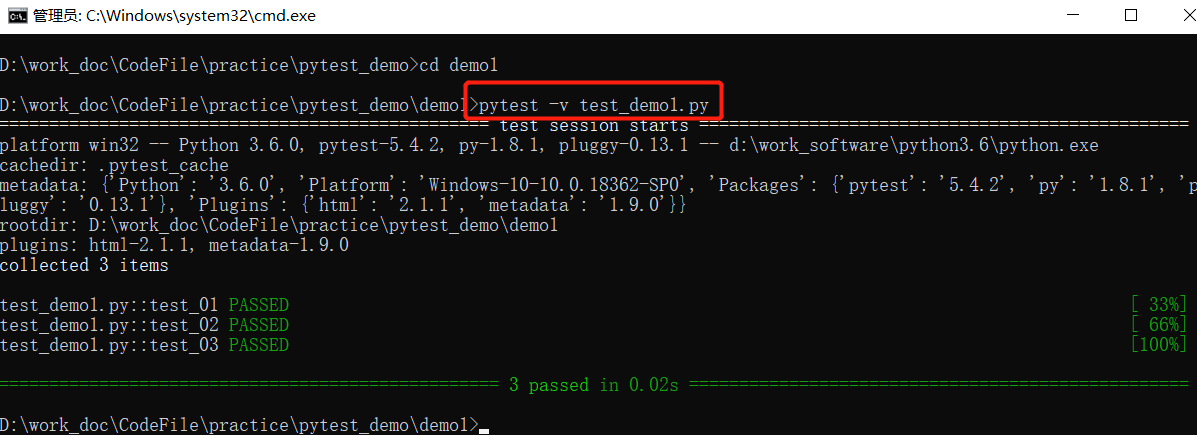
- pytest –v filename(最高级别信息 — verbose)
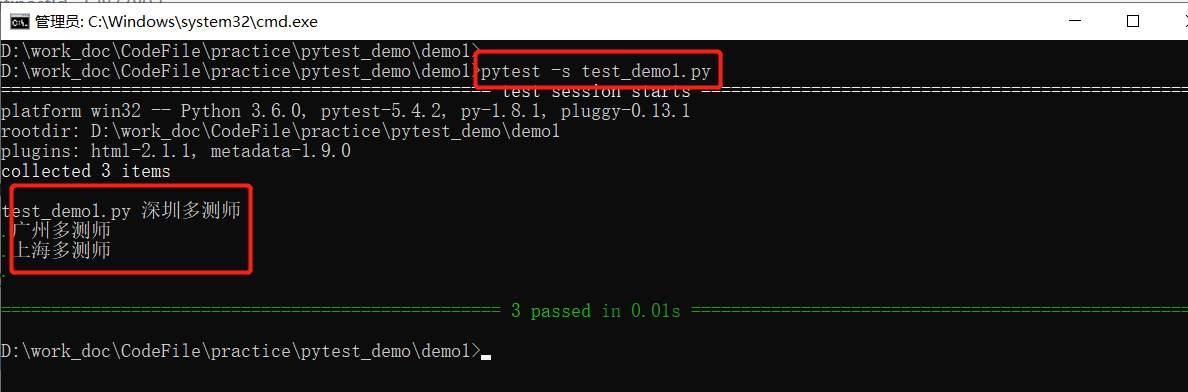
- pytest -s filename(输出打印)
- pytest -v -s filename
- pytest -q filename(静默输出,不会打印用例输出)
6、实例介绍一
- dos 窗口中执行用例
# test_demo1.py

def test_01():

    print("深圳多测师")

def test_02():

    print("广州多测师")

def test_03():

    print("上海多测师")
- 执行方法一:pytest -q test_demo1.py

- 执行方法二:pytest -s test_demo1.py
- 执行方法三:pytest -v test_demo1.py
- 执行方法四:pytest -v -s test_demo1.py

7、实例介绍二
- demo1
- demo1 发现结果中没有用例的执行打印结果
# test_demo.py

import pytest

def test_01():

    print("深圳多测师")

def test_02():

    print("广州多测师")

def test_03():

    print("上海多测师")

if __name__ == '__main__':

    pytest.main()

# 结果如下

============================= test session starts =============================

platform win32 -- Python 3.6.0, pytest-5.4.2, py-1.8.1, pluggy-0.13.1

rootdir: D:\work_doc\CodeFile\practice\pytest_demo

plugins: html-2.1.1, metadata-1.9.0

collected 3 items

test_demo1.py ...                                                        [100%]

============================== 3 passed in 0.05s ==============================

Process finished with exit code 0
- demo2
- demo2 中在 main() 中加入 ["-s"],结果中就可以展示打印结果
import pytest

def test_01():

    print("深圳多测师")

def test_02():

    print("广州多测师")

def test_03():

    print("上海多测师")

if __name__ == '__main__':

    pytest.main(["-s"])    # 在 main() 中加入 ["-s"]

# 结果如下

============================= test session starts =============================

platform win32 -- Python 3.6.0, pytest-5.4.2, py-1.8.1, pluggy-0.13.1

rootdir: D:\work_doc\CodeFile\practice\pytest_demo

plugins: html-2.1.1, metadata-1.9.0

collected 3 items

test_demo1.py 深圳多测师

.广州多测师

.上海多测师

.

============================== 3 passed in 0.02s ==============================

Process finished with exit code 0
- demo3
- 运行指定的用例文件
# test_demo1.py

def test_01():

    print("深圳多测师")

def test_02():

    print("广州多测师")

def test_03():

    print("上海多测师")
# run_all.py

import pytest

if __name__ == '__main__':

    pytest.main(["D:/test_demo1.py"])

# 结果如下

============================= test session starts =============================

platform win32 -- Python 3.6.0, pytest-5.4.2, py-1.8.1, pluggy-0.13.1

rootdir: D:\

plugins: html-2.1.1, metadata-1.9.0

collected 3 items

test_demo1.py ...                                                        [100%]

============================== 3 passed in 0.01s ==============================

Process finished with exit code 0
- demo4
- 运行指定目录下的用例文件
# demo1/test_demo1.py  demo1 目录下的 test_demo1.py 文件

def test_01():

    print("深圳多测师")

def test_02():

    print("广州多测师")

def test_03():

    print("上海多测师")
# demo2/test_demo2.py  demo2 目录下的 test_demo2.py 文件

def test_04():

    print("杭州多测师")

def test_05():

    print("北京多测师")

def test_06():

    print("重庆多测师")
import pytest

if __name__ == '__main__':

    pytest.main(["D:/demo1","D:/demo2"])    # 指定 D:/demo1 和 D:/demo2 目录

# 结果如下

============================= test session starts =============================

platform win32 -- Python 3.6.0, pytest-5.4.2, py-1.8.1, pluggy-0.13.1

rootdir: D:

plugins: html-2.1.1, metadata-1.9.0

collected 6 items

demo1\test_demo1.py ...                                                  [ 50%]

demo2\test_demo2.py ...                                                  [100%]

============================== 6 passed in 0.04s ==============================

Process finished with exit code 0
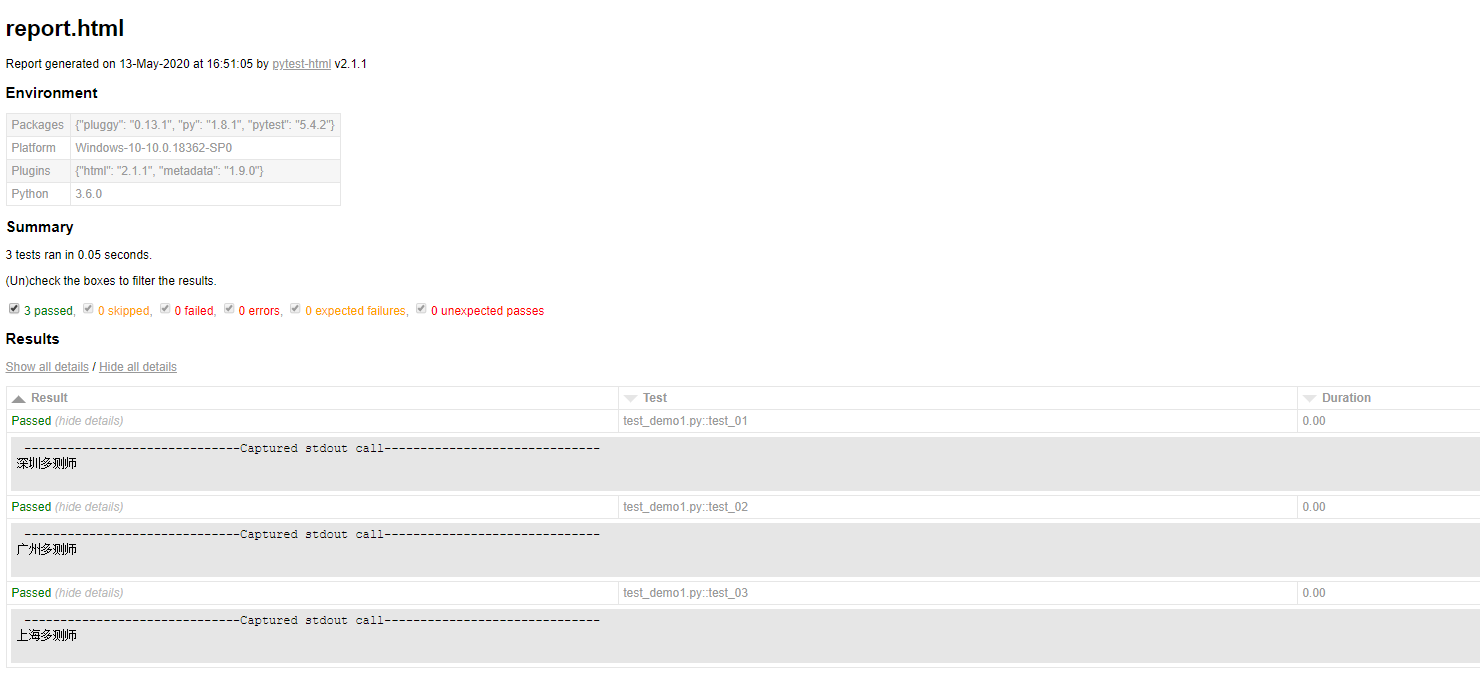
8、pytest-html 生成测试报告
- 安装 pytest-html
pip install pytest-html
- cmd 下执行用例且生成报告

- 代码中生成测试报告
import pytest

def test_01():

    print("深圳多测师")

def test_02():

    print("广州多测师")

def test_03():

    print("上海多测师")

if __name__ == '__main__':

    pytest.main(["-q","test_demo1.py","--html=report.html"])    # --html=report.html 生成测试报告,也可以自定义报告路径如:--html=d://report.html
Pytest 单元测试框架的更多相关文章
- Pytest单元测试框架-测试用例运行规则
1.Pytest测试用例运行规则 在pytest单元测试框架下面执行用例,需要满足以下几个特点: 1. 文件名以test_*.py开头或者*_test.py 2. 测试类.测试函数以test开头 3. ...
- Pytest单元测试框架-Pytest环境安装
unittest是python自带的单元测试框架,它封装好了一些校验返回的结果方法和一些用例执行前的初始化操作,使得单元测试易于开展,因为它的易用性,很多同学也拿它来做功能测试和接口测试,只需简单开发 ...
- Pytest单元测试框架:插件-allure-pytest环境搭建并在本地生成一个测试报告
之前写了allure-pytest的官方文档啃的内容,有些交流的朋友,实践起来没什么头绪,所以就有了这篇文章,也给自己填个坑 第一步:搭建Allure.JDK环境 1. 搭建JDK环境 不装jdk你会 ...
- Pytest单元测试框架之简单操作示例
前言: Pytest是第三方单元格测试框架,更加简单,灵活,而且提供了更多丰富的扩展: Pytest与UnitTest框架的区别 UnitTest测试用例执行顺序是依照ascii码执行,而Pytest ...
- Pytest单元测试框架——Pytest+Allure+Jenkins的应用
一.简介 pytest+allure+jenkins进行接口测试.生成测试报告.结合jenkins进行集成. pytest是python的一种单元测试框架,与python自带的unittest测试框架 ...
- Pytest单元测试框架-学习
pytest: Python的一个单元测试框架,基于UnitTest二次开发,语法上更加简洁,可以用来做Python开发项目的单元测试,UI自动化.接口自动化测试等,有很多的插件访问Pytest插件汇 ...
- Pytest单元测试框架之FixTure基本使用
前言: 在单元测试框架中,主要分为:测试固件,测试用例,测试套件,测试执行及测试报告: 测试固件不难理解,也就是我们在执行测试用例前需要做的动作和测试执行后的需要做的事情: 比如在UI自动化测试中,我 ...
- pytest单元测试框架
一.安装方式 1.安装命令:pip install pytest 2.html安装插件:pip install pytest -html 二.pytest执行指定测试用例 1.思想:通过对测试用例进行 ...
- Pytest单元测试框架-allure测试报告
Allure Test Report 对于不同的编程语言,有很多很酷的测试框架.不幸的是,它们中只有少数能够提供测试执行输出的良好表示.Qameta软件测试团队正在致力于Allure--一个开源框架, ...
随机推荐
- stand up meeting 12/17/2015
part 组员 今日工作 工作耗时/h 明日计划 工作耗时/h UI 冯晓云 建立基本的pdf阅读器界面框架 4 开始实现界面框架 4 foxit PDF ...
- P1464 Function
Function 简 单 的 递 归 这道题一开始十分智障地用递归做,虽然知道没那么简单,但还是冒着送死的心态交了一遍,果然,如我所料 样例输入: 密密麻麻,几万行的样例输入 //:) ...
- [转载]深度理解Session
什么是session session的官方定义是:Session:在计算机中,尤其是在网络应用中,称为“会话控制”.Session 对象存储特定用户会话所需的属性及配置信息. 说白了session就是 ...
- Springboot:员工管理之添加员工(十(7))
构建员工添加请求 com\springboot\controller\EmployeeController.java /*调转到员工添加页 携带部门信息 restful风格*/ @GetMapping ...
- react: typescript interface useState issue
define interface: interface ILoginState { imageId: string; imageSrc: string; username: string; passw ...
- [nodejs] 同步/异步创建多层目录
背景 有时项目里需要同时创建多层目录的功能,但低版本的nodejs并没有提供快捷的api 尽管在v10.12.0版本 mkdir() 第二个参数支持recursive 参数,为true时能递归创建,但 ...
- tensorflow1.0 lstm学习曲线
import tensorflow as tf import numpy as np import matplotlib.pyplot as plt BATCH_START = 0 TIME_STEP ...
- 关于flex弹性布局
http://www.ruanyifeng.com/blog/2015/07/flex-grammar.html
- VR全景视图 Google VrPanoramaView
2019独角兽企业重金招聘Python工程师标准>>> 一.背景简介 Welcome to VR at Google 进入Google VR主页,发现官方给我们提供了两套解决观看VR ...
- 与IBM的Lin Sun关于Istio 1.0和微服务的问答
北京时间 7 月 31 日,Istio 正式发布了 1.0 版本,并表示已经可用于生产环境.该版本的主要新特性包括跨集群 mesh 支持.细粒度流量控制以及在一个 mesh 中增量推出 mutual ...