
Azure Cognitive Services- Speech To Text
Speech 服务是认知服务的一种,提供了语音转文本,文本转语音, 语音翻译等,今天我们实战的是语音转文本(Speech To Text)。
STT支持两种访问方式,1.是SDK,2.是REST API。
其中:
SDK方式支持 识别麦克风的语音流 和 语音文件;
REST API方式仅支持语音文件;
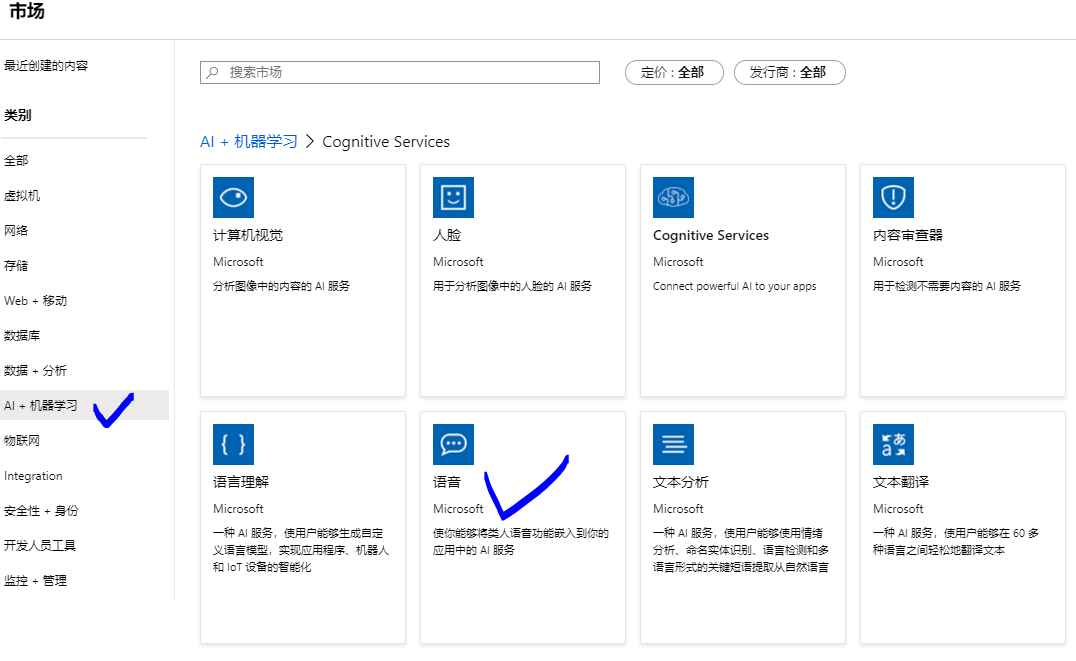
准备工作:创建 认知服务之Speech服务:
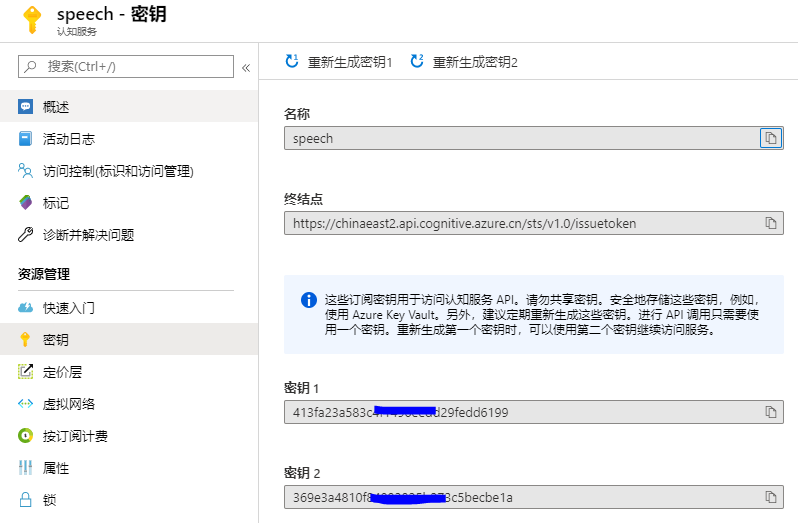
创建完成后,两个重要的参数可以在页面查看:
一. REST API方式将语音文件转换成文本:
Azure global的 Speech API 终结点请参考:
https://docs.microsoft.com/zh-cn/azure/cognitive-services/speech-service/rest-speech-to-text#regions-and-endpoints
Azure 中国区 的 Speech API 终结点:
截至到2020.2月,仅中国东部2区域已开通Speech服务,服务终结点为:
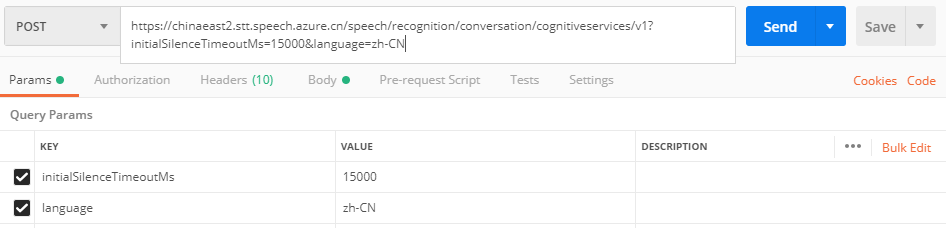
https://chinaeast2.stt.speech.azure.cn/speech/recognition/conversation/cognitiveservices/v1
对于Speech To Text来说,有两种身份验证方式:
其中Authorization Token有效期为10分钟。
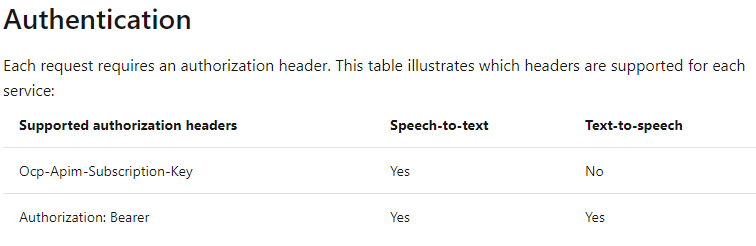
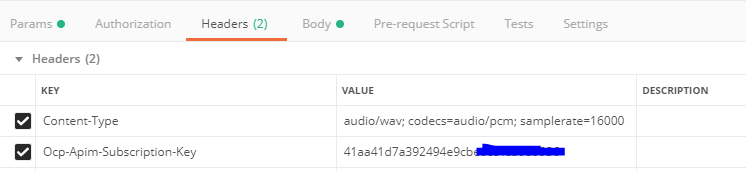
为了简便,本文使用了Ocp-Apim-Subscription-Key的方式。
注意:如果要实现文本转语音,按照上表,则必须使用 Authorization Token形式进行身份验证。
构建请求的其他注意事项:
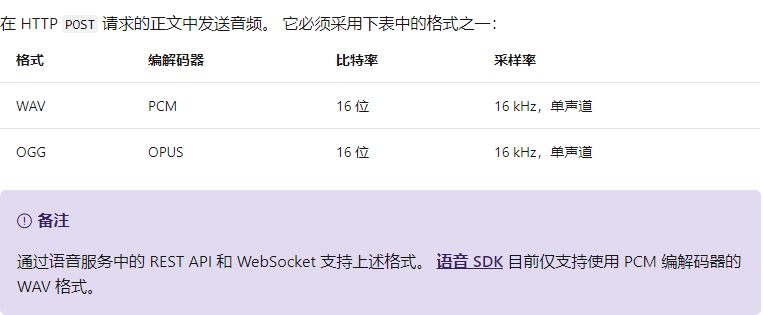
- 文件格式:
- 请求头:
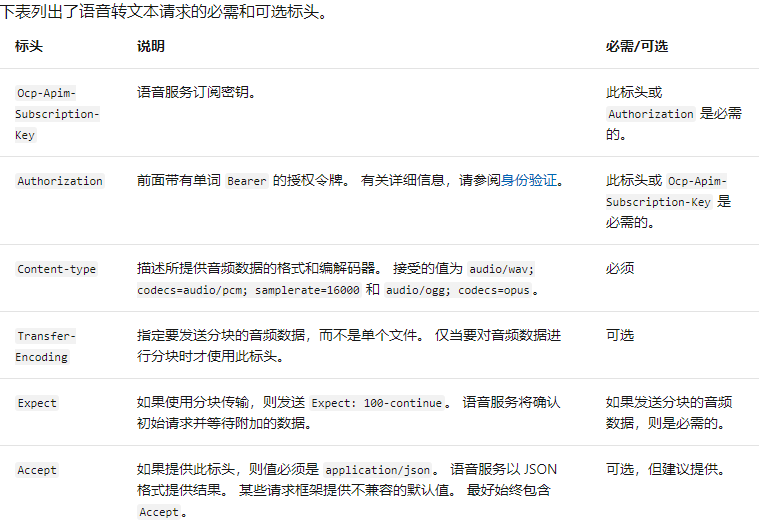
需要注意的是,Key或者Authorization是二选一的关系。 - 请求参数:
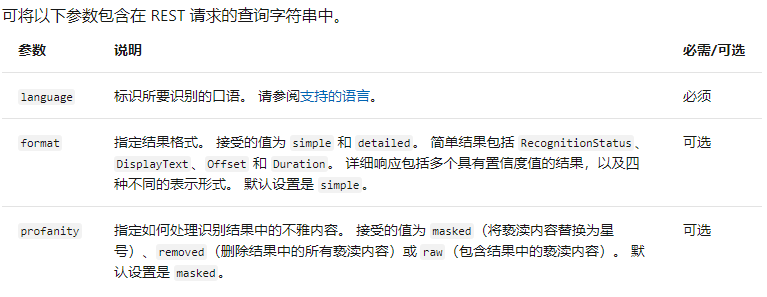
在Postman中的示例如下:
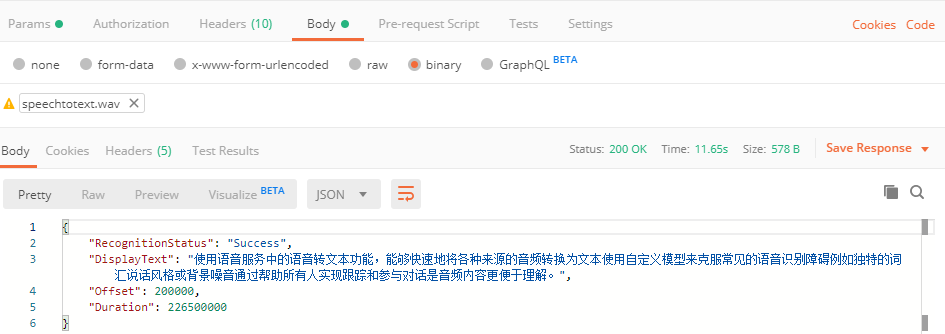
如果要在REST API中使用 Authorization Token,则需要先获得Token:
Global 获取Token的终结点:
https://docs.microsoft.com/zh-cn/azure/cognitive-services/speech-service/rest-speech-to-text#authentication
中国区获取Token的终结点:
截至2020.02,只有中国东部2有Speech服务,其Token终结点为:
https://chinaeast2.api.cognitive.azure.cn/sts/v1.0/issuetoken
Postman获取Token 参考如下:
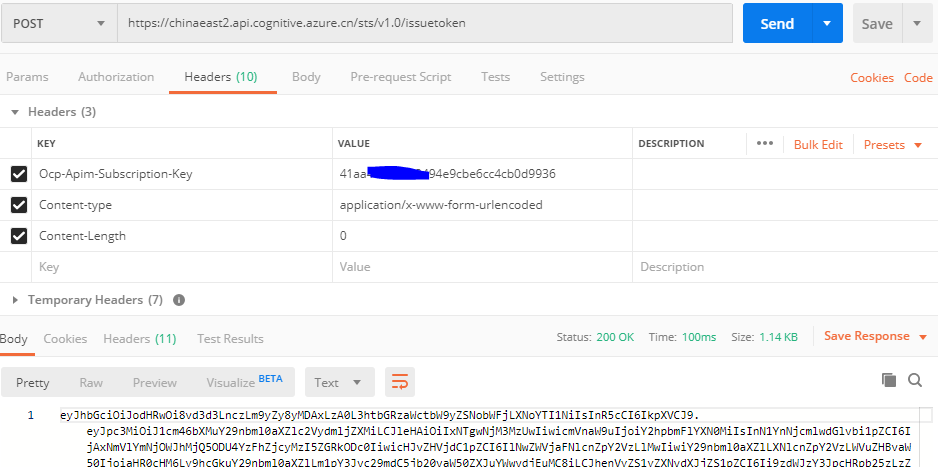
二. SDK方式将语音文件转换成文本(Python示例):
在官网可以看到类似的代码,但需要注意的是,该代码仅在Azure Global的Speech服务中正常工作,针对中国区,需要做特定的修改(见下文)。
import azure.cognitiveservices.speech as speechsdk
# Creates an instance of a speech config with specified subscription key and service region.
# Replace with your own subscription key and service region (e.g., "chinaeast2").
speech_key, service_region = "YourSubscriptionKey", "YourServiceRegion"
speech_config = speechsdk.SpeechConfig(subscription=speech_key, region=service_region)
# Creates an audio configuration that points to an audio file.
# Replace with your own audio filename.
audio_filename = "whatstheweatherlike.wav"
audio_input = speechsdk.AudioConfig(filename=audio_filename)
# Creates a recognizer with the given settings
speech_recognizer = speechsdk.SpeechRecognizer(speech_config=speech_config, audio_config=audio_input)
print("Recognizing first result...")
# Starts speech recognition, and returns after a single utterance is recognized. The end of a
# single utterance is determined by listening for silence at the end or until a maximum of 15
# seconds of audio is processed. The task returns the recognition text as result.
# Note: Since recognize_once() returns only a single utterance, it is suitable only for single
# shot recognition like command or query.
# For long-running multi-utterance recognition, use start_continuous_recognition() instead.
result = speech_recognizer.recognize_once()
# Checks result.
if result.reason == speechsdk.ResultReason.RecognizedSpeech:
print("Recognized: {}".format(result.text))
elif result.reason == speechsdk.ResultReason.NoMatch:
print("No speech could be recognized: {}".format(result.no_match_details))
elif result.reason == speechsdk.ResultReason.Canceled:
cancellation_details = result.cancellation_details
print("Speech Recognition canceled: {}".format(cancellation_details.reason))
if cancellation_details.reason == speechsdk.CancellationReason.Error:
print("Error details: {}".format(cancellation_details.error_details))
代码提供页面:
https://docs.azure.cn/zh-cn/cognitive-services/speech-service/quickstarts/speech-to-text-from-file?tabs=linux&pivots=programming-language-python#create-a-python-application-that-uses-the-speech-sdk
针对中国区,需要使用自定义终结点的方式,才能正常使用SDK:
speech_key, service_region = "Your Key", "chinaeast2"

template = "wss://{}.stt.speech.azure.cn/speech/recognition" \

               "/conversation/cognitiveservices/v1?initialSilenceTimeoutMs={:d}&language=zh-CN"

speech_config = speechsdk.SpeechConfig(subscription=speech_key,

endpoint=template.format(service_region, int(initial_silence_timeout_ms)))
中国区完整代码如下:
#!/usr/bin/env python
# coding: utf-8
# Copyright (c) Microsoft. All rights reserved.
# Licensed under the MIT license. See LICENSE.md file in the project root for full license information.
"""
Speech recognition samples for the Microsoft Cognitive Services Speech SDK
"""
import time
import wave
try:
import azure.cognitiveservices.speech as speechsdk
except ImportError:
print("""
Importing the Speech SDK for Python failed.
Refer to
https://docs.microsoft.com/azure/cognitive-services/speech-service/quickstart-python for
installation instructions.
""")
import sys
sys.exit(1)
# Set up the subscription info for the Speech Service:
# Replace with your own subscription key and service region (e.g., "westus").
speech_key, service_region = "your key", "chinaeast2"
# Specify the path to an audio file containing speech (mono WAV / PCM with a sampling rate of 16
# kHz).
filename = "D:\FFOutput\speechtotext.wav"
def speech_recognize_once_from_file_with_custom_endpoint_parameters():
"""performs one-shot speech recognition with input from an audio file, specifying an
endpoint with custom parameters"""
initial_silence_timeout_ms = 15 * 1e3
template = "wss://{}.stt.speech.azure.cn/speech/recognition/conversation/cognitiveservices/v1?initialSilenceTimeoutMs={:d}&language=zh-CN"
speech_config = speechsdk.SpeechConfig(subscription=speech_key,
endpoint=template.format(service_region, int(initial_silence_timeout_ms)))
print("Using endpoint", speech_config.get_property(speechsdk.PropertyId.SpeechServiceConnection_Endpoint))
audio_config = speechsdk.audio.AudioConfig(filename=filename)
# Creates a speech recognizer using a file as audio input.
# The default language is "en-us".
speech_recognizer = speechsdk.SpeechRecognizer(speech_config=speech_config, audio_config=audio_config) result = speech_recognizer.recognize_once()
# Check the result
if result.reason == speechsdk.ResultReason.RecognizedSpeech:
print("Recognized: {}".format(result.text))
elif result.reason == speechsdk.ResultReason.NoMatch:
print("No speech could be recognized: {}".format(result.no_match_details))
elif result.reason == speechsdk.ResultReason.Canceled:
cancellation_details = result.cancellation_details
print("Speech Recognition canceled: {}".format(cancellation_details.reason))
if cancellation_details.reason == speechsdk.CancellationReason.Error:
print("Error details: {}".format(cancellation_details.error_details))
speech_recognize_once_from_file_with_custom_endpoint_parameters()
需要注意的是,如果我们使用SDK识别麦克风中的语音,则将
speech_recognizer = speechsdk.SpeechRecognizer(speech_config=speech_config, audio_config=audio_config),修改为:
speech_recognizer = speechsdk.SpeechRecognizer(speech_config=speech_config)
Azure Cognitive Services- Speech To Text的更多相关文章
- 利用Google Speech API实现Speech To Text
很久很久以前, 网上流传着一个免费的,识别率暴高的,稳定的 Speech To Text API, 那就是Google Speech API. 但是最近再使用的时候,总是返回500 Error. 后来 ...
- How to use VS2012 remote debug Windows Azure Cloud Services
Background: Windows Azure Cloud Services 可以在本地调试,使用Visual Studio 2012 + 模拟器 Emulator.但是模拟器的工作状态和环境和真 ...
- Azure Mobile Services的REST API调用方式和自定义API
Azure Mobile Services(移动服务)是微软在Azure平台中提供的一种跨平台的移动应用后端服务,即移动后端即服务.支持.NET和JavaScript(Node.js)写后端代码:支持 ...
- 利用Meida Service的Java SDK来调用Azure Media Services的Index V2实现视频字幕自动识别
Azure Media Services新的Index V2 支持自动将视频文件中的语音自动识别成字幕文件WebVtt,非常方便的就可以跟Azure Media Player集成,将一个原来没字幕的视 ...
- Windows Azure - App Services
1. 需要了解的概念:App Service Plan, Resource Group 2. Create an ASP.NET web app in Azure App Services 3. Cr ...
- 如何使用 Microsoft Azure Media Services 现场直播,(Live Streaming) 直播流媒体系统
不久之前,微软公司宣布了 Microsoft Azure Media Services 实时直播服务 ( Live ) 开始进入技术预览阶段,公开接受用户测试. 而这些实时直播服务其实早已被 NBC ...
- Power BI 与 Azure Analysis Services 的数据关联:1、建立 Azure Analysis Services服务
Power BI 与 Azure Analysis Services 的数据关联:1.建立 Azure Analysis Services服务
- Power BI 与 Azure Analysis Services 的数据关联:2、Azure Analysis Services与 本地版本的 SQL Analysis Services 连接
Power BI 与 Azure Analysis Services 的数据关联:2.Azure Analysis Services与 本地版本的 SQL Analysis Services ...
- Power BI 与 Azure Analysis Services 的数据关联:3、还原备份文件到Azure Analysis Services
Power BI 与 Azure Analysis Services 的数据关联:3.还原备份文件到Azure Analysis Services 配置存储设置 备份前,需要为服务器配置存储设置. ...
随机推荐
- windows系统下hosts文件的改写(为了测试nginx内网的证书代理,需要做域名解析)
1. win加R C:\WINDOWS\system32\drivers\etc 2.打开hosts文件 加入一行 IP为客户机要访问的IP地址 域名也是在nginx中定义好的 3.ct ...
- Java 调用系统系统可执行文件
public class Test { public static Map<String, String> executeCmd(String cmd) { Runtime rt = Ru ...
- Linux命令:ifconfig命令
ifconfig功能:配置网络接口,CentOS7最小化安装不包含此命令,需要安装net-tools包. ifconfig常见的用法: ifconfig :显示所有活动接口的相关信息 ifconfig ...
- Day11 - I - 取石子游戏 HDU - 2516
1堆石子有n个,两人轮流取.先取者第1次可以取任意多个,但不能全部取完.以后每次取的石子数不能超过上次取子数的2倍.取完者胜.先取者负输出"Second win".先取者胜输出&q ...
- 「POJ1734」Sightseeing trip
「POJ1734」Sightseeing trip 传送门 这题就是要我们求一个最小环并且按顺序输出一组解. 考虑 \(O(n^3)\) 地用 \(\text{Floyd}\) 求最小环: 考虑 \( ...
- 【C++初学者自学笔记一】(把自己刚学到的东西做一下总结,如果有哪些地方不足请留言指正)
这是我写的第一个博客关于C++的一些笔记,我不会写的太深奥,因为这样很多人会看不懂(我刚开始学C语言深受其害).个人觉得C++这门语言有些类似于C语言但是有些函数的用法还是有不一样的.C语言中的头文件 ...
- Java生鲜电商平台-小程序或者APP拼团功能设计与架构实战
Java生鲜电商平台-小程序或者APP拼团功能设计与架构实战 说明:Java生鲜电商平台拼团是拉新引流的利器,将拼团运用到极致的就是拼多多,前期通过选取性价比高.实用性强的商品进行拼团,在社交圈(主要 ...
- Hadoop大实验——MapReduce的操作
日期:2019.10.30 博客期:114 星期三 实验6:Mapreduce实例——WordCount 实验说明: 1. 本次实验是第六次上机,属于验证性实验.实验报告上交截止 ...
- Random Variables
可测空间(Measurable Space)和测度空间(Measure Space) 集合X,X上的一个σ-algebra A,则(X,A)被称为可测空间(measurable space) 再在A上 ...
- redis之string数据类型常用方法总结
目录 redis 字符串(string)[需要掌握] 特点 语法 redis 字符串(string)[需要掌握] 特点 一个键能存储512MB数据 string类型是二进制安全的,可以存储任何数据,比 ...