
How to setup Visual Studio without pain
Visual Studio (VS) can be very hard to install. If you are lucky, one whole day may be enough to install VS. However, in some cases, some students spent weeks to install VS. In all cases, installing VS can be (very) painful.
Fortunately, Microsoft provides a virtual machine (VM) to help you quickly setup VS.
To run a VS virtual machine, your computer needs to have at least 8GB of RAMs. You also need 30GB of disk spaces.
Follow these steps to setup a VS virtual machine:
- Download and install Oracel VirtualBox. (If you have other VM softwares (VMware, Hyper-V, Parallels) installed on your computer, you can ignore this step.)
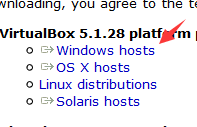
- Download Oracle VirtualBox from https://www.virtualbox.org/. just click on "Download VirtualBox" and select "Windows hosts".
- Install Oracle VirtualBox.
- Download Oracle VirtualBox from https://www.virtualbox.org/. just click on "Download VirtualBox" and select "Windows hosts".
- Download the "Windows 10 development environment" VM.
The VM is very big. Since our campus network charges you for the data you use, it is very expensive to download the VM. Thus, I will give you an IPv6 torrent to download the VM free of data. The VM is already unzipped, you can use it directly.
You can also download the VM directly from https://developer.microsoft.com/en-us/windows/downloads/virtual-machines. Choose the "Windows 10 Enterprise" download, and select VIRTUALBOX in our case. Unzip the file you downloaded, you will get a .ova file.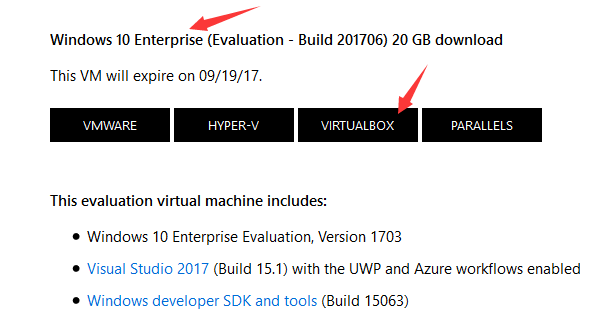
- Import the VM:
- Open Oracle VirtualBox from your start menu.
- In "管理", choose "导入虚拟电脑".
- Choose the .ova file you get from step 2, click on "下一步".
- In "处理器", choose 2. In "内存", choose 4096 MB if your computer have 8GB of RAMs, or 8192 if your computer have 16GB of RAMS. In 虚拟硬盘, change the path of the vmdk file to a location where you have at least 30GB of disk spaces.
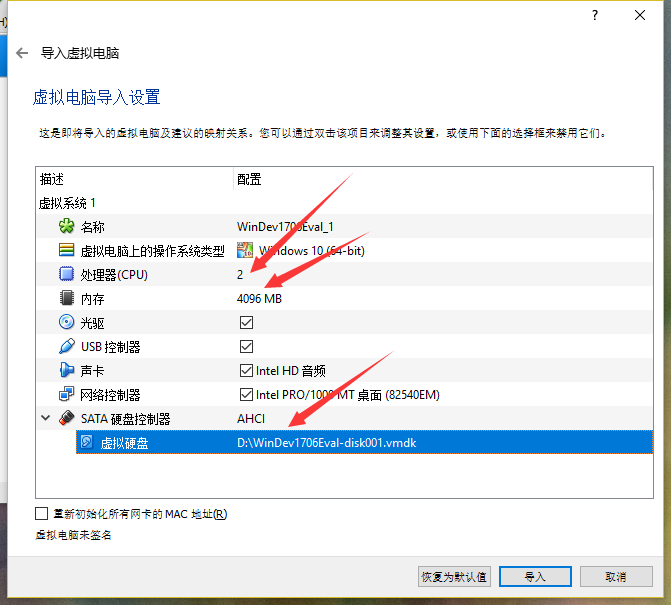
- Click on "导入", wait till it finishs.
- Install VirtualBox Guest Additions:
- Start the VM you just imported, wait till it boots to desktop.
- In "设备", choose "安装增强功能".
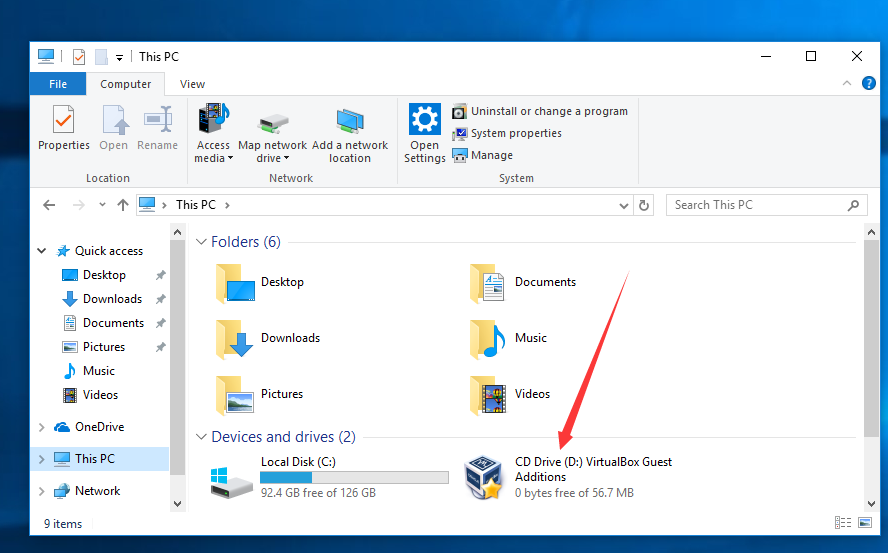
- Inside the VM, in This PC, you will find a CD drive named "CD Drive (D:) VirutalBox Guest Additions", open it, click on "VBoxWindowsAdditions.exe" to install the VirtualBoxGuest Additions.
- Inside the VM, reboot the VM.
After all these steps, you will have a VM wil VS preinstalled inside the VM. The VM will expire after a period of time. Usually Microsoft will release a new VM before the old VM expires.
You can enable clipboard sharing and file dragging between your computer and the VM. That means you can ctrl+c some test from your computer and ctrl+v into your VM. You can also drag files into your VM or drag file out of it. To enable clipboard sharing and file dragging:
- Open your VM, in "设备", choose "共享剪贴板", choose "双向".
- In "设备", choose "拖放", choose "双向".
You could also share folders between your computer and the VM. To enable file sharing:
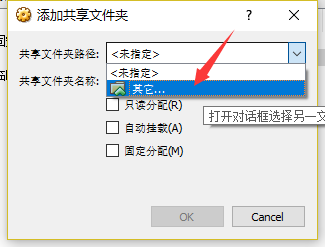
- Open your VM, in "设备", choose "共享文件夹", choose "共享文件夹". Click on the add icon on the right side. Click on the down arrow on the right of the "共享文件夹路径" textbox, choose "其他" to select a folder to share.
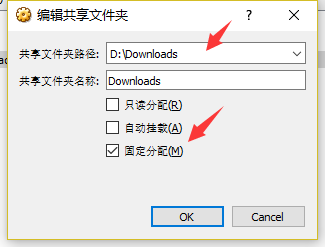
- Check "固定分配", click on "OK", click on "OK".
- Make sure you VM is discoverable:
- Click on the network icon in your system tray, select Network (Connected).
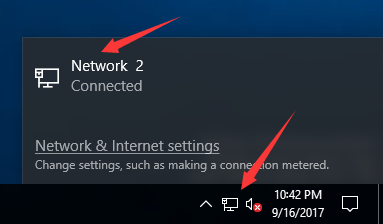
- Click on the Network (Connect) icon listed under Ethernet.
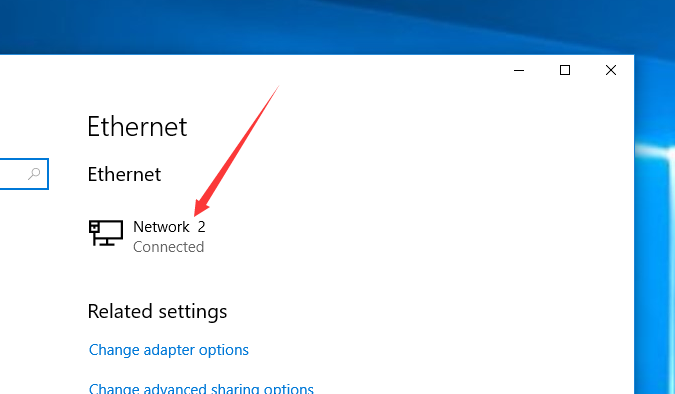
- Make sure "Make this PC discoverable" is on.

- Click on the network icon in your system tray, select Network (Connected).
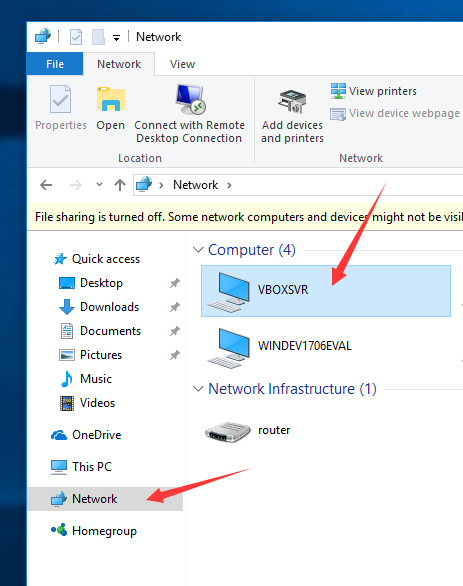
- In This PC, on the left pane, choose Network. On the right pane, double click on VBOXSVR, you can see your shared folder.
How to setup Visual Studio without pain的更多相关文章
- Visual Studio 2008 – ASP.NET “System.Runtime.InteropServices.COMException”
The Issue When openning an existing ASP.NET project for the first time in Visual Studio 2008 it retu ...
- .Net Core 常用开发工具(IDE和运行时、Visual Studio插件、Visual Studio Code插件)
IDE和运行时 组件名 描述 可选版本 推荐版本 Visual Studio Community 社区免费版 For Visual Studio 2017 For Visual Studio 2019 ...
- Setup QT 5.5.1 + OpenCV 3.0 + Visual Studio 2013 on windows 10
1. Install Visual studio 2013 community version which is free to use for personal usage. 2. Setup th ...
- VS2017、VS2019没有Setup安装项目(Visual Studio Installer)_解决方案
前言: VS2010中有一个自带的安装部署项目,叫:Visual Studio Installer ,我们通常称为:setup项目,是一个用于自定义安装部署的项目方案.但是在VS2017,VS2019 ...
- 让InstallShield 2015 Limited Edition for Visual Studio 2015生成的setup.exe双击时以管理员权限运行
转载:http://blog.csdn.net/zztoll/article/details/52096700 如题,如何让InstallShield 2015 Limited Edition for ...
- Visual Studio 2015 update 2 setup fails with "missing or damaged package kb3022398"
Question Hi, I wanted to install Visual Studio Professional 2015 Update 2 from my MSDN abo (web ...
- python setup.py install 报错:error: [WinError 3] 系统找不到指定的路径。: 'C:\\Program Files (x86)\\Microsoft Visual Studio 14.0\\VC\\PlatformSDK\\lib
Outline 在通过 setup.py 安装python模块时,遇到了以下报错: # 执行 python setup.py install # 报错: error: [WinError 3] 系统找 ...
- 修改visual studio setup 安装顺序(解决新版安装包无法自动移除老版本程序的问题)
背景 visual studio setup 支持自动删除之前版本的安装,需要设置RemovePreviousVersions = true, DetectNewerInstalledVersion ...
- Visual Studio Code Setup
Windows https://code.visualstudio.com/docs/setup/windows Additional Components and Tools https://cod ...
随机推荐
- 安装oracle [INS-32025] 所选安装与指定 Oracle 主目录中已安装的软件冲突” 的问题
删除C:\Program Files (x86)\Oracle\Inventory\下的Oracle文件夹即可解决问题
- C语言典型编程1
关于C的一些小而精的编程,适合希望提升编程能力的初学者学习:关键编程也就几句,但思维可以迁移到其他编程语言.同一问题,算法多种 //阶乘运算(有多种编写方式,编程需要看懂,更要打出来)#include ...
- 云笔记项目-Spring事务学习-传播NEVER
接下来测试事务传播属性NEVER Service层 Service层中设置事务传播属性都为NEVER. LayerT层代码 package LayerT; import javax.annotatio ...
- 【练习】Python第三次
对函数,内置函数的用法,递归,程序运行顺序的考试 1.列举布尔值为 False 的值 0 False '' [] () {} None 经常使用的场景是 if object 如果object有值就执行 ...
- oracle数据库查询语句case的用法
实现功能: 1.先查询status=2的记录,如果查询到记录则返回第一条记录的Product_Name:2.如果查询不到status=2的记录,则判断status=1的记录是否存在,不存在则返回“请耐 ...
- redis目前最好用的客户端推荐
- 制作docker基础镜像
docker build -t tomcat:jre8-alpine . sudo docker tag 5a3 registry.cn-shenzhen.aliyuncs.com/ibase/tom ...
- stm32-arduino-f103
希望给工作中偶尔要用的一些辅助板卡(例如运行信息现场记录)找一个快速开发的手段,Arduino作为流行的开源嵌入硬件框架,组件丰富,资料众多,所以想以Arduino作为平台.但是Arduino板子基本 ...
- mysql查询时间段内的数据
https://blog.csdn.net/ls1645/article/details/79118464
- 永久注册Oracle工具PL/SQL