
20192305 王梓全Python程序设计实验四报告
20192305 王梓全Python程序设计实验四报告
课程:《Python程序设计》
班级: 1923
姓名: 王梓全
学号:20192305
实验教师:王志强
实验日期:2021年6月14日
必修/选修:公选课
1.实验内容
- 1.Python综合应用:爬虫、数据处理、可视化、机器学习、神经网络、游戏、网络安全等;
- 2.结合手头的python教学书,我选择了编写一个五子棋游戏
2.实验过程及结果
- 先设计一个15x15的标准五子棋棋盘
- 由于四周留下空缺后计算点位时将会更加麻烦,故我的棋盘四周未留下空缺
import random

import pygame

from pygame.locals import MOUSEBUTTONUP

pygame.init()

cell_size = 40

cell_num = 15

grid_size = cell_size * (cell_num - 1)

screencaption = pygame.display.set_caption('五子棋')

screen = pygame.display.set_mode((grid_size, grid_size))
定义一个chess_arr用于储存棋子的位置,监听鼠标弹起的位置后,将该点的坐标保存入数组chess_arr flag = 1
state = 1

while True:

    for event in pygame.event.get():

        if event.type == pygame.QUIT:

            pygame.quit()

            exit()

        if state == 1 and event.type == pygame.MOUSEBUTTONUP:

            x, y = pygame.mouse.get_pos()

    screen.fill((238, 232, 170))
鼠标弹起的位置不一定是在纵横线的交界点,故需要对每个落点xi,yi的位置进行限定,修改如下
xi = int(round((x) * 1.0 / cell_size))

yi = int(round((y) * 1.0 / cell_size))
对重复落点处进行判断,若为新点则正常进行落点,否则,落点无效
if xi >= 0 and xi < cell_num and yi >= 0 and yi < cell_num and (xi, yi, 1) not in chess_arr and (

            xi, yi, 2) not in chess_arr:

                chess_arr.append((xi, yi, flag))

                if check_win(chess_arr, flag):

                    state = 2 if flag == 1 else 3

                else:

                    flag = 2 if flag == 1 else 1
将棋盘线绘制上,同时设置在落点处画圆代表落子
 for x in range(0, cell_size * cell_num, cell_size):

        pygame.draw.line(screen, (200, 200, 200), (x, 0 ),

                         (x, cell_size * (cell_num - 1)), 1)

    for y in range(0, cell_size * cell_num, cell_size):

        pygame.draw.line(screen, (200, 200, 200), (0, y),

                         (cell_size * (cell_num - 1), y), 1)

    for x, y, c in chess_arr:

        chess_color = (30, 30, 30) if c == 1 else (225, 225, 225)

        pygame.draw.circle(screen, chess_color, [x * cell_size, y * cell_size], 16, 16)
定义一个判断落点位置的函数
def get_one_dire_num(lx, ly, dx, dy, m):

    tx = lx

    ty = ly

    s = 0

    while True:

        tx += dx

        ty += dy

        if tx < 0 or tx >= cell_num or ty < 0 or ty >= cell_num or m[ty][tx] == 0: return s

        s += 1
定义一个检查最终是否胜利的函数,若一点周围左上两点中,右上两点中,左下两点中,右下两点中的一点均有同一方的子存在,则判定其为胜利
def check_win(chess_arr, flag):

    m = [[0] * cell_num for i in range(cell_num)]

    for x, y, c in chess_arr:

        if c == flag:

            m[y][x] = 1

    lx = chess_arr[-1][0]

    ly = chess_arr[-1][1]

    dire_arr = [[(-1, 0), (1, 0)], [(0, -1), (0, 1)], [(-1, -1), (1, 1)],

                [(-1, 1), (1, -1)]]
进行最后的修正,将棋盘颜色设置为木头的颜色,将胜利提示设置为黄色,将所有的更改体现在屏幕上
screen.fill((238, 232, 170))

    if state != 1:

        myfont = pygame.font.Font(None, 60)

        white = 210, 210, 0

        win_text = "IS %s" % ('black' if state == 2 else 'white')

        textImage = myfont.render(win_text, True, white)

        screen.blit(textImage, (260, 320))

    pygame.display.update()
最终代码:
import random

import pygame

from pygame.locals import MOUSEBUTTONUP

pygame.init()

cell_size = 40

cell_num = 15

grid_size = cell_size * (cell_num - 1)

screencaption = pygame.display.set_caption('五子棋')

screen = pygame.display.set_mode((grid_size, grid_size))

chess_arr = []

flag = 1

state = 1

def get_one_dire_num(lx, ly, dx, dy, m):

    tx = lx

    ty = ly

    s = 0

    while True:

        tx += dx

        ty += dy

        if tx < 0 or tx >= cell_num or ty < 0 or ty >= cell_num or m[ty][tx] == 0: return s

        s += 1

def check_win(chess_arr, flag):

    m = [[0] * cell_num for i in range(cell_num)]

    for x, y, c in chess_arr:

        if c == flag:

            m[y][x] = 1

    lx = chess_arr[-1][0]

    ly = chess_arr[-1][1]

    dire_arr = [[(-1, 0), (1, 0)], [(0, -1), (0, 1)], [(-1, -1), (1, 1)],

                [(-1, 1), (1, -1)]]

    for dire1, dire2 in dire_arr:

        dx, dy = dire1

        num1 = get_one_dire_num(lx, ly, dx, dy, m)

        dx, dy = dire2

        num2 = get_one_dire_num(lx, ly, dx, dy, m)

        if num1 + num2 + 1 >= 5: return True

    return False

while True:

    for event in pygame.event.get():

        if event.type == pygame.QUIT:

            pygame.quit()

            exit()

        if state == 1 and event.type == pygame.MOUSEBUTTONUP:

            x, y = pygame.mouse.get_pos()

            xi = int(round((x) * 1.0 / cell_size))

            yi = int(round((y) * 1.0 / cell_size))

            if xi >= 0 and xi < cell_num and yi >= 0 and yi < cell_num and (xi, yi, 1) not in chess_arr and (

            xi, yi, 2) not in chess_arr:

                chess_arr.append((xi, yi, flag))

                if check_win(chess_arr, flag):

                    state = 2 if flag == 1 else 3

                else:

                    flag = 2 if flag == 1 else 1

    screen.fill((238, 232, 170))

    for x in range(0, cell_size * cell_num, cell_size):

        pygame.draw.line(screen, (200, 200, 200), (x, 0 ),

                         (x, cell_size * (cell_num - 1)), 1)

    for y in range(0, cell_size * cell_num, cell_size):

        pygame.draw.line(screen, (200, 200, 200), (0, y),

                         (cell_size * (cell_num - 1), y), 1)

    for x, y, c in chess_arr:

        chess_color = (30, 30, 30) if c == 1 else (225, 225, 225)

        pygame.draw.circle(screen, chess_color, [x * cell_size, y * cell_size], 16, 16)

    if state != 1:

        myfont = pygame.font.Font(None, 60)

        white = 210, 210, 0

        win_text = "IS %s" % ('black' if state == 2 else 'white')

        textImage = myfont.render(win_text, True, white)

        screen.blit(textImage, (260, 320))

    pygame.display.update()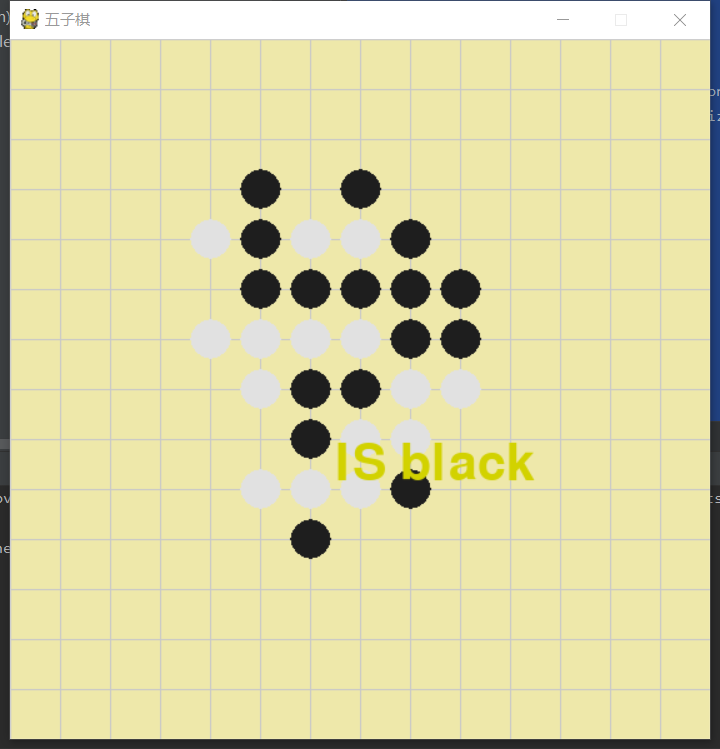
3. 实验过程中遇到的问题和解决过程
- 问题1:下载安装pygame一晚上都未成功
- 问题1解决方案:放弃使用pip安装pygame,转而使用pycharm自带的库下载,并挂上清华的源
- 问题二:对pygame的使用不熟悉
- 问题二解决方案:参考手上的python教程书中的pygame章节
- 问题三:不知道如何处理五子棋的落点统计
- 问题三解决方案:参考cnblog上的一篇专栏,使用数组和上述的get one dire函数实现对落点的储存
- 问题四:未判断是否落点于交界线处导致落子混乱
- 问题四解决方案:参考cnblog上的专栏,用int函数取整,向上或向下落在最接近的交界线处
其他(感悟、思考等)
本次的实验完全超脱了平时所学的内容,大部分过程都参考了《python:从入门到实践》一书中对pygame的讲解,对五子棋的具体实现则参考了cnblog上的文章,总体而言,
是目前编写过的最复杂的程序,虽然许多内容非自己的积累,但在这个过程中切实的提升了我的编程能力以及自学能力,对他人代码的揣摩也让我对程序设计有了更加全面的认识。
参考资料
- 《python从入门到实践》
20192305 王梓全Python程序设计实验四报告的更多相关文章
- 20184302 2019-2020-2 《Python程序设计》实验四报告
20184302 2019-2020-2 <Python程序设计>实验四报告 课程:<Python程序设计> 班级: 1843 姓名: 李新锐 学号:184302 实验教师:王 ...
- 20192204 2019-2020-2 《Python程序设计》实验四报告
20192204 2019-2020-2 <Python程序设计>实验四报告 课程:<Python程序设计> 班级: 1922 姓名: 李龙威 学号:20192204 实验教师 ...
- Python程序设计实验报告四:循环结构程序设计(设计型实验)
安徽工程大学 Python程序设计 实验报告 班级 物流191 姓名 姚彩琴 学号3190505129 成绩 日期 2020.4.8 指导老师 修宇 [实验名称 ...
- PYTHON程序设计实验
Python程序设计实验报告一: 熟悉IDLE和在线编程平台 安徽工程大学 Python程序设计实验报告 班级 物流191 姓名 邹缕学号 3190505117成绩 ▁▁▁ 日期 2020.3.5 指 ...
- Python程序设计实验报告二:顺序结构程序设计(验证性实验)
安徽工程大学 Python程序设计 实验报告 班级 物流191 姓名 崔攀 学号3190505136 成绩 日期 2020.3.22 指导老师 修宇 [实验 ...
- Python程序设计实验报告一:熟悉IDLE和在线编程平台
安徽工程大学 Python程序设计 实验报告 班级 物流191 姓名 崔攀 学号3190505136 成绩_____ 日期 2020.3.8 指导老师 ...
- Python程序设计 实验 1 熟悉 IDLE 和在线编程平台
------------恢复内容开始------------ 安徽工程大学 Python程序设计 实验报告 班级 物流191 姓名 姚彩琴 学号3190505129 成绩 日期 2 ...
- Python程序设计实验报告三:分支结构程序设计
安徽工程大学 Python程序设计 实验报告 班级 物流191 姓名 姚彩琴 学号3190505129 成绩 日期 2020.4.5 指导老师 修宇 [实验目的 ...
- 20145204&20145212信息安全系统实验四报告
20145204信息安全设计基础实验四报告 博客链接:信息安全设计基础实验
- 20201123 《python程序设计》实验四报告
20201123 2020-2021-2 <python程序设计>实验三报告 课程:<Python程序设计>班级:2011姓名:晏鹏捷学号:20201123实验教师:王志强实验 ...
随机推荐
- Pycharm报错:Error running ‘‘: Cannot run program “\python.exe“ (in directory ““)系统找不到指定文件夹?已解决!
问题报错 报错原因:我修改的工程的名称/或者移动了工程位置,运行导致找不到之前的运行路径 解决办法1.在该项目文件夹下找到一个叫.idea的文件夹.(若没有,选择显示隐藏项目,可能被隐藏了)PyCha ...
- python 提取文件的名字 和路径
# coding=utf-8 import sys import os s = 'C:/Users/Desktop/lesson/python/calss1.py' m_dir = os.path.d ...
- LightOJ - 1162 Min Max Roads
LightOJ - 1162 Min Max Roads 题解:在线倍增LCA和模拟ST表 让我们求从\(u->v\)最短路径上的边权最大值和边权最小值,那么我们可以利用倍增思想,类似其\(fa ...
- openssl常用操作
参考:https://www.golinuxcloud.com/openssl-view-certificate/ 查看证书信息 openssl x509 -in server.crt -text - ...
- vue打包后打开index.html文件显示空白页问题
通过网上的资料发现在vue.config.js中写入再重新打包就可以再index.html中显示. https://blog.csdn.net/m0_51060602/article/details/ ...
- top单核与32C--CPU爆表
linux的cpu使用频率是根据cpu个数和核数决定的 top, 然后你按一下键盘的1,这就是单个核心的负载,不然是所有核心的负载相加,自然会超过100 单核为100%,服务器是32核的,下面基本用了 ...
- 第12周 预习、实验与作业:Java并发编程
以前你编写的Java程序同时能做几件事情?有几个执行流程?main方法执行完,整个程序一定会退出吗? 最多只能做一件事 函数按着顺序执行,函数内按着语句执行.可以有多个可以有一个. 不一定.因为Mai ...
- 关于给widget添加属性
在django中,我们通过修改Form/ModelForm的初始化函数__init__修改表单的显示样式,其中修改widget的属性操作和字典操作一致. 1.给widget添加属性 说明:这是在不影响 ...
- gitlab+jenkins配置自动触发构建
1.jenkins安装gitlab插件 2.启动gitlab容器 docker run -itd -v /opt/gitlab/etc:/etc/gitlab -v /opt/gitlab/log:/ ...
- spring-cloud项目初始化问题
无法引入本地依赖 参考:https://blog.csdn.net/qq_39684784/article/details/115289982 时区问题: url设置:serverTimezone=U ...