
SSM-learning
架构流程图:
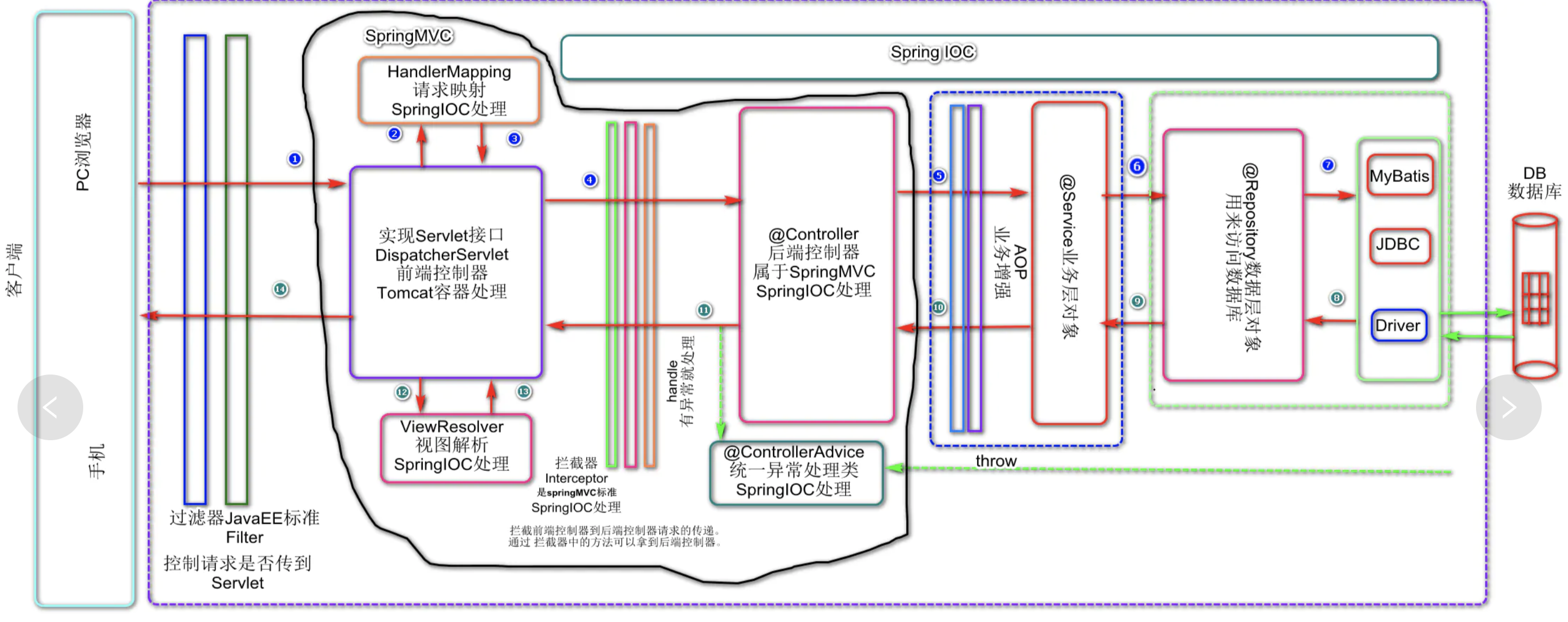
第一步:建立spring框架;
包括:建立所需要的dao层,sevice层和controller层和实体类,建立spring配置文件,配置自动扫描bean
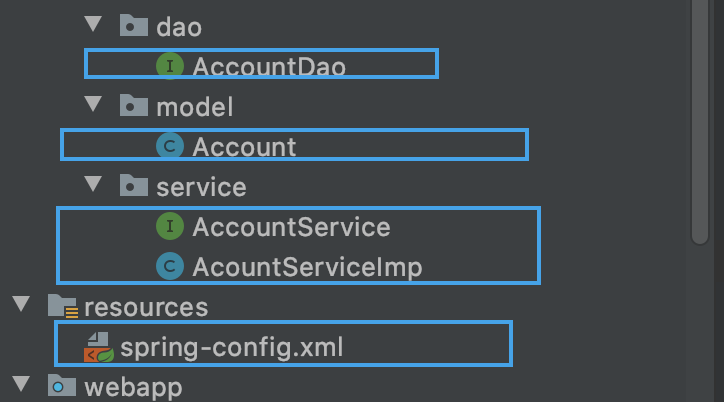
AccountDao:
@Repository

public interface AccountDao {

   @Select("select * from account where id = 1")

   Account findAll() ;

}
Account:
package com.quan.model;

import javax.annotation.Resource;

@Resource

public class Account {

    private Integer id;

    private Integer uid;

    private Double money;

    public Integer getId() {

        return id;

    }

    public void setId(Integer id) {

        this.id = id;

    }

    public Integer getUid() {

        return uid;

    }

    public void setUid(Integer uid) {

        this.uid = uid;

    }

    public Double getMoney() {

        return money;

    }

    public void setMoney(Double money) {

        this.money = money;

    }

    @Override

    public String toString() {

        return "Account{" +

                "id=" + id +

                ", uid=" + uid +

                ", money=" + money +

                '}';

    }

}
AcountService
public interface AccountService {

   Account findAll();

}
AcountServiceImp
@Service

public class AcountServiceImp  implements AccountService{

    @Autowired

    private AccountDao accountDao;

    @Override

    public Account findAll() {

       Account account =accountDao.findAll();

       System.out.println(account);

        System.out.println("springMVC-done.....");

        return account;

    }

}
spring-config.xml
<?xml version="1.0" encoding="UTF-8"?>

<beans xmlns="http://www.springframework.org/schema/beans"

       xmlns:tx="http://www.springframework.org/schema/tx"

       xmlns:context="http://www.springframework.org/schema/context"

       xmlns:mvc="http://www.springframework.org/schema/mvc"

       xmlns:aop="http://www.springframework.org/schema/aop"

       xmlns:xsi="http://www.w3.org/2001/XMLSchema-instance"

       xsi:schemaLocation="http://www.springframework.org/schema/beans

        http://www.springframework.org/schema/beans/spring-beans.xsd

        http://www.springframework.org/schema/tx

        http://www.springframework.org/schema/tx/spring-tx.xsd

        http://www.springframework.org/schema/context

        http://www.springframework.org/schema/context/spring-context.xsd

        http://www.springframework.org/schema/mvc

        http://www.springframework.org/schema/mvc/spring-mvc.xsd

            http://www.springframework.org/schema/aop

        http://www.springframework.org/schema/mvc/spring-aop.xsd

">

    <context:component-scan base-package="com.quan">

<!--        配置需要忽略的注解,controller 让spingmvc配置文件去配置-->

        <context:exclude-filter type="annotation" expression="org.springframework.stereotype.Controller"/>

    </context:component-scan>
spring的配置文件主要是,除了springMVC需要配置的扫描controller的注解,其他都需要在这里配置
建议没实现一个框架的配置,都进行简单的验证
第二部,实现springMVC配置:
配置web.xml文件,实现过滤器,核心处理器,中文乱码过滤
<!--  spring-MVC的配置,-->

  <servlet>

    <servlet-name>springmvc</servlet-name>

    <servlet-class>

      org.springframework.web.servlet.DispatcherServlet

    </servlet-class>

<!--    服务器启动的时候,让DispatcherServlet对象创建-->

    <load-on-startup>1</load-on-startup>

  </servlet>

  <!--  如果没有定义配置文件名字,spring直接会找web-inf下的servlet-name-servler.xml文件-->

  <servlet-mapping>

    <servlet-name>springmvc</servlet-name>

    <url-pattern>/</url-pattern>

  </servlet-mapping>

  <filter>

    <filter-name>characterEncodingFilter</filter-name>

    <filter-class>org.springframework.web.filter.CharacterEncodingFilter</filter-class>

    <init-param>

      <param-name>encoding</param-name>

      <param-value>UTF-8</param-value>

    </init-param>

  </filter>

  <filter-mapping>

    <filter-name>characterEncodingFilter</filter-name>

    <url-pattern>/*</url-pattern>

  </filter-mapping>
在WEB-INF/建立springmvc的配置文件:
springmvc-servlet.xml
<?xml version="1.0" encoding="UTF-8"?>

<beans xmlns="http://www.springframework.org/schema/beans"

       xmlns:tx="http://www.springframework.org/schema/tx"

       xmlns:context="http://www.springframework.org/schema/context"

       xmlns:mvc="http://www.springframework.org/schema/mvc"

       xmlns:aop="http://www.springframework.org/schema/aop"

       xmlns:xsi="http://www.w3.org/2001/XMLSchema-instance"

       xsi:schemaLocation="http://www.springframework.org/schema/beans

        http://www.springframework.org/schema/beans/spring-beans.xsd

        http://www.springframework.org/schema/tx

        http://www.springframework.org/schema/tx/spring-tx.xsd

        http://www.springframework.org/schema/context

        http://www.springframework.org/schema/context/spring-context.xsd

        http://www.springframework.org/schema/mvc

        http://www.springframework.org/schema/mvc/spring-mvc.xsd

            http://www.springframework.org/schema/aop

        http://www.springframework.org/schema/mvc/spring-aop.xsd

">

<!--    配置注解扫描-->

    <context:component-scan base-package="com.quan">

        <context:include-filter type="annotation" expression="org.springframework.stereotype.Controller"/>

    </context:component-scan>

<!--    配置试图解析器-->

    <bean id="viewResolver" class="org.springframework.web.servlet.view.InternalResourceViewResolver">

        <property name="prefix" value="/WEB-INF/pages/"/>

        <property name="suffix" value=".jsp"/>

    </bean>

<!--    设置静态资源不过滤-->

    <mvc:resources mapping="/css/**" location="WEB-INF/css"/>

    <mvc:resources mapping="/images/**" location="WEB-INF/images"/>

    <mvc:resources mapping="/js/**" location="WEB-INF/js"/>

<!--    开启springMVC注解支持-->

    <mvc:annotation-driven/>

</beans>
编写controller:
@Controller

@RequestMapping("/account")

public class AccountController {

    @Autowired

    private AccountService accountService;

    @RequestMapping("/findAll")

    public ModelAndView accFindAll(){

        ModelAndView mv = new ModelAndView();

        System.out.println("springmvcdone1");

        Account account = accountService.findAll();

        mv.addObject("at",account);

        mv.addObject("atmoney",account.getMoney());

        mv.setViewName("list");

        System.out.println("springmvcdone2");

        return mv;

    }

}
list.jsp:
<%@ page contentType="text/html;charset=UTF-8" language="java" isELIgnored="false"%>

<html>

<head>

    <title>findAll</title>

</head>

<body>

${requestScope.atmoney}

${requestScope.at.toString()}

</body>

</html>
这里可以不用编写页面,直接命令行输入消息验证生效就行
由于Tomcat服务器会自动通过web.xml配置文件进行springmvc配置文件的加载,
并没有applicationContext.xml的加载(也就是spring并没有被加载),所以可以通过监听ServeltContext域对象,在创建时加载spring的配置文件
在web.xml文件加入监听器:
<!--  配置spring的监听器-->

  <listener>

    <listener-class>org.springframework.web.context.ContextLoaderListener</listener-class>

  </listener>

<!--  配置加载的类路径-->

  <context-param>

    <param-name>contextConfigLocation</param-name>

    <param-value>classpath:spring-config.xml</param-value>

  </context-param>
这样子我们就可以使用依赖注入
配置Mybaties:
可以在spring配置文件里面直接在上mybatis的配置
<!--配置链接对象-->

    <bean id="dataSource" class="org.springframework.jdbc.datasource.DriverManagerDataSource">

        <property name="url" value="jdbc:mysql://129.204.3.133/mybatis" />

        <property name="driverClassName" value="com.mysql.jdbc.Driver"/>

        <property name="username" value="root"/>

        <property name="password" value="2004"/>

    </bean>

<!--    配置SQLsession工厂-->

 <bean id="factoryBean" class="org.mybatis.spring.SqlSessionFactoryBean">

     <property name="dataSource" ref="dataSource"/>

<!--     <property name="mapperLocations" value="com.quan.dao/*.xml"/>-->

 </bean>

<!--    配置邵渺的dao-->

    <bean id="mapperScannerConfigurer" class="org.mybatis.spring.mapper.MapperScannerConfigurer">

        <property name="basePackage" value="com.quan.dao"/>

    </bean>
编写AccountDao的maping文件:
<?xml version="1.0" encoding="utf-8" ?>

<!DOCTYPE mapper

        PUBLIC "-//mybatis.org//DTD Mapper 3.0//EN"

        "http://mybatis.org/dtd/mybatis-3-mapper.dtd">

<mapper namespace="com.quan.dao.AccountDao">

    <select id="findAll" resultType="com.quan.model.Account">

        select * from account where id = 1;

    </select>

</mapper>
测试结果: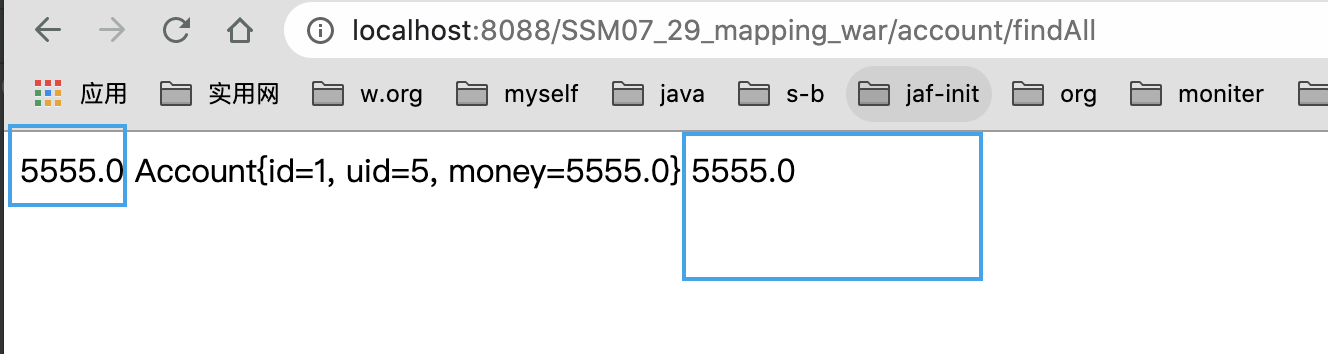
SSM-learning的更多相关文章
- 【Machine Learning】KNN算法虹膜图片识别
K-近邻算法虹膜图片识别实战 作者:白宁超 2017年1月3日18:26:33 摘要:随着机器学习和深度学习的热潮,各种图书层出不穷.然而多数是基础理论知识介绍,缺乏实现的深入理解.本系列文章是作者结 ...
- 【SSM框架】Spring + Springmvc + Mybatis 基本框架搭建集成教程
本文将讲解SSM框架的基本搭建集成,并有一个简单demo案例 说明:1.本文暂未使用maven集成,jar包需要手动导入. 2.本文为基础教程,大神切勿见笑. 3.如果对您学习有帮助,欢迎各种转载,注 ...
- 【Machine Learning】Python开发工具:Anaconda+Sublime
Python开发工具:Anaconda+Sublime 作者:白宁超 2016年12月23日21:24:51 摘要:随着机器学习和深度学习的热潮,各种图书层出不穷.然而多数是基础理论知识介绍,缺乏实现 ...
- 【Machine Learning】机器学习及其基础概念简介
机器学习及其基础概念简介 作者:白宁超 2016年12月23日21:24:51 摘要:随着机器学习和深度学习的热潮,各种图书层出不穷.然而多数是基础理论知识介绍,缺乏实现的深入理解.本系列文章是作者结 ...
- 【Machine Learning】决策树案例:基于python的商品购买能力预测系统
决策树在商品购买能力预测案例中的算法实现 作者:白宁超 2016年12月24日22:05:42 摘要:随着机器学习和深度学习的热潮,各种图书层出不穷.然而多数是基础理论知识介绍,缺乏实现的深入理解.本 ...
- springmvc 多数据源 SSM java redis shiro ehcache 头像裁剪
获取下载地址 QQ 313596790 A 调用摄像头拍照,自定义裁剪编辑头像 B 集成代码生成器 [正反双向](单表.主表.明细表.树形表,开发利器)+快速构建表单; 技术:31359679 ...
- Deep learning:五十一(CNN的反向求导及练习)
前言: CNN作为DL中最成功的模型之一,有必要对其更进一步研究它.虽然在前面的博文Stacked CNN简单介绍中有大概介绍过CNN的使用,不过那是有个前提的:CNN中的参数必须已提前学习好.而本文 ...
- SSM项目搭建(提供源码)
1创建web动态项目,项目结构截图 2.配置日志文件 #\u5B9A\u4E49LOG\u8F93\u51FA\u7EA7\u522B log4j.rootLogger=INFO,Console,Fi ...
- activiti工作流的web流程设计器整合视频教程 SSM和独立部署
本视频为activiti工作流的web流程设计器整合视频教程 整合Acitiviti在线流程设计器(Activiti-Modeler 5.21.0 官方流程设计器) 本视频共讲了两种整合方式 1. 流 ...
- activiti工作流的web流程设计器整合视频教程 SSM 和 独立部署
本视频为activiti工作流的web流程设计器整合视频教程 整合Acitiviti在线流程设计器(Activiti-Modeler 5.21.0 官方流程设计器) 本视频共讲了两种整合方式 1. 流 ...
随机推荐
- kali linux清理垃圾
sudo apt-get autoclean # 清理旧版本的软件缓存 sudo apt-get clean # 清理所有软件缓 ...
- [题解]Codeforces Round #254 (Div. 2) B - DZY Loves Chemistry
链接:http://codeforces.com/contest/445/problem/B 描述:n种药品,m个反应关系,按照一定顺序放进试管中.如果当前放入的药品与试管中的药品要反应,危险系数变为 ...
- [题解]UVA10129 Play on Words
链接:http://vjudge.net/problem/viewProblem.action?id=19492 描述:单词接龙 思路:求欧拉回路或欧拉道路. 首先建图,以字母为节点,单词为边.因为单 ...
- Clickhouse写入问题汇总
Clickhouse写入问题汇总 Zookeeper相关 当clickhouse在建表时使用了Replicated引擎族时, 会对zookeeper有非常重的依赖, 这时候就要注意zookeeper集 ...
- 企业如何建立一体化数据分析平台?还是得说说那几家BI工具
近年来,BI工具和报表工具犹如一股春风,吹遍了大江南北,成为了众多企业的发展利器,受到了企业决策者的拥戴.同时,在企业信息化需求日益旺盛的市场里也孕育了不少BI工具与报表工具厂商.商业智能的应用在国外 ...
- ShapeNet: An Information-Rich 3D Model Repository 阅读笔记
ShapeNet: An Information-Rich 3D Model Repository 注:本论文只是讲述数据库建立方法 摘要 ShapeNet是一个有丰富注释的大型形状存储库,由对象的3 ...
- linux中jupyter notebook中切换虚拟环境
python -m ipykernel install --user --name 虚拟环境名称 --display-name "虚拟环境名称" 然后再打开jupyter note ...
- CPU长指令(VLIW)失败的主要原因是什么,VLIW真的无药可救吗?
software和hardware之间总是存在tradeoff:要么是hardware结构复杂,software灵活.要么是hardware结构保持简洁清晰,software干一些脏活累活.VLIW就 ...
- LeetCode-022-括号生成
括号生成 题目描述:数字 n 代表生成括号的对数,请你设计一个函数,用于能够生成所有可能的并且 有效的 括号组合. 示例说明请见LeetCode官网. 来源:力扣(LeetCode) 链接:https ...
- redis存储token
redis存储token 欢迎关注博主公众号「Java大师」, 专注于分享Java领域干货文章http://www.javaman.cn/sb2/redis-token 在实际开发中,token需要保 ...