
SpringSecurity02 表单登录、SpringSecurity配置类
1 功能需求
springSecuriy默认的登录窗口是一个弹出窗口,而且会默认对所有的请求都进行拦截;要求更改登录页面(使用表单登录)、排除掉一些请求的拦截
2 编写一个springSecurity配置类
继承 WebSecurityConfigurerAdapter 类,并重写两个configure方法
package cn.xiangxu.spring_security_system;

//import cn.xiangxu.spring_security_system.service.MyUserService;

import cn.xiangxu.spring_security_system.utils.MyPasswordEncoder;

import org.springframework.beans.factory.annotation.Autowired;

import org.springframework.context.annotation.Configuration;

import org.springframework.security.config.annotation.authentication.builders.AuthenticationManagerBuilder;

import org.springframework.security.config.annotation.web.builders.HttpSecurity;

import org.springframework.security.config.annotation.web.builders.WebSecurity;

import org.springframework.security.config.annotation.web.configuration.EnableWebSecurity;

import org.springframework.security.config.annotation.web.configuration.WebSecurityConfigurerAdapter;

/**

 * 权限服务类

 */

@Configuration // 等同于XML中的beans

@EnableWebSecurity // 开启webSecurity功能

public class SpringSecurityConfig extends WebSecurityConfigurerAdapter {

//    @Autowired

//    private MyUserService myUserService;

//    @Override

//    protected void configure(AuthenticationManagerBuilder auth) throws Exception {

//

//        // 直接将用户信息和权限写死

////        auth.inMemoryAuthentication()

////                .withUser("admin")

////                .password("123456")

////                .roles("ADMIN");

////        auth.inMemoryAuthentication()

////                .withUser("wys")

////                .password("123456")

////                .roles("ADMIN");

////        auth.inMemoryAuthentication()

////                .withUser("demo")

////                .password("123456")

////                .roles("USER");

//

//        auth.userDetailsService(myUserService).passwordEncoder(new MyPasswordEncoder()); // 利用自定义的UserService进行管理

//    }

    @Override

    protected void configure(HttpSecurity http) throws Exception {

        http.authorizeRequests()

                .antMatchers("/").permitAll() // 主页面请求拦截排除

                .anyRequest().authenticated()  // 除主页面外的所有请求都会被拦截

                .and()

                .logout().permitAll() // 注销请求拦截排除

                .and()

                .formLogin(); // 设置使用表单登录的方式

        http.csrf().disable(); // 关闭csrf验证

    }

    @Override

    public void configure(WebSecurity web) throws Exception {

        // 拦截排除设置

        web.ignoring().antMatchers("/js/**", "/css/**", "/images/**");

    }

}
权限配置类
技巧01:@Configuration 就相当于xml配置文件中的beans,@Bean就相当于XML配置文件中的bean
3 编写一些接口用于测试
注意:为了简便,我直接将测试接口写在了启动类中
package cn.xiangxu.spring_security_system;

import org.springframework.boot.SpringApplication;

import org.springframework.boot.autoconfigure.SpringBootApplication;

import org.springframework.security.access.prepost.PreAuthorize;

import org.springframework.security.config.annotation.method.configuration.EnableGlobalMethodSecurity;

import org.springframework.web.bind.annotation.GetMapping;

import org.springframework.web.bind.annotation.RestController;

@SpringBootApplication

@RestController

//@EnableGlobalMethodSecurity(prePostEnabled = true) // 开启@PreAuthorize注解

public class SpringSecuritySystemApplication {

    public static void main(String[] args) {

        SpringApplication.run(SpringSecuritySystemApplication.class, args);

    }

    @GetMapping(value = "/")

    public String home() {

        return "Welcome to study springSecurity.";

    }

    @GetMapping(value = "/hello")

    public String hello() {

        return "hello boy";

    }

//    @PreAuthorize("hasRole('ROLE_ADMIN')") // 设定权限校验:只用ADMIN角色才能调用该接口

    @GetMapping("/roleAuth")

    public String role() {

        return "admin role";

    }

}
3.1 访问主页面 http://127.0.0.1:8080/ 时跳过了登录验证
原因:我们在springSecurity配置类中排除了 http://127.0.0.1:8080/ 请求(即:http://127.0.0.1:8080/ 会默认不进行登录验证)
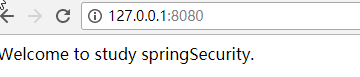
3.2 访问hello页面 http://127.0.0.1:8080/hello 时自动跳转到了登录页面
技巧01:登录名默认是user,登录密码在控制台打印出来了

SpringSecurity02 表单登录、SpringSecurity配置类的更多相关文章
- SpringSecurity 自定义表单登录
SpringSecurity 自定义表单登录 本篇主要讲解 在SpringSecurity中 如何 自定义表单登录 , SpringSecurity默认提供了一个表单登录,但是实际项目里肯定无法使用的 ...
- SpringSecurity实战记录(一)开胃菜:基于内存的表单登录小Demo搭建
Ps:本次搭建基于Maven管理工具的版本,Gradle版本可以通过gradle init --type pom命令在pom.xml路径下转化为Gradle版本(如下图) (1)构建工具IDEA In ...
- SpringSecurity 默认表单登录页展示流程源码
SpringSecurity 默认表单登录页展示流程源码 本篇主要讲解 SpringSecurity提供的默认表单登录页 它是如何展示的的流程, 涉及 1.FilterSecurityIntercep ...
- SpringBoot集成Spring Security(4)——自定义表单登录
通过前面三篇文章,你应该大致了解了 Spring Security 的流程.你应该发现了,真正的 login 请求是由 Spring Security 帮我们处理的,那么我们如何实现自定义表单登录呢, ...
- Spring Security 表单登录
1. 简介 本文将重点介绍使用Spring Security登录. 本文将构建在之前简单的Spring MVC示例之上,因为这是设置Web应用程序和登录机制的必不可少的. 2. Maven 依赖 要将 ...
- spring security 之自定义表单登录源码跟踪
上一节我们跟踪了security的默认登录页的源码,可以参考这里:https://www.cnblogs.com/process-h/p/15522267.html 这节我们来看看如何自定义单表认 ...
- VC POST表单——登录验证新浪邮箱
1.本机环境: Windows XP SP3.ADSL 2.开发工具: WildPackets OmniPeek V5.1.4 Visual C++ 6.0 IE6.0 FlexEdit V2.3.1 ...
- Android逆向破解表单登录程序
Android逆向破解表单登录程序 Android开发 ADT: android studio(as) 程序界面如下,登录成功时弹出通知登录成功,登录失败时弹出通知登录失败. 布局代码 <?xm ...
- Confluence 6 管理员联系表单的后台配置界面
管理员联系表单的后台配置界面截图和配置. 对输入的数据进行编辑和选择是否启用发送电子邮件给管理员 https://www.cwiki.us/display/CONFLUENCEWIKI/Configu ...
随机推荐
- php......调研投票练习
调研题目与调研选项显示页面<style type="text/css"> #list{ width:400px; height:200px;} #jieguo{ wid ...
- HackerRank - beautiful-binary-string 【字符串】
题意 给出一个 N 位的 01 串 然后 每次 改动 可以将其中的 (0 -> 1) 或者 (1 -> 0) 然后 求 最少几次 改动 使得 这个 01 串 当中 不存在 连续的 010 ...
- 动态添加select的option
动态给select标签添加option,结合前人经验以及自己经验,现在总结三种方法供大家参考,一起交流学习! 首先是定义的select元素: //根据ID获得select元素var mySelect ...
- spring-boot3
更多的配置: # =================================================================== # COMMON SPRING BOOT PR ...
- JS一些碎知识点
一些js基本知识点 Doctype 浏览器渲染模式 渲染模式发展历史 在多年以前(IE6诞生以前),各浏览器都处于各自比较封闭的发展中(基本没有兼容性可谈).随着WEB的发展,兼容性问题的解决越来越显 ...
- 简化Hadoop命令
1. 安装客户端(通过端用户可以方便的和集群交互) 2. 简化Hadoop命令 修改~/.bashrcalias hadoop='/home/work/hadoop/client/hadoop-cli ...
- java入门了解12
1.SequenceInputStream序列流:能将其他输入流的串联 用处:读完第一个再去读第二个输入流 用法:构造方法:SequenceInputStream(InputStream s1,Inp ...
- JQuery- JQuery学习
jQuery与JavaScript加载页面的区别 1.JavaScript传统的方式页面加载会存在覆盖问题,加载比jQuery慢(整个页面加载完毕<包含里面的其他内容,比如图片>) 2.j ...
- cscope usage
1) Reference: Linux 平台下阅读源码的工具链 程序员的利器 – cscope 2) cscope help: :help cscope :help cscope-suggestion ...
- 模拟Windows任务管理器CPU使用率的动态折线图-农夫山泉
Delphi的TCanvas类可以实现各种复杂的图形输出功能,基于近期项目的需求,利用它实现了一个很炫的动态折线图(模拟了资源管理器中CPU使用率的折线图),可以直观地展现出数值的实时变化情况. 这段 ...