
2017.4.12 开涛shiro教程-第十八章-并发登录人数控制
原博客地址:http://jinnianshilongnian.iteye.com/blog/2018398
根据下载的pdf学习。
开涛shiro教程-第十八章-并发登录人数控制
shiro中没有提供默认实现,不过可以很容易实现。通过shiro filter机制拓展KickoutSessionControllerFilter。
kickoutSessionControllerFilter -> 将这个filter配置到shiro的配置文件中 -> 遇到的一些问题。
示例代码的结构:
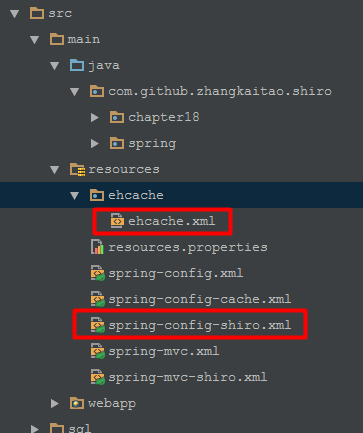
1.配置spring-config-shiro.xml
(1)kickoutSessionControllerFilter
kickoutAfter:是否提出后来登录的,默认为false,即后来登录的踢出前者。
maxSession:同一个用户的最大会话数,默认1,表示同一个用户最多同时一个人登录。
kickoutUrl:被踢出后重定向的地址。
 <bean id="kickoutSessionControlFilter"

     class="com.github.zhangkaitao.shiro.chapter18.web.shiro.filter.KickoutSessionControlFilter">

   <property name="cacheManager" ref="cacheManager"/>

   <property name="sessionManager" ref="sessionManager"/>

   <property name="kickoutAfter" value="false"/>

   <property name="maxSession" value="2"/>

   <property name="kickoutUrl" value="/login?kickout=1"/>

 </bean>
(2)shiroFilter
此处配置除了登录等之外的地址都走 kickout 拦截器进行并发登录控制。
 <bean id="shiroFilter" class="org.apache.shiro.spring.web.ShiroFilterFactoryBean">

   <property name="securityManager" ref="securityManager"/>

   <property name="loginUrl" value="/login"/>

   <property name="filters">

     <util:map>

       <entry key="authc" value-ref="formAuthenticationFilter"/>

       <entry key="sysUser" value-ref="sysUserFilter"/>

       <entry key="kickout" value-ref="kickoutSessionControlFilter"/>

     </util:map>

   </property>

   <property name="filterChainDefinitions">

     <value>

       /login = authc

       /logout = logout

       /authenticated = authc

       /** = kickout,user,sysUser

     </value>

   </property>

 </bean>
(3) ehcache.xml
这里的名称在后面的kickoutController里要用到。
     <cache name="shiro-kickout-session"

            maxEntriesLocalHeap="2000"

            eternal="false"

            timeToIdleSeconds="3600"

            timeToLiveSeconds="0"

            overflowToDisk="false"

            statistics="true">

     </cache>
2.KickoutSessionControllerFilter
此处,使用了Cache缓存"用户名-会话id"之间的关系,如果量比较大的话,可以考虑持久化到数据库/其他持久化的Cache中。
另外,此处没有并发控制的同步实现,可以考虑根据用户名来获取锁,减少锁的粒度。
 package com.github.zhangkaitao.shiro.chapter18.web.shiro.filter;

 import org.apache.shiro.cache.Cache;

 import org.apache.shiro.cache.CacheManager;

 import org.apache.shiro.session.Session;

 import org.apache.shiro.session.mgt.DefaultSessionKey;

 import org.apache.shiro.session.mgt.SessionManager;

 import org.apache.shiro.subject.Subject;

 import org.apache.shiro.web.filter.AccessControlFilter;

 import org.apache.shiro.web.util.WebUtils;

 import javax.servlet.ServletRequest;

 import javax.servlet.ServletResponse;

 import java.io.Serializable;

 import java.util.Deque;

 import java.util.LinkedList;

 /**

  * <p>User: Zhang Kaitao

  * <p>Date: 14-2-18

  * <p>Version: 1.0

  */

 public class KickoutSessionControlFilter extends AccessControlFilter {

     private String kickoutUrl; //踢出后到的地址

     private boolean kickoutAfter = false; //踢出之前登录的/之后登录的用户 默认踢出之前登录的用户

     private int maxSession = 1; //同一个帐号最大会话数 默认1

     private SessionManager sessionManager;

     private Cache<String, Deque<Serializable>> cache;

     public void setKickoutUrl(String kickoutUrl) {

         this.kickoutUrl = kickoutUrl;

     }

     public void setKickoutAfter(boolean kickoutAfter) {

         this.kickoutAfter = kickoutAfter;

     }

     public void setMaxSession(int maxSession) {

         this.maxSession = maxSession;

     }

     public void setSessionManager(SessionManager sessionManager) {

         this.sessionManager = sessionManager;

     }

     public void setCacheManager(CacheManager cacheManager) {

         this.cache = cacheManager.getCache("shiro-kickout-session");

     }

     @Override

     protected boolean isAccessAllowed(ServletRequest request, ServletResponse response, Object mappedValue) throws Exception {

         return false;

     }

     @Override

     protected boolean onAccessDenied(ServletRequest request, ServletResponse response) throws Exception {

         Subject subject = getSubject(request, response);

         if(!subject.isAuthenticated() && !subject.isRemembered()) {

             //如果没有登录,直接进行之后的流程

             return true;

         }

         Session session = subject.getSession();

         String username = (String) subject.getPrincipal();

         Serializable sessionId = session.getId();

         //TODO 同步控制

         Deque<Serializable> deque = cache.get(username);

         if(deque == null) {

             deque = new LinkedList<Serializable>();

             cache.put(username, deque);

         }

         //如果队列里没有此sessionId,且用户没有被踢出;放入队列

         if(!deque.contains(sessionId) && session.getAttribute("kickout") == null) {

             deque.push(sessionId);

         }

         //如果队列里的sessionId数超出最大会话数,开始踢人

         while(deque.size() > maxSession) {

             Serializable kickoutSessionId = null;

             if(kickoutAfter) { //如果踢出后者

                 kickoutSessionId = deque.removeFirst();

             } else { //否则踢出前者

                 kickoutSessionId = deque.removeLast();

             }

             try {

                 Session kickoutSession = sessionManager.getSession(new DefaultSessionKey(kickoutSessionId));

                 if(kickoutSession != null) {

                     //设置会话的kickout属性表示踢出了

                     kickoutSession.setAttribute("kickout", true);

                 }

             } catch (Exception e) {//ignore exception

             }

         }

         //如果被踢出了,直接退出,重定向到踢出后的地址

         if (session.getAttribute("kickout") != null) {

             //会话被踢出了

             try {

                 subject.logout();

             } catch (Exception e) { //ignore

             }

             saveRequest(request);

             WebUtils.issueRedirect(request, response, kickoutUrl);

             return false;

         }

         return true;

     }

 }
3.测试
因为此处设置maxSession=2,所以需要打开3个浏览器。分别访问:http:l//ocalhost:8080/chapter18 进行登录。
然后刷新第一次打开的浏览器,将会被强制退出。
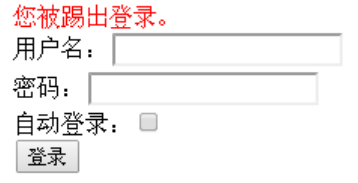
4.遇到的问题
(1)there is no session Id ***
报错:there is no session Id ***。
原因:我没有在ehcache.xml里配置"shiro-kickout-session"。
因为kickoutController里用到了:
     public void setCacheManager(CacheManager cacheManager) {

         this.cache = cacheManager.getCache("shiro-kickout-session");

     }
所以在ehcache.xml中一定记得加上(名字匹配即可):
   <cache name="shiro-kickout-session"

            eternal="false"

            timeToIdleSeconds="3600"

            timeToLiveSeconds="0"

            overflowToDisk="false"

            statistics="true">

     </cache>
(2)sessionKey must be an HTTP compatible implementation
报错:sessionKey must be an HTTP compatible implementation。
原因:我的sessionManager和示例代码中的sessionManager不同,示例中用的是DefaultWebSessionManager,我用的是ServletContainerSessionManager。
代码中这一句报的错误:
Session kickoutSession = sessionManager.getSession(new DefaultSessionKey(kickoutSessionId));
sessionManager.getSession时,因为sessionManager的类类型是ServletContainerSessionManager,所以会进行一个http判定。
参考来自:http://blog.csdn.net/qq_26946497/article/details/51064654?locationNum=3
  public Session getSession(SessionKey key) throws SessionException {

         if (!WebUtils.isHttp(key)) { //判断是不是http的key,否则抛异常

             String msg = "SessionKey must be an HTTP compatible implementation.";

             throw new IllegalArgumentException(msg);

         }

         ...
     }
最后的解决办法:不存放sessionId在deque中,直接存放Session。又可以跳过通过sessionId获取session这一步,直接从deque中拿到之前保存的session。
 //修改前

 Deque<Serializable> deque = cache.get(username);

 deque.push(sessionId);

 kickoutSessionId = deque.removeLast();

 Session kickoutSession = sessionManager.getSession(new DefaultSessionKey(kickoutSessionId));

 //修改后

 Deque<Session> deque = cache.get(username);

 deque.push(session);

 kickoutSession = deque.removeLast();
(3)没有增加锁
   synchronized (this.cache) {

        Deque<Session> deque = cache.get(usernameTenant);

        ...

   }

     //如果被踢出了,直接退出,重定向到踢出后的地址

     if (session.getAttribute(KICK_OUT) != null && session.getAttribute(KICK_OUT) == true) {

   ...
(4)动态设定是否需要kickout
在配置文件中,设置参数 kickout = false。然后在kickoutController里拿到这个参数的值。
   protected boolean onAccessDenied(ServletRequest request, ServletResponse response) throws Exception {

         if("false".equals(kickout)){

             //如果不需要单用户登录的限制

             return true;

         }

         ...

 }
5.CacheManager和SessionManager详解
(1)CacheManager
示例中的配置文件:
-> ehcache.xml
-> ehcacheManager(EhCacheManagerFactoryBean)
-> springCacheManager(EhCacheCacheManager)
-> cacheManager(SpringCacheManagerWrapper)
-> 其他bean里使用
我的配置文件:
-> ehcache.xml
-> ehcacheManager(EhCacheManagerFactoryBean)
-> cacheManager(EhCacheCacheManager)
-> springCacheManager(SpringCacheManagerWrapper)
-> 其他bean里使用
所以名字都是浮云,重点是从cacheManager的构成:
-> ehcache.xml

-> EhCacheManagerFactoryBean

-> EhCacheCacheManager

-> SpringCacheManagerWrapper

-> 其他bean使用
详细配置如下:
 1 spring-config-shiro.xml

 2    <bean id="cacheManager" class="com.github.zhangkaitao.shiro.spring.SpringCacheManagerWrapper">

 3          <property name="cacheManager" ref="springCacheManager"/>

 4    </bean>

 5

 6    <bean id="credentialsMatcher" class="com.github.zhangkaitao.shiro.chapter18.credentials.RetryLimitHashedCredentialsMatcher">

 7         <constructor-arg ref="cacheManager"/>

 8         ...

 9     </bean>

10

11     <bean id="securityManager" class="org.apache.shiro.web.mgt.DefaultWebSecurityManager">

12         <property name="sessionManager" ref="sessionManager"/>

13         <property name="cacheManager" ref="cacheManager"/>

14         ...

15     </bean>

16

17    <bean id="kickoutSessionControlFilter" class="com.github.zhangkaitao.shiro.chapter18.web.shiro.filter.KickoutSessionControlFilter">

18         <property name="cacheManager" ref="cacheManager"/>

19         <property name="sessionManager" ref="sessionManager"/>

20         ...

21     </bean>

22

23  spring-config-cache.xml

24    <bean id="springCacheManager" class="org.springframework.cache.ehcache.EhCacheCacheManager">

25         <property name="cacheManager" ref="ehcacheManager"/>

26    </bean>

27

28    <bean id="ehcacheManager" class="org.springframework.cache.ehcache.EhCacheManagerFactoryBean">

29         <property name="configLocation" value="classpath:ehcache/ehcache.xml"/>

30    </bean>
(2)SessionManager
SessionManager是一个接口。
 public interface SessionManager {

     Session start(SessionContext sessionContext);

     Session getSession(SessionKey sessionKey) throws SessionException;

 }
类结构图如下:
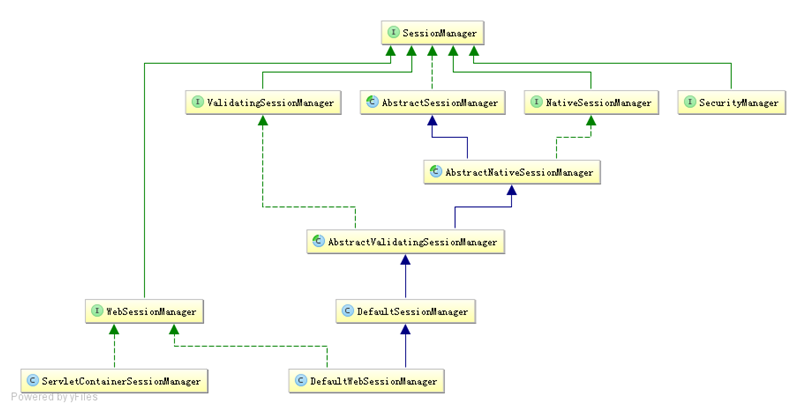
Shiro提供了三个默认实现:
DefaultSessionManager:DefaultSecurityManager使用的默认实现,用于JavaSE环境;
ServletContainerSessionManager:DefaultWebSecurityManager使用的默认实现,用于Web环境,其直接使用Servlet容器的会话;
DefaultWebSessionManager:用于Web环境的实现,可以替代ServletContainerSessionManager,自己维护着会话,直接废弃了Servlet容器的会话管理。
示例中:配置文件spring-config-shiro.xml中使用的是DefaultWebSessionManager。
<!-- 会话管理器 -->

 3     <bean id="sessionManager" class="org.apache.shiro.web.session.mgt.DefaultWebSessionManager">

 4     ...

 5     </bean>

 6

 7     <!-- 安全管理器 -->

 8     <bean id="securityManager" class="org.apache.shiro.web.mgt.DefaultWebSecurityManager">

 9         <property name="sessionManager" ref="sessionManager"/>

10         <property name="cacheManager" ref="cacheManager"/>

11         ...

12     </bean>

13
13     <!-- 并发登录控制 -->

14     <bean id="kickoutSessionControlFilter" class="com.github.zhangkaitao.shiro.chapter18.web.shiro.filter.KickoutSessionControlFilter">

15         <property name="cacheManager" ref="cacheManager"/>

16         <property name="sessionManager" ref="sessionManager"/>

17          ...

18     </bean>
我的项目中:配置文件applicationContext-shiro.xml中没有进行sessionManager的配置(为了共享session),所以使用的是shiro的默认实现:ServletContainerSessionManager。(或者运行代码时,可以去看sessionManager的类类型)
   <!--文件中没有sessionManager的配置-->

   <bean id="securityManager" class="org.apache.shiro.web.mgt.DefaultWebSecurityManager">

         <property name="cacheManager" ref="springCacheManager"/>

         <!--这里没有配置sessionManager-->

         ...

     </bean>

   <bean id="kickoutSessionControlFilter" class="com.baosight.common.filter.KickoutSessionControlFilter">

         <property name="cacheManager" ref="springCacheManager"/>

          <!--这里没有配置sessionManager-->

          ...

     </bean>
而这两种实现(DefaultWebSessionManager 和 ServletContainerSessionManager)的区别以及源码分析:
http://blog.csdn.net/qq_26946497/article/details/51064654?locationNum=3
注意:没有配置SessionManager时,默认为ServletContainerSessionManager。
2017.4.12 开涛shiro教程-第十八章-并发登录人数控制的更多相关文章
- 2017.2.12 开涛shiro教程-第七章-与Web集成
2017.2.9 开涛shiro教程-第七章-与Web集成(一) 原博客地址:http://jinnianshilongnian.iteye.com/blog/2018398 根据下载的pdf学习. ...
- 第十八章 并发登录人数控制——《跟我学Shiro》
目录贴:跟我学Shiro目录贴 在某些项目中可能会遇到如每个账户同时只能有一个人登录或几个人同时登录,如果同时有多人登录:要么不让后者登录:要么踢出前者登录(强制退出).比如spring securi ...
- 2017.2.12 开涛shiro教程-第八章-拦截器机制
原博客地址:http://jinnianshilongnian.iteye.com/blog/2018398 根据下载的pdf学习. 1.拦截器介绍 下图是shiro拦截器的基础类图: 1.Namea ...
- 2017.2.13 开涛shiro教程-第十二章-与Spring集成(二)shiro权限注解
原博客地址:http://jinnianshilongnian.iteye.com/blog/2018398 根据下载的pdf学习. 第十二章-与Spring集成(二)shiro权限注解 shiro注 ...
- 2017.2.13 开涛shiro教程-第十二章-与Spring集成(一)配置文件详解
原博客地址:http://jinnianshilongnian.iteye.com/blog/2018398 根据下载的pdf学习. 第十二章-与Spring集成(一)配置文件详解 1.pom.xml ...
- 2017.2.15 开涛shiro教程-第二十一章-授予身份与切换身份(一) table、entity、service、dao
原博客地址:http://jinnianshilongnian.iteye.com/blog/2018398 根据下载的pdf学习. 第二十一章 授予身份与切换身份(一) 1.使用场景 某个领导因为某 ...
- 2017.2.16 开涛shiro教程-第十七章-OAuth2集成(一)服务器端
原博客地址:http://jinnianshilongnian.iteye.com/blog/2018398 根据下载的pdf学习. 开涛shiro教程-第十七章-OAuth2集成 1.OAuth2介 ...
- 2017.2.15 开涛shiro教程-第二十一章-授予身份与切换身份(二) controller
原博客地址:http://jinnianshilongnian.iteye.com/blog/2018398 根据下载的pdf学习. 开涛shiro教程-第二十一章-授予身份与切换身份(二) 1.回顾 ...
- 2017.2.16 开涛shiro教程-第十七章-OAuth2集成(二)客户端
原博客地址:http://jinnianshilongnian.iteye.com/blog/2018398 根据下载的pdf学习. 开涛shiro教程-第十七章-OAuth2集成 3.客户端 客户端 ...
随机推荐
- margin-top影响父元素定位
写样式时无意中发现margin-top会影响到父元素的定位,下面是示例: HTML代码: <div class="demo"> <div class=" ...
- (转)Ant使用例子
文章来自:http://www.blogjava.net/feng0801/archive/2014/07/29/416297.html Ant是一个Apache基金会下的跨平台的构件工具,它可以实现 ...
- 《R语言实战》读书笔记--为什么要学
本人最近在某咨询公司实习,涉及到了一些数据分析的工作,用的是R语言来处理数据.但是在应用的过程中,发现用R很不熟练,所以再打算学一遍R.曾经花一个月的时间看过一遍<R语言编程艺术>,还用R ...
- Linux机器-网卡磁盘监控
1)实时监控网卡流量的通用脚本: 1 2 3 4 5 6 7 8 9 10 11 12 13 14 15 16 17 18 19 20 21 22 23 24 25 26 27 28 29 30 31 ...
- 更改mvc版本的时候,手动修改交3.0改到4.0,将razor改到2.0,仍然提示出现错误,mvc3.0
偶然碰到,更改mvc版本,由3.0升级到4.0,但是依然提示3.0的错误 几经周折排查,最终发现 <runtime> <assemblyBinding xmlns="urn ...
- [ CodeVS冲杯之路 ] P1116
不充钱,你怎么AC? 题目:http://codevs.cn/problem/1116/ 数据很小,DFS可A,每层枚举颜色,判断相邻的点是否有重复的颜色,记得回溯时把颜色染回0,即无颜色 这里我使用 ...
- SQL 整理
批量插入 insert into table select ... union all select... insert into table (...) values (...) , (...) i ...
- 信息传递(NOIP2015)(寻找最小环。。)
原题传送门 这是一道寻找最小环的题目. 在做的时候给每一个点染色.. 防止再做已经搜过的点(优化) v[]表示是否访问的过,以及第一次访问该点的时间. u[]表示染色.. 这道题还可以用拓补排序做. ...
- eclipse keys
Navigate Open Declaration F3 Editing Script Source Source Mark Occurrences Alt+Shift+O Editing PHP s ...
- UVA 10205 Stack 'em Up
直接模拟就好. #include <map> #include <set> #include <list> #include <cmath> #incl ...