
Spark-class启动脚本解读
#!/usr/bin/env bash

#

# Licensed to the Apache Software Foundation (ASF) under one or more

# contributor license agreements.  See the NOTICE file distributed with

# this work for additional information regarding copyright ownership.

# The ASF licenses this file to You under the Apache License, Version 2.0

# (the "License"); you may not use this file except in compliance with

# the License.  You may obtain a copy of the License at

#

#    http://www.apache.org/licenses/LICENSE-2.0

#

# Unless required by applicable law or agreed to in writing, software

# distributed under the License is distributed on an "AS IS" BASIS,

# WITHOUT WARRANTIES OR CONDITIONS OF ANY KIND, either express or implied.

# See the License for the specific language governing permissions and

# limitations under the License.

#

# NOTE: Any changes to this file must be reflected in SparkSubmitDriverBootstrapper.scala!

#判断是否是cygwin环境

cygwin=false

case "`uname`" in

    CYGWIN*) cygwin=true;;

esac

SCALA_VERSION=2.10

# Figure out where Spark is installed

#进去到SPark的安装目录

FWDIR="$(cd `dirname $0`/..; pwd)"

# Export this as SPARK_HOME

# 生成SPARK_HOME环境变量

export SPARK_HOME="$FWDIR"

#执行load-spark-env.sh脚本,主要功能为:

#执行spark-env.sh

#spark-env.sh的主要内容为一些程序过程中的配置和路径的环境变量

. $FWDIR/bin/load-spark-env.sh

#如果没有参数的话执行以下内容

if [ -z "$1" ]; then

  echo "Usage: spark-class <class> [<args>]" >&

  exit

fi

#如果SPARK_MEM不为null

if [ -n "$SPARK_MEM" ]; then

  echo -e "Warning: SPARK_MEM is deprecated, please use a more specific config option" >&

  echo -e "(e.g., spark.executor.memory or spark.driver.memory)." >&

fi

# Use SPARK_MEM or 512m as the default memory, to be overridden by specific options

#默认SPARK_MEM的大小为512M

DEFAULT_MEM=${SPARK_MEM:-512m}

SPARK_DAEMON_JAVA_OPTS="$SPARK_DAEMON_JAVA_OPTS -Dspark.akka.logLifecycleEvents=true"

#注意SPARK_DRIVER_MEMORY从spark-env.sh的配置文件中读取SPARK_DRIVER_MEMORY参数

# Add java opts and memory settings for master, worker, history server, executors, and repl.

case "$1" in

  # Master, Worker, and HistoryServer use SPARK_DAEMON_JAVA_OPTS (and specific opts) + SPARK_DAEMON_MEMORY.

  'org.apache.spark.deploy.master.Master')

    OUR_JAVA_OPTS="$SPARK_DAEMON_JAVA_OPTS $SPARK_MASTER_OPTS"

    OUR_JAVA_MEM=${SPARK_DAEMON_MEMORY:-$DEFAULT_MEM}

    ;;

  'org.apache.spark.deploy.worker.Worker')

    OUR_JAVA_OPTS="$SPARK_DAEMON_JAVA_OPTS $SPARK_WORKER_OPTS"

    OUR_JAVA_MEM=${SPARK_DAEMON_MEMORY:-$DEFAULT_MEM}

    ;;

  'org.apache.spark.deploy.history.HistoryServer')

    OUR_JAVA_OPTS="$SPARK_DAEMON_JAVA_OPTS $SPARK_HISTORY_OPTS"

    OUR_JAVA_MEM=${SPARK_DAEMON_MEMORY:-$DEFAULT_MEM}

    ;;

  # Executors use SPARK_JAVA_OPTS + SPARK_EXECUTOR_MEMORY.

  'org.apache.spark.executor.CoarseGrainedExecutorBackend')

    OUR_JAVA_OPTS="$SPARK_JAVA_OPTS $SPARK_EXECUTOR_OPTS"

    OUR_JAVA_MEM=${SPARK_EXECUTOR_MEMORY:-$DEFAULT_MEM}

    ;;

  'org.apache.spark.executor.MesosExecutorBackend')

    OUR_JAVA_OPTS="$SPARK_JAVA_OPTS $SPARK_EXECUTOR_OPTS"

    OUR_JAVA_MEM=${SPARK_EXECUTOR_MEMORY:-$DEFAULT_MEM}

    ;;

  # Spark submit uses SPARK_JAVA_OPTS + SPARK_SUBMIT_OPTS +

  # SPARK_DRIVER_MEMORY + SPARK_SUBMIT_DRIVER_MEMORY.

  'org.apache.spark.deploy.SparkSubmit')

    OUR_JAVA_OPTS="$SPARK_JAVA_OPTS $SPARK_SUBMIT_OPTS"

    OUR_JAVA_MEM=${SPARK_DRIVER_MEMORY:-$DEFAULT_MEM}

    if [ -n "$SPARK_SUBMIT_LIBRARY_PATH" ]; then

      OUR_JAVA_OPTS="$OUR_JAVA_OPTS -Djava.library.path=$SPARK_SUBMIT_LIBRARY_PATH"

    fi

    if [ -n "$SPARK_SUBMIT_DRIVER_MEMORY" ]; then

      OUR_JAVA_MEM="$SPARK_SUBMIT_DRIVER_MEMORY"

    fi

    ;;

  *)

    OUR_JAVA_OPTS="$SPARK_JAVA_OPTS"

    OUR_JAVA_MEM=${SPARK_DRIVER_MEMORY:-$DEFAULT_MEM}

    ;;

esac

#找到java的安装目录

# Find the java binary

if [ -n "${JAVA_HOME}" ]; then

  RUNNER="${JAVA_HOME}/bin/java"

else

  if [ `command -v java` ]; then

    RUNNER="java"

  else

    echo "JAVA_HOME is not set" >&

    exit

  fi

fi

# Set JAVA_OPTS to be able to load native libraries and to set heap size

JAVA_OPTS="-XX:MaxPermSize=128m $OUR_JAVA_OPTS"

JAVA_OPTS="$JAVA_OPTS -Xms$OUR_JAVA_MEM -Xmx$OUR_JAVA_MEM"

# Load extra JAVA_OPTS from conf/java-opts, if it exists

if [ -e "$FWDIR/conf/java-opts" ] ; then

  JAVA_OPTS="$JAVA_OPTS `cat $FWDIR/conf/java-opts`"

fi

# Attention: when changing the way the JAVA_OPTS are assembled, the change must be reflected in CommandUtils.scala!

TOOLS_DIR="$FWDIR"/tools

SPARK_TOOLS_JAR=""

if [ -e "$TOOLS_DIR"/target/scala-$SCALA_VERSION/spark-tools*[-9Tg].jar ]; then

  # Use the JAR from the SBT build

  export SPARK_TOOLS_JAR=`ls "$TOOLS_DIR"/target/scala-$SCALA_VERSION/spark-tools*[-9Tg].jar`

fi

if [ -e "$TOOLS_DIR"/target/spark-tools*[-9Tg].jar ]; then

  # Use the JAR from the Maven build

  # TODO: this also needs to become an assembly!

  export SPARK_TOOLS_JAR=`ls "$TOOLS_DIR"/target/spark-tools*[-9Tg].jar`

fi

# Compute classpath using external script

classpath_output=$($FWDIR/bin/compute-classpath.sh)

if [[ "$?" != "" ]]; then

  echo "$classpath_output"

  exit

else

  CLASSPATH=$classpath_output

fi

if [[ "$1" =~ org.apache.spark.tools.* ]]; then

  if test -z "$SPARK_TOOLS_JAR"; then

    echo "Failed to find Spark Tools Jar in $FWDIR/tools/target/scala-$SCALA_VERSION/" >&

    echo "You need to build spark before running $1." >&

    exit

  fi

  CLASSPATH="$CLASSPATH:$SPARK_TOOLS_JAR"

fi

if $cygwin; then

  CLASSPATH=`cygpath -wp $CLASSPATH`

  if [ "$1" == "org.apache.spark.tools.JavaAPICompletenessChecker" ]; then

    export SPARK_TOOLS_JAR=`cygpath -w $SPARK_TOOLS_JAR`

  fi

fi

export CLASSPATH

# In Spark submit client mode, the driver is launched in the same JVM as Spark submit itself.

# Here we must parse the properties file for relevant "spark.driver.*" configs before launching

# the driver JVM itself. Instead of handling this complexity in Bash, we launch a separate JVM

# to prepare the launch environment of this driver JVM.

# 最终调用org.apache.spark.deploy.SparkSubmit类

if [ -n "$SPARK_SUBMIT_BOOTSTRAP_DRIVER" ]; then

  # This is used only if the properties file actually contains these special configs

  # Export the environment variables needed by SparkSubmitDriverBootstrapper

  export RUNNER

  export CLASSPATH

  export JAVA_OPTS

  export OUR_JAVA_MEM

  export SPARK_CLASS=

  shift # Ignore main class (org.apache.spark.deploy.SparkSubmit) and use our own

  exec "$RUNNER" org.apache.spark.deploy.SparkSubmitDriverBootstrapper "$@"

else

  # Note: The format of this command is closely echoed in SparkSubmitDriverBootstrapper.scala

  if [ -n "$SPARK_PRINT_LAUNCH_COMMAND" ]; then

    echo -n "Spark Command: " >&

    echo "$RUNNER"    #E:\Program Files\Java\jdk1..0_79/bin/java

    echo "$CLASSPATH" #E:\cygwin64\home\hadoop2\hive\lib\mysql-connector-java-5.1.-bin.jar;E:\cygwin64\home\hadoop2\hive\conf\hive-site.xml;E:\cygwin64\home\hadoop2\spark-1.1.-bin-hadoop2.\lib\datanucleus-core-3.2..jar;E:\cygwin64\home\hadoop2\spark-1.1.-bin-hadoop2.\lib\datanucleus-api-jdo-3.2..jar;E:\cygwin64\home\hadoop2\spark-1.1.-bin-hadoop2.\lib\datanucleus-rdbms-3.2..jar;.;E:\cygwin64\usr\local\spark-1.1.-bin-hadoop2.\conf;E:\cygwin64\usr\local\spark-1.1.-bin-hadoop2.\lib\spark-assembly-1.1.-hadoop2.4.0.jar;E:\cygwin64\home\hadoop2\hadoop-2.5.\etc\hadoop\

    echo $JAVA_OPTS   #-XX:MaxPermSize=512m -Djline.terminal=unix -Xms2048M -Xmx2048M

    echo "$@"         #org.apache.spark.deploy.SparkSubmit --class org.apache.spark.repl.Main spark-shell

    echo "$RUNNER" -cp "$CLASSPATH" $JAVA_OPTS "$@" >&

    echo -e "========================================\n" >&

  fi

  exec "$RUNNER" -cp "$CLASSPATH" $JAVA_OPTS "$@"

fi
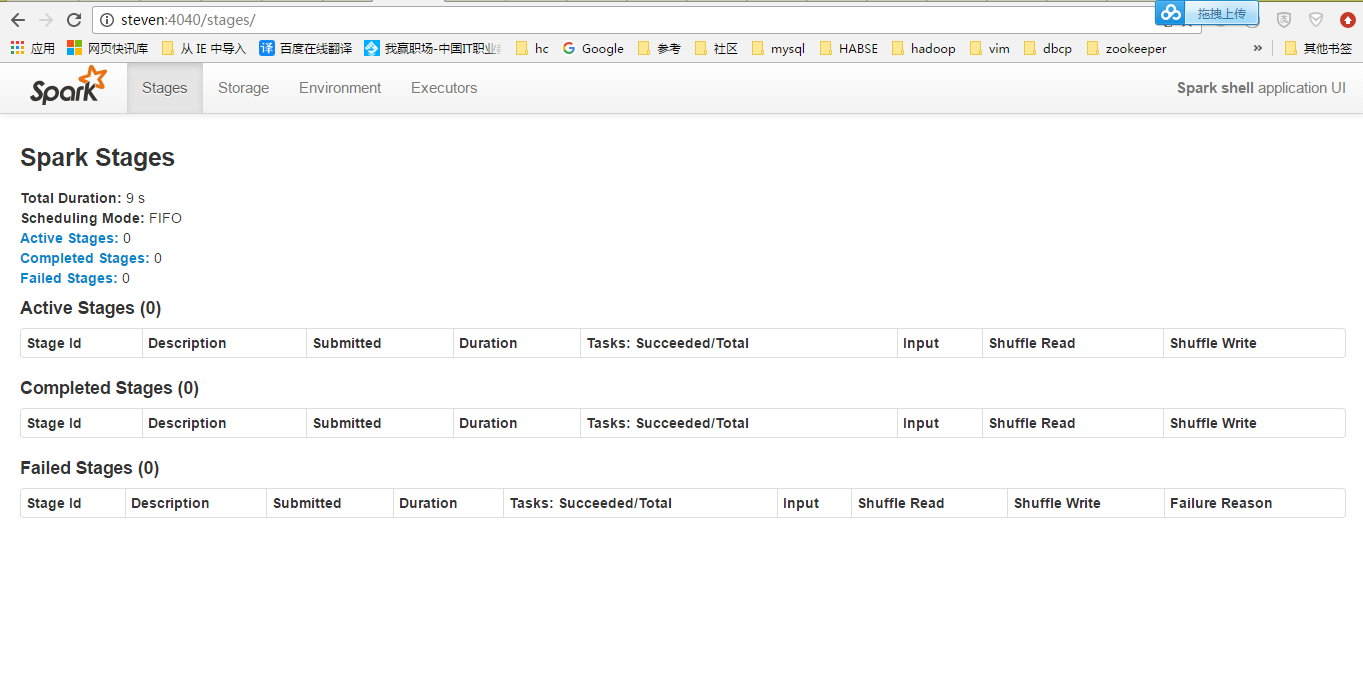
用Client模式跑一下:
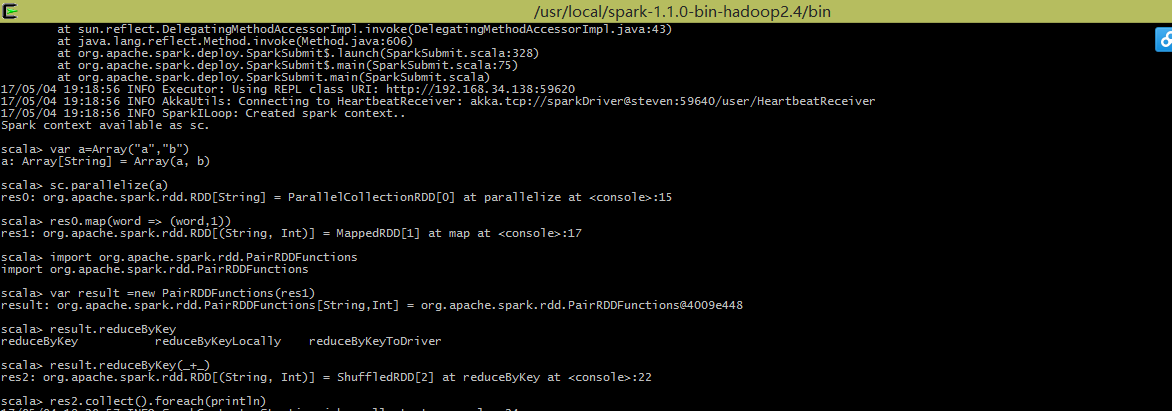
执行一个WordCount:
Spark-class启动脚本解读的更多相关文章
- Spark配置&启动脚本分析
本文档基于Spark2.0,对spark启动脚本进行分析. date:2016/8/3 author:wangxl Spark配置&启动脚本分析 我们主要关注3类文件,配置文件,启动脚本文件以 ...
- Spark-shell启动脚本解读
#!/usr/bin/env bash # # Licensed to the Apache Software Foundation (ASF) under one or more # contrib ...
- Spark学习之路 (十五)SparkCore的源码解读(一)启动脚本
一.启动脚本分析 独立部署模式下,主要由master和slaves组成,master可以利用zk实现高可用性,其driver,work,app等信息可以持久化到zk上:slaves由一台至多台主机构成 ...
- spark的sparkUI如何解读?
spark的sparkUI如何解读? 以spark2.1.4来做例子 Job - schedule mode 进入之后默认是进入spark job 页面 这个说明有很详细的解释,spark有两种操作算 ...
- spark Master启动流程
spark Master是spark集群的首脑,负责资源调度,任务分配,负载平衡等功能 以下是master启动流程概述 通过shell进行对master进行启动 首先看一下启动脚本more start ...
- logstash服务启动脚本
logstash服务启动脚本 最近在弄ELK,发现logstash没有sysv类型的服务启动脚本,于是按照网上一个老外提供的模板自己进行修改 #添加用户 useradd logstash -M -s ...
- 改进uwsgi启动脚本,使其支持多个独立配置文件
最近在研究flask,在架设运行环境的时候犯了难.因为我想把每个独立的应用像NGINX处理多个网站那样,每个应用单独一个配置文件.而网上流传的uwsgi启动脚本都只支持单个配置文件.虽然有文章说可以把 ...
- linux nginx 启动脚本
linux nginx 启动脚本 [root@webtest76 ~]# vi /etc/init.d/nginx #!/bin/bash # nginx Startup script for the ...
- busybox rootfs 启动脚本分析(二)
上次分析了busybox的启动脚本,这次分析一下init.d中一些脚本的内容. 参考链接 http://www.cnblogs.com/helloworldtoyou/p/6169678.html h ...
随机推荐
- vim使用的一些积累
vi visual interfacevim vi improved vim模式:编辑模式(命令模式)输入模式末行模式 编辑模式下,zz保存并退出移动光标:(编辑模式)1.逐字符移动 h 左 l 右 ...
- web自动化测试:watir+minitest(四)
脚本连跑: rake是ruby中的一个构建工具,和make很像.允许用ruby来写rakefile. 我们使用rake以任务的方式来运行我们的脚本集. 新建Rakefile文件,写入如下内容: req ...
- nginx限速白名单配置
在<nginx限制连接数ngx_http_limit_conn_module模块>和<nginx限制请求数ngx_http_limit_req_module模块>中会对所有的I ...
- EXTJS4.0 form 表单提交 后 回调函数 不响应的问题
在提交表单后,应返回一个 JSON 至少要包含{success:true} 否则,EXT 不知道是否成功,没有响应. {success:true,msg:'成功',Url:'http://www.ba ...
- [洛谷P4074][WC2013]糖果公园
题目大意:给一棵$n$个节点的树,每个点有一个值$C_i$,每次询问一条路径$x->y$,求$\sum\limits_{c}val_c\times \sum\limits_{i=1}^{cnt_ ...
- GYM - 101147 F.Bishops Alliance
题意: 一个n*n的棋盘,有m个主教.每个主教都有自己的权值p.给出一个值C,在棋盘中找到一个最大点集.这个点集中的点在同一条对角线上且对于点集中任意两点(i,j),i和j之间的主教数(包括i,j)不 ...
- 雅礼集训 Day7 T1 Equation 解题报告
Reverse 题目背景 小\(\text{G}\)有一个长度为\(n\)的\(01\)串\(T\),其中只有\(T_S=1\),其余位置都是\(0\).现在小\(\text{G}\)可以进行若干次以 ...
- 8.2 前端检索的敏感词过滤的Python实现(针对元搜索)
对于前端的搜索内容进行控制,比如敏感词过滤,同样使用socket,这里使用Python语言做一个demo.这里不得不感叹一句,socket真是太神奇了,可以跨语言把功能封装,为前端提供服务. 下面就是 ...
- C++vector使用
标准库Vector类型使用需要的头文件:#include <vector>Vector:Vector 是一个类模板.不是一种数据类型. Vector<int>是一种数据类型. ...
- 适配器模式 & 装饰器模式
一.适配器模式:简单来讲,就是为了方便使用,完成从 一个接口 到 另一个接口 的 转换,这个负责转换的就是 适配器例如:Reader ——> InputStreamReader 通过类内部组合 ...