
微信小程序--导航跟随
最近开发小程序的时候遇到这样一个需求:如图1
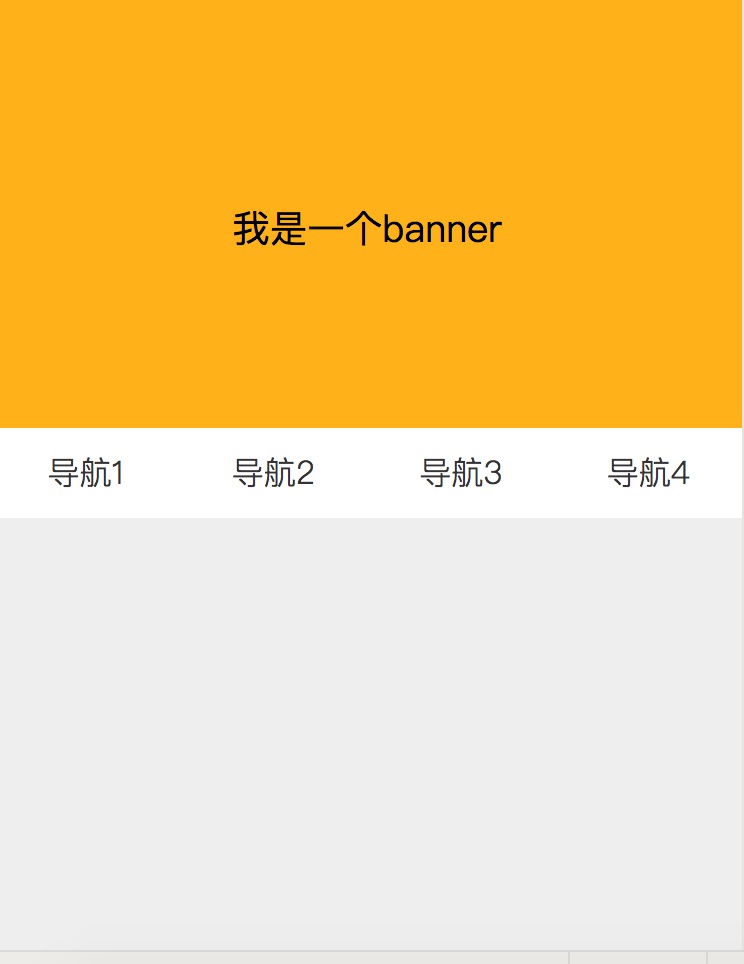
页面向下滚动到白色导航的位置时,白色导航固定到页面最上方;当页面向上滚动到白色导航时,白色导航恢复到原始位置;点击各个导航,平滑的跳到相应位置。
思路1:
1.给导航设置position: absolute; 页面向下滚动到白色导航的位置时,将给导航设置为position: fixed;
2.绑定小程序滚动事件bindscroll,监听滚动距离;
代码如下:
wxml:
<scroll-view class="layout" bindscroll='layoutScroll' scroll-y="true" >

  <view class='banner'>

    <text>我是一个banner</text>

  </view>

  <!-- 导航开始 -->

  <view class='nav clearfix {{navFixed?"positionFixed":""}}'>

    <view class='nav_row'>

     <text>导航1</text>

    </view>

    <view class='nav_row'>

     <text>导航2</text>

    </view>

    <view class='nav_row'>

     <text>导航3</text>

    </view>

    <view class='nav_row'>

     <text>导航4</text>

    </view>

  </view>

  <!-- 导航结束  -->

  <!-- 内容开始 -->

  <view class='content content1'>

    <text>我是内容1</text>

  </view>

  <view class='content content2'>

    <text>我是内容2</text>

  </view>

  <view class='content content3'>

    <text>我是内容3</text>

  </view>

  <view class='content content4'>

    <text>我是内容4</text>

  </view>

  <!-- 内容结束 -->

</scroll-view>
wxss:
.clearfix:after {

  content: ".";

  display: block;

  height:;

  clear: both;

  visibility: hidden;

}

.positionFixed{

  position: fixed;

  left:;

  top:;

}

page{

  width: 100%;

  height:100%;

}

.layout{

  width: 100%;

  height: 100%;

  background: #eee;

}

.banner{

  width: 100%;

  height: 200px;

  line-height: 200px;

  background: #FFB11A ;

}

.banner text{

  text-align: center;

  display: block;

}

.nav{

  width: 100%;

  height: 45px;

  line-height: 45px;

  background: #fff;

}

.nav_row{

  float: left;

  width: 25%;

  font-family: PingFangSC-Light;

  font-size: 16px;

  color: #333333;

}

.nav_row text{

  text-align: center;

  display: block;

}

.content {

  width: 100%;

  height: 200px;

  font-family: PingFangSC-Light;

  font-size: 16px;

  color: #333333;

  padding: 15px;

}

.content1{

  background: #F5BBA4;

}

.content2{

  background: #E9ED9A;

}

.content3{

  background: #9DE59C;

}

.content4{

  background: #98A5E2;

}
js:
Page({

  data: {

    scrollTop:'',    //滑动的距离

    navFixed:false,  //导航是否固定

  },

  //页面滑动

  layoutScroll: function (e) {

    this.data.scrollTop = this.data.scrollTop * 1 + e.detail.deltaY * 1;

    console.log(this.data.scrollTop)

    console.log(this.data.navFixed)

    if (this.data.scrollTop <= -200){

      this.setData({

        navFixed:true

      })

    }else{

      this.setData({

        navFixed: false

      })

    }

  }

})
这个代码能基本实现需求,但是存在很大的弊端:
1.导航固定后,页面卡顿一下
2.导航效果延迟较长,用户体验很差
总体来说这种方案并不可取,所以进行第二次迭代
思路2:
未完待续。。。
注意:
1.整个滑动的页面应该写在scroll-view中;
2.scroll-view一定
微信小程序--导航跟随的更多相关文章
- 微信小程序-导航 & 路由
微信小程序-导航 & 路由 页面跳转 页面路由 页面栈, 框架以栈的形式维护了当前的所有页面. https://developers.weixin.qq.com/miniprogram/dev ...
- 自定义微信小程序导航(兼容各种手机)
详细代码请见github,请点击地址,其中有原生小程序的实现,也有wepy版本的实现 了解小程序默认导航 如上图所示,微信导航分为两部分,第一个部分为statusBarHeight,刘海屏手机(iPh ...
- 微信小程序——导航栏组件
组件内属性详解 属性 类型 默认值 必填 说明 nav-postion String relative 否 导航栏(包含导航栏以及状态栏)的position,可取值relative.fixed.a ...
- 微信小程序导航:官方工具+精品教程+DEMO集合(1月7更新)
1:官方工具:https://mp.weixin.qq.com/debug/w ... tml?t=14764346784612:简易教程:https://mp.weixin.qq.com/debug ...
- 微信小程序------导航栏样式、tabBar导航栏
一:导航栏样式设置 小程序的导航栏样式在app.json中定义. 这里设置导航,背景黑色,文字白色,文字内容测试小程序 app.json内容: { "pages":[ " ...
- 微信小程序 导航(a 连接)自定义组件
导航:navigator 组件 组件上的属性: target:跳到其他小程序( 默认是当前小程序 ),当属性值为 miniProgram 时,跳到别的小程序(如果要跳到别的小程序,需要填写 appid ...
- 微信小程序导航栏,下面内容滑动,上册导航栏跟着滑动,内容随着导航栏滑动
16.类似微信导航栏滑动.png 今日头条导航栏,下面滑动上面跟着滑动 index.wxml <swiper class="content" style="heig ...
- 微信小程序---导航
1.wx.navigateTo(OBJECT):保留当前页面,跳转到应用内的某个页面,使用wx.navigateBack可以返回到原页面. wx.navigateTo({ url: 'test?id= ...
- 微信小程序导航设置
"tabBar": { "backgroundColor": "#ffffff", "color": "#00 ...
随机推荐
- OBJC依赖库管理利器cocoapods 安装及使用详细图解
cocoapods: github:https://github.com/CocoaPods/CocoaPods 官方网站:http://www.cocoapods.org/ 1.安装 RubyGem ...
- EXCEL函数常用技巧浅析
EXCEL函数常用技巧浅析 EXCEL函数是一门趣味性非常大的游戏,此贴内容基本上为总结前人经验而来.废话不多说,我们现在走入正题. 一:判断数值奇偶性 1.1 ISODD(number) 判断一个 ...
- MDK,关于 STM32F4 配置失败, GPIO, USART 写入值没反应
需要先将RCC->AHB1ENR寄存器的对应时钟打开! 下面做个测试: 配置GPIO实验 没有打开时钟使能,配置无反应: 打开时钟使能后,可以成功写入数据: 配置USART实验 RCC 未开启时 ...
- Ubuntu 上如何安装Docker
Docker 是一个开源项目,为开发者和系统管理员提供了一个开放的平台,在任何地方通过打包和运行应用程序作为一个轻量级的容器.Docker 在软件容器内自动部署应用程序.Docker 最开始由 Sol ...
- 小程序开发之wepy框架
ps 本教程使用wepy 1.7+以上的版本 wepy-让小程序支持组件化开发的框架 鹅厂出品,用于开发自家产品的框架还是很良心的,框架设计思路上参照vue,但不是全部照搬,这点要注意. 对微信小程序 ...
- POJ 2318 /// 判断点与直线的位置关系
题目大意: n块玩具箱隔板 m个玩具落地点 给定玩具箱的左上和右下两个端点 接下来给定n块隔板的上点的x和下点的x(因为y就是玩具箱的上下边缘) 接下来给定m个玩具落地点 输出n+1个区域各有的玩具数 ...
- NEERC 2015 Adjustment Office /// oj25993
题目大意: 输入n,q: 矩阵大小为n*n 每个位置的值为该位置的行数+列数 接下来q行 “R m”表示输出第m行的总和并整行消去 “C m”表示输出第m列的总和并整列消去 Sample Input ...
- 面试系列24 dubbo负载均衡策略和集群容错策略
(1)dubbo负载均衡策略 1)random loadbalance 默认情况下,dubbo是random load balance随机调用实现负载均衡,可以对provider不同实例设置不同的权重 ...
- Java开发系列-MySQL
概述 数据库 公司 特点 Mysql Oracle 开源的数据库 社区版免费 商业版是收费的 Oracle Oracle 大型的 收费的数据库 DB2 IBM 大型的 收费的数据库 一般用于银行系统 ...
- 安卓中 使用html来使文字变色Html.fromHtml
在这里 我是用的html使文字的个别颜色变红 String textStr = " 本课程为<font color=\"#FF0000\">" + ...