
无线连接网络-FAST SSID Change
这篇随笔主要记录的是Apple设备连接思科无线可能出现的问题,尤其是在思科WLC3504下部署的无线网络,这种故障体现的尤为明显。
For Single SSID
To support Apple iOS-based devices (iPhone/iPad) switching from one SSID to another on the same wireless access point, configure the Wireless LAN Controller (WLC) to enable the “FAST SSID change” function. This function helps ensure iOS-based devices are able to more quickly switch between SSIDs.
For Dual SSID BYOD
Fast SSID must be enabled to support dual SSID BYOD. When Fast SSID changing is enabled, the wireless controller allows clients to move faster between SSIDs. When fast SSID is enabled, the client entry is not cleared and the delay is not enforced. For more information about configuring Fast SSID on a Cisco WLC,
1、场景
WLC版本:8.5.131
WLC型号:AIR-CT3504-K9
2、示例
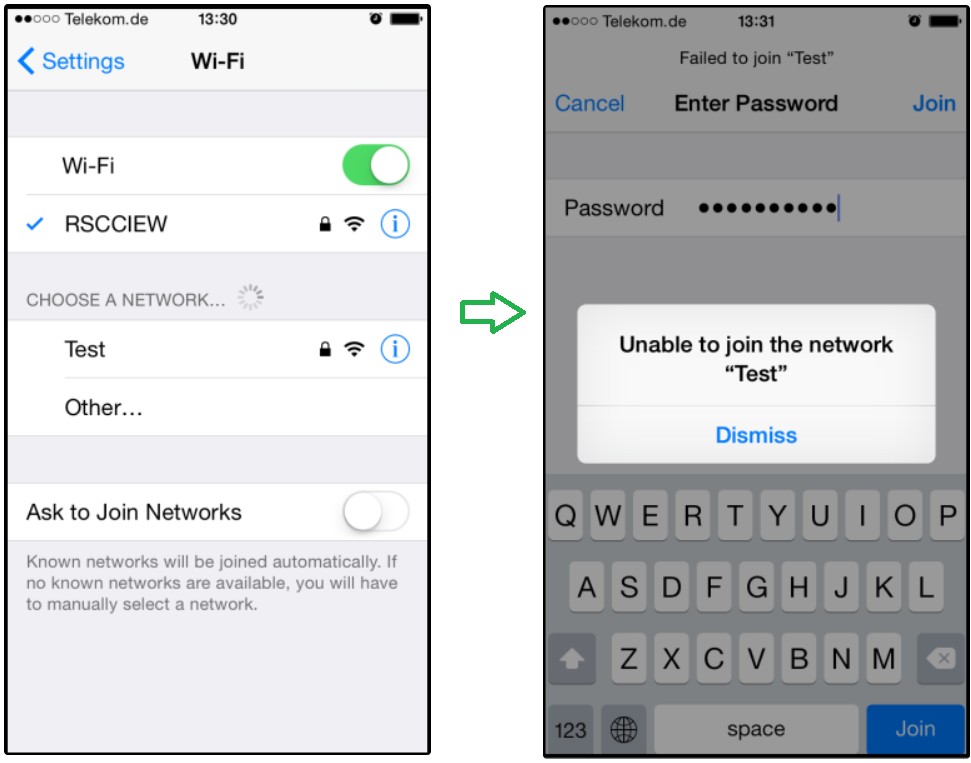
假设在该无线网络下存在多个SSID,如果连接一个,再尝试连接另一个,可能会出现“无法连接该网络”/ "Unable to join the network SSID-name"
如下是一个例子,从RSCCIEW的SSID切换到TEST时出现的问题:
如果收集debug client xx.xx.xx.xx.xx.xx
可能会获取到如下信息:
(WLC1) >*apfMsConnTask_0: Jun 05 13:56:04.571: 54:26:96:3e:4b:ee Association received from mobile on AP 00:22:bd:98:3a:30

 *apfMsConnTask_0: Jun 05 13:56:04.572: 54:26:96:3e:4b:ee Deleting client immediately since WLAN has changed

 *apfMsConnTask_0: Jun 05 13:56:04.572: 54:26:96:3e:4b:ee Scheduling deletion of Mobile Station:  (callerId: 50) in 1 seconds

 *apfMsConnTask_0: Jun 05 13:56:04.883: 54:26:96:3e:4b:ee Ignoring 802.11 assoc request from mobile pending deletion
3、解决方法
通过在WLC上开启FAST SSID Change,该功能默认是关闭的。
When fast SSID changing is enabled, the controller allows clients to move between SSIDs. When the client sends a new association for a different SSID, the client entry in the controller connection table is cleared before the client is added to the new SSID. When fast SSID changing is disabled, the controller enforces a delay before clients are allowed to move to a new SSID.
当FAST SSID Change开启是,控制器允许客户端在SSID之间移动,这种情况下是当客户端发送一个新的关联信息到一个不同的SSID时,控制器上的客户端连接条目在该客户端连接到另一个SSID之前就会立即被清除掉。而当FAST SSID Change被关闭时,在客户端移动到一个新的SSID之前WLC会让这个操作延迟。
操作步骤:
3.1 登录WLC的GUI,打开General界面
3.2 在Fast SSID Change下拉框选择enable
3.3 点击apply
3.4 点击Save Configuration保存配置

通过命令行开启:
(WLC1) >config network fast-ssid-change ?

 enable/disable] Enable or disables fast SSID changing for mobile stations

(WLC1) >config network fast-ssid-change enable
(WLC1) >save config

 Are you sure you want to save? (y/n) y

 Configuration Saved!
4、这个问题还可能伴随一个问题,WPA+WPA2 参数的问题。
对于WPA和WPA2最好按照如下设置:
WPA+TKIP
WPA2+AES
最好不要混用。
无线连接网络-FAST SSID Change的更多相关文章
- CentOS最小化安装后启用无线连接网络
想要链接无线就需要无线工具包. yum install -y wireless-tools安装完成之后就有 iwconfig,iwlist,iw等命令行工具了. 首先启动无线网卡,记得开启无线开关, ...
- CentOS7 最小化安装后启用无线连接网络
1.ip addr 找到自己的无线网接口 (ps:本人的是wlp2s0) 2.ip link set wlp2s0 up 打开无线网的驱动 3.ip link show wlp2s0 查看该网络接口的 ...
- windows XP系统搜索无线网络时提示“windows无法配置此无线连接”,如何处理?
转自:http://support1.lenovo.com.cn/lenovo/wsi/htmls/detail_12839009034375918.html 文章编号:C191612 201 ...
- Ubuntu Server无线连接配置
由于Ubuntu Linux内核对于WPA的加密方式支持不是很好,所有使用普通方式的命令行无法连接WPA2类型的路由.首先检查是否安装了wpasupplicant,Ubuntu 10.04已经安装了 ...
- android下获取无线wif信号、ssid、MAC等操作类
一个android下获取无线wif信号.ssid.MAC等操作的类. WifiAdmin.java package com.afu; import java.util.List; import and ...
- WiFi无线连接过程中有哪几个主要步骤?
WiFi无线连接过程中有哪几个主要步骤?[1]在使用WIFI功能时,经常性的操作是打开手机上的WiFi设备,搜索到心目中的热点,输入密码,联网成功,成功上网.这个看似简单的过程,背后却是隐藏着大量的无 ...
- IOS(SystemConfiguration)框架中关于测试连接网络状态相关方法
1. 在SystemConfiguration.famework中提供和联网相关的function, 可用来检查网络连接状态. 2. SC(SystemConfiguration)框架中关于测试连接网 ...
- bat文件编写(无线承载网络设置)
就弄个例子,自己看执行效果,然后模仿写就行. 1)获取当前时间: @echo off set YEAR=%date:~0,4% set MONTH=%date:~5,2% set DAY=%date: ...
- 使用arm开发板搭建无线mesh网络(二)
上篇博文介绍了无线mesh网络和adhoc网络的区别,这篇文章将介绍无线mesh网络的骨干网节点的组建过程.首先需要介绍下骨干网节点的设计方案:每个骨干网节点都是由一块友善之臂的tiny6410 ar ...
随机推荐
- Linux - cron - 基础
概述 cron 相关的理解与使用 背景 最近实在没啥写的了 我写东西, 一般是是这些 看了书过后, 做一些系统的整理 比如之前的 docker 和 git 系列 遇到了实际问题, 解决过程也不是那么顺 ...
- 洛谷 P1659 [国家集训队]拉拉队排练(Manacher)
题目链接:https://www.luogu.com.cn/problem/P1659 思路: 首先跑一遍Manacher,用$cnt_i$记录长为$i$的回文串有多少个. 所记录的$cnt$并不是最 ...
- Scrapy爬虫基本使用
一.Scrapy爬虫的第一个实例 演示HTML地址 演示HTML页面地址:http://python123.io/ws/demo.html 文件名称:demo.html 产生步骤 步骤1:建议一个Sc ...
- STM32程序烧录总结
1.程序烧录方式 1)ST-LINK下载 2)SWD下载 SWD对应的引脚为:GND.RST.SWDIO.SWDCLK SWD与Jlink的比较 3)串口下载 串口下载不能直接在MDK点击Downlo ...
- java 子线程异常处理
如何在父线程中捕获来自子线程的异常呢 方法一:子线程中try... catch... 方法二:为线程设置异常处理器UncaughtExceptionHandler (异常处理也是在子线程中执行,相当于 ...
- python练习:编写一个程序,要求用户输入10个整数,然后输出其中最大的奇数,如果用户没有输入奇数,则输出一个消息进行说明。
python练习:编写一个程序,要求用户输入10个整数,然后输出其中最大的奇数,如果用户没有输入奇数,则输出一个消息进行说明. 重难点:通过input函数输入的行消息为字符串格式,必须转换为整型,否则 ...
- Redis-消息
Redis 发布订阅(实际开发不使用) Redis 发布订阅(pub/sub)是一种消息通信模式:发送者(pub)发送消息,订阅者(sub)接收消息. Redis 客户端可以订阅任意数量的频道. 下图 ...
- ‘\0’的ASCII码
1.'\0'的ASCII码为0 2.用串口发送字符串时,可以通过'\0'判断字符串是否结束,但发送数字数组的时候不能通过'\0'判断数组是否结束,因为数字0与'\0'的ASCII码值相同.
- numpy函数hstack,vstack,dstack简介
vstack.hstack和dstack都用于把几个小数组合并成一个大数组.它们的差别是小数组的元素在大数组中的排列顺序有所不同.把两部手机摆到一起有几种方式?水平的左右排列,垂直的上下排列,还可以把 ...
- Linux控制服务和守护进程
目录 控制服务和守护进程 1.systemd 1.1.systemd简介 1.2.systemd的新特性 1.3.systemd的核心概念Unit 2.使用systemctl管理服务 控制服务和守护进 ...