
Scala与Mongodb实践2-----图片、日期的存储读取
目的:在IDEA中实现图片、日期等相关的类型在mongodb存储读取
- 主要是Scala和mongodb里面的类型的转换。Scala里面的数据编码类型和mongodb里面的存储的数据类型各个不同。存在类型转换。
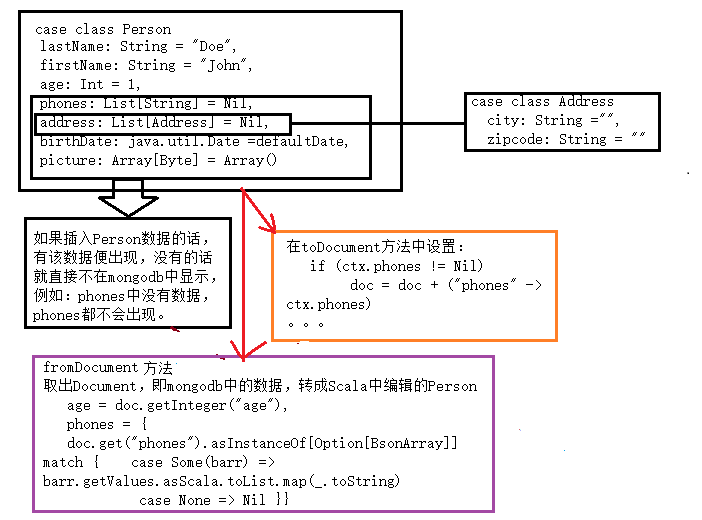
- 而图片和日期的转换如下图所示。

1、日期的存取
- 简单借助java.until.Calendar即可。
val ca=Calendar.getInstance()

ca.set()

ca.getTime
- 有多种具体的格式等,再直接应用mgoDateTime等方法
 //显示各种格式

type MGODate = java.util.Date

  def mgoDate(yyyy: Int, mm: Int, dd: Int): MGODate = {

    val ca = Calendar.getInstance()

    ca.set(yyyy,mm,dd)

    ca.getTime()

  }

  def mgoDateTime(yyyy: Int, mm: Int, dd: Int, hr: Int, min: Int, sec: Int): MGODate = {

    val ca = Calendar.getInstance()

    ca.set(yyyy,mm,dd,hr,min,sec)

    ca.getTime()

  }

  def mgoDateTimeNow: MGODate = {

    val ca = Calendar.getInstance()

    ca.getTime

  }

  def mgoDateToString(dt: MGODate, formatString: String): String = {

    val fmt= new SimpleDateFormat(formatString)

    fmt.format(dt)

  }
2、图片的存取(看图片大小,一般都是如下,大于16M的图片即采用GridFS,分别将图片的属性存储)
借助Akka的FileStream
将File(图片)===》Array[Byte]代码格式,图片在mongodb中显示形式binary
具体代码如下:
FileStreaming.scala
package com.company.files

import java.nio.file.Paths

import java.nio._

import java.io._

import akka.stream.{Materializer}

import akka.stream.scaladsl.{FileIO, StreamConverters}

import scala.concurrent.{Await}

import akka.util._

import scala.concurrent.duration._

object FileStreaming {

  def FileToByteBuffer(fileName: String, timeOut: FiniteDuration)(

    implicit mat: Materializer):ByteBuffer = {

    val fut = FileIO.fromPath(Paths.get(fileName)).runFold(ByteString()) { case (hd, bs) =>

      hd ++ bs

    }

    (Await.result(fut, timeOut)).toByteBuffer

  }

  def FileToByteArray(fileName: String, timeOut: FiniteDuration)(

    implicit mat: Materializer): Array[Byte] = {

    val fut = FileIO.fromPath(Paths.get(fileName)).runFold(ByteString()) { case (hd, bs) =>

      hd ++ bs

    }

    (Await.result(fut, timeOut)).toArray

  }

  def FileToInputStream(fileName: String, timeOut: FiniteDuration)(

    implicit mat: Materializer): InputStream = {

    val fut = FileIO.fromPath(Paths.get(fileName)).runFold(ByteString()) { case (hd, bs) =>

      hd ++ bs

    }

    val buf = (Await.result(fut, timeOut)).toArray

    new ByteArrayInputStream(buf)

  }

  def ByteBufferToFile(byteBuf: ByteBuffer, fileName: String)(

    implicit mat: Materializer) = {

    val ba = new Array[Byte](byteBuf.remaining())

    byteBuf.get(ba,0,ba.length)

    val baInput = new ByteArrayInputStream(ba)

    val source = StreamConverters.fromInputStream(() => baInput)  //ByteBufferInputStream(bytes))

    source.runWith(FileIO.toPath(Paths.get(fileName)))

  }

  def ByteArrayToFile(bytes: Array[Byte], fileName: String)(

    implicit mat: Materializer) = {

    val bb = ByteBuffer.wrap(bytes)

    val baInput = new ByteArrayInputStream(bytes)

    val source = StreamConverters.fromInputStream(() => baInput) //ByteBufferInputStream(bytes))

    source.runWith(FileIO.toPath(Paths.get(fileName)))

  }

  def InputStreamToFile(is: InputStream, fileName: String)(

    implicit mat: Materializer) = {

    val source = StreamConverters.fromInputStream(() => is)

    source.runWith(FileIO.toPath(Paths.get(fileName)))

  }

}
- Helpers.scala
package com.company.lib

import java.util.concurrent.TimeUnit

import scala.concurrent.Await

import scala.concurrent.duration.Duration

import java.text.SimpleDateFormat

import java.util.Calendar

import org.mongodb.scala._

object Helpers {

  implicit class DocumentObservable[C](val observable: Observable[Document]) extends ImplicitObservable[Document] {

    override val converter: (Document) => String = (doc) => doc.toJson

  }

  implicit class GenericObservable[C](val observable: Observable[C]) extends ImplicitObservable[C] {

    override val converter: (C) => String = (doc) => doc.toString

  }

  trait ImplicitObservable[C] {

    val observable: Observable[C]

    val converter: (C) => String

    def results(): Seq[C] = Await.result(observable.toFuture(), Duration(10, TimeUnit.SECONDS))

    def headResult() = Await.result(observable.head(), Duration(10, TimeUnit.SECONDS))

    def printResults(initial: String = ""): Unit = {

      if (initial.length > 0) print(initial)

      results().foreach(res => println(converter(res)))

    }

    def printHeadResult(initial: String = ""): Unit = println(s"${initial}${converter(headResult())}")

  }

  type MGODate = java.util.Date

  def mgoDate(yyyy: Int, mm: Int, dd: Int): MGODate = {

    val ca = Calendar.getInstance()

    ca.set(yyyy,mm,dd)

    ca.getTime()

  }

  def mgoDateTime(yyyy: Int, mm: Int, dd: Int, hr: Int, min: Int, sec: Int): MGODate = {

    val ca = Calendar.getInstance()

    ca.set(yyyy,mm,dd,hr,min,sec)

    ca.getTime()

  }

  def mgoDateTimeNow: MGODate = {

    val ca = Calendar.getInstance()

    ca.getTime

  }

  def mgoDateToString(dt: MGODate, formatString: String): String = {

    val fmt= new SimpleDateFormat(formatString)

    fmt.format(dt)

  }

}
- Model.scala
模型中包含了两个具体的模型Person和Address,二者是包含关系,具体模型内含存取方法
package com.company.demo

import org.mongodb.scala._

import bson._

import java.util.Calendar

import com.company.files._

import akka.stream.ActorMaterializer

object Models {

//Model可存在在不同的模型,下面存在一个拥有代表性的模型Person

  case class Address(

                    //Scala中的字段类型,且String的默认参数是“”

                    city: String ="",

                    zipcode: String = ""

                    ) {

    def toDocument: Document =

      bson.Document(

 //bson.Document是bson包里面的Document,其他包内有不同的Document

        "city" -> city,

        "zipcode" -> zipcode

      )

    def fromDocument(doc: Document): Address =

      this.copy(

        city = doc.getString("city"),

        zipcode = doc.getString("zipcode")

      )

  }

    //这是日期的设置

  val ca = Calendar.getInstance()

  ca.set(2001,10,23)

  val defaultDate = ca.getTime

  case class Person (

                    lastName: String = "Doe",

                    firstName: String = "John",

                    age: Int = 1,

                    phones: List[String] = Nil,

                    address: List[Address] = Nil,

                    birthDate: java.util.Date = defaultDate,

                    picture: Array[Byte] = Array()

                    ) { ctx =>

    def toDocument: Document = {

      var doc = bson.Document(

        "lastName" -> ctx.lastName,

        "firstName" -> ctx.firstName,

        "age" -> ctx.age,

        "birthDate" -> ctx.birthDate

      )

      if (ctx.phones != Nil)

        doc = doc + ("phones" -> ctx.phones)

      if (ctx.address != Nil)

        doc = doc + ("address" -> ctx.address.map(addr => addr.toDocument))

      if (!ctx.picture.isEmpty)

        doc = doc + ("picture" -> ctx.picture)

      doc

    }

    import scala.collection.JavaConverters._

    def fromDocument(doc: Document): Person = {

        //keySet

      val ks = doc.keySet

      ctx.copy(

        lastName = doc.getString("lastName"),

        firstName = doc.getString("firstName"),

        age = doc.getInteger("age"),

        phones = {

            doc.get("phones").asInstanceOf[Option[BsonArray]] match {

            case Some(barr) => barr.getValues.asScala.toList.map(_.toString)

            case None => Nil

          }

        },

        address = {

          if (ks.contains("address")) {

            doc.get("address").asInstanceOf[Option[BsonArray]] match {

              case Some(barr) => barr.getValues.asScala.toList.map (

                ad => Address().fromDocument(ad.asDocument())

              )

              case None => Nil

            }

          }

          else Nil

        },

        picture = {

          if (ks.contains("picture")) {

            doc.get("picture").asInstanceOf[Option[BsonBinary]] match {

              case Some(ba) => ba.getData

              case None => Array()

            }

          }

          else Array()

        }

      )

    }

     //在控制台显示的格式。

    def toSink()(implicit mat: ActorMaterializer) = {

      println(s"LastName: ${ctx.lastName}")

      println(s"firstName: ${ctx.firstName}")

      println(s"age: ${ctx.age}")

      println(s"phones: ${ctx.phones}")

      println(s"address ${ctx.address}")

      if(!ctx.picture.isEmpty) {

        val path = s"/img/${ctx.firstName}.jpg"

        FileStreaming.ByteArrayToFile(ctx.picture,path)

        println(s"picture saved to: ${path}")

      }

    }

  }

}
- PersonCRUD.scala简单测试
package com.company.demo

import org.mongodb.scala._

import bson._

import java.util.Calendar

import scala.collection.JavaConverters._

import com.company.lib.Helpers._

import com.company.files.FileStreaming._

import akka.actor._

import akka.stream._

import scala.concurrent.duration._

import scala.util._

object PersonCRUD extends  App {

  import Models._

    implicit val system = ActorSystem()

    implicit val ec = system.dispatcher

    implicit val mat = ActorMaterializer()

    // or provide custom MongoClientSettings

    val settings: MongoClientSettings = MongoClientSettings.builder()

      .applyToClusterSettings(b => b.hosts(List(new ServerAddress("localhost")).asJava))

      .build()

    val client: MongoClient = MongoClient(settings)

    val mydb = client.getDatabase("mydb")

    val mytable = mydb.getCollection("personal")

    val susan = Person(

      lastName = "Wang",

      firstName = "Susan",

      age = 18,

      phones = List("137110998","189343661"),

      address = List(

        Address("Sz","101992"),

        Address(city = "gz", zipcode="231445")

      ),

      birthDate = mgoDate(2001,5,8),

      picture = FileToByteArray("/img/sc.jpg",3 seconds)

    )

/*

    val futResult = mytable.insertOne(susan.toDocument).toFuture()

    futResult.onComplete {

      case Success(value) => println(s"OK! ${value}")

      case Failure(err) => println(s"Boom!!! ${err.getMessage}")

    }

    scala.io.StdIn.readLine() */

  mytable.find().toFuture().andThen {

    case Success(ps) => ps.foreach(Person().fromDocument(_).toSink())

    case Failure(err) => println(s"ERROR: ${err.getMessage}")

  }

  scala.io.StdIn.readLine()

  system.terminate()

  }
Scala与Mongodb实践2-----图片、日期的存储读取的更多相关文章
- Scala与Mongodb实践4-----数据库操具体应用
目的:在实践3中搭建了运算环境,这里学会如何使用该环境进行具体的运算和相关的排序组合等. 由数据库mongodb操作如find,aggregate等可知它们的返回类型是FindObservable.A ...
- Scala与Mongodb实践3-----运算环境的搭建
目的:使的在IDEA中编辑代码,令代码实现mongodb运算,且转换较为便捷 由实验2可知,运算环境的搭建亦需要对数据进行存储和计算,故需要实现类型转换,所以在实验2的基础上搭建环境. 由菜鸟教程可得 ...
- Scala与Mongodb实践1-----mongodbCRUD
目的:如何使用MongoDB之前提供有关Scala驱动程序及其异步API. 1.现有条件 IDEA中的:Scala+sbt+SDK mongodb-scala-driver的网址:http://mon ...
- Python中使用Flask、MongoDB搭建简易图片服务器
主要介绍了Python中使用Flask.MongoDB搭建简易图片服务器,本文是一个详细完整的教程,需要的朋友可以参考下 1.前期准备 通过 pip 或 easy_install 安装了 pymong ...
- 使用Scala操作Mongodb
介绍 Scala是一种功能性面向对象语言.它融汇了很多前所未有的特性.而同一时候又执行于JVM之上.随着开发人员对Scala的兴趣日增,以及越来越多的工具支持,无疑Scala语言将成为你手上一件不可缺 ...
- Scala对MongoDB的增删改查操作
=========================================== 原文链接: Scala对MongoDB的增删改查操作 转载请注明出处! ==================== ...
- 【Scala】Scala多线程-并发实践
Scala多线程-并发实践 scala extends Thread_百度搜索 scala多线程 - 且穷且独立 - 博客园 Scala和并发编程 - Andy Tech Talk - ITeye博客 ...
- 一个从MongoDB中导出给定日期范围内数据的shell脚本
#!/bin/sh ver=`date "+%Y%m%d"` #d1, the beginning date, eg:2017-06-28 d1=$1 d1=`date -d $d ...
- Scala操作MongoDB
Scala操作MongoDB // Maven <dependencies> <dependency> <groupId>org.mongodb</group ...
随机推荐
- javascript和jquery 移除事件 和 改变样式
javascript移除事件: document.getElementById("word").onmouseover = null; javascript改变样式: docume ...
- PHP Warning: Module 'json' already loaded in Unknown on line 0
Zend加密文件.启动服务器后无法正常运行加密后的文件.处理方法: 某台服务器上跑着php 5.3.8,线上服务运行正常. 某天拆分php错误日志时,发现其中有一段连续的错误信息. [14-Feb ...
- 2018-8-10-UWP-分享用那个图标
title author date CreateTime categories UWP 分享用那个图标 lindexi 2018-08-10 19:16:52 +0800 2018-2-13 17:2 ...
- [转]C#操作word模板插入文字、图片及表格详细步骤
c#操作word模板插入文字.图片及表格 1.建立word模板文件 person.dot用书签 标示相关字段的填充位置 2.建立web应用程序 加入Microsoft.Office.Interop.W ...
- H3C 无类域间路由斜线表示法
- 【u104】组合数
Time Limit: 1 second Memory Limit: 128 MB [问题描述] 组合数C(N, K)表示了N个数字不重复地选取K个作组合的方案数. C(N, K) = N!/(N-M ...
- C# 获取进程退出代码
我需要写一个程序,让这个程序知道另一个程序是否正常退出,于是就需要获取这个进程的退出代码 在程序如果需要手动退出,可以设置当前的退出代码 static void Main(string[] args) ...
- jquery自己写的带左右箭头自动播放幻灯插件,简化
<!DOCTYPE html PUBLIC "-//W3C//DTD XHTML 1.0 Transitional//EN" "http://www.w3.org/ ...
- ZOJ——Knight Moves(bfs)
Knight Moves Time Limit: 2 Seconds Memory Limit: 65536 KB A friend of you is doing research on ...
- IdentityServer4 Resources
原文地址 Resources 的定义 通常在系统中是顶一个需要保护的资源.这些资源可是用户的信息,比如身份信息或者邮箱地址,也可以是某些API的访问权限. Note: 可以通过C#的对象模型或者通过数 ...