
bcc-tools工具之profile
profile是用于追踪程序执行调用流程的工具,类似于perf中的-g指令
相比perf -g而言,profile功能化更加细分,可以根据需要选择追踪层面,例如-U(用户要调用流程) -K (内核态调用流程)
下面具体介绍该工具的使用
采用profile --help,我们可以看到如下介绍:
usage: profile [-h] [-p PID] [-U | -K] [-F FREQUENCY | -c COUNT] [-d] [-a]

               [-f] [--stack-storage-size STACK_STORAGE_SIZE] [-C CPU]

               [duration]

Profile CPU stack traces at a timed interval

positional arguments:

  duration              duration of trace, in seconds   # profile的持续时间

optional arguments:

  -h, --help            show this help message and exit

  -p PID, --pid PID     profile this PID only           # 只追踪该pid的调用流程

  -U, --user-stacks-only                   # 查看用户态函数调用流程

                        show stacks from user space only (no kernel space

                        stacks)

  -K, --kernel-stacks-only                  # 只查看内核态调用流程

                        show stacks from kernel space only (no user space

                        stacks)

  -F FREQUENCY, --frequency FREQUENCY                   # profile追踪采样频率  例如: -F 99  表示按照99hz的频率进行采样,默认是采用的49hz

                        sample frequency, Hertz

  -c COUNT, --count COUNT                   # 选择采样次数 -c 5表示在周期内采样5次,-c和-F两者不能同时使用

                        sample period, number of events

  -d, --delimited       insert delimiter between kernel/user stacks  # 在内核和用户态之间插入分界符 “---”

  -a, --annotations     add _[k] annotations to kernel frames        # 在显示的内核函数后面标记 '[k]'标识

  -f, --folded          output folded format, one line per stack (for flame #采用横向线上模式 xxx;xxx_1;xxxxx_2

                        graphs)

  --stack-storage-size STACK_STORAGE_SIZE                 # 设置调用栈的使用空间和默认支持空间大小

                        the number of unique stack traces that can be stored

                        and displayed (default )

  -C CPU, --cpu CPU     cpu number to run profile on           # 允许几个cpu运行profile程序

examples:

    ./profile             # profile stack traces at  Hertz until Ctrl-C

    ./profile -F        # profile stack traces at  Hertz

    ./profile -c   # profile stack traces every  in a million events

    ./profile            # profile at  Hertz for  seconds only

    ./profile -f         # output in folded format for flame graphs

    ./profile -p       # only profile threads for PID

    ./profile -U          # only show user space stacks (no kernel)

    ./profile -K          # only show kernel space stacks (no user)
下面对相关重要指令进行测试分析:
- profile -f
在没有添加-f参数时,可看出是一行线上一个函数调用信息
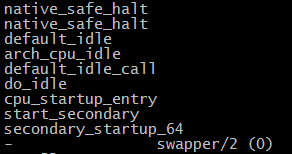
加入-f参数后,采用每行递增线上函数调用信息。

- profile -d :用于将内核态和用户态函数通过"--"分割开来,如下图红色框框所示

3.profile -F :用于设置该工具采样频率

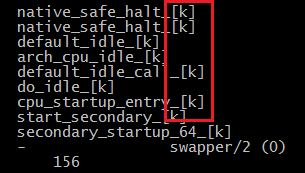
4. profile -K -a :用于仅显示内核调用函数,并且在函数后面增加"_[K]"标识 (156标识进程id号)
5. profile -c :在采样周期内对每一个线程xx个event进行采样

bcc-tools工具之profile的更多相关文章
- instsrv.exe下载和使用方法(微软Windows Server 2003 Resource Kit Tools工具中的一个)
instsrv.exe是微软Windows Server 2003 Resource Kit Tools工具中的一个. Windows Server 2003 Resource Kit Tools是一 ...
- MTK Android software Tools工具的说明
MTK发布的Android software Tools工具包,里面包含了很多的MTK工具,如下是简要说明及学习文档 MTK Android software Tools工具的说明如下: 工具 说明 ...
- kail linux虚拟机安装tools工具
因为自己比较懒,有时候自己不想打字需要粘贴就安装了虚拟机tools工具,又因为自己脑子不好使所以就写一下步骤,以便以后用得着.我这里用得是kail linux系统,不知道contest能不能这样安,下 ...
- 【申嵌视频】5-1 ubuntu下安装VMWare Tools工具
[申嵌视频]5-1 ubuntu下安装VMWare Tools工具 适合搭建mini2440, Tiny6410, smart210,Tiny4412, NanoPC-T2, NanoPC-T3, N ...
- 解决Linux安装 VMware tools 工具的方法
一:启动linux服务器,并用远程登录工具访问linux服务器 1:启动系统 2:用服务器控制台 :查看点ip地址 3:用客户端 连接服务器 二:挂起 vm虚拟机的 tools 安装光盘 三:开始 ...
- Linux下 安装VMware Tools工具
Linux下需要安装VMware Tools工具 Linux下需要安装VMware Tools工具来实现主机和虚拟机直接文件复制粘贴功能,安装方法如下: ①点击虚拟机VM菜单栏--虚拟机--安装VMw ...
- 【Linux】VMware安装VMware Tools工具
VMware Tools是VMware虚拟机中自带的一种增强工具,相当于VirtualBox中的增强功能(Sun VirtualBox Guest Additions),是VMware提供的增强虚拟显 ...
- VS混淆/反编译/远程调试/Spy++的Tools工具
VS的Tools工具(混淆/反编译/远程调试/Spy++等) https://blog.csdn.net/chunyexiyu/article/details/14445605 参考:http://b ...
- 虚拟机乌班图系统安装 VMware tools 工具
在VMware虚拟机中安装完毕Linux操作系统之后,我们经常会发现桌面不能全屏显示或者windows主机系统与linux操作系统之间无法创建共享文件夹.这是因为我们还没有安装VMware tools ...
- 第三篇:Entity Framework CodeFirst & Model 映射 续篇 EntityFramework Power Tools 工具使用
上一篇 第二篇:Entity Framework CodeFirst & Model 映射 主要介绍以Fluent API来实作EntityFramework CodeFirst,得到了大家一 ...
随机推荐
- js的width函数
参考: (1)https://blog.csdn.net/chen__jinfei/article/details/6520678 (2)https://developer.mozilla.org/e ...
- jQuery随机抽取数字号代码
html <!DOCTYPE html> <html> <head> <meta charset="utf-8"> <meta ...
- pip install RISE报错解决
ERROR: Cannot uninstall 'tornado' ERROR: Cannot uninstall 'tornado'. It is a distutils installed pro ...
- 中位数+暴力——cf433C
/* 中位数到所有数的距离之和最小 因为只能改一个数,所以我们找一个数,将其改为和其相邻的数的中位数,使答案最小 先求一次原答案 把每个数相邻的数用vector存下来,然后排序找中位数,计算减小的量 ...
- 解决$.ajax请求在ie8下失效问题
ie8下默认把跨域请求拦截了,需要用jquery.xdomainrequest.min.js 处理跨域问题,需放在jq下引入 http://cdnjs.cloudflare.com/ajax/libs ...
- Sql生成 Insert 语句
declare @TableName sysname select @TableName = 'T_OOSOrder' declare @result varchar(max) = 'INSERT I ...
- python中处理.mat文件
python中处理.mat文件 背景 在实际使用python的时候,发现很多数据都是使用.mat的形式保存,所以,如何使用python读写.mat文件成为了许多python使用者必备的技能. -v7. ...
- vbs 之 解决打开Excel文件格式与扩展名指定格式不一致的问题
' Q:解决打开Excel文件格式与扩展名指定格式不一致的问题' A: 使用工作簿saveAs时,往往忽略掉它的第二个参数FileFormat,添加即可. 比如: set bookDiff = oEx ...
- opencv 打开摄像头(c++)
1,打开视频文件 2,打开IP摄像头 读取大华摄像头 大华的网络摄像头编号:DH-IPC-HFW1225M-I1-0600B,用的是RTSP协议. "rtsp://admin:dahua@1 ...
- 【Linux】- 守护进程的启动方法
转自:Linux 守护进程的启动方法 Linux中"守护进程"(daemon)就是一直在后台运行的进程(daemon). 本文介绍如何将一个 Web 应用,启动为守护进程. 一.问 ...