
How to Set Up a NFS Server on Debian 10 Buster
How to Set Up a NFS Server on Debian 10 Buster
- Nick Congleton
- Debian
- 24 May 2019
There are plenty of reasons why you'd want to share files across computers on your network, and Debian makes a perfect file server, whether you're running it from a workstation, dedicated server, or even a Raspberry Pi. Since NFS functionality comes from the kernel, everything is fairly simple to set up and well integrated.
In this tutorial you will learn:
- How to Install the NFS Packages
- How to Configure Your Shares
- How to Connect to a Share

Software Requirements and Conventions Used
| Category | Requirements, Conventions or Software Version Used |
|---|---|
| System | Debian 10 Buster |
| Software | NFS Server |
| Other | Privileged access to your Linux system as root or via the sudo command. |
| Conventions | # - requires given linux commands to be executed with root privileges either directly as a root user or by use of sudo command$ - requires given linux commands to be executed as a regular non-privileged user |
Install the NFS Packages

NFS is super simple to install on Debian. It's connected to the kernel, and it's a common package. You can install everything you need from the main repositories.
$ sudo apt install nfs-kernel-server
Subscribe to Linux Career NEWSLETTER and receive latest Linux news, jobs, career advice and tutorials.
Configure Your Shares
Start by creating a directory that you want to share or choosing an existing one. Make sure that the directory that you choose doesn't have root-only permissions.
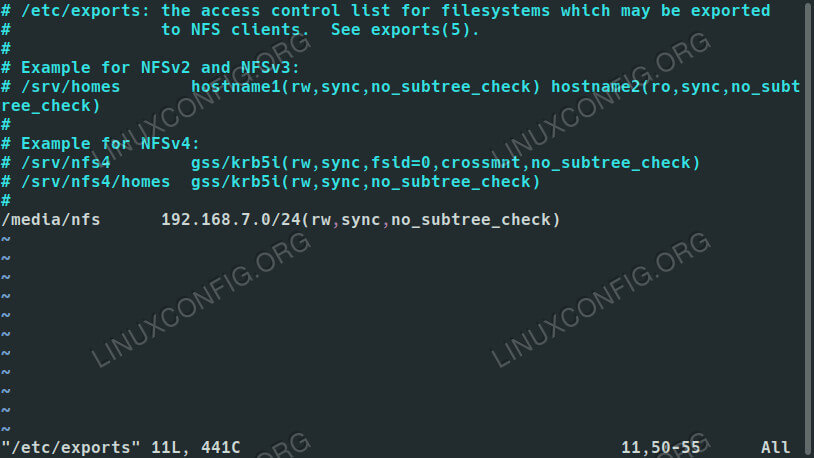
Next, open up /etc/exports with your favorite text editor. This is the file that you'll use to set up your shares. Here, you can configure which directories you're sharing and who can access them. You can also set specific permissions for the shares to further limit access.
In the file, each share gets its own line. That line begins with the location of the share on the server machine. Across from that, you can list the hostname of an accepted client, if is available in the server's hosts file, or an IP or range of IPs. Directly behind the IP address, place the rules for the share in a set of parenthesis. Altogether, it should look something like this:
/media/nfs 192.168.1.0/24(rw,sync,no_subtree_check)
You can include as many shares as you like, provided each has its own line. You can also include more than one hostname or IP in each line and assign them different permissions. For example:
/media/nfs 192.168.1.112(rw,sync,no_subtree_check) 192.168.1.121(ro,sync,no_subtree_check)
In that instance, each of those machines could view and read from the share, but only the computer at 192.168.1.112 could write to it.
There are plenty more options that you can choose from to configure how the server handles you share for each guest. Here is a complete breakdown of what's available:
- ro: specifies that the directory may only be mounted as read only
- rw: grants both read and write permissions on the directory
- no_root_squash: is an extremely dangerous option that allows remote “root” users the same privilege as the “root” user of the host machine
- subtree_check: specifies that, in the case of a directory is exported instead of an entire filesystem, the host should verify the location of files and directories on the host filesystem
- no_subtree_check: specifies that the host should not check the location of the files being accessed withing the host filesystem
- sync: this just ensures that the host keeps any changes uploaded to the shared directory in sync
- async: ignores synchronization checks in favor of increased speed
Once you have everything set up the way you want, save and exit the file. Then, restart the server to load your new exports configuration.
$ sudo systemctl restart nfs-kernel-server
Connect to a Share
Your share is now accessible from the client machines that you configured in your exports. Assuming that your clients are Ubuntu or Debian based, you can install the required package to connect with:
$ sudo apt install nfs-common

With that, you'll be able to mount the NFS shares. So, to try it out, pick a directory to mount to, and run the mount command as root privileges to mount the networked share.
$ sudo mount -t nfs4 192.168.1.110:/media/nfs /media/share
Provided the mount succeeded, you'll be able to access your shared files in the directory where you mounted them.
For a more permanent solution, you can add the share to your client's /etc/fstab file. The overall syntax looks a lot like the command that you just used to mount your share. Start with the location of the share on your network. Follow that with where the share is to be mounted. The filesystem type here is nfs4. The options are up to you, but using the defaults and allowing user access are pretty common for non-sensitive shares. The end result should look a bit like the example below.
192.168.1.110:/media/nfs /media/share nfs4 defaults,user,exec 0 0
If you aren't certain if the share will always be available on the client, add noauto to the list of options to prevent your system from trying to mount it automatically.
192.168.1.110:/media/nfs /media/share nfs4 defaults,user,exec,noauto 0 0
Try mounting it on the client using /etc/fstab.
$ sudo mount -a
Your share should be mounted exactly where you specified.
Conclusion
Your Debian server is now ready to start serving files, and you shouldn't have any trouble setting up the rest of your client machines. Remember that NFS doesn't have much in the way of security, so you're going to need other methods to restrict access to your files, should you choose to share anything more sensitive.
How to Set Up a NFS Server on Debian 10 Buster的更多相关文章
- nfs server的配置 Starting NFS daemon: [FAILED]
总结了一下是nfs server的制作过程:nfs(Network File System)其实就是说,这个机器的硬盘不够了,我要把文件放到别的服务器上去,服务器端的配置如下:首先(1)确保你的机器上 ...
- nfs:server 172.168.1.22 not responding,still trying问题解决方法 平台为RealARM 210平台
nfs:server 172.168.1.22 not responding,still trying问题解决方法 ,平台为RealARM 210平台. 这里的问题是在使用nfs挂载文件系统时遇到的, ...
- windows nfs server for linux
摘要 在开发嵌入式系统的过程中,为了方便调试与文件共享,需要使用到nfs,即网络文件系统,这位板子的调试测试带来了很大的方便.之前在linux系统下开发,与ARM11核心板 linux系统对接共享也比 ...
- Ubuntu 12.04安装NFS server
首先安装nfs-kernel-server apt-get install nfs-kernel-server 然后创建一个目录: mkdir -p /opt/share 并赋予权限777: chmo ...
- nfs:server is not responding,still trying 原因与解决
方案(学自他人) nfs:server is not responding,still trying的解决方法 (2009-04-20 10:20) 方法1 : 我在arm上通过NFS共享文件时出现下 ...
- Linux 文件服务---------- nfs Server
Linux 文件服务nfs (Network file system)#网络文件系统 ---> 远程文件调用samba #文件共享(unix /linux /windows ) ,只能适用于局域 ...
- 树莓派 nfs server安装
安装服务 sudo apt-get install portmap sudo apt-get install nfs-kernel-server 配置: sudo nano /etc/expo ...
- CentOS 7下NFS Server作rootfs时的兼容性问题
最近新装CentOS 7,发现原先CentOS 6.3下可用的一块ARM Dev board不能用了,表现为VFS mount挂载rootfs失败. 使用WireShark发现,服务器对client发 ...
- NFS Server宕机后,NFS Client主机上df命令挂死
方法1: 使用root用户:Oracle@NDMCDB05:~> su -Password: NDMCDB05:~ # cat /etc/mtab /dev/sda2 / reiserfs rw ...
随机推荐
- 通过tushare获取股票价格
# Author llll # coding=utf-8 # ---描述# 完成股票 价格查询和展示# 不直接根据网页进行爬虫获取股票价格,而是通过已有组件查询股票价格,并保存到csv文件或者exce ...
- C语言变量和常量
常量 在程序执行过程中,其值不能被改变 常量一般出现在表达式或者赋值语句 利用const 修饰的变量为常量,不可修改 利用define定义的一般为常量,定义时候不需要分号 利用extern修饰的量知识 ...
- hadoop 批量处理脚本编写
编写shell脚本就是解决批量处理 1. 在/usr/local/bin 创建脚本 并授权所有用户 chmod a+x xcall.sh xcall.sh 比如:删除/tmp/*所有文件 批量删 ...
- MySql五大引擎的区别以及优劣之分
五大引擎 一: MyISAM:在创建MyISAM的时候会出来三个默认的文件 1.tb_demo.frm,存储表定义:2.tb_demo.MYD,存储数据:3.tb_demo.MYI,存储索引. 因为M ...
- oracle_job进程相关学习测试
Oracle cjq0进程测试 测试流程: .CJQ进程不存在 .模拟问题处理 .问题总结 一.问题现象 CJQ0进程不存在 [root@adg1 ~]# ps -ef|grep cjq root : ...
- lock的等效代码
1.lock的等效代码 在.NET的多线程程序中,经常会遇到lock关键字来控制同步,比如下列代码: private object o = new object(); public void Work ...
- Python初识对象
一 楔子 你现在是一家游戏公司的开发人员,现在需要你开发一款叫做<人狗大战>的游戏,你就思考呀,人狗作战,那至少需要2个角色,一个是人, 一个是狗,且人和狗都有不同的技能,比如人拿棍打狗, ...
- 虹软人脸识别 - faceId及IR活体检测的更新介绍
虹软人脸识别 - faceId及IR活体检测的介绍 前几天虹软推出了 Android ArcFace 2.2版本的SDK,相比于2.1版本,2.2版本中的变化如下: VIDEO模式新增faceId(类 ...
- mysql数据库的多实例与主从同步。
1.MySQL的多实例: 多实例的特点:能够有效地利用服务器的资源,节约服务器的资源 MySQL多实例的配置有两种,第一是使用一个配置文件,这种方法不推荐使用,容易出错:第二种是用多个配置文件,这种方 ...
- javascript_13-函数是一种数据类型
函数是一种数据类型 函数是一种数据类型 function var num =60; // 1 函数是一种数据类型 function var myFun = function(){ console.lo ...