
python之tkinter入坑Pack()------(1)
tkinter 的pack()可以设置的属性如下:
pack_configure(self, cnf={}, **kw)Pack a widget in the parent widget. Use as options:
after=widget - pack it after you have packed widget
anchor=NSEW (or subset) - position widget according to
given direction
before=widget - pack it before you will pack widget
expand=bool - expand widget if parent size grows
fill=NONE or X or Y or BOTH - fill widget if widget grows
in=master - use master to contain this widget
in_=master - see 'in' option description
ipadx=amount - add internal padding in x direction
ipady=amount - add internal padding in y direction
padx=amount - add padding in x direction
pady=amount - add padding in y direction
side=TOP or BOTTOM or LEFT or RIGHT - where to add this widget.
中文解释如下:
anchor=NSEW,表示设置我们要加的当前部件的位置
side=TOP or BOTTOM or LEFT or RIGHT 表示在父类容器的什么地方家我们的部件
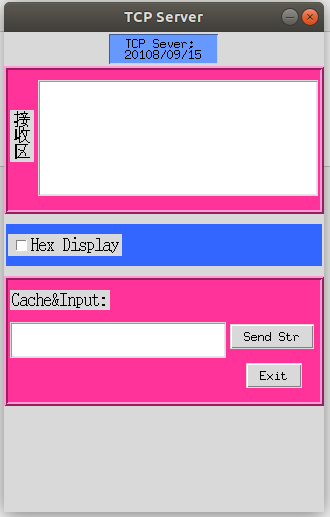
Python 入坑的pack()方法:
 #coding:utf-8

 import tkinter

 # 导入TK的符号常亮

 from tkinter.constants import *

 def sendStr():

     print('Data Send Ok!')

 #  实例化TK类,主窗口必须为.TK(),而其他子窗口为.Toplevel()

 top = tkinter.Tk()

 # 设置窗口的尺寸大小

 top.wm_geometry('320x480+1000+100')

 # 不允许 改变 窗口的宽和高

 top.wm_resizable(False,False)

 # 设置窗口标题

 top.title('TCP Server')

 # 设置label标签

 L1 = tkinter.Label(top, text='TCP Sever;\n20108/09/15',

                    width=15, justify=LEFT, relief=RIDGE, background='#6699ff', )\

     .pack_configure(anchor=S, side=TOP, ipady=2, pady=2, fill=NONE)

 # 设置容器

 frame1 = tkinter.Frame(top,height=80,width=60,relief=RIDGE, bg='#ff3399',bd=5,borderwidth=4)

 # 设置填充和布局

 frame1.pack(fill=NONE,ipady=2,expand=False)

 # 添加接收区文字标签

 L2 = tkinter.Label(frame1,text='接\n收\n区',width=2, justify=LEFT, font=("宋体", 12, "bold"),)\

     .pack(padx=2,pady=40,side=LEFT,anchor=N)

 # 添加接收区的文本框

 txt1 = tkinter.Text(frame1,width = 40, height = 10).pack(padx=2,pady=10,side=RIGHT,anchor=N)

 frame2 = tkinter.Frame(top, relief=RIDGE,bg='#3366ff')

 frame2.pack(fill=X, padx=2,pady=10,side=TOP)

 # 加一个复选框,一个按键

 chk_text = 'Hex Display'

 int_if_choise = tkinter.IntVar()

 chk1 = tkinter.Checkbutton(frame2,text=chk_text,font=('黑体',12),variable=int_if_choise,onvalue='OK',offvalue='NO')

 chk1.pack(fill=NONE,side=LEFT,padx=2,pady=10)

 print('shuchu:',int_if_choise)

 # 设置容器

 frame3 = tkinter.Frame(top,height=120,width=60,relief=RIDGE, bg='#ff3399',bd=5,borderwidth=4)

 # 设置填充和布局

 frame3.pack(fill=X,ipady=2,expand=False)

 # 设置字符串变量

 ServerReceiveVar = tkinter.StringVar(top,'')

 L3 = tkinter.Label(frame3, text='Cache&Input:',font=('黑体',12))

 L3.pack(fill=NONE, expand=NO, side=TOP, anchor=W, padx=2,pady=10)

 txt2 = tkinter.Text(frame3, height = 2, width = 30).pack(padx=2, pady=2, ipady=4, side=LEFT, anchor=N)

 button1 = tkinter.Button(frame3,text='Send Str', command=sendStr).pack(side=TOP, anchor=W, padx=2, pady=4)

 # IP 列表

 button2 = tkinter.Button(frame3,text="Exit",command=top.destroy).pack(side=TOP, anchor=N, padx=2, pady=10)

 top.mainloop()
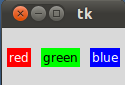
 from Tkinter import *

 root = Tk()

 w = Label(root, text="red", bg="red", fg="white")

 w.pack(padx=5, pady=10, side=LEFT)

 w = Label(root, text="green", bg="green", fg="black")

 w.pack(padx=5, pady=20, side=LEFT)

 w = Label(root, text="blue", bg="blue", fg="white")

 w.pack(padx=5, pady=20, side=LEFT)

 mainloop()
dd
python之tkinter入坑Pack()------(1)的更多相关文章
- win7 python pdf2image入坑经历
Python开发菜鸟入坑 项目要求pdf转成图片,网上较多的方案对于windows极其不友好,wand,Pythonmagick(win下载地址:www.lfd.uci.edu/~gohlke/pyt ...
- [Python]Python入坑小项目推荐- Flask example minitwit
知乎上看到的Python练手项目推荐,链接见:https://www.zhihu.com/question/29372574,不知道是我自己懒得看还是理解力不行,这些项目真的是...太大了呀~~~~ ...
- python函数中把列表(list)当参数时的"入坑"与"出坑"
在Python函数中,传递的参数如果默认有一个为 列表(list),那么就要注意了,此处有坑!! 入坑 def f(x,li=[]): for i in range(x): li.append(i*i ...
- python使用tkinter无法给顶层窗体的输入框设定默认值
这几天某同学遇到了一个棘手的问题,困扰了很久.今天终于解决了,我来记录一下坑. 情景:python 使用tkinter为第二层窗体(顶层窗体)中的一个输入框设定默认值时,总是无法设置,而且对输入框获取 ...
- ReactNative for Android入坑(一)
最近找工作发现有些公司要求会ReactNative,决定入坑. 搭建环境:官网详细的教程附链接. 坑一:FQ,建议整个搭建过程中FQ.(FQ链接,注册有200M试用流量,环境搭建够了)第一步:安装Ch ...
- Python GUI - Tkinter tkMessageBox
Python GUI - Tkinter tkMessageBox: tkMessageBox模块用于显示在您的应用程序的消息框.此模块提供了一个功能,您可以用它来显示适当的消息 tkMess ...
- Python GUI - tkinter
目录: Tkinter 组件 标准属性 几何管理 代码实例: 1. Label & Button 2. Entry & Text 3.Listbox列表 4.Radiobutton单选 ...
- python中的这些坑,早看早避免。
python中的这些坑,早看早避免. 说一说python中遇到的坑,躲坑看这一篇就够了 传递参数时候不要使用列表 def foo(num,age=[]): age.append(num) print( ...
- c#调用c++ dll 入坑记录
1.DLL引用坑 [DllImport("NetDLL.dll", CharSet = CharSet.Ansi, CallingConvention = CallingConve ...
随机推荐
- 【大产品思路】Amazon
http://www.woshipm.com/it/2844056.html 强烈赞同,对复杂业务,分布团队和开发可以借鉴. “ 这种公司级“微服务(Microservice)”架构的好处在于,每个团 ...
- Intellij IDEA Debug 多模块下断点目标源问题
Ctrl+Alt+S进入Settings,选择Debugger->show alternative source switcher 勾选,开启显示替代源选择器 由于项目工程存放了多个应用模块,包 ...
- Flutter中的日期插件date_format 中文 国际化 及flutter_cupertino_date_picker
今天我们来聊聊Flutter中的日期和日期选择器. Flutter中的日期和时间戳 //日期时间戳转换 var _nowTime = DateTime.now();//获取当前时间 print(_no ...
- ubuntu18.04 阿里镜像源
备份:cp /etc/apt/sources.list /etc/apt/sources.list.bak 清空source.list:echo > /etc/apt/sources.list ...
- qbittorrent搜索在线插件
https://raw.githubusercontent.com/khensolomon/leyts/master/yts.py https://raw.githubusercontent.com/ ...
- fastai 2019 part1 数据集分享
链接:https://pan.baidu.com/s/1UuQ8gJ2qXLvPK2rdIqWCMQ 提取码:ghn9
- LeetCode 617. 合并二叉树(Merge Two Binary Trees)
617. 合并二叉树 617. Merge Two Binary Trees 题目描述 给定两个二叉树,想象当你将它们中的一个覆盖到另一个上时,两个二叉树的一些节点便会重叠. 你需要将他们合并为一个新 ...
- MyBatis代码生成器(maven插件方式和控制台命令运行方式)
代码生成器的作用: 1.生成domain 2.生成mapper接口 3.生成mapper映射文件 准备工作:导入MyBatis所需要的包 第一步:在src/main/resources(必须)目录下创 ...
- Ubuntu 软件卸载脚本(卸载软件 + 移除配置文件 + 移除依赖项)
#!/bin/bash function z-apt-uninstall() { if [ ! $1 ] then echo "z-apt-uninstall error: software ...
- 使用pyinstaller编译python文件
1.安装pyinstaller pip install pyinstaller 2.编译 pyinstaller yourprogram.py 具体操作 1.编译 d: cd python pyi ...