
单元测试自动生成工具evosuite
<dependencies>

  <dependency>

    <groupId>junit</groupId>

    <artifactId>junit</artifactId>

    <version>4.12</version>

    <scope>test</scope>

  </dependency>

</dependencies>
 <plugin>

    <groupId>org.evosuite.plugins</groupId>

    <artifactId>evosuite-maven-plugin</artifactId>

    <version>1.0.6</version>

  </plugin>

evosuite 的仓库

<pluginRepositories>

  <pluginRepository>

    <id>EvoSuite</id>

    <name>EvoSuite Repository</name>

    <url>http://www.evosuite.org/m2</url>

  </pluginRepository>

</pluginRepositories>
<dependency>

    <groupId>org.evosuite</groupId>

    <artifactId>evosuite-standalone-runtime</artifactId>

    <version>1.0.6</version>

    <scope>test</scope>

</dependency>
4.开始生成

<plugins>

      <plugin>

          <groupId>org.apache.maven.plugins</groupId>

          <artifactId>maven-surefire-report-plugin</artifactId>

          <version>3.0.0-M3</version>

      </plugin>

    <plugin>

        <groupId>org.jacoco</groupId>

        <artifactId>jacoco-maven-plugin</artifactId>

        <version>0.8.0</version>

        <configuration>

          <excludes>//排出不需要收集覆盖率的

             <exclude>**/*ClazzSearchController.class</exclude>

             <exclude>**/*Application.class</exclude>

             <exclude>com/xxx/xxxx/api/config/**/*</exclude>

          </excludes>

        </configuration>

        <executions>

        <!--                  <execution>-->

<!--                      <id>prepare-agent</id>-->

<!--                      <goals>-->

<!--                          <goal>prepare-agent</goal>-->

<!--                      </goals>-->

<!--                  </execution>-->

<!--                  <execution>-->

<!--                      <id>report</id>-->

<!--                      <phase>prepare-package</phase>-->

<!--                      <goals>-->

<!--                          <goal>report</goal>-->

<!--                      </goals>-->

<!--                  </execution>-->

<!--                  <execution>-->

<!--                      <id>post-unit-test</id>-->

<!--                      <phase>test</phase>-->

<!--                      <goals>-->

<!--                          <goal>report</goal>-->

<!--                      </goals>-->

<!--                      <configuration>-->

<!--                          <dataFile>target/jacoco.exec</dataFile>-->

<!--                          <outputDirectory>target/jacoco-ut</outputDirectory>-->

<!--                      </configuration>-->

<!--                  </execution>-->

                  <execution>

                      <id>prepare-agent</id>

                      <goals>

                          <goal>prepare-agent</goal>

                      </goals>

                  </execution>

                  <execution>

                      <id>generate-code-coverage-report</id>

                      <phase>test</phase>

                      <goals>

                          <goal>report</goal>

                      </goals>

                  </execution>

        </executions>

    </plugin>

</plugins>
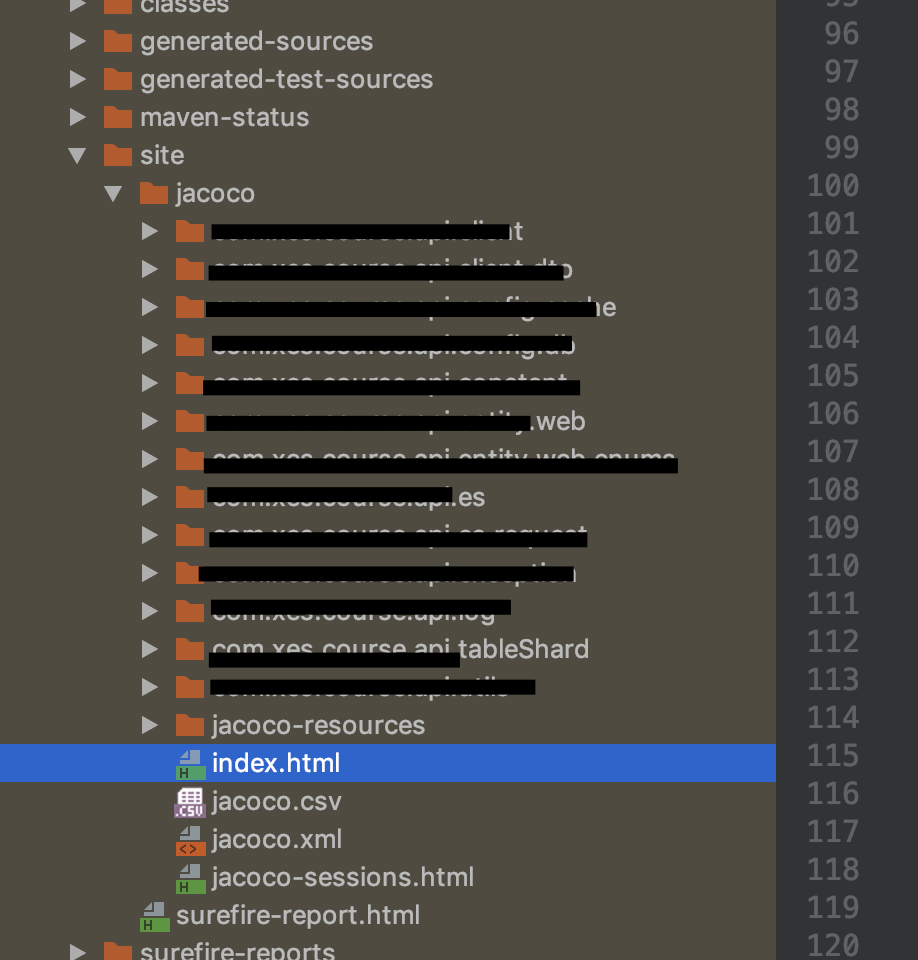
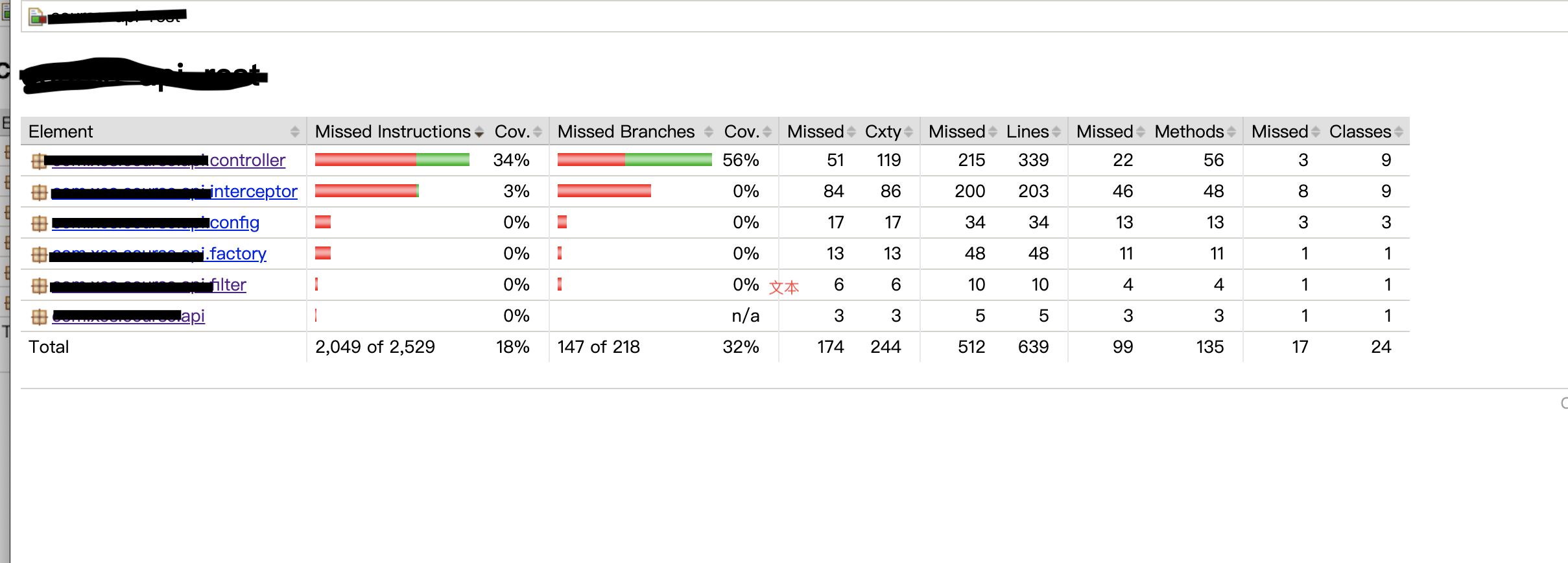
3.查看测试报告
单元测试自动生成工具evosuite的更多相关文章
- h5自动生成工具
一.前言 写了很多h5之后,对于写手写html和css已经麻木的我决定动手写个工具自动生成h5结构和样式.其实这个想法由来已久,但总是觉得自己技术不够,所以一直没实行.直到某天我真的写够了,我决定动手 ...
- 代码自动生成工具MyGeneration之一(程序员必备工具)
代码自动生成工具MyGeneration之一(程序员必备工具) 转 分类: C#2008-08-06 18:12 16064人阅读 评论(12) 收藏 举报 工具数据库相关数据库stringbrows ...
- Makefile自动生成工具-----autotools的使用(详细)
相信每个学习Linux的人都知道Makefile,这是一个很有用的东西,但是编写它是比较复杂,今天介绍一个它的自动生成工具,autotools的使用.很多GNULinux的的软件都是用它生成Makef ...
- Asp.net mvc 5 CRUD代码自动生成工具- vs.net 2013 Saffolding功能扩展
Asp.net mvc 5 CRUD代码自动生成工具 -Visual Studio.net2013 Saffolding功能扩展 上次做过一个<Asp.net webform scaffoldi ...
- springboot成神之——swagger文档自动生成工具
本文讲解如何在spring-boot中使用swagger文档自动生成工具 目录结构 说明 依赖 SwaggerConfig 开启api界面 JSR 303注释信息 Swagger核心注释 User T ...
- 基于数据库的代码自动生成工具,生成JavaBean、生成数据库文档、生成前后端代码等(v6.0.0版)
TableGo v6.0.0 版震撼发布,此次版本更新如下: 1.UI界面大改版,组件大调整,提升界面功能的可扩展性. 2.新增BeautyEye主题,界面更加清新美观,也可以通过配置切换到原生Jav ...
- C# 代码自动生成工具
开源:C# 代码自动生成工具,支持站点前后台 前言 写这个项目有很长一段时间了,期间也修修改改,写到最后,自己也没咋用(研究方向变化了). 正文 具体项目开源了:https://github.co ...
- iBatis 代码自动生成工具 iBator 及 Example 使用
iBator的下载和安装 官方下载地址:http://people.apache.org/builds/ibatis/ibator/ 安装:见<Eclipse 插件安装> 安装完成后,“F ...
- CoolPlist 帧动画自动生成工具
工具英文名称:CoolPlist作者: 陈前帆 thinkingMan | sonny 邮箱: 625936034@qq.com | chenqianfan1@163.com电话: 136704713 ...
随机推荐
- Tips for vcpkg
概述 vcpkg是微软开发的在Windows, Linux和MacOS平台管理C/C++库的开源工具. 快速开始 要求 使用vcpkg需满足如下条件: Windows 10, 8.1, 7, Linu ...
- Can't create a new thread (errno 11) 解决办法 mysql无法连接
问题的现象: 错误信息: ERROR 1135 (00000): Can't create a new thread (errno 11); if you are not out of availab ...
- iOS-UIImageView和UIImage
UIImage self.imageView.contentMode = UIViewContentModeCenter;// 图片的内容模式 [self.imageView setFrame:CGR ...
- 02. oc语言是动态语言
参照着知乎上大神们给的解释,(https://www.zhihu.com/question/19918532)自己要总结下知识: 自己初级并没有理解 动态.静态.强类型.弱类型 语言的这些含义,区分. ...
- TCP Socket + UDP Socket
小例子:http://soft.yesky.com/238/2035738.shtml 服务器程序: #include <iostream> #include <WinSock2.h ...
- 【VS开发】Windows平台下Makefile学习笔记
作者:朱金灿 来源:http://blog.csdn.net/clever101 决心学习Makefile,一方面是为了解决编译开源代码时需要跨编译平台的问题(发现一些开源代码已经在使用VS2010开 ...
- Vue 拖拽组件 vuedraggable 、 vue-dragging 、awe-dnd
参考链接:http://www.ptbird.cn/vue-draggable-dragging.html vue-draggable 学习和使用:https://www.jianshu.com/p/ ...
- 修改jira数据库配置
- printf特殊用法
printf("%*.*lf\n", a, b, c); //表示a宽距,保留b位小数 用这种方法可以通过输入控制a和b
- v-if v-else-if v-else 条件渲染案例
<body><!--修饰符--><div id="app"> <span v-if="isuser"> < ...