
springboot成神之——swagger文档自动生成工具
本文讲解如何在spring-boot中使用swagger文档自动生成工具
目录结构
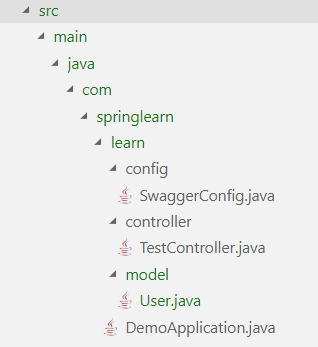
说明
swagger的使用本身是非常简单的,因为所有的一切swagger都帮你做好了,你所要做的就是专注写你的api信息

swagger自动生成html文档并且打包到jar包中

本文不仅用了swagger,JSR 303注释信息也支持使用
依赖
// springfox-bean-validators 用来支持 JSR 303

<dependency>

    <groupId>io.springfox</groupId>

	<artifactId>springfox-swagger2</artifactId>

	<version>2.9.2</version>

</dependency>

<dependency>

	<groupId>io.springfox</groupId>

	<artifactId>springfox-swagger-ui</artifactId>

	<version>2.9.2</version>

</dependency>

<dependency>

	<groupId>io.springfox</groupId>

	<artifactId>springfox-bean-validators</artifactId>

	<version>2.9.2</version>

</dependency>
SwaggerConfig
package com.springlearn.learn.config;

import org.springframework.context.annotation.Bean;

import org.springframework.context.annotation.Configuration;

import org.springframework.context.annotation.Import;

import org.springframework.web.servlet.config.annotation.CorsRegistry;

import org.springframework.web.servlet.config.annotation.ResourceHandlerRegistry;

import org.springframework.web.servlet.config.annotation.WebMvcConfigurationSupport;

import springfox.bean.validators.configuration.BeanValidatorPluginsConfiguration;

import springfox.documentation.builders.ApiInfoBuilder;

import springfox.documentation.builders.RequestHandlerSelectors;

import springfox.documentation.service.ApiInfo;

import springfox.documentation.service.Contact;

import springfox.documentation.spi.DocumentationType;

import springfox.documentation.spring.web.plugins.Docket;

import springfox.documentation.swagger2.annotations.EnableSwagger2;

import static springfox.documentation.builders.PathSelectors.regex;

@Configuration

@EnableSwagger2

@Import(BeanValidatorPluginsConfiguration.class)

public class SwaggerConfig extends WebMvcConfigurationSupport {

    private ApiInfo metaData() {

        return new ApiInfoBuilder()

                .title("Spring Boot REST API")

                .description("\"REST API 测试\"")

                .version("1.0.0")

                .license("无")

                .licenseUrl("https://www.baidu.com")

                .contact(new Contact("yejiawei", "https://www.cnblogs.com/ye-hcj/", "2640199637@qq.com"))

                .build();

    }

    @Bean

    public Docket productApi() {

        return new Docket(DocumentationType.SWAGGER_2)

                .select()

                .apis(RequestHandlerSelectors.basePackage("com.springlearn.learn.controller"))

                .paths(regex("/.*"))

                .build()

                .apiInfo(metaData());

    }

    @Override

    protected void addResourceHandlers(ResourceHandlerRegistry registry) {

        registry.addResourceHandler("swagger-ui.html")

                .addResourceLocations("classpath:/META-INF/resources/");

        registry.addResourceHandler("/webjars/**")

                .addResourceLocations("classpath:/META-INF/resources/webjars/");

    }

    @Override

    public void addCorsMappings(CorsRegistry registry) {

        registry.addMapping("/**").allowedOrigins("*").allowedMethods("GET", "POST", "PUT", "DELETE").allowedOrigins("*")

        .allowedHeaders("*");

    }

}
开启api界面
在你做好了上述的步骤以后,运行项目

直接访问 yourapiurl/v2/api-docs 查看json数据

直接访问 yourapiurl/swagger-ui.html 查看文档界面
JSR 303注释信息
@NotNull(message = "...")

@NotBlank(message = "...")

@Pattern(regexp = "[a-z-A-Z]*", message = "...")

@Past(message = "过去的日期...")

@Min(value = 1, message = "必须大于或等于1")

@Max(value = 10, message = "必须小于或等于10")

@Email(message = "Email Address")
Swagger核心注释
@ApiModel               返回json对象描述

@ApiModelProperty       返回json对象属性描述

@ApiResponses           设置状态码含义

@Api                    控制器描述

@ApiOperation           api描述

@ApiParam               api参数描述
User
package com.springlearn.learn.model;

import javax.validation.constraints.Max;

import javax.validation.constraints.Min;

import javax.validation.constraints.NotBlank;

import javax.validation.constraints.NotNull;

import javax.validation.constraints.Pattern;

import javax.validation.constraints.Size;

import io.swagger.annotations.ApiModel;

import io.swagger.annotations.ApiModelProperty;

@ApiModel(description = "用户基本信息")

public class User {

    // @NotBlank

    // @Size(min = 1, max = 10)

    @ApiModelProperty(notes = "用户姓名", example = "叶家伟", required = true, position = 0)

    String name;

    // @NotBlank

    @Pattern(regexp ="[m|f]")

    @ApiModelProperty(notes = "用户性别", example = "m", required = true, position = 1)

    Character sex;

    // @NotNull

    // @Min(0)

    // @Max(100)

    @ApiModelProperty(notes = "用户年龄", example = "19", position = 3)

    Integer age;

    public String getname() {

        return name;

    }

    public void setname(String name) {

        this.name = name;

    }

    public Character getsex() {

        return sex;

    }

    public void setsex(Character sex) {

        this.sex = sex;

    }

    public Integer getage() {

        return age;

    }

    public void setage(Integer age) {

        this.age = age;

    }

}
TestController
package com.springlearn.learn.controller;

import javax.servlet.http.HttpServletRequest;

import com.springlearn.learn.model.User;

import org.springframework.web.bind.annotation.PathVariable;

import org.springframework.web.bind.annotation.RequestMapping;

import org.springframework.web.bind.annotation.RequestMethod;

import org.springframework.web.bind.annotation.ResponseBody;

import org.springframework.web.bind.annotation.RestController;

import io.swagger.annotations.Api;

import io.swagger.annotations.ApiOperation;

import io.swagger.annotations.ApiParam;

import io.swagger.annotations.ApiResponse;

import io.swagger.annotations.ApiResponses;

@RestController

@Api(value="测试控制器", description="测试控制器描述")

@ApiResponses(value = {

    @ApiResponse(code = 200, message = "Successfully retrieved list"),

    @ApiResponse(code = 401, message = "You are not authorized to view the resource"),

    @ApiResponse(code = 403, message = "Accessing the resource you were trying to reach is forbidden"),

    @ApiResponse(code = 404, message = "The resource you were trying to reach is not found")

})

public class TestController {

    @ResponseBody

    @RequestMapping(value = "/test1/{id}", method = RequestMethod.GET, produces = "application/json")

    @ApiOperation(value = "测试api", response = User.class)

    public User Test1(HttpServletRequest request, @ApiParam("Id of the person to be obtained. Cannot be empty.") @PathVariable int id){

        User user = new User();

        user.setname("叶家伟");

        user.setage(18);

        user.setsex('m');

        return user;

    }

}
springboot成神之——swagger文档自动生成工具的更多相关文章
- Api文档自动生成工具
java开发,根据代码自动生成api接口文档工具,支持RESTful风格,今天我们来学一下api-doc的生成 作者:互联网编程. 欢迎投稿,一起交流技术 https://www.jianshu.co ...
- Word 2010文档自动生成目录和某页插入页码
一.Word 2010文档自动生成目录 关于Word文档自动生成目录一直是我身边同学们最为难的地方,尤其是毕业论文,经常因为目录问题,被要求修改,而且每次修改完正文后,目录的内容和页码可能都会发生变化 ...
- VS文档自动生成
VS2008文档自动生成 (发现,Sandcastle主要是用于C#项目.里面的注释都是XML格式的.不太适合VC的.最终还是得用Doxygen) 一.Sandcastle简介: Sandcastle ...
- django接口文档自动生成
django-rest_framework接口文档自动生成 只针对用到序列化和返序列化 一般还是用第三方yipi 一.安装依赖 pip3 install coreapi 二.设置 setting.py ...
- 基于 React 开发了一个 Markdown 文档站点生成工具
Create React Doc 是一个使用 React 的 markdown 文档站点生成工具.就像 create-react-app 一样,开发者可以使用 Create React Doc 来开发 ...
- 优于 swagger 的 java markdown 文档自动生成框架-01-入门使用
设计初衷 节约时间 Java 文档一直是一个大问题. 很多项目不写文档,即使写文档,对于开发人员来说也是非常痛苦的. 不写文档的缺点自不用多少,手动写文档的缺点也显而易见: 非常浪费时间,而且会出错. ...
- java 文档自动生成的神器 idoc
写文档 作为一名开发者,每个人都要写代码. 工作中,几乎每一位开发者都要写文档. 因为工作是人和人的协作,产品要写需求文档,开发要写详细设计文档,接口文档. 可是,作为一个懒人,平时最讨厌的一件事情就 ...
- 如何让接口文档自动生成,SpringBoot中Swagger的使用
目录 一.在SpringBoot项目中配置Swagger2 1.pom.xml中对Swagger2的依赖 2.编写配置类启用Swagger 3.配置实体类的文档 4.配置接口的文档 5.访问文档 二. ...
- swagger:API在线文档自动生成框架
传统的API从开发测试开始我们经常借用类似Postman.fiddle等等去做接口测试等等工具:Swagger 为API的在线测试.在线文档提供了一个新的简便的解决方案: NET 使用Swagger ...
随机推荐
- 列出远程git的全部分支
列出全部分支 git ls-remote --heads your.git | awk 'sub(/refs\/heads\//,""){print $2}' 其中awk中sub替 ...
- POI使用总结
一. POI简介 Apache POI是Apache软件基金会的开放源码函式库,POI提供API给Java程序对Microsoft Office格式档案读和写的功能.二. HSSF概况 HSSF 是H ...
- cenOs7安装redis
1.安装redis redis 目前没有官方 RPM 安装包,我们需要从源代码编译,而为了要编译就需要安装 Make 和 GCC. 如果没有安装过 GCC 和 Make,那么就使用 yum 安装 -- ...
- IOS-SQLite3的封装
IWStudent.h // // IWStudent.h // 02-SQLite的封装 // // Created by apple on 14-5-22. // Copyright (c) 20 ...
- Xcode export/upload error: Your session has expired. Please log in 解决方法
问题: 突然打包账号不好使了 重登 重启 清缓存 一套都打完了 还是不好使 解决方法: 删除掉其他账号 重新登录 参考网址 http://stackoverflow.com/ques ...
- layui中实现上传图片压缩
一.关于js上传图片压缩的方法,百度有很多种方法,这里我参考修改了一下: function photoCompress(file, w, objDiv) { var ready = new FileR ...
- Java并发编程之CyclicBarrier
一.场景描述 有四个游戏玩家玩游戏,游戏有三个关卡,每个关卡必须要所有玩家都到达后才能允许通过.其实这个场景里的玩家中如果有玩家A先到了关卡1,他必须等到其他所有玩家都到达关卡1时才能通过,也就是说线 ...
- Python读取指定目录下指定后缀文件并保存为docx
最近有个奇葩要求 要项目中的N行代码 申请专利啥的 然后作为程序员当然不能复制粘贴 用代码解决.. 使用python-docx读写docx文件 环境使用python3.6.0 首先pip安装pytho ...
- js的搜索框
第一种 单独一个form表单提交 <div class="hc-prm-search search flr"> <form action="/user ...
- bzoj 4465 游戏中的学问
Written with StackEdit. Description 大家应该都见过很多人手拉手围着篝火跳舞的场景吧?一般情况下,大家手 拉手跳舞总是会围成一个大圈,每个人的左手拉着旁边朋友的右手, ...