
Mybaits-Maven项目之逆向工程(代码自动生成)
1、添加maven插件,让maven环境支持mybatis-generator组件
在pom.xml里面添加如下代码:
<project xmlns="http://maven.apache.org/POM/4.0.0"
xmlns:xsi="http://www.w3.org/2001/XMLSchema-instance"
xsi:schemaLocation="http://maven.apache.org/POM/4.0.0 http://maven.apache.org/xsd/maven-4.0.0.xsd">
<modelVersion>4.0.0</modelVersion>
<groupId>cn.mybatis.generator</groupId>
<artifactId>mybatis-generator</artifactId>
<version>0.0.1-SNAPSHOT</version>
<properties>
<project.build.sourceEncoding>UTF-8</project.build.sourceEncoding>
</properties>
<dependencies>
<!-- mysql驱动 -->
<dependency>
<groupId>mysql</groupId>
<artifactId>mysql-connector-java</artifactId>
<version>5.1.35</version>
</dependency>
<!-- Mybaits逆转工程依赖包 -->
<dependency>
<groupId>org.mybatis.generator</groupId>
<artifactId>mybatis-generator-core</artifactId>
<version>1.3.2</version>
</dependency>
<!-- Mybaits 依赖jar包 -->
<dependency>
<groupId>org.mybatis</groupId>
<artifactId>mybatis</artifactId>
<version>3.3.1</version>
</dependency>
<!-- log4j 依赖jar包 -->
<dependency>
<groupId>log4j</groupId>
<artifactId>log4j</artifactId>
<version>1.2.17</version>
</dependency>
</dependencies>
<build>
<pluginManagement>
<plugins>
<plugin>
<groupId>org.apache.maven.plugins</groupId>
<artifactId>maven-compiler-plugin</artifactId>
<configuration>
<source>1.8</source>
<target>1.8</target>
</configuration>
<version>3.3</version>
</plugin>
<plugin>
<groupId>org.mybatis.generator</groupId>
<artifactId>mybatis-generator-maven-plugin</artifactId>
<version>1.3.2</version>
<dependencies>
<dependency>
<groupId>mysql</groupId>
<artifactId>mysql-connector-java</artifactId>
<version>5.1.35</version>
</dependency>
</dependencies>
<configuration>
<!--配置文件的路径 -->
<configurationFile>src/main/resources/generatorConfig.xml</configurationFile>
<overwrite>true</overwrite>
</configuration>
</plugin>
<!--JDK版本 -->
<plugin>
<groupId>org.apache.maven.plugins</groupId>
<artifactId>maven-compiler-plugin</artifactId>
<version>2.5.1</version>
<configuration>
<source>1.8</source>
<target>1.8</target>
<encoding>UTF-8</encoding>
<showWarnings>true</showWarnings>
</configuration>
</plugin>
</plugins>
</pluginManagement>
</build>
</project>
2、新建generator.xml配置文件
<?xml version="1.0" encoding="UTF-8"?>
<!DOCTYPE generatorConfiguration
PUBLIC "-//mybatis.org//DTD MyBatis Generator Configuration 1.0//EN"
"http://mybatis.org/dtd/mybatis-generator-config_1_0.dtd">
<generatorConfiguration>
<context id="generateTables" targetRuntime="MyBatis3">
<!-- 此处是将 Example 改名为 Criteria
<plugin type="org.mybatis.generator.plugins.RenameExampleClassPlugin">
<property name="searchString" value="Example" />
<property name="replaceString" value="Criteria" />
</plugin> -->
<!-- 序列化 -->
<plugin type="org.mybatis.generator.plugins.SerializablePlugin" />
<commentGenerator>
<!-- 是否去除自动生成的注释 true:是 : false:否 -->
<property name="suppressAllComments" value="true" />
<property name="suppressDate" value="true" />
</commentGenerator>
<!--数据库连接的信息:驱动类、连接地址、用户名、密码 -->
<jdbcConnection driverClass="com.mysql.jdbc.Driver"
connectionURL="jdbc:mysql://39.108.217.125:3306/RoboBlogs" userId="root"
password="HZBhzb1237763522-1">
</jdbcConnection>
<!-- <jdbcConnection driverClass="oracle.jdbc.OracleDriver" connectionURL="jdbc:oracle:thin:@127.0.0.1:1521:yycg"
userId="yycg" password="yycg"> </jdbcConnection> -->
<!-- 默认false,把JDBC DECIMAL 和 NUMERIC 类型解析为 Integer,为 true时把JDBC DECIMAL
和 NUMERIC 类型解析为java.math.BigDecimal -->
<javaTypeResolver>
<property name="forceBigDecimals" value="false" />
</javaTypeResolver>
<!-- targetProject:生成PO类的位置 -->
<javaModelGenerator targetPackage="com.Mybaits.pojo"
targetProject=".\src\main\java">
<!-- enableSubPackages:是否让schema作为包的后缀 -->
<property name="enableSubPackages" value="false" />
<!-- 从数据库返回的值被清理前后的空格 -->
<property name="trimStrings" value="true" />
</javaModelGenerator>
<!-- targetProject:mapper映射文件生成的位置 -->
<sqlMapGenerator targetPackage="com.Mybaits.mapper"
targetProject=".\src\main\java">
<!-- enableSubPackages:是否让schema作为包的后缀 -->
<property name="enableSubPackages" value="false" />
</sqlMapGenerator>
<!-- targetPackage:mapper接口生成的位置 -->
<javaClientGenerator type="XMLMAPPER"
targetPackage="com.Mybaits.mapper" targetProject=".\src\main\java">
<!-- enableSubPackages:是否让schema作为包的后缀 -->
<property name="enableSubPackages" value="false" />
</javaClientGenerator>
<!-- 指定数据库表 保留Example例子 -->
<table schema="" tableName="u01" domainObjectName="u01" />
<table schema="" tableName="Upload_info" domainObjectName="Upload_info"/>
<table schema="" tableName="Upload_UserPushContent" domainObjectName="Upload_UserPushContent" />
<!-- 指定数据库表 去除Example例子
<table schema="general" tableName="tb_item" domainObjectName="Item"
enableCountByExample="false" enableUpdateByExample="false"
enableDeleteByExample="false" enableSelectByExample="true"
selectByExampleQueryId="false">
<property name="useActualColumnNames" value="false" />
</table> -->
</context>
</generatorConfiguration>
3.1、运用maven指令生成逆向工程代码

3.2、使用单元测试生成逆向工程代码:
package MybaitsGenerator;

import java.io.File;

import java.io.IOException;

import java.sql.SQLException;

import java.util.ArrayList;

import java.util.List;

import org.mybatis.generator.api.MyBatisGenerator;

import org.mybatis.generator.config.Configuration;

import org.mybatis.generator.config.xml.ConfigurationParser;

import org.mybatis.generator.exception.InvalidConfigurationException;

import org.mybatis.generator.exception.XMLParserException;

import org.mybatis.generator.internal.DefaultShellCallback;

import org.junit.Test;

public class MybaitsGeneratorTest {

    @Test

   public void MybaitsGenerator() throws IOException, XMLParserException, InvalidConfigurationException, SQLException, InterruptedException{

        List<String> warnings = new ArrayList<String>();

        boolean overwrite = true;//加载上面的配置文件

        File configFile = new File("./src/main/resources/generatorconfig.xml");

        ConfigurationParser cp = new ConfigurationParser(warnings);

        Configuration config = cp.parseConfiguration(configFile);

        DefaultShellCallback callback = new DefaultShellCallback(overwrite);

        MyBatisGenerator myBatisGenerator = new MyBatisGenerator(config, callback, warnings);

        myBatisGenerator.generate(null);

   }

}
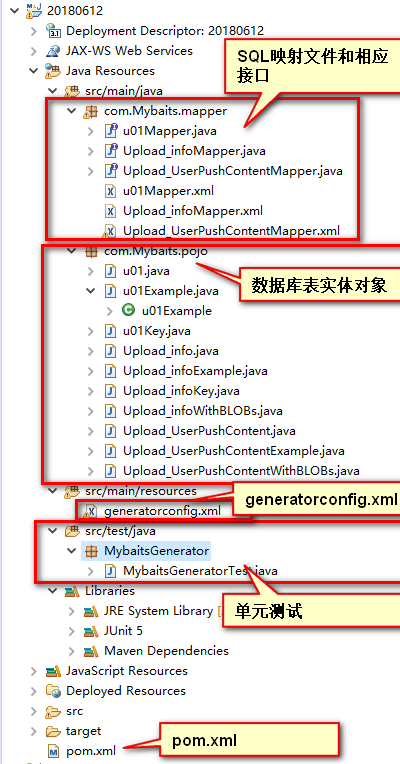
4.刷新页面,效果如:
Mybaits-Maven项目之逆向工程(代码自动生成)的更多相关文章
- eclipse生成mybatis的逆向工程-mybatis代码自动生成
首先,工作中一直在使用命令方式的mybatis的代码自动生成,今天把自己的笔记本直接搞一个在eclipse中生成的逆向代码生成工程,方便自己在家学习使用,在搞这个工程的过程中由于自己搞了一套环境,所i ...
- Spring Boot (七)MyBatis代码自动生成和辅助插件
一.简介 1.1 MyBatis Generator介绍 MyBatis Generator 是MyBatis 官方出品的一款,用来自动生成MyBatis的 mapper.dao.entity 的框架 ...
- Mybatis最入门---代码自动生成(generatorConfig.xml配置)
[一步是咫尺,一步即天涯] 经过前文的叙述,各位看官是不是已经被Mybatis的强大功能给折服了呢?本文我们将介绍一个能够极大提升我们开发效率的插件:即代码自动生成.这里的代码自动生成包括,与数据库一 ...
- 基于数据库的代码自动生成工具,生成JavaBean、生成数据库文档、生成前后端代码等(v6.0.0版)
TableGo v6.0.0 版震撼发布,此次版本更新如下: 1.UI界面大改版,组件大调整,提升界面功能的可扩展性. 2.新增BeautyEye主题,界面更加清新美观,也可以通过配置切换到原生Jav ...
- Mybatis 代码自动生成(generatorConfig.xml配置)
博客推荐: Mybatis最入门---代码自动生成(generatorConfig.xml配置) MyBatis Generator generatorConfig.xml配置详解 pom.xml&l ...
- 实现一个代码自动生成(一):模板引擎Freemarker
目录 前言 模板引擎FreeMarker 前言 在现在的开发当中,代码生成已经是必不可少的一个功能,每个公司都会有自己的一套定制的项目骨架,而实现代码自动生成,模板引擎是必不可少的,所以在这篇博客中, ...
- MyBatis代码自动生成
MyBatis的代码自动生成的功能,由于MyBatis属于一种半自动的ORM框架,所以主要的工作就是配置Mapping映射文件,但是由于手写映射文件很容易出错,所以可利用MyBatis生成器自动生成实 ...
- 代码自动生成工具_java版
项目结构: 这里要实现的功能是,当我们给出了bean,如:Admin,User,People等实体类后, 我想用代码自动生成我想要的代码,最后生成的效果: 也就是说为每一个bean都生成相应的Dao, ...
- mybatisGenerator 代码自动生成报错 Result Maps collection already contains value for BaseResultMap【转】
由于mybatis简单易学,比起Hibername来,更容易上手,代码也能自动生成.这几天研究了下代码自动生成的,参考: http://0609xiaohua.iteye.com/blog/14535 ...
- 基于eclipse的mybatis映射代码自动生成的插件
基于eclipse的mybatis映射代码自动生成的插件 分类: JAVA 数据库 工具相关2012-04-29 00:15 2157人阅读 评论(9) 收藏 举报 eclipsegeneratori ...
随机推荐
- Linux安装apidoc
一.安装apidoc所需环境(nodejs) 1. 查看系统是32位还是64位 uname -r 可以看出我这台linux的是64位的 2. 到node官网下载node的包并上传linux https ...
- 解决PHP中json_encode()不支持中文的替代函数
json_encode()是PHP中将数组转换成JSON格式的函数,因为各种原因只要是中文就会乱码= = 找到了这么一个函数替代了原有的json_encode(),能很好地输出中文~ function ...
- zencart批量评论插件Easy Populate CSV add reviews使用教程
此插件在Easy Populate CSV 1.2.5.7b产品批量插件基础上开发,有1.3x与1.5x两个版本. zencart批量评论插件Easy Populate CSV add reviews ...
- 《Python基础教程》第六章:抽象(一)
用def定义函数 __doc__是函数属性.属性名中的双下划线表示它是个特殊属性
- impdp导入报错39002
原文:https://www.cnblogs.com/huacw/p/3888807.html 1 create directory data_pump_dir as '\exphd\datapump ...
- java 学习笔记(三)ZooKeeper集群搭建实例,以及集成dubbo时的配置 (转)
ZooKeeper集群搭建实例,以及集成dubbo时的配置 zookeeper是什么: Zookeeper,一种分布式应用的协作服务,是Google的Chubby一个开源的实现,是Hadoop的分布式 ...
- BZOJ 3594: [Scoi2014]方伯伯的玉米田 (二维树状数组优化DP)
分析 首先每次增加的区间一定是[i,n][i,n][i,n]的形式.因为如果选择[i,j](j<n)[i,j](j<n)[i,j](j<n)肯定不如把后面的全部一起加111更优. 那 ...
- Spring下的@Order和@Primary与javax.annotation-api下@Priority【Spring4.1后】等方法控制多实现的依赖注入(转)
@Order 可以作用在类.方法.属性. 影响加载顺序. 若不加,spring的加载顺序是随机的. @Primary 当注入bean冲突时,以@Primary定义的为准. @Order是控制配置类的加 ...
- 【原】spring+mybatis下sqlSession.delete和insert返回值-2147482646问题
这是由于spring-beans.xml中的batch批处理配置所导致的,注释掉BATCH配置的代码就可以返回1了: <bean id="sqlSessionFactory" ...
- JAVA中java.lang.OutOfMemoryError常见的解决方式
在开发中我们很多人都遇到过内存溢出的情况,其实内存溢出分几种形式: 1.tomcat中java.lang.OutOfMemoryError: PermGen space异常处理(最常见的) 概念大家可 ...