
(转载)如何创建一个以管理员权限运行exe 的快捷方式? How To Create a Shortcut That Lets a Standard User Run An Application as Administrator
How To Create a Shortcut That Lets a Standard User Run An Application as Administrator

Want to allow a standard user account to run an application as administrator without a UAC or password prompt? You can easily create a shortcut that uses the runas command with the /savecred switch, which saves the password.
Note that using /savecred could be considered a security hole – a standard user will be able to use the runas /savecred command to run any command as administrator without entering a password. However, it’s still useful for situations where this doesn’t matter much – perhaps you want to allow a child’s standard user account to run a game as Administrator without asking you.
We’ve also covered allowing a user to run an application as Administrator with no UAC prompts by creating a scheduled task.
Enabling the Administrator Account
First you’ll need to enable the built-in Administrator account, which is disabled by default.
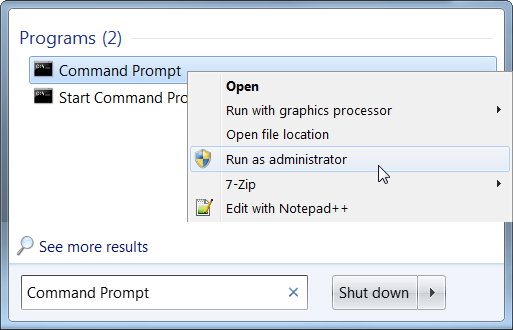
To do so, search for Command Prompt in the Start menu, right-click the Command Prompt shortcut, and select Run as administrator.
Run the following command in the elevated Command Prompt window that appears:
net user administrator /active:yes
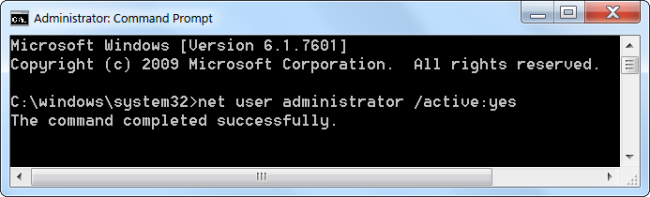
The Administrator user account is now enabled, although it has no password.
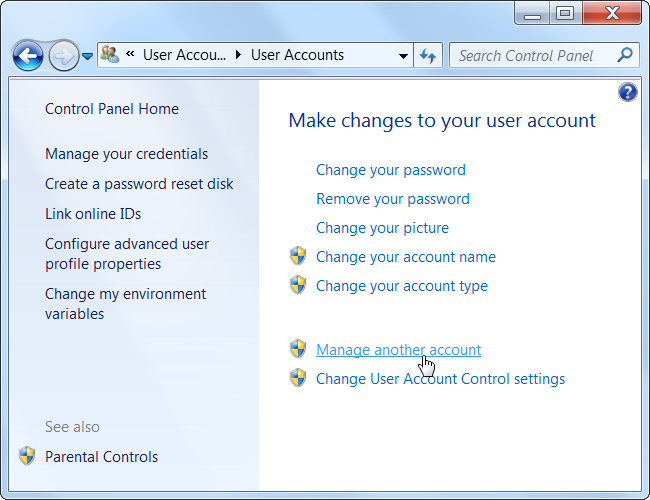
To set a password, open the Control Panel, select User Accounts and Family Safety, and select User Accounts. Click the Manage another account link in the User Accounts window.
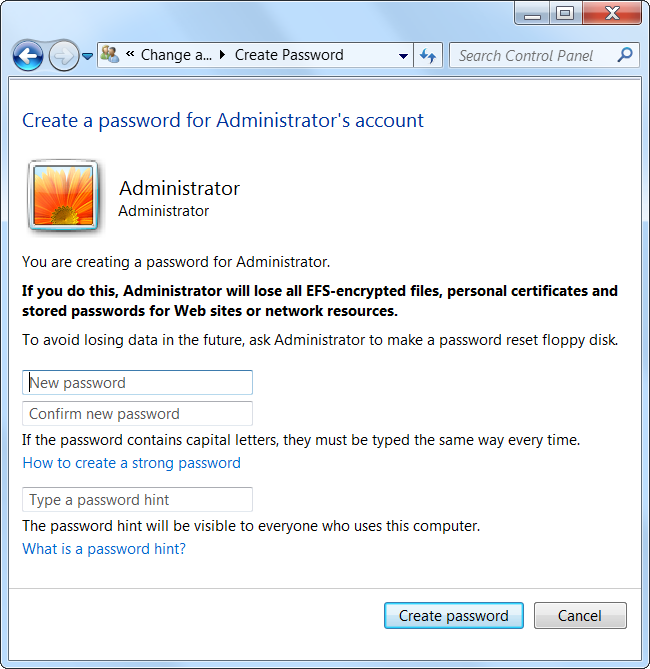
Select the Administrator account, click Create a password, and create a password for the Administrator account.
Creating the Shortcut
Now we’ll create a new shortcut that launches the application with Administrator privileges.
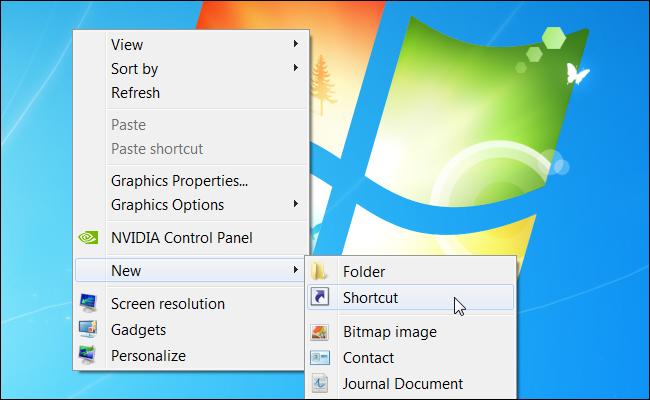
Right-click the desktop (or elsewhere), point to New, and select Shortcut.
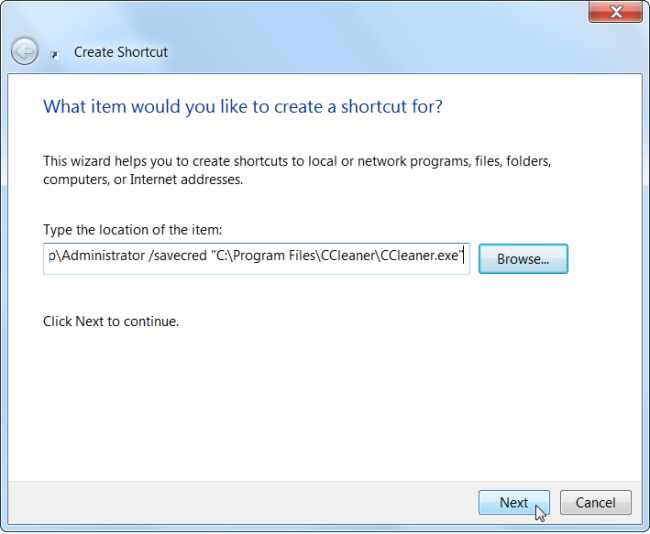
Enter a command based on the following one into the box that appears:
runas /user:%computername%\Administrator /savecred “C:\Path\To\Program.exe“
Replace ComputerName with the name of your computer and C:\Path\To\Program.exe with the full path of the program you want to run. For example, if your computer’s name was Laptop and you wanted to run CCleaner, you’d enter the following path:
runas /user:%computername%\Administrator /savecred “C:\Program Files\CCleaner\CCleaner.exe”
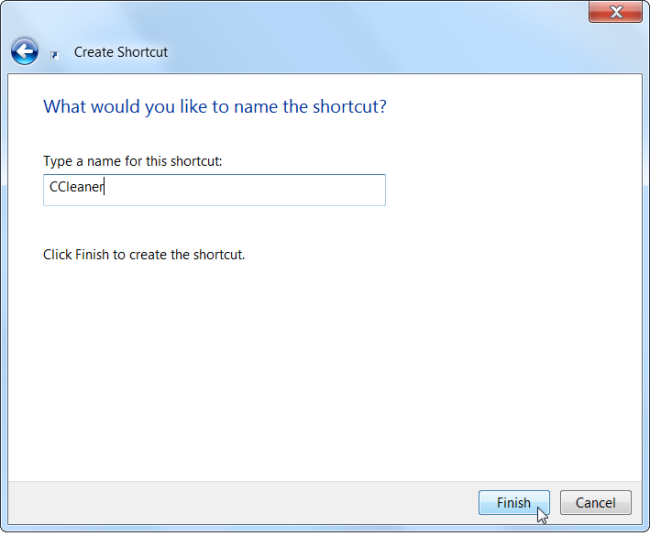
Enter a name for the shortcut.
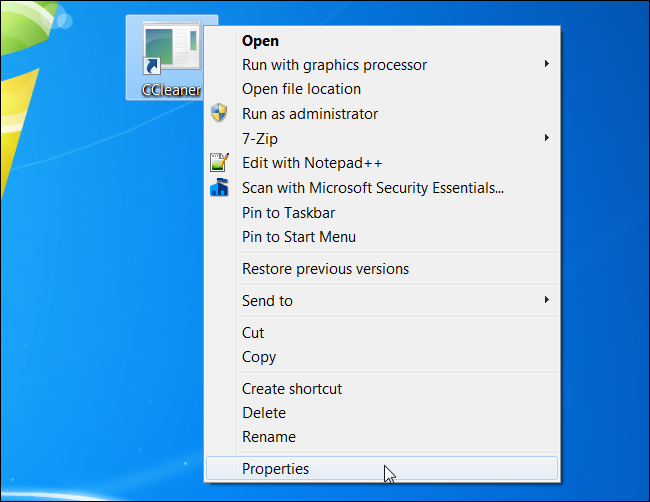
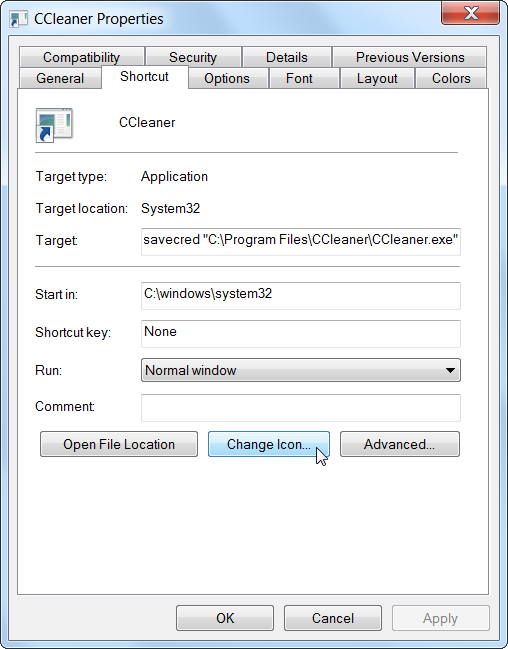
To select an icon for your new shortcut, right-click it and select Properties.
Click the Change Icon button in the Properties window.
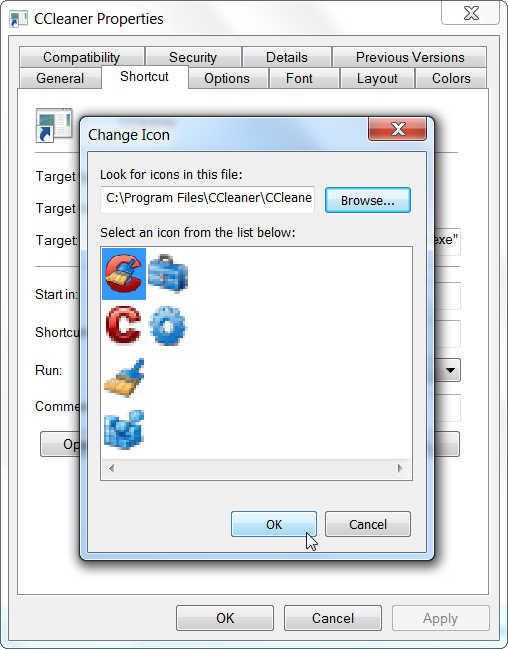
Select an icon for your shortcut. For example, you can browser to CCleaner.exe and choose an icon associated with it. If you’re using an other program, browse to its .exe file and select your preferred icon.
The first time you double-click your shortcut, you’ll be prompted to enter the Administrator account’s password, which you created earlier.

This password will be saved – the next time you double-click the shortcut, the application will launch as Administrator without asking you for a password.
As we mentioned above, the standard user account now has the ability to run any application as Administrator without entering a password (using the runas /savecred command to launch any .exe file), so bear that in mind.
The Administrator password is saved in the Windows Credential Manager – if you want to remove the saved password, you can do it from there.
(转载)如何创建一个以管理员权限运行exe 的快捷方式? How To Create a Shortcut That Lets a Standard User Run An Application as Administrator的更多相关文章
- bat 判断 bat 是否是以管理员权限运行,和自动以管理员权限运行
bat 判断 bat 是否是以管理员权限运行,和自动以管理员权限运行 判断 @echo off net.exe session 1>NUL 2>NUL && ( goto ...
- sharepoint 脚本 强迫以管理员权限运行
#region 关键代码:强迫以管理员权限运行 $currentWi = [Security.Principal.WindowsIdentity]::GetCurrent() $currentWp = ...
- vs2005 ,2008,2010中引入app.manifest(即c#程序在win7下以管理员权限运行方法)
打开VS2005.VS2008.VS2010工程,查看工程文件夹中的Properties文件夹下是否有app.manifest这个文件:如没有,按如下方式创建:鼠标右击工程在菜单中选择“属性”,点击工 ...
- Visual Studio 中用管理员权限运行、调试程序
原文:Visual Studio 中用管理员权限运行.调试程序 一个Sample小程序,用于验证WoW64的Windows Registry的读写访问.在Visual Studio 2010中调试运行 ...
- 如何设置默认以管理员权限运行cmd
设置cmd以管理员权限运行 目的:创建或删除文件等命令时,需要管理员权限运行cmd(linux以root用户登录). 例如,创建日志目录. 方法一: 1.激活administrator用户 2 ...
- RobotFramework环境配置:默认以管理员权限运行cmd
设置cmd以管理员权限运行 目的:创建或删除文件等命令时,需要管理员权限运行cmd(linux以root用户登录). 例如,创建日志目录. 方法一: 1.激活administrator用户 2 ...
- C#程序以管理员权限运行(ZT)
本文转载:http://www.cnblogs.com/Interkey/p/RunAsAdmin.html 在Vista 和 Windows 7 及更新版本的操作系统,增加了 UAC(用户账户控制) ...
- 让InstallShield 2015 Limited Edition for Visual Studio 2015生成的setup.exe双击时以管理员权限运行
转载:http://blog.csdn.net/zztoll/article/details/52096700 如题,如何让InstallShield 2015 Limited Edition for ...
- 如何让QT程序以管理员权限运行(UAC)
方案一:(仅适用于使用msvc编译器) 在PRO文件中添加一行指令即可, QMAKE_LFLAGS += /MANIFESTUAC:"level='requireAdministrator' ...
随机推荐
- rabbitmq 持久化 事务 发送确认模式
部分内容来自:http://blog.csdn.net/hzw19920329/article/details/54315940 http://blog.csdn.net/hzw19920329/ar ...
- js重写页面之后后台如何获取重写后的控件值
需求描述:专业分流系统中,学生在选择志愿时,我想实现在页面按照点击相应专业的顺序来设置选专业的志愿,如首先点击“工商”,则工商专业为第一志愿,接着点击“营销”,则营销专业为第二志愿,以此类推.从而达到 ...
- uniq cut wc 命令详解
uniq uniq命令可以去除排序过的文件中的重复行,因此uniq经常和sort合用.也就是说,为了使uniq起作用,所有的重复行必须是相邻的. uniq语法 [root@www ~]# uniq [ ...
- 基于Flask和百度AI实现与机器人对话
实现对话机器人主要有个步骤 : 一.前端收集语音传入后端 二.后端基于百度AI接口进行语音识别,转换成文字 三.对文字进行自定义验证或通过图灵端口进行处理,生成回复内容 四.将文字通过百度AI接口合成 ...
- date对象获取get
<!DOCTYPE html> <html lang="en"> <head> <meta charset="UTF-8&quo ...
- BZOJ 1420 Discrete Root
思路:数学大汇总 提交:\(3\)次 错因:有一个\(j\)写成\(i\) 题解: 求:\(x^k \equiv a \mod p\) 我们先转化一下:求出\(p\)的原根\(g\) 然后我们用\(B ...
- 046_Shell 脚本的 fork 炸弹
#!/bin/bash#快速消耗计算机资源,致使计算机死机#定义函数名为.(点), 函数中递归调用自己并放入后台执行.() {.|.& };.
- decompiler
.NET Reflector trial version http://www.red-gate.com/products/dotnet-development/reflector/ 破解版本 .N ...
- chrome扩展开发实战入门之一-hellocrx
后记:在写这篇文章时,我还没搞懂chrome扩展的基本原理.后来才明白,最简单(且实用)的扩展只需要manifest.json和content_scripts.js两个文件,无需background. ...
- leetcode解题报告(10):Merge Two Sorted Lists
描述 Merge two sorted linked lists and return it as a new list. > The new list should be made by sp ...