
spring hadoop 访问hbase入门
1、 环境准备:
Maven
Eclipse
Java
Spring 版本 3..2.9
2、 Maven pom.xml配置
<!-- Spring hadoop  -->

				   <dependency>

	        <groupId>org.apache.hbase</groupId>

	        <artifactId>hbase-client</artifactId>

	        <version>0.96.1.1-hadoop2</version>

   		 </dependency>

		<dependency>

			<groupId>org.springframework.data</groupId>

			<artifactId>spring-data-jpa</artifactId>

			<version>1.6.0.RELEASE</version>

		</dependency>

		 <dependency>

	        <groupId>org.springframework.data</groupId>

	        <artifactId>spring-data-hadoop</artifactId>

	        <version>2.0.2.RELEASE</version>

   		 </dependency>
3、 Spring和hadoop、hbase相关配置文件
  <?xml version="1.0" encoding="UTF-8"?>

<beans xmlns="http://www.springframework.org/schema/beans"

	xmlns:xsi="http://www.w3.org/2001/XMLSchema-instance" xmlns:jdbc="http://www.springframework.org/schema/jdbc"

	xmlns:tx="http://www.springframework.org/schema/tx" xmlns:util="http://www.springframework.org/schema/util"

	xmlns:aop="http://www.springframework.org/schema/aop" xmlns:context="http://www.springframework.org/schema/context"

	xmlns:mongo="http://www.springframework.org/schema/data/mongo"

	xmlns:hdp="http://www.springframework.org/schema/hadoop"

	xmlns:cache="http://www.springframework.org/schema/cache" xmlns:c="http://www.springframework.org/schema/c"

	xmlns:p="http://www.springframework.org/schema/p"

	xsi:schemaLocation="

        http://www.springframework.org/schema/jdbc http://www.springframework.org/schema/jdbc/spring-jdbc.xsd

        http://www.springframework.org/schema/beans http://www.springframework.org/schema/beans/spring-beans.xsd

        http://www.springframework.org/schema/util http://www.springframework.org/schema/util/spring-util.xsd

        http://www.springframework.org/schema/tx http://www.springframework.org/schema/tx/spring-tx.xsd

        http://www.springframework.org/schema/aop http://www.springframework.org/schema/aop/spring-aop.xsd

        http://www.springframework.org/schema/data/mongo http://www.springframework.org/schema/data/mongo/spring-mongo.xsd

        http://www.springframework.org/schema/hadoop http://www.springframework.org/schema/hadoop/spring-hadoop.xsd

        http://www.springframework.org/schema/cache http://www.springframework.org/schema/cache/spring-cache.xsd

        http://www.springframework.org/schema/context http://www.springframework.org/schema/context/spring-context.xsd">
其中标红的是spring hadoop xml命名空间配置。
Hadoop hbase相关配置文件如下:
<!-- 默认properties-->
<hdp:configuration>fs.default.name=hdfs://192.98.8.224:8010</hdp:configuration>
<hdp:hbase-configuration delete-connection="${delete-connection}" zk-quorum="${hbase.zookeeper.quorum}" zk- port="${hbase.zookeeper.property.clientPort}"/>
对应的properties如下:
hbase.zookeeper.property.clientPort=2181
hbase.zookeeper.quorum=192.98.8.224
hbase.master=192.98.8.224:600000
fs.default.name=hdfs://192.98.8.224:8010
delete-connection=true
#hive jdbc url
hive.url=jdbc:hive://192.98.8.224:10000/default
spring hbasetemplate配置如下:
<bean id="hbaseTemplate" class="org.springframework.data.hadoop.hbase.HbaseTemplate"> <property name="configuration" ref="hbaseConfiguration" />
</bean>
Hbasetemplate使用代码示例:
Tile t = hbaseTemplate.get("GW_TILES", "0_1_1", new RowMapper<Tile>() {

			@Override

			public Tile mapRow(Result result, int rowNum) throws Exception {

				// TODO Auto-generated method stub

				Tile t = new Tile();

				t.setData(result.getValue("T".getBytes(), "key".getBytes()));

				return t;

			}

		});
Hbasetemplate 常用方法简介:
hbaseTemplate.get("GW_TILES", "0_1_1", new RowMapper 常用于查询,使用示例如下所示:
Tile t = hbaseTemplate.get("GW_TILES", "0_1_1", new RowMapper<Tile>() {

			@Override

			public Tile mapRow(Result result, int rowNum) throws Exception {

				// TODO Auto-generated method stub

				Tile t = new Tile();

				t.setData(result.getValue("T".getBytes(), "key".getBytes()));

				return t;

			}

		});
hbaseTemplate.execute(dataIdentifier, new TableCallback 常用于更新操作,使用示例如下所示:
return hbaseTemplate.execute(dataIdentifier, new TableCallback<Boolean>() {

			@Override

			public Boolean doInTable(HTableInterface table) throws Throwable {

				// TODO Auto-generated method stub

				boolean flag = false;

				try{

				Delete delete = new Delete(key.getBytes());

				table.delete(delete);

				flag = true;

				}catch(Exception e){

					e.printStackTrace();

				}

				return flag;

			}

		});
备注:spring hbasetemplate针对hbase接口做了强大的封装,普通功能可以使用它强大的接口,同时复杂的功能,还可以使用hbase原生的接口,如:HTableInterface、Result等。其类方法如下图:
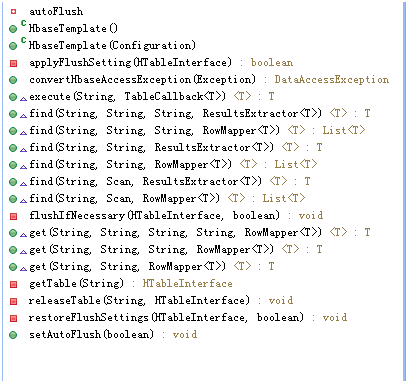
同时hbasetemplate封装了hbase连接池等,它的创建和释放通过配置来自动管理。
文章转载请注明出处:http://www.cnblogs.com/likehua/p/4016257.html
spring hadoop 访问hbase入门的更多相关文章
- HBase之四--(2):spring hadoop 访问hbase
1. 环境准备: Maven Eclipse Java Spring 2. Maven pom.xml配置 <dependency> <groupId>org.apache ...
- Spring Boot(一):入门篇+前端访问后端
转自:Spring Boot(一):入门篇 什么是Spring Boot Spring Boot 是由 Pivotal 团队提供的全新框架,其设计目的是用来简化新 Spring 应用的初始搭建以及开发 ...
- JAVA API访问Hbase org.apache.hadoop.hbase.client.RetriesExhaustedException: Failed after attempts=32
Java使用API访问Hbase报错: 我的hbase主节点是spark1 java代码访问hbase的时候写的是ip 结果运行程序报错 不能够识别主机名 修改主机名 修改主机hosts文 ...
- Hbase入门教程--单节点伪分布式模式的安装与使用
Hbase入门简介 HBase是一个分布式的.面向列的开源数据库,该技术来源于 FayChang 所撰写的Google论文"Bigtable:一个结构化数据的分布式存储系统".就像 ...
- 基于Hadoop技术实现的离线电商分析平台(Flume、Hadoop、Hbase、SpringMVC、highcharts)
离线数据分析平台是一种利用hadoop集群开发工具的一种方式,主要作用是帮助公司对网站的应用有一个比较好的了解.尤其是在电商.旅游.银行.证券.游戏等领域有非常广泛,因为这些领域对数据和用户的特性把握 ...
- HBase入门基础教程之单机模式与伪分布式模式安装(转)
原文链接:HBase入门基础教程 在本篇文章中,我们将介绍Hbase的单机模式安装与伪分布式的安装方式,以及通过浏览器查看Hbase的用户界面.搭建HBase伪分布式环境的前提是我们已经搭建好了Had ...
- HBase入门篇
目录: 1-HBase的安装 2-Java操作HBase例子 3-HBase简单的优化技巧 4–存储 5(集群) -压力分载与失效转发 6 -白话MySQL(RDBMS)与HBase之间 7 -安全& ...
- 1.1-1.3 HBase入门
一.HBASE入门 部分参考链接:https://www.cnblogs.com/steven-note/p/7209398.html 1.简介 HBase – Hadoop Database,是一个 ...
- spring boot(一):入门篇
构建微服务:Spring boot 入门篇 什么是spring boot Spring Boot是由Pivotal团队提供的全新框架,其设计目的是用来简化新Spring应用的初始搭建以及开发过程.该框 ...
随机推荐
- ASP.NET MVC4 传递Model到View
原文发表在:http://www.star110.com/Note/ReadArticle/60641215331146140043.html 开发环境:.NET MVC4 + EF6.0 模型: 1 ...
- C# 快速反射 IL
public class FastInvoke { public delegate object FastInvokeHandler(object target, object[] paramters ...
- mysql 数据类型,字符集
数据类型 1,数值类型2,字符串类型3,日期和时间4,ENUM和SET5,几何数据类型 数据类型选项 unsigned 无负值 zerofill 数值显示有影响,会前置0来填充不 ...
- SQL SERVER获取数据库文件信息
MS SQL SERVER 获取当前数据库文件等信息,适用于多个版本: SELECT dbf.file_id AS FileID , dbf.name AS [FileName] , s.fi ...
- C# Winform 窗体美化
using System; using System.ComponentModel; using System.Diagnostics; using System.Drawing; using Sys ...
- 对CSS进行wxss思路学习,display属性。
先来概要一下学习思路: 本系列内容,将针对微信小程序中的WXSS学习,所以在学习CSS时每一个知识点都在小程序IDE中进行实践,达到最好的学习效果. 由于wxss与CSS有些许不同,在学习CSS过程中 ...
- 【使用 DOM】使用 Document 对象
Document 对象时通往DOM功能的入口,它向你提供了当前文档的信息,以及一组可供探索.导航.搜索或操作结构与内容的功能. 我们通过全局变量document访问Document对象,它是浏览器为我 ...
- 使用SWFUpload无刷新上传图片
使用SWFUpload组件无刷新上传图片 在做项目时,需要用到一个图片的无刷新上传,之前听说过SWFUpload,于是想要通过SWFUpload来进行图片的无刷新上传,由于我的项目属于是ASP.NET ...
- MySQL到MsSQL的迁移工具——SSMA
SQL Server迁移助手(SSMA)团队开发了针对MySQL的迁移助手Microsoft SQL Server Migration Assistant 2008 for MySQL.微软同时发布了 ...
- SharePoint 页面中添加.Net代码
今天整理资料,看到一个非常有意思的截图,可以在SharePoint页面库里的页面中,添加.Net代码,只需修改一下相应应用程序的web.config文件,即可: 在web.config里面的<P ...