
HBase之四--(2):spring hadoop 访问hbase
1、 环境准备:
Maven
Eclipse
Java
Spring
2、 Maven pom.xml配置
<dependency>

            <groupId>org.apache.hbase</groupId>

            <artifactId>hbase-client</artifactId>

            <version>1.3.0</version>

            <exclusions>

                <exclusion>

                    <artifactId>jdk.tools</artifactId>

                    <groupId>jdk.tools</groupId>

                </exclusion>

            </exclusions>

        </dependency>

        <dependency>

            <groupId>org.apache.hadoop</groupId>

            <artifactId>hadoop-common</artifactId>

            <version>2.7.3</version>

            <exclusions>

                <exclusion>

                    <artifactId>jdk.tools</artifactId>

                    <groupId>jdk.tools</groupId>

                </exclusion>

            </exclusions>

        </dependency>

        <dependency>

            <groupId>org.springframework.data</groupId>

            <artifactId>spring-data-hadoop</artifactId>

            <version>2.0.2.RELEASE</version>

         </dependency>
3、 Spring和hadoop、hbase相关配置文件
<?xml version="1.0" encoding="UTF-8"?>

<beans xmlns="http://www.springframework.org/schema/beans"

    xmlns:xsi="http://www.w3.org/2001/XMLSchema-instance"

    xmlns:context="http://www.springframework.org/schema/context"

    xmlns:hdp="http://www.springframework.org/schema/hadoop"

    xmlns:p="http://www.springframework.org/schema/p"

    xsi:schemaLocation="

        http://www.springframework.org/schema/beans http://www.springframework.org/schema/beans/spring-beans.xsd

        http://www.springframework.org/schema/context http://www.springframework.org/schema/context/spring-context.xsd

        http://www.springframework.org/schema/hadoop http://www.springframework.org/schema/hadoop/spring-hadoop-1.0.xsd">
其中标红的是spring hadoop xml命名空间配置。
Hadoop hbase相关配置文件如下:
对应的properties如下:
spring hbasetemplate配置如下:
<?xml version="1.0" encoding="UTF-8"?>

<beans xmlns="http://www.springframework.org/schema/beans"

    xmlns:xsi="http://www.w3.org/2001/XMLSchema-instance"

    xmlns:context="http://www.springframework.org/schema/context"

    xmlns:hdp="http://www.springframework.org/schema/hadoop"

    xmlns:p="http://www.springframework.org/schema/p"

    xsi:schemaLocation="

        http://www.springframework.org/schema/beans http://www.springframework.org/schema/beans/spring-beans.xsd

        http://www.springframework.org/schema/context http://www.springframework.org/schema/context/spring-context.xsd

        http://www.springframework.org/schema/hadoop http://www.springframework.org/schema/hadoop/spring-hadoop-1.0.xsd">

    <hdp:configuration>

        fs.default.name=hdfs://10.202.34.200:8020

    </hdp:configuration>

    <hdp:hbase-configuration delete-connection="true" stop-proxy="false">

        <!-- hbase.rootdir=${hbase.rootdir} -->

        <!-- hbase.zookeeper.quorum=${hbase.zookeeper.quorum} -->

        hbase.rootdir=hdfs://10.202.34.200:8020/hbase

        hbase.zookeeper.quorum=10.202.34.200

        hbase.zookeeper.property.clientPort=2181

        hbase.zookeeper.property.dataDir=/hbase

        hbase.cluster.distributed=true

        zookeeper.session.timeout=180000

        hbase.zookeeper.property.tickTime=4000

        dfs.replication=3

        hbase.regionserver.handler.count=100

        hbase.hregion.max.filesize=10737418240

        hbase.regionserver.global.memstore.upperLimit=0.4

        hbase.regionserver.global.memstore.lowerLimit=0.35

        hfile.block.cache.size=0.2

        hbase.hstore.blockingStoreFiles=20

        hbase.hregion.memstore.block.multiplier=2

        hbase.hregion.memstore.mslab.enabled=true

        hbase.client.scanner.timeout.period=6000000

         hbase.client.write.buffer=20971520

           hbase.hregion.memstore.flush.size=268435456

         hbase.client.pause=20

           hbase.client.retries.number=11

           hbase.client.max.perserver.tasks=50

        hbase.client.max.perregion.tasks=10

    </hdp:hbase-configuration>

    <!--

    <bean id="tablePool" class="org.apache.hadoop.hbase.client.HTablePool">

        <constructor-arg ref="hbaseConfiguration" />

        <constructor-arg value="100" />

    </bean>

     -->

    <bean id="hbaseTemplate" class="org.springframework.data.hadoop.hbase.HbaseTemplate">

        <property name="configuration" ref="hbaseConfiguration" />

    </bean>

</beans>
Hbasetemplate使用代码示例:
|
1
2
3
4
5
6
7
8
9
10
11
|
Tile t = hbaseTemplate.get("GW_TILES", "0_1_1", new RowMapper<Tile>() { @Override public Tile mapRow(Result result, int rowNum) throws Exception { // TODO Auto-generated method stub Tile t = new Tile(); t.setData(result.getValue("T".getBytes(), "key".getBytes())); return t; } }); |
Hbasetemplate 常用方法简介:
hbaseTemplate.get("GW_TILES", "0_1_1", new RowMapper 常用于查询,使用示例如下所示:
|
1
2
3
4
5
6
7
8
9
10
11
|
Tile t = hbaseTemplate.get("GW_TILES", "0_1_1", new RowMapper<Tile>() { @Override public Tile mapRow(Result result, int rowNum) throws Exception { // TODO Auto-generated method stub Tile t = new Tile(); t.setData(result.getValue("T".getBytes(), "key".getBytes())); return t; } }); |
hbaseTemplate.execute(dataIdentifier, new TableCallback 常用于更新操作,使用示例如下所示:
|
1
2
3
4
5
6
7
8
9
10
11
12
13
14
15
16
|
return hbaseTemplate.execute(dataIdentifier, new TableCallback<Boolean>() { @Override public Boolean doInTable(HTableInterface table) throws Throwable { // TODO Auto-generated method stub boolean flag = false; try{ Delete delete = new Delete(key.getBytes()); table.delete(delete); flag = true; }catch(Exception e){ e.printStackTrace(); } return flag; } }); |
备注:spring hbasetemplate针对hbase接口做了强大的封装,普通功能可以使用它强大的接口,同时复杂的功能,还可以使用hbase原生的接口,如:HTableInterface、Result等。其类方法如下图:
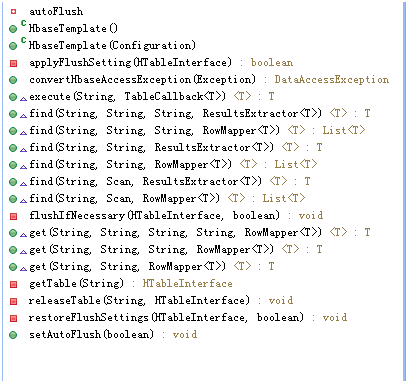
同时hbasetemplate封装了hbase连接池等,它的创建和释放通过配置来自动管理。
示例:
package com.sf.study.hbase;

import org.apache.hadoop.hbase.KeyValue;

import org.apache.hadoop.hbase.client.Result;

import org.apache.hadoop.hbase.util.Bytes;

import org.springframework.beans.factory.BeanFactory;

import org.springframework.context.ApplicationContext;

import org.springframework.context.support.ClassPathXmlApplicationContext;

import org.springframework.data.hadoop.hbase.HbaseTemplate;

import org.springframework.data.hadoop.hbase.RowMapper;

public class SpringHbaseTest {

    public static void main(String[] agrs) {

        // 在xml配置文件中找到htemplate

        ApplicationContext context = new ClassPathXmlApplicationContext(new String[] { "classpath:/com/sf/study/META-INF/config/biz-hbase.xml" });

        BeanFactory factory = (BeanFactory) context;

        HbaseTemplate htemplate = (HbaseTemplate) factory.getBean("hbaseTemplate");

        // 使用find方法查找 fvp_dev_duan为表名 ,info为列族名称及family

        htemplate.find("fvp_dev_duan", "info", new RowMapper<String>() {

            // result为得到的结果集

            public String mapRow(Result result, int rowNum) throws Exception {

                // 循环行

                for (KeyValue kv : result.raw()) {

                    // 得到列族组成列qualifier

                    String key = new String(kv.getQualifier());

                    // 得到值

                    String value = new String(kv.getValue());

                    System.out.println(key + "= " + Bytes.toString(value.getBytes()));

                }

                return null;

            }

        });

    }

}
结果:
D=

592W"7958687*209��n�
HBase之四--(2):spring hadoop 访问hbase的更多相关文章
- spring hadoop 访问hbase入门
1. 环境准备: Maven Eclipse Java Spring 版本 3..2.9 2. Maven pom.xml配置 <!-- Spring hadoop --> <d ...
- HBase之四--(1):Java操作Hbase进行建表、删表以及对数据进行增删改查,条件查询
1.搭建环境 新建JAVA项目,添加的包有: 有关Hadoop的hadoop-core-0.20.204.0.jar 有关Hbase的hbase-0.90.4.jar.hbase-0.90.4-tes ...
- 【HBase基础教程】1、HBase之单机模式与伪分布式模式安装(转)
在这篇blog中,我们将介绍Hbase的单机模式安装与伪分布式的安装方式,以及通过浏览器查看Hbase的用户界面.搭建hbase伪分布式环境的前提是我们已经搭建好了hadoop完全分布式环境,搭建ha ...
- JAVA API访问Hbase org.apache.hadoop.hbase.client.RetriesExhaustedException: Failed after attempts=32
Java使用API访问Hbase报错: 我的hbase主节点是spark1 java代码访问hbase的时候写的是ip 结果运行程序报错 不能够识别主机名 修改主机名 修改主机hosts文 ...
- 使用ganglia监控hadoop及hbase集群
一.Ganglia简介 Ganglia 是 UC Berkeley 发起的一个开源监视项目,设计用于测量数以千计的节点.每台计算机都运行一个收集和发送度量数据(如处理器速度.内存使用量等)的名为 gm ...
- Hadoop 之Hbase命令
一.常用命令:(hbase shell 进入终端) 1.创建表: create 'users','user_id','address','info' 表users,有三个列族user_id,addre ...
- 使用Ganglia监控hadoop、hbase
Ganglia是一个监控服务器,集群的开源软件,能够用曲线图表现最近一个小时,最近一天,最近一周,最近一月,最近一年的服务器或者集群的cpu负载,内存,网络,硬盘等指标. Ganglia的强大在于:g ...
- HBase(一): c#访问hbase组件开发
HDP2.4安装系列介绍了通过ambari创建hbase集群的过程,但工作中一直采用.net的技术路线,如何去访问基于Java搞的Hbase呢? Hbase提供基于Java的本地API访问,同时扩展了 ...
- 使用C#通过Thrift访问HBase
前言 因为项目需要要为客户程序提供C#.Net的HBase访问接口,而HBase并没有提供原生的.Net客户端接口,可以通过启动HBase的Thrift服务来提供多语言支持. Thrift介绍 环境 ...
随机推荐
- JS标签获取另一个页面传过来的href值
a href=b.html?id=楼主>B页面</a>b.html中的获取函数:function getParam(){C1=window.location.href.split(& ...
- js时间戳和时间格式之间的转换
//时间戳转换成日期时间2014-8-8 下午11:40:20 function formatDate(ns){ return new Date(parseInt(ns) * 1000).toLoca ...
- Nuxt.js使用lazyload
Vue的使用方式: 1. 安装插件: npm install vue-lazyload --save-dev 2. main.js引入插件: import VueLazyLoad from 'vue- ...
- iOS类的合理设计,面向对象思想
每天更新的东西可能有反复的内容.当时每一部分的知识点是不同的,须要大家认真阅读 这里介绍了iOS类的合理设计.面向对象思想 main.m #import <Foundation/Foundati ...
- VisualSVN Server 改动用户password
VisualSVN Server是很方便好用的SVNserver端软件.但有个问题,你在server端创建了usernamepassword后,用户无法自己改动password.据说VisualSVN ...
- javascript Array method总结
0.创建 Javascript创建数组的基本方式有两种.第一种是使用Array构造函数. var colors = new Array(); var colors = new Array(20); v ...
- OpenStack源码系列---起始篇
近一年来我负责公司云点的自动化部署工作,包括公司自有云平台方案.XenServer.vSphere.Ovirt和OpenStack的自动化安装部署,目前已经到了OpenStack这一部分.自动化部署首 ...
- 项目Beta冲刺(团队7/7)
项目Beta冲刺(团队7/7) 团队名称: 云打印 作业要求: 项目Beta冲刺(团队) 作业目标: 完成项目Beta版本 团队队员 队员学号 队员姓名 个人博客地址 备注 221600412 陈宇 ...
- curl: (7) Failed to connect to 127.0.0.1 port 1086: Connection refused
今天我用curl命令,无论如何都是出现: curl: (7) Failed to connect to 127.0.0.1 port 1086: Connection refused 找了很久,不知道 ...
- SSM整理笔记3——配置解析
github:https://github.com/lakeslove/SSM 项目的目录结构如下 首先,配置web.xml <?xml version="1.0" enco ...