
二十四、MongoDB数据库的使用
首先按照上一篇文章的介绍,启动并连接数据库
然后我们开始学习如何使用MongoDB数据库:
1、创建数据库
第一步,在cmd窗口执行:
use dbname
dbname是你打算要创建的数据库名称
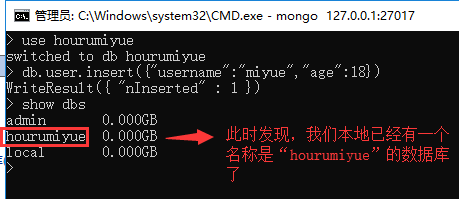
执行完上一步,我们并没有真正的创建数据库,我们如果想要dbname数据库真正的创建,我们需要先创建一个表(集合),但是MongoDB也没有创建表的命令,
那么我们如果想创建表,我们需要直接向表里插入一条数据:

此时我们可以通过命令查看本地所有的数据库:
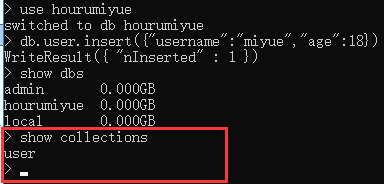
显示当前的所有数据集合(mysql 中叫表)
show collections
2、删除数据库,删除表:
删除数据库,删除当前所在的数据库
db.dropDatabase();
删除集合,删除指定的集合 删除表
删除集合 db.COLLECTION_NAME.drop()
db.user.drop()
3、向某个表插入数据:
db.表名.insert({"name":"zhangsan"});
注意,在插入数据的时候字段数可以不保持统一
例如:
db.user.insert({"name":"zhangsan"});
db.user.insert({"name":"lisi","age":20});
4、查找数据
1、查询所有记录
db.userInfo.find();
相当于:select* from userInfo;

2、查询去掉后的当前聚集集合中的某列的重复数据
db.userInfo.distinct("name");
会过滤掉 name 中的相同数据
相当于:select distict name from userInfo;
3、查询 age = 22 的记录
db.userInfo.find({"age": 22});
相当于: select * from userInfo where age = 22;
4、查询 age > 22 的记录
db.userInfo.find({age: {$gt: 22}});
相当于:select * from userInfo where age >22;
5、查询 age < 22 的记录
db.userInfo.find({age: {$lt: 22}});
相当于:select * from userInfo where age <22;
6、查询 age >= 25 的记录
db.userInfo.find({age: {$gte: 25}});
相当于:select * from userInfo where age >= 25;
7、查询 age <= 25 的记录
db.userInfo.find({age: {$lte: 25}});
8、查询 age >= 23 并且 age <= 26 注意书写格式
db.userInfo.find({age: {$gte: 23, $lte: 26}});
9、查询 name 中包含 mongo 的数据 模糊查询用于搜索
db.userInfo.find({name: /mongo/});
//相当于%%
select * from userInfo where name like ‘%mongo%’;
10、查询 name 中以 mongo 开头的
db.userInfo.find({name: /^mongo/});
select * from userInfo where name like ‘mongo%’;
11、查询指定列 name、age 数据
db.userInfo.find({}, {name: 1, age: 1});
相当于:select name, age from userInfo;
当然 name 也可以用 true 或 false,当用 ture 的情况下河 name:1 效果一样,如果用 false 就
是排除 name,显示 name 以外的列信息。
12、查询指定列 name、age 数据, age > 25
db.userInfo.find({age: {$gt: 25}}, {name: 1, age: 1});
相当于:select name, age from userInfo where age >25;
13、按照年龄排序 1 升序 -1 降序
升序:db.userInfo.find().sort({age: 1});
降序:db.userInfo.find().sort({age: -1});
14、查询 name = zhangsan, age = 22 的数据
db.userInfo.find({name: 'zhangsan', age: 22});
相当于:select * from userInfo where name = ‘zhangsan’ and age = ‘22’;
15、查询前 5 条数据
db.userInfo.find().limit(5);
相当于:selecttop 5 * from userInfo;
16、查询 10 条以后的数据
db.userInfo.find().skip(10);
相当于:select * from userInfo where id not in (
selecttop 10 * from userInfo
);
17、分页查询
db.userInfo.find().limit(10).skip(500);
可用于分页,limit 是 pageSize,skip (50*10)是第几页*pageSize,查出来的是501-510之间的数据
18、or 与 查询
db.userInfo.find({$or: [{age: 22}, {age: 25}]});
相当于:select * from userInfo where age = 22 or age = 25;
19、findOne 查询第一条数据
db.userInfo.findOne();
相当于:selecttop 1 * from userInfo;
db.userInfo.find().limit(1);
20、查询某个结果集的记录条数 统计数量
db.userInfo.find({age: {$gte: 25}}).count();
相当于:select count(*) from userInfo where age >= 20;
如果要返回限制之后的记录数量,要使用 count(true)或者 count(非 0)
db.users.find().skip(10).limit(5).count(true);
5、修改数据
查找名字叫做小明的,把年龄更改为 16 岁:
db.student.update({"name":"小明"},{$set:{"age":16}});
查找数学成绩是 70,把年龄更改为 33 岁:
db.student.update({"score.shuxue":70},{$set:{"age":33}});
更改所有匹配项目:"
By default, the update() method updates a single document. To update multiple documents, use
the multi option in the update() method.
默认情况下,update()方法更新单个文档。若要更新多个文档,请使用

update()方法中的multi选项。
db.student.update({"sex":"男"},{$set:{"age":33}},{multi: true});
如果不使用$set 关键字了:完整替换, 注意:下面这句sql的意思就是把name=小明的数据的数据内容填充为:{"name":"大明","age":16}
db.student.update({"name":"小明"},{"name":"大明","age":16});
db.users.update({name: 'Lisi'}, {$inc: {age: 50}}, false, true);
相当于:update users set age = age + 50 where name = ‘Lisi’;
db.users.update({name: 'Lisi'}, {$inc: {age: 50}, $set: {name: 'hoho'}}, false, true);
相当于:update users set age = age + 50, name = ‘hoho’ where name = ‘Lisi’;
6、删除数据
db.collectionsNames.remove( { "borough": "Manhattan" } )
db.users.remove({age: 132,“username”:“zhagsan”});
By default, the remove() method removes all documents that match the remove condition. Use
the justOne option to limit the remove operation to only one of the matching documents.
默认情况下,remove()方法删除所有匹配remove条件的文档。使用

justOne选项将删除操作限制为只有一个匹配的文档。
db.restaurants.remove( { "borough": "Queens" }, { justOne: true } )
二十四、MongoDB数据库的使用的更多相关文章
- 第三百二十四节,web爬虫,scrapy模块介绍与使用
第三百二十四节,web爬虫,scrapy模块介绍与使用 Scrapy是一个为了爬取网站数据,提取结构性数据而编写的应用框架. 其可以应用在数据挖掘,信息处理或存储历史数据等一系列的程序中.其最初是为了 ...
- python3.4学习笔记(二十四) Python pycharm window安装redis MySQL-python相关方法
python3.4学习笔记(二十四) Python pycharm window安装redis MySQL-python相关方法window安装redis,下载Redis的压缩包https://git ...
- Bootstrap<基础二十四> 缩略图
Bootstrap 缩略图.大多数站点都需要在网格中布局图像.视频.文本等.Bootstrap 通过缩略图为此提供了一种简便的方式.使用 Bootstrap 创建缩略图的步骤如下: 在图像周围添加带有 ...
- 二十四、Struts2中的UI标签
二十四.Struts2中的UI标签 Struts2中UI标签的优势: 数据回显 页面布局和排版(Freemark),struts2提供了一些常用的排版(主题:xhtml默认 simple ajax) ...
- WCF技术剖析之二十四: ServiceDebugBehavior服务行为是如何实现异常的传播的?
原文:WCF技术剖析之二十四: ServiceDebugBehavior服务行为是如何实现异常的传播的? 服务端只有抛出FaultException异常才能被正常地序列化成Fault消息,并实现向客户 ...
- VMware vSphere 服务器虚拟化之二十四 桌面虚拟化之手动池管理物理机
VMware vSphere 服务器虚拟化之二十四 桌面虚拟化之手动池管理物理机 VMwareView手动池可以管理物理计算机 说明: 环境基于实验二十三 1.准备一台Windows 7的物理计算机名 ...
- Bootstrap入门(二十四)data属性
Bootstrap入门(二十四)data属性 你可以仅仅通过 data 属性 API 就能使用所有的 Bootstrap 插件,无需写一行 JavaScript 代码.这是 Bootstrap 中的一 ...
- 3360: [Usaco2004 Jan]算二十四
3360: [Usaco2004 Jan]算二十四 Time Limit: 10 Sec Memory Limit: 128 MBSubmit: 6 Solved: 6[Submit][Statu ...
- JAVA之旅(二十四)——I/O流,字符流,FileWriter,IOException,文件续写,FileReader,小练习
JAVA之旅(二十四)--I/O流,字符流,FileWriter,IOException,文件续写,FileReader,小练习 JAVA之旅林林总总也是写了二十多篇了,我们今天终于是接触到了I/O了 ...
- 二十四. Python基础(24)--封装
二十四. Python基础(24)--封装 ● 知识结构 ● 类属性和__slots__属性 class Student(object): grade = 3 # 也可以写在__slots ...
随机推荐
- iPhone与Android手机 各个型号的UserAgent
摘要:userAgent 属性是一个只读的字符串,声明了浏览器用于 HTTP 请求的用户代理头的值.一般来讲,它是在navigator.appCodeName 的值之后加上斜线和navigator.a ...
- Linux实战教学笔记43:squid代理与缓存实践(二)
第6章 squid代理模式案例 6.1 squid传统正向代理生产使用案例 6.1.1 squid传统正向代理两种方案 (1)普通代理服务器 作为代理服务器,这是SQUID的最基本功能:通过在squi ...
- GetHashCode作用
除了以下的转载,再补充几点: 1.相同对象的hashcode一定相同,不同的hashcode不一定不相同. 2.好的散列算法可以更均匀的分布,进而可以更快的索引 3.据说,值对象的hashcode由第 ...
- Render Texture
[Render Texture] Render Textures are special types of Textures that are created and updated at runti ...
- Unity3d 下websocket的使用
今天介绍一下如何在Unity3D下使用WebSocket. 首先介绍一下什么是websocket,以及与socket,和http的区别与联系,然后介绍一下websocket的一些开源的项目. WebS ...
- yum基本用法与修改源
一.yum简介 yum,是Yellow dog Updater Modified的简称,起初是由yellow dog这一发行版的开发者Terra Soft研发,用python写成,那时还叫做yup(y ...
- 15-I hate it (HDU1754:线段树)
http://acm.hdu.edu.cn/showproblem.php?pid=1754 相似例题: 敌兵布阵 http://www.cnblogs.com/zhumengdexiao ...
- .net 多线程同步的相关知识点
在多线程开发中,共享对象的同步是经常遇到的问题,以下总结了C#中线程同步的几种技术: 1,InterLocked原子操作 Decrement(ref int location);递减1 Add(ref ...
- Openssl pkey命令
一.简介 pkey是一个公钥或私钥的处理命令,可以用于打印和转换不同的表单和组件 二.语法 openssl pkey [-inform PEM|DER] [-outform PE|DER] [-in ...
- 高性能python编程之协程(stackless)-乾颐堂
我们都知道并发(不是并行)编程目前有四种方式,多进程,多线程,异步,和协程. 多进程编程在python中有类似C的os.fork,当然还有更高层封装的multiprocessing标准库,在之前写过的 ...