
robotium原理之获取WebElement元素
版权声明:本文为博主原创文章,未经博主同意不得转载。
https://blog.csdn.net/hunterno4/article/details/35569665
RobotiumWeb.js就是此功能实现用的JS脚本。以solo中getWebElements()为例,
	public ArrayList<WebElement> getWebElements(boolean onlySufficientlyVisible){

		boolean javaScriptWasExecuted = executeJavaScriptFunction("allWebElements();");

		return getWebElements(javaScriptWasExecuted, onlySufficientlyVisible);

	}
private boolean executeJavaScriptFunction(final String function){
final WebView webView = viewFetcher.getFreshestView(viewFetcher.getCurrentViews(WebView.class, true));
if(webView == null){
return false;
}
//做一些JS注入运行前的准备工作。比如将WebView设为可同意运行JS等,并将RobotiumWeb.js中的脚本以String形式返回
final String javaScript = prepareForStartOfJavascriptExecution();
activityUtils.getCurrentActivity(false).runOnUiThread(new Runnable() {
public void run() {
if(webView != null){
webView.loadUrl("javascript:" + javaScript + function);
}
}
});
return true;
}javascript:
function allWebElements() {
for (var key in document.all){
try{
promptElement(document.all[key]); //调用promptElement(element)函数
}catch(ignored){}
}
finished(); //运行完后,调用finished()函数
}
function promptElement(element) {
var id = element.id;
var text = element.innerText;
if(text.trim().length == 0){
text = element.value;
}
var name = element.getAttribute('name');
var className = element.className;
var tagName = element.tagName;
var attributes = "";
var htmlAttributes = element.attributes;
for (var i = 0, htmlAttribute; htmlAttribute = htmlAttributes[i]; i++){
attributes += htmlAttribute.name + "::" + htmlAttribute.value;
if (i + 1 < htmlAttributes.length) {
attributes += "#$";
}
}
var rect = element.getBoundingClientRect();
if(rect.width > 0 && rect.height > 0 && rect.left >= 0 && rect.top >= 0){
prompt(id + ';,' + text + ';,' + name + ";," + className + ";," + tagName + ";," + rect.left + ';,' + rect.top + ';,' + rect.width + ';,' + rect.height + ';,' + attributes); //弹出包括id、text、name等字段的提示框
}
}
function finished(){
prompt('robotium-finished'); //弹出包括robotium-finished字符串的提示框,用于标识脚本注入运行结束
}onJsPrompt(WebView view, String url, String message, String defaultValue, JsPromptResult result) |
	@Override

	public boolean onJsPrompt(WebView view, String url, String message,	String defaultValue, JsPromptResult r) {

		if(message != null && (message.contains(";,") || message.contains("robotium-finished"))){

                        //假设提示框中包括robotium-finished字符串,即表示那段JS注入脚本运行完毕了

			if(message.equals("robotium-finished")){

				webElementCreator.setFinished(true);

			}

			else{

				webElementCreator.createWebElementAndAddInList(message, view);//有人提示框中的内容。那么就能够对提示框中的内容进行处理了

			}

			r.confirm();

			return true;

		}

		else {

			if(originalWebChromeClient != null) {

				return originalWebChromeClient.onJsPrompt(view, url, message, defaultValue, r);

			}

			return true;

		}

	}
将JavaScriptEnabled设置为true。将将WebChromeClient设置为robotiumWebClient
	public void enableJavascriptAndSetRobotiumWebClient(List<WebView> webViews, WebChromeClient originalWebChromeClient){

		this.originalWebChromeClient = originalWebChromeClient;

		for(final WebView webView : webViews){

			if(webView != null){

				inst.runOnMainSync(new Runnable() {

					public void run() {

						webView.getSettings().setJavaScriptEnabled(true);

						webView.setWebChromeClient(robotiumWebClient);

					}

				});

			}

		}

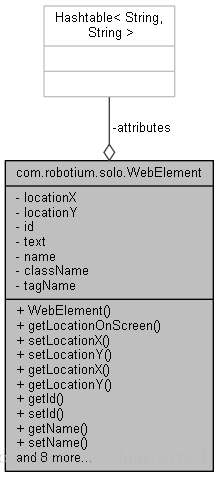
	}
	private WebElement createWebElementAndSetLocation(String information, WebView webView){

		String[] data = information.split(";,");            //将消息按;,符号切割,当中;,符号是在前面运行JS时增加的

		String[] elements = null;

		int x = 0;

		int y = 0;

		int width = 0;

		int height = 0;

		Hashtable<String, String> attributes = new Hashtable<String, String>();

		try{

			x = Math.round(Float.valueOf(data[5]));

			y = Math.round(Float.valueOf(data[6]));

			width = Math.round(Float.valueOf(data[7]));

			height = Math.round(Float.valueOf(data[8]));

			elements = data[9].split("\\#\\$");

		}catch(Exception ignored){}

		if(elements != null) {

			for (int index = 0; index < elements.length; index++){

				String[] element = elements[index].split("::");

				if (element.length > 1) {

					attributes.put(element[0], element[1]);

				} else {

					attributes.put(element[0], element[0]);

				}

			}

		}

		WebElement webElement = null;

		try{

			webElement = new WebElement(data[0], data[1], data[2], data[3], data[4], attributes);//将id、text、name等字段存入

			setLocation(webElement, webView, x, y, width, height);

		}catch(Exception ignored) {}

		return webElement;

	}
/**
* Sets the location of a {@code WebElement}
*
* @param webElement the {@code TextView} object to set location
* @param webView the {@code WebView} the text is shown in
* @param x the x location to set
* @param y the y location to set
* @param width the width to set
* @param height the height to set
*/
private void setLocation(WebElement webElement, WebView webView, int x, int y, int width, int height ){
float scale = webView.getScale();
int[] locationOfWebViewXY = new int[2];
webView.getLocationOnScreen(locationOfWebViewXY);
int locationX = (int) (locationOfWebViewXY[0] + (x + (Math.floor(width / 2))) * scale);
int locationY = (int) (locationOfWebViewXY[1] + (y + (Math.floor(height / 2))) * scale);
webElement.setLocationX(locationX);
webElement.setLocationY(locationY);
}至此。WebElement对象中包括了id、text、name等字段。还包括了x、y坐标,知道了坐标后就能够像其他Android中的原生View一样依据坐标发送点击事件。
robotium原理之获取WebElement元素的更多相关文章
- Selenium 获取隐藏元素的内容
第一种 先获取元素通过 属性获取 WebElement webElemt= webElement.findElement(By.xpath("//*[@class='xxxxxx]/a&qu ...
- selenium定位方式-获取标签元素:find_element_by_xxx
定位方式取舍# 唯一定位方式.多属性定位.层级+角标定位(离目标元素越近,相对定位越好) # 推荐用css selector(很少用递进层次的定位)# 什么时候用xpath呢? 当你定位元素时,必须要 ...
- vue获取dom元素注意问题
mounted(){ setTimeout(()=>{ this.contentToggle(); },1000) }, methods:{ contentToggle(){ console.l ...
- Robotium原理初步--Android自动化测试学习历程
章节:自动化基础篇——Robotium原理初步(第四讲) 主要讲解内容与笔记: 一.基于控件 1.spinner——下拉菜单 2.TabHost——左右滑动选择菜单,类似电话本 3.Gallery—— ...
- selenium 获取某元素的 某属性 的值
selenium 获取某元素的 某属性的值 1 先通过元素定位,获得此元素的 WebElement; WebElement yuansu = driver.findElement(By.clas ...
- javascript实现浏览器管理员工具鼠标获取Html元素 并生成 xpath
javascript实现浏览器管理员工具鼠标获取Html元素 并生成 xpath 看看标题就被吓尿了,够长吧.让我们看看到底是个什么玩意.. 直接上图: 就是这个东东了,做为一个写爬虫的,有必要了解下 ...
- selenium+python自动化104-如何获取隐藏元素text文本
前言 首先 selenium 是可以定位到隐藏元素的,但是 selenium 不能跟隐藏元素交互,也就是隐藏元素element不能使用element.click()方法. 隐藏元素element.te ...
- 如何通过源生js获取一个元素的具体样式值 /* getCss:获取指定元素的具体样式的属性值 curElement:[dom对象] attr:[string] */
昨天的博客些的真的是惨不忍睹啊!!!但是我的人生宗旨就是将不要脸的精神进行到底,所以,今天我又来了.哈哈哈哈哈! 方法一:元素.style.属性名:(这个有局限性--只能获取行内样式的值,对于样式表或 ...
- v-for遍历出的元素上添加click事件,获取对应元素上的属性id值
<span v-for="(n,nav) in floorList" data-id="{{nav.itemId}}" v-on:click=" ...
随机推荐
- HTML5中的拖放
关于HTML5中的拖放 拖放(Drag 和 Drop)是一种常见的特性,即抓取对象以后拖到另一个位置,在 HTML5 中,拖放是标准的组成部分.在HTML5中用户可以使用鼠标选择一个可拖动元素,将元素 ...
- Android——Android Studio的一些小技巧(转)
ndroid课程---Android Studio的一些小技巧 APK瘦身 在Android Studio中我们可以开启混淆,和自动删除没有Resources文件,来达到给APP瘦身的目的,这对于 ...
- 关于Aspose强大的应用--EXECL
protected void btnConfirg_Click(object sender, EventArgs e) { genExcel(); } //设置内容文字色 表中有一个蓝色文字列和绿色文 ...
- Android学习笔记36:使用SQLite方式存储数据
在Android中一共提供了5种数据存储方式,分别为: (1)Files:通过FileInputStream和FileOutputStream对文件进行操作.具体使用方法可以参阅博文<Andro ...
- 【noip模拟题】最大公约数(数论)
好神的一题... 首先我们只需要枚举这个gcd即可..从大到小,然后问题转换为判定问题...即判定是否有k个数有gcd这个约数.. orz 这样做的复杂度最坏是O(n+n/2+n/3+…+n/n)=O ...
- 转载:基于Redis实现分布式锁
转载:基于Redis实现分布式锁 ,出处: http://blog.csdn.net/ugg/article/details/41894947 背景在很多互联网产品应用中,有些场景需要加锁处理,比如 ...
- bootstrap基础学习八篇
bootstrap辅助类 a.对于文本颜色 以下不同的类展示了不同的文本颜色.如果文本是个链接鼠标移动到文本上会变暗: 类 描述 .text-muted "text-muted" ...
- C# 压缩和解压文件(SharpZipLib)
先从网上下载ICSharpCode.SharpZipLib.dll类库 将文件或文件夹压缩为zip,函数如下 /// <summary> /// 压缩文件 /// </summary ...
- 漫游Kafka设计篇之消息传输的事务定义(5)
之前讨论了consumer和producer是怎么工作的,现在来讨论一下数据传输方面.数据传输的事务定义通常有以下三种级别: 最多一次: 消息不会被重复发送,最多被传输一次,但也有可能一次不传输. 最 ...
- Linux系统下MySQL数据库的备份和恢复
当我们MySQL数据库保存重要数据的时候,备份工作极为重要.本文介绍如何使用mysqldump备份和恢复数据,使用该方法,可以将数据库中的数据备份成一个文本文件,也可将备份好的数据库迁移到另一台的服务 ...