
iOS实现白板、画板功能,有趣的涂鸦工具,已封装,简单快捷使用
一、效果图:


二、选择颜色:
分【固定颜色模式】和【自由取模式】。


三、操作栏功能:

1、撤销:撤销上一步操作,可一直往上进行,直到全部清空。
2、清空:直接清除所有绘画。
3、橡皮擦:去除不要的绘画部分。
4、保存:一键保存相册。
四、实现方式:
贝塞尔曲线结合drawrect绘画。
代码结构:

核心代码模块:
#pragma mark - 画画

-(void)touchesBegan:(NSSet<UITouch *> *)touches withEvent:(UIEvent *)event

{

    UITouch *touch = [touches anyObject];

    CGPoint currentPoint = [touch locationInView:self];

    self.bezierPath = [[YJBezierPath alloc] init];

    self.bezierPath.lineColor = self.lineColor;

    self.bezierPath.isErase = self.isErase;

    [self.bezierPath moveToPoint:currentPoint];

    [self.beziPathArrM addObject:self.bezierPath];

}

-(void)touchesMoved:(NSSet<UITouch *> *)touches withEvent:(UIEvent *)event{

    UITouch *touch = [touches anyObject];

    CGPoint currentPoint = [touch locationInView:self];

    CGPoint previousPoint = [touch previousLocationInView:self];

    CGPoint midP = midpoint(previousPoint,currentPoint);

    //  这样写不会有尖头

    [self.bezierPath addQuadCurveToPoint:currentPoint controlPoint:midP];

    [self setNeedsDisplay];

}

-(void)touchesEnded:(NSSet<UITouch *> *)touches withEvent:(UIEvent *)event{

    UITouch *touch = [touches anyObject];

    CGPoint currentPoint = [touch locationInView:self];

    CGPoint previousPoint = [touch previousLocationInView:self];

    CGPoint midP = midpoint(previousPoint,currentPoint);

    [self.bezierPath addQuadCurveToPoint:currentPoint   controlPoint:midP];

    // touchesMoved

    [self setNeedsDisplay];

}
-(void)drawRect:(CGRect)rect{

    if (self.beziPathArrM.count) {

        for (YJBezierPath *path in self.beziPathArrM) {

            if (path.isErase) {

                [self.backgroundColor setStroke];

            }else{

                [path.lineColor setStroke];

            }

            path.lineCapStyle = kCGLineCapRound;

            path.lineJoinStyle = kCGLineCapRound;

            if (path.isErase) {

                path.lineWidth = ;    //   这里可抽取出来枚举定义

                [path strokeWithBlendMode:kCGBlendModeDestinationIn alpha:1.0];

            }else{

                path.lineWidth = ;

                [path strokeWithBlendMode:kCGBlendModeNormal alpha:1.0];

            }

            [path stroke];

        }

    }

    [super drawRect:rect];

}
外部引用代码:
#import "BaiBanViewController.h"

#import "BaibanView.h"

@interface BaiBanViewController ()

@property (nonatomic,strong) BaibanView  *baibanV;

@end

@implementation BaiBanViewController

-(BaibanView *)baibanV{

    if(_baibanV==nil){

        _baibanV=[[BaibanView alloc] initWithFrame:CGRectMake(, , KScreenWidth, KScreenHeight - )];

    }

    return  _baibanV;

}

- (void)viewDidLoad {

    [super viewDidLoad];

    self.navigationItem.title = @"画 板";

    [[UIBarButtonItem appearance] setBackButtonTitlePositionAdjustment:UIOffsetMake(, -) forBarMetrics:UIBarMetricsDefault];

    self.view.backgroundColor = [UIColor whiteColor];

    //添加画板功能

    [self.view addSubview:self.baibanV];

}
简单吧~
五、源码获取:
我直接把我的测试Demo放上去了,大家下载后,直接定位画板功能即可。

========================更新于2017年==========================
上面那种方式,是利用drawrect方式绘画,通过cpu渲染,所以一定程度上比较耗cpu,内存也有一定上升
因此,如果你的应用不需要橡皮擦功能,只需要上一步或下一步这种的撤销操作,可以利用CAShapeLayer集合来实现,原理如下:
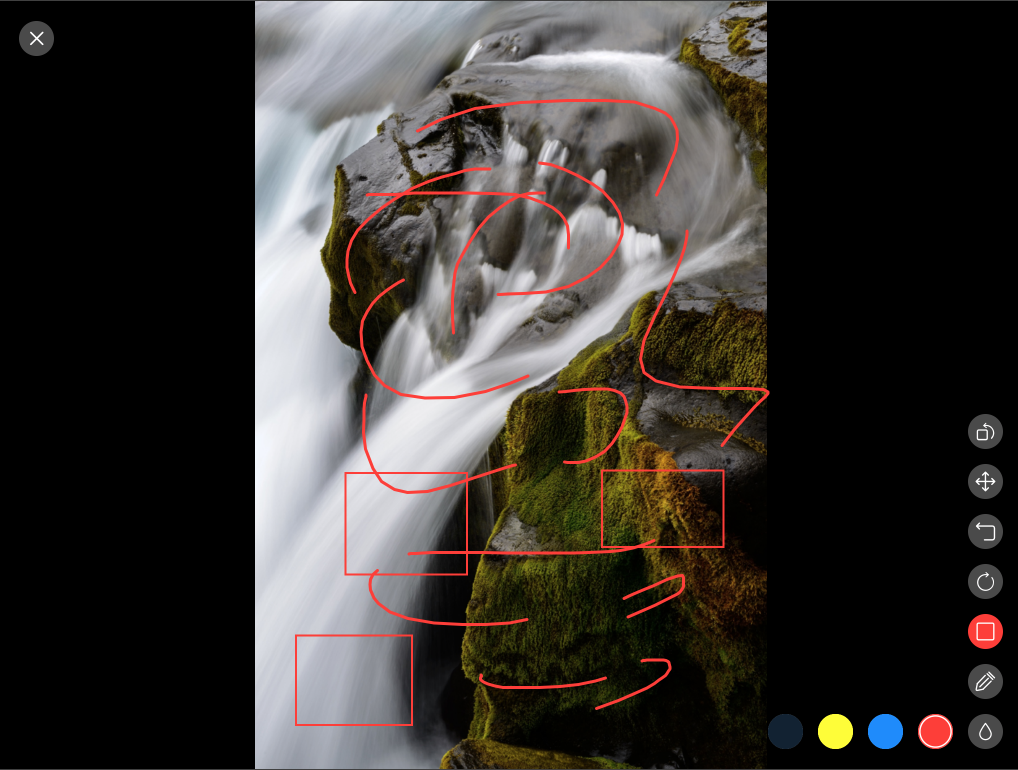
每一笔都是一个layer,然后一层层叠加在底view上,并记录到一个list里,这样,上一步和下一步都是直接对一个layer进行add或remove,简单明了,而且这种对于,绘画特殊图形也比较方便(比如画圆、矩形等)
下图是我另一个应用的涂鸦功能截图,这种对内存和cpu消耗特别低,而且集成了缩放、旋转功能, 大家可以借鉴一下。
但这种实现,如果需要橡皮擦功能,只能实现橡皮擦擦除区域与layer有交汇点,就清除layer(类似苹果相册编辑里的橡皮擦功能),如果想实现任意清除, 我暂时没想到特别好的解决方式。
iOS实现白板、画板功能,有趣的涂鸦工具,已封装,简单快捷使用的更多相关文章
- iOS之开发支付功能概述
前言:本随笔将对IOS开发的支付功能进行一个概述. 内容大纲: 一.常见的支付方案简介 二.第三方支付SDK 三.苹果官方支付方案 四.Web支付方案 正文: 一.常见的支付方案简介 在微信支付中 微 ...
- IOS开发之支付功能概述
前言:本随笔将对IOS开发的支付功能进行一个概述. 内容大纲: 一.常见的支付方案简介 二.第三方支付SDK 三.苹果官方支付方案 四.Web支付方案 正文: 一.常见的支付方案简介 在微信支付中 微 ...
- iOS项目开发常用功能静态库
YHDeveloperTools iOS项目开发常用功能静态库 查看源码 功能方法: 1.字符检查 [NSString checkStringWithType:Email andTargetStrin ...
- iOS的录屏功能
iOS的录屏功能其实没什么好说的,因为网上的教程很多,但是网上的Demo无一例外几乎都有一个bug,那就是iPad上会出现闪退,这也体现了国内的教程文档的一个特点,就是抄袭,教程几乎千篇一律,bug也 ...
- iOS开发UI篇—使用picker View控件完成一个简单的选餐应用
iOS开发UI篇—使用picker View控件完成一个简单的选餐应用 一.实现效果 说明:点击随机按钮,能够自动选取,下方数据自动刷新. 二.实现思路 1.picker view的有默认高度为162 ...
- 每位iOS开发者不容错过的10大有用工具
内容简单介绍 1.iOS简单介绍 2.iOS开发十大有用工具之开发环境 3.iOS开发十大有用工具之图标设计 4.iOS开发十大有用工具之原型设计 5.iOS开发十大有用工具之演示工具 6.iOS开发 ...
- ios开发UI篇—使用纯代码自定义UItableviewcell实现一个简单的微博界面布局
本文转自 :http://www.cnblogs.com/wendingding/p/3761730.html ios开发UI篇—使用纯代码自定义UItableviewcell实现一个简单的微博界面布 ...
- XML真正强大的功能是来自其元素与封装的内容
创建文档类型声明 一般而言,XML声明放在文档顶部.在PHP中声明十分简单:只需实例化一个DOM文档类的对象并赋予它一个版本号.查看程序清单A: 程序清单 A <?php// create do ...
- iOS开发UI篇—Date Picker和UITool Bar控件简单介绍
iOS开发UI篇—Date Picker和UITool Bar控件简单介绍 一.Date Picker控件 1.简单介绍: Date Picker显示时间的控件 有默认宽高,不用设置数据源和代理 如何 ...
随机推荐
- CentOS 5.8 x64 安装TomCat
简单记录一下...虽然安装很简单... 首先下载配置安装 jdk http://www.oracle.com/technetwork/java/javase/downloads/jdk-6u25-do ...
- Android Material各种颜色设置
Blogpost about support appcompat v21 from Chris Banes
- 25个Linux性能监控工具
一段时间以来,我们在网上向读者介绍了如何为Linux以及类Linux操作系统配置多种不同的性能监控工具.在这篇文章中我们将罗列一系列使用最频繁的性能监控工具,并对介绍到的每一个工具提供了相应的简介链接 ...
- android中广播的使用
广播消息机制用于进行系统级别的消息通知,每个应用程序可以对感兴趣的广播进行注册,并且将接收广播的方法定义在广播接收器中(Broadcast). 广播可以分为标准广播和有序广播. 注册广播的方法可以动态 ...
- highcharts柱状图和饼图的数据填充
1.其实数据填充很简单,它们就是json的格式,然后后台按照这种格式去套数据发给前端:前端再做一下连接处理等就行了. $('#program_statistics_bar').highcharts({ ...
- 推荐几个web中常用js图表插件
作者:zccst 我自己用过fusioncharts和highchart. jQuery插件有: TufteGraph flot js charts jqchart elycharts jquery ...
- 字典NSDictionary的常见用法
// 动态获取字典的第一个典 NSString *firstKey = responseObject.keyEnumerator.nextObject;
- Vue.js与angular在数据实现的思考
Vue.js,其简洁的API以及活跃的社区,对于打算从angular转向Vue还是挺友好的,打算最近一段时间去整理下Vue自己的一些思考,加深下对于此的印象. Vue与Angular同属于MVVM框架 ...
- 2.4 easyui - panel的使用
<div id="p" class="easyui-panel" title="My Panel" style ...
- X-004 FriendlyARM tiny4412 uboot移植之点亮指路灯
<<<<<<<<<<<<<<<<<<<<<<<<< ...