
ASP.NET - GridView实现点击编辑列
加载:
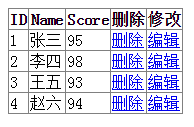
点击编辑:
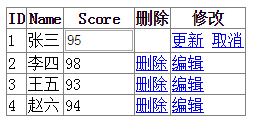
数据库设计:
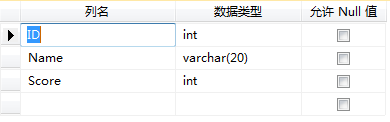
前端代码:
- DataKeyNames="ID" 设置点击“编辑”选项的时候,要获取的值,一般获取ID主键,便于修改数据。
- AutoGenerateColumns="False" 设置“设置是否自动生成列”为False。
- ReadOnly="True" 设置为只读,这样在点击编辑的时候,设置为只读的字段,不会变成文本框。
- DataField="ID" 设置绑定数据的字段名称。
- OnRowEditing ="GridView1_RowEditing" 编辑。
- OnRowDeleting ="GridView1_RowDeleting" 删除。
- OnRowCancelingEdit ="GridView1_RowCancelingEdit" 取消。
- OnRowUpdating ="GridView1_RowUpdating1"> 更新。
<form id="form1" runat="server">

<div>

    <asp:GridView ID="GridView1" runat="server"

        DataKeyNames="ID"

        AutoGenerateColumns="False"

        OnRowEditing ="GridView1_RowEditing"

        OnRowDeleting ="GridView1_RowDeleting"

        OnRowCancelingEdit ="GridView1_RowCancelingEdit"

        OnRowUpdating ="GridView1_RowUpdating1">

        <Columns>

            <asp:BoundField HeaderText="ID" DataField="ID" ReadOnly="True" />

            <asp:BoundField HeaderText="Name" DataField="Name" ReadOnly="True" />

            <asp:BoundField HeaderText="Score" DataField="Score"/>

            <asp:CommandField HeaderText ="删除" ShowDeleteButton="true" />

            <asp:CommandField HeaderText="修改" ShowEditButton="True" />

        </Columns>

    </asp:GridView>

</div>

</form>
后台代码:
protected void Page_Load(object sender, EventArgs e)

{

    if (!IsPostBack)

    {

        BindSoure();

    }

}

/// <summary>

/// 绑定数据源

/// </summary>

public void BindSoure()

{

    this.GridView1.DataSource = SQLHelper.ExecuteTable("select ID, Name, Score from Tb_Mark", System.Data.CommandType.Text);

    this.GridView1.DataBind();

}

/// <summary>

/// 编辑记录

/// </summary>

/// <param name="sender"></param>

/// <param name="e"></param>

protected void GridView1_RowEditing(object sender, GridViewEditEventArgs e)

{

    //获得编辑列

    GridView1.EditIndex = e.NewEditIndex;

    //重新绑定数据

    BindSoure();

}

/// <summary>

/// 删除记录

/// </summary>

/// <param name="sender"></param>

/// <param name="e"></param>

protected void GridView1_RowDeleting(object sender, GridViewDeleteEventArgs e)

{

    //获取编辑列的键值对中的值。在属性的DataKeyNames中设置。对一个的ID

    int UpdateIdentifier = Convert.ToInt32(GridView1.DataKeys[e.RowIndex].Value.ToString());

    string text = "delete from Tb_Mark where ID = '" + UpdateIdentifier + "'";

    if (SQLHelper.ExecuteNonQuery(text, System.Data.CommandType.Text) != 1)

    {

        ClientScript.RegisterStartupScript(this.GetType(), "msg", "<script>alert('删除失败!')</script>");

    }

    //重新绑定数据

    BindSoure();

}

/// <summary>

/// 取消修改

/// </summary>

/// <param name="sender"></param>

/// <param name="e"></param>

protected void GridView1_RowCancelingEdit(object sender, GridViewCancelEditEventArgs e)

{

    //退出编辑状态

    GridView1.EditIndex = -1;

    //重新绑定数据

    BindSoure();

}

/// <summary>

/// 更新修改

/// </summary>

/// <param name="sender"></param>

/// <param name="e"></param>

protected void GridView1_RowUpdating1(object sender, GridViewUpdateEventArgs e)

{

    //获取编辑列的键值对中的值。在属性的DataKeyNames中设置。对一个的ID

    int UpdateIdentifier = Convert.ToInt32(GridView1.DataKeys[e.RowIndex].Value.ToString());

    //获取第三列Score的值(从0开始),要修改的值。

    int UpdateValue = Convert.ToInt32(((TextBox)(GridView1.Rows[e.RowIndex].Cells[2].Controls[0])).Text.ToString());

    string text = "update Tb_Mark set Score = '" + UpdateValue + "' where ID = '" + UpdateIdentifier + "'";

    if (SQLHelper.ExecuteNonQuery(text, System.Data.CommandType.Text) != 1)

    {

        ClientScript.RegisterStartupScript(this.GetType(), "msg", "<script>alert('更新失败!')</script>");

    }

    //退出编辑状态

    GridView1.EditIndex = -1;

    //重新绑定数据

    BindSoure();

}
ASP.NET - GridView实现点击编辑列的更多相关文章
- C# GridView点击某列打开新浏览器窗口
C# GridView点击某列打开新窗口的方式: (1)打开浏览器新窗口:蓝色部分 通过超链接. (2)打开模式化窗口:通过OnRowCommand事件,弹出模式化窗口. 具体如下: <asp: ...
- Asp.net GridView 72般绝技
快速预览:GridView无代码分页排序GridView选中,编辑,取消,删除GridView正反双向排序GridView和下拉菜单DropDownList结合GridView和CheckBox结合鼠 ...
- Asp.net GridView控件使用纪要
1:数据绑定 GridView 支持数据绑定的数据源格式比较多,例如可以使用ObjectDataSource绑定数据源, Dataset,datatable,List<T>等 2:列绑定 ...
- ASP.NET GridView HyperLinkField传值和取值【转】
来源:http://www.cnblogs.com/junjie94wan/archive/2011/08/17/2143623.html 经常做Winform程序,好久没有做WEB都有些生疏了,Gr ...
- gridview中后台获取某列的值
下面的gridview中,获取某行某列的值(非模板页),如图所示 <asp:GridView AutoGenerateColumns="false" CssClass=&qu ...
- 图解DataGridView编辑列
WinForm中DataGridView功能强大,除了可以自动绑定数据源外,还可以根据需求编辑列.下面以截图说明添加编辑列的步骤(HoverTreeSCJ 项目实际界面). 1.选择DataGridV ...
- asp.net gridview 鼠标悬浮提示信息
使用场景: gridview绑定数据,某列数据太多,故超过一定字符,隐藏起来,同时鼠标移到指定列显示其明细信息: 知识点: 1,oderListTbl_DataBound事件中,添加,oderList ...
- 【DevExpress v17.2新功能预告】增强ASP.NET GridView的功能
在下一个主要版本v17.2中,我们将为DevExpress ASP.NET GridView添加一些优秀的新功能.在本文中为大家介绍的所有功能都可用于 GridView的ASP.NET WebForm ...
- 【译】在Asp.Net中操作PDF - iTextSharp - 利用列进行排版
原文 [译]在Asp.Net中操作PDF - iTextSharp - 利用列进行排版 在使用iTextSharp通过ASP.Net生成PDF的系列文章中,前面的文章已经讲述了iTextSharp所涵 ...
随机推荐
- 基于visual Studio2013解决C语言竞赛题之0519最大值
题目
- 进入MFC讲坛的前言(五)
框窗.视图和文档及其关系 MFC架构的另外一个特色是它的框窗.视图和文档这个三位一体的结构,它是一个典型的MVC(Model.View and Controler)结构.严格的讲,框窗不属于MVC中的 ...
- Http的操作(不传递参数)
ttpResponse httpResponse = null; HttpEntity httpEntity = null; HttpGet httpGet = new HttpGet ...
- A2DP和AVRCP蓝牙音频传输协议的应用解释
A2DP全名是Advenced Audio Distribution Profile 蓝牙音频传输模型拹定.A2DP 规定了使用蓝牙非同步传输信道方式,传输高质量音乐文件数据的拹议堆栈软件和使用方法, ...
- C语言中关于scanf函数的用法
scanf()函数的控制串 函数名: scanf 功 能: 执行格式化输入 用 法: int scanf(char *format[,argument,...]); scanf()函数是通用终端格式化 ...
- Steve Yegge:Google面试秘籍
我憋了很长时间想写点关于去Google面试的秘籍.不过我总是推迟,因为写出来的东西会让你抓狂.很可能是这样.如果按统计规律来定义"你"的话,这文章很可能让你不爽. 为啥呢?因为啊- ...
- Hibernate 多对多映射
package com.entity.manytomany; import java.util.List; import javax.persistence.Entity; import javax. ...
- C#中对文件的操作
详细介绍参考:http://blog.csdn.net/wangyue4/article/details/4616801 源码举例: public class FileSystemManager { ...
- The parent project must have a packaging type of POM
在Eclipse中使用Maven添加模块时报错:The parent project must have a packaging type of POM 解决办法: 是将pom.xml 中的 < ...
- linux下编译qt5.6.0静态库——configure配置(超详细,有每一个模块的说明)(乌合之众)
linux下编译qt5.6.0静态库 linux下编译qt5.6.0静态库 configure生成makefile 安装选项 Configure选项 第三方库: 附加选项: QNX/Blackberr ...