
IOS开发-UI学习-UIWebView,简单浏览器的制作
制作一个简单的浏览器,包含网址输入框,Search按钮,前进、回退按钮,UIWebView就这几个简单的控件。
UITextField:用来输入网址;
UIbuttom:实现前进,后退,搜索等功能;
UIWebView:实现网页展示。
准备工作:
右键Info.plist并Open As Source Code,打开之后添加以下代码段:
     <key>NSAppTransportSecurity</key>

     <dict>

     <key>NSAllowsArbitraryLoads</key>

     <true/>

     </dict>
以上代码段功能:有些网址为Http,要搞成Https,具体原理以后探索出来了再补充。
言归正传,实现浏览器功能的具体代码如下:
 #import "ViewController.h"

 @interface ViewController (){

 //    定义全局变量,各个控件

     UIWebView *mywebview;

     UIButton *backbutton;

     UIButton *goforbutton;

     UITextField *urlField;

     UIButton *searchButton;

 }

 @end

 @implementation ViewController

 - (void)viewDidLoad {

     [super viewDidLoad];

 //    添加浏览器view,

     mywebview = [[UIWebView alloc]initWithFrame:CGRectMake(, , self.view.frame.size.width, self.view.frame.size.height-)];

     [self.view addSubview:mywebview];

 //    网址输入框

     urlField = [[UITextField alloc]initWithFrame:CGRectMake(, , self.view.frame.size.width-, )];

     urlField.borderStyle = UITextBorderStyleRoundedRect;

     urlField.text= mywebview.request.URL.absoluteString;

     [self.view addSubview:urlField];

 //    search button

     searchButton = [[UIButton alloc]initWithFrame:CGRectMake(self.view.frame.size.width-, , , )];

     searchButton.backgroundColor = [UIColor redColor];

     [searchButton setTitle:@"Search" forState:UIControlStateNormal];

     [searchButton addTarget:self action:@selector(search:) forControlEvents:UIControlEventTouchUpInside];

     [self.view addSubview:searchButton];

 //    返回按键

     backbutton = [[UIButton alloc]initWithFrame:CGRectMake(, self.view.frame.size.height-, , )];

     backbutton.backgroundColor = [UIColor redColor];

     [backbutton setTitle:@"返回" forState:UIControlStateNormal];

     [backbutton addTarget:self action:@selector(backFbution:) forControlEvents:UIControlEventTouchUpInside];

     [self.view addSubview:backbutton];

 //    前进按钮

     goforbutton = [[UIButton alloc]initWithFrame:CGRectMake(self.view.frame.size.width-, self.view.frame.size.height-, , )];

     goforbutton.backgroundColor = [UIColor redColor];

     [goforbutton setTitle:@"前进" forState:UIControlStateNormal];

     [goforbutton addTarget:self action:@selector(goFobution:) forControlEvents:UIControlEventTouchUpInside];

     [self.view addSubview:goforbutton];

 }

 //返回按钮绑定事件

 -(void)backFbution:(id)sender{

     [mywebview goBack];

 }

 //前进按钮绑定事件

 -(void)goFobution:(id)sender{

     [mywebview goForward];

 }

 //搜索按钮绑定事件

 -(void)search:(id)sender{

     [mywebview loadRequest:[NSURLRequest requestWithURL:[NSURL URLWithString:urlField.text]]];

 }

 - (void)didReceiveMemoryWarning {

     [super didReceiveMemoryWarning];

 }

 @end
运行效果如下(请无视UI所用颜色。。。。。):
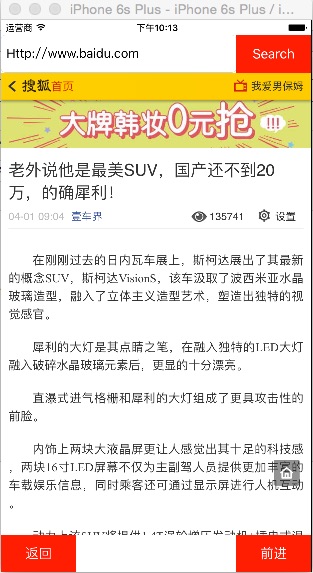
存在一个问题,就是我在百度里面随便点击一个网址链接之后,可以打开网址,但打开之后浏览器的网址输入框中的网址依然是之前那个,没有改变为当前网站地址。这个问题遗留下来。。。
IOS开发-UI学习-UIWebView,简单浏览器的制作的更多相关文章
- iOS开发UI篇—UITabBarController简单介绍
iOS开发UI篇—UITabBarController简单介绍 一.简单介绍 UITabBarController和UINavigationController类似,UITabBarControlle ...
- iOS开发UI篇—Modal简单介绍
iOS开发UI篇—Modal简单介绍 一.简单介绍 除了push之外,还有另外一种控制器的切换方式,那就是Modal 任何控制器都能通过Modal的形式展⽰出来 Modal的默认效果:新控制器从屏幕的 ...
- iOS开发UI篇—Kvc简单介绍
ios开发UI篇—Kvc简单介绍 一.KVC简单介绍 KVC key valued coding 键值编码 KVC通过键值间接编码 补充: 与KVC相对的时KVO,即key valued observ ...
- iOS开发UI篇—UIWindow简单介绍
iOS开发UI篇—UIWindow简单介绍 一.简单介绍 UIWindow是一种特殊的UIView,通常在一个app中只会有一个UIWindow iOS程序启动完毕后,创建的第一个视图控件就是UIWi ...
- iOS开发UI篇—Quartz2D简单介绍
iOS开发UI篇—Quartz2D简单介绍 一.什么是Quartz2D Quartz 2D是⼀个二维绘图引擎,同时支持iOS和Mac系统 Quartz 2D能完成的工作: 绘制图形 : 线条\三角形\ ...
- iOS开发UI篇—Quartz2D简单使用(一)
iOS开发UI篇—Quartz2D简单使用(一) 一.画直线 代码: // // YYlineview.m // 03-画直线 // // Created by apple on 14-6-9. // ...
- iOS开发UI篇—Quartz2D简单使用(二)
iOS开发UI篇—Quartz2D简单使用(二) 一.画文字 代码: // // YYtextview.m // 04-写文字 // // Created by 孔医己 on 14-6-10. // ...
- iOS开发UI篇—Quartz2D简单使用(三)
iOS开发UI篇—Quartz2D简单使用(三) 一.通过slider控制圆的缩放 1.实现过程 新建一个项目,新建一个继承自UIview的类,并和storyboard中自定义的view进行关联. 界 ...
- iOS开发UI篇—popoverController简单介绍
iOS开发UI篇—popoverController简单介绍 一.简单介绍 1.什么是UIPopoverController 是iPad开发中常见的一种控制器(在iPhone上不允许使用) 跟其他控制 ...
- iOS开发UI篇—Quartz2D简单使用(一)
iOS开发UI篇—Quartz2D简单使用(一) 一.画直线 代码: 1 // 2 // YYlineview.m 3 // 03-画直线 4 // 5 // Created by apple on ...
随机推荐
- Java NIO的探究
1.Java NIO与阻塞IO的区别 阻塞IO通信模型(在上一篇<J2SE网络编程之 TCP与UDP>博客中有所介绍) 我们知道阻塞I/O在调用InputStream.read()方法时是 ...
- HDU 2609 How many
最小表示法+Map或者字典树,最小表示法找了个模板,还没学习呢... #include<cstdio> #include<cstring> #include<cmath& ...
- UVALive 4992 Jungle Outpost(半平面交)
题意:给你n个塔(点)形成一个顺时针的凸包,敌人可以摧毁任何塔,摧毁后剩下的塔再组成凸包 在开始的凸包内选一点为主塔,保证敌人摧毁尽量多塔时主塔都还在现在的凸包内,求出最多摧毁的塔 题解:这题关键就是 ...
- 3398: [Usaco2009 Feb]Bullcow 牡牛和牝牛
3398: [Usaco2009 Feb]Bullcow 牡牛和牝牛 Time Limit: 1 Sec Memory Limit: 128 MBSubmit: 243 Solved: 167[S ...
- WindowsAPI 之 CreatePipe、CreateProcess
MSDN介绍 CreatePipe A pipe is a section of shared memory that processes use for communication. The pro ...
- js 常用正则表达式表单验证代码
正则表达式使用详解 简介 简单的说,正则表达式是一种可以用于模式匹配和替换的强有力的工具.其作用如下:测试字符串的某个模式.例如,可以对一个输入字符串进行测试,看在该字符串是否存在一个电话号码模式或一 ...
- System.Text.RegularExpressions.Regex
System.Text.RegularExpressions.Regex.IsMatch(string) 是否在指定字符串中找到制定项 System.Text.RegularExpressions.R ...
- AnimationSet的使用
Animations的使用(3) 1 AnimationSet的使用方法 什么是AnimationSet 1 AnimationSet是Animation的子类 2 一个AnimationSet包含了 ...
- 细菌(disease)
细菌(disease) 题目描述 近期,农场出现了D(1≤D≤15)种细菌.John要从他的N(1≤N≤1000)头奶牛中尽可能多地选些产奶,但是如果选中的奶牛携带了超过K(1≤K≤D)种不同细菌,所 ...
- article标签
<html><head lang="en"> <meta charset="UTF-8"> <title>富士康 ...