
cocos2dx 的Hello world的简单分析
Node之间的关系:
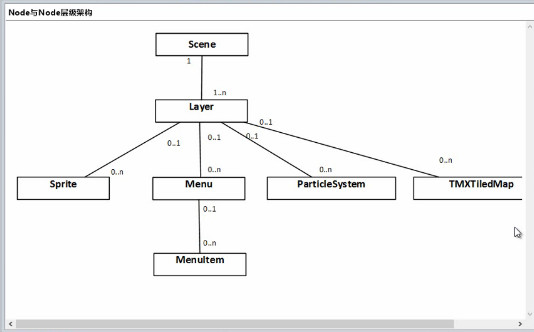
场景AppDelegate.cpp又要由导演去调用然后进行表演:
    // create a scene. it's an autorelease object

    auto scene = HelloWorld::createScene();

    // run

    director->runWithScene(scene);
这里层里面的场景HelloWorldScene.cpp里面的内容:
#include "HelloWorldScene.h"

USING_NS_CC;

Scene* HelloWorld::createScene()

{

    // 'scene' is an autorelease object

    auto scene = Scene::create();

    // 'layer' is an autorelease object

    auto layer = HelloWorld::create();

    // add layer as a child to scene

    scene->addChild(layer);

    // return the scene

    return scene;

}

// on "init" you need to initialize your instance

bool HelloWorld::init()

{

    //////////////////////////////

    // 1. super init first

    if ( !Layer::init() )

    {

        return false;

    }

    Size visibleSize = Director::getInstance()->getVisibleSize();

    Vec2 origin = Director::getInstance()->getVisibleOrigin();

    /////////////////////////////

    // 2. add a menu item with "X" image, which is clicked to quit the program

    //    you may modify it.

    //每一个addChild会创建出一个添加的层

    // add a "close" icon to exit the progress. it's an autorelease object

    auto closeItem = MenuItemImage::create(

                                           "CloseNormal.png",

                                           "CloseSelected.png",

                                           CC_CALLBACK_1(HelloWorld::menuCloseCallback, this));

    closeItem->setPosition(Vec2(origin.x + visibleSize.width - closeItem->getContentSize().width/ ,

                                origin.y + closeItem->getContentSize().height/));

    // create menu, it's an autorelease object

    auto menu = Menu::create(closeItem, NULL);

    menu->setPosition(Vec2::ZERO);

    this->addChild(menu, );

    /////////////////////////////

    // 3. add your codes below...

    // add a label shows "Hello World"

    // create and initialize a label

    auto label = Label::createWithTTF("Hello sunzhiyan", "fonts/arial.ttf", );

    // position the label on the center of the screen

    label->setPosition(Vec2(origin.x + visibleSize.width/,

                            origin.y + visibleSize.height - label->getContentSize().height));

    // add the label as a child to this layer

    this->addChild(label, );

    auto label1= Label::createWithTTF("", "fonts/arial.ttf", );

    // position the label on the center of the screen

    label1->setPosition(Vec2(origin.x + visibleSize.width / ,

        origin.y + visibleSize.height - label1->getContentSize().height));

    // add the label as a child to this layer

    this->addChild(label1, );

    //创建一个精灵

    auto sprite = Sprite::create("sun.jpg");

    //设置精灵的显示位置

    sprite->setPosition(Vec2(visibleSize.width/ + origin.x, visibleSize.height/ + origin.y));

    // 将精灵添加到层里面

    this->addChild(sprite, );

    return true;

}

void HelloWorld::menuCloseCallback(Ref* pSender)

{

    Director::getInstance()->end();

#if (CC_TARGET_PLATFORM == CC_PLATFORM_IOS)

    exit();

#endif

}
cocos2dx 的Hello world的简单分析的更多相关文章
- cocos2dx骨骼动画Armature源码分析(一)
源码分析一body { font-family: Helvetica, arial, sans-serif; font-size: 14px; line-height: 1.6; padding-to ...
- 简单分析JavaScript中的面向对象
初学JavaScript的时候有人会认为JavaScript不是一门面向对象的语言,因为JS是没有类的概念的,但是这并不代表JavaScript没有对象的存在,而且JavaScript也提供了其它的方 ...
- CSipSimple 简单分析
简介 CSipSimple是一款可以在android手机上使用的支持sip的网络电话软件,可以在上面设置使用callda网络电话.连接使用方式最好是使用wifi,或者3g这样上网速度快,打起电话来效果 ...
- C#中异常:“The type initializer to throw an exception(类型初始值设定项引发异常)”的简单分析与解决方法
对于C#中异常:“The type initializer to throw an exception(类型初始值设定项引发异常)”的简单分析,目前本人分析两种情况,如下: 情况一: 借鉴麒麟.NET ...
- 透过byte数组简单分析Java序列化、Kryo、ProtoBuf序列化
序列化在高性能网络编程.分布式系统开发中是举足轻重的之前有用过Java序列化.ProtocolBuffer等,在这篇文章这里中简单分析序列化后的byte数组观察各种序列化的差异与性能,这里主要分析Ja ...
- 简单分析Java的HashMap.entrySet()的实现
关于Java的HashMap.entrySet(),文档是这样描述的:这个方法返回一个Set,这个Set是HashMap的视图,对Map的操作会在Set上反映出来,反过来也是.原文是 Returns ...
- Ffmpeg解析media容器过程/ ffmpeg 源代码简单分析 : av_read_frame()
ffmpeg 源代码简单分析 : av_read_frame() http://blog.csdn.net/leixiaohua1020/article/details/12678577 ffmpeg ...
- FFmpeg的HEVC解码器源码简单分析:解析器(Parser)部分
===================================================== HEVC源码分析文章列表: [解码 -libavcodec HEVC 解码器] FFmpeg ...
- FFmpeg资料来源简单分析:libswscale的sws_getContext()
===================================================== FFmpeg库函数的源代码的分析文章: [骨架] FFmpeg源码结构图 - 解码 FFmp ...
随机推荐
- iReport中求和的问题
数据库取出值TAX_AMT,但是不想在数据库里面计算,太麻烦,后面group by 字段太多.那就放到ireport里面去计算咯 在字段的如下位置进行计算吧.
- 【Java】整理关于java的String类,equals函数和比较操作符的区别
初学 Java 有段时间了,感觉似乎开始入了门,有了点儿感觉但是发现很多困惑和疑问而且均来自于最基础的知识折腾了一阵子又查了查书,终于对 String 这个特殊的对象有了点感悟大家先来看看一段奇怪的程 ...
- 5个提升Google Chrome浏览器运行速度的技巧
尽管有无数个喜欢Google Chrome 浏览器的理由,其中就包括,Chrome已经够快了,但Google Chrome的内存占用而导致的速度拖累还是广受诟病,这种弊端在windows下尤为明显, ...
- Hadoop上结合opencv\javacv
mac上安装opencv 1. 去 http://opencv.org 下载最新版OpenCV for Linux/Mac源文件,目前版本是2.4.3.下载后解压.2. 去 http://www.cm ...
- [LeetCode#204]Factorial Trailing Zeroes
Problem: Description: Count the number of prime numbers less than a non-negative number, n. Analysis ...
- 【异步编程】when.js
异步编程:When.js快速上手 var api = 'http://qgy18.imququ.com/file/when/d.php?cb=?'; var getData = function() ...
- Bootstrap 3 兼容 IE8 浏览器
公司新上的项目,前端用的Bootstrap3的框架,但它已经放弃对IE9下的支持了.可IE8还是有着许多用户,不能不照顾到他们,IE7以下的,我只想说,现在什么年代了,要解放思想,与时俱进啊,就不能动 ...
- C# 光标文件的创建
base.m_cursor = new System.Windows.Forms.Cursor(GetType(), "Resources.MeasuredisTool.cur") ...
- winform中DataGridView的数据实现导出excel
1,窗体设计 首先需要引入程序集:Microsoft.Office.Interop.Excel (如果没有引用过的需要右键添加引用再搜索就行了) 实现的方法: /// <summary> ...
- 【设计模式 - 11】之享元模式(FlyWeight)
1 模式简介 当系统中存在大量对象时,非常容易造成内存溢出.为了解决这个问题,我们把这些对象中共有的部分抽象出来,如果有相同的业务请求,则直接返回在内存中已有的对象,避免重新创建,这就是享元 ...